
Jump to content

GTX or Quadro?

Go to solution Solved by Streetguru,
16 minutes ago, A11out said:


You'll have to do some work on google to figure out how much better a workstation GPU is in those programs

Workstation cards just aren't the best for gaming due to thermal and power limits. The P4000 here is slower than a GTX 1070 in firestrike

https://www.reddit.com/r/nvidia/comments/5uktm6/share_your_gtx_1070_timespy_score/

https://www.youtube.com/watch?v=T_wihzaaPmE

Vega FE might be your best bet if it works well in your applications, it has Vega 64 gaming performance, with 10-bit color support, and some Workstation/Pro Drivers. It appears comparable to the P6000 in 3DS Max at least.
https://www.tomshardware.com/reviews/amd-radeon-vega-frontier-edition-16gb,5128-6.html


https://techgage.com/article/a-look-at-amds-radeon-rx-vega-64-workstation-compute-performance/2/
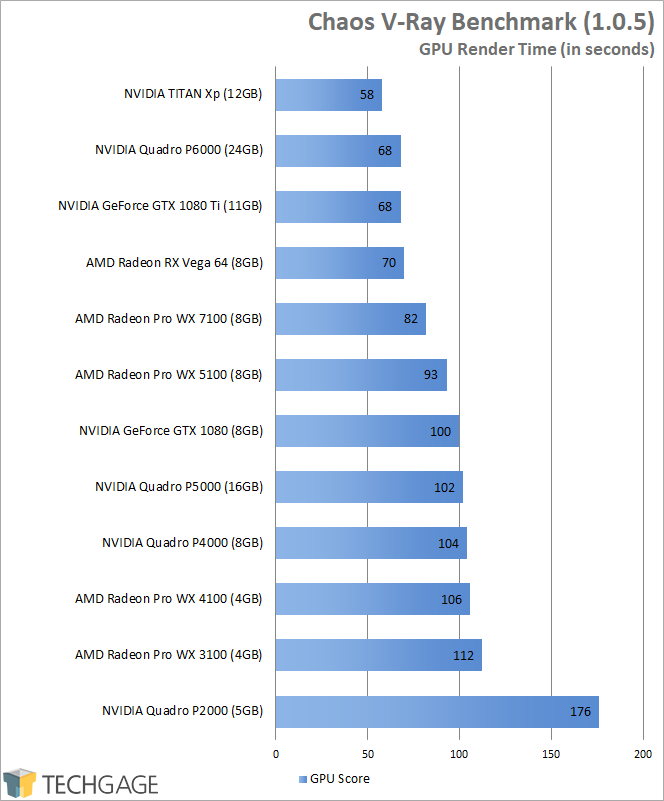

aHR0cDovL21lZGlhLmJlc3RvZm1pY3JvLmNvbS9S
Chaos-V-Ray-Benchmark-1.0.5.png


Hello!


I recently bought a 4k 10-bit monitor, so my current GTX 680 4gb video card began to really struggle. Well, I was due to upgrade anyway, might as well be now. Therefore, have an important decision to make: GTX or Quadro?


I'm talking at a minimum a choice between GTX1080ti and Quadro P4000, or at a maximum between Titan X and Quadro P5000.


A little bit about the use. I'm an architect, I do photography as a hobby, and have a carefully controlled passion (read mania) for PC games. The most demanding software I use:


Modeling:

  • 3ds Max
  • Sketchup
  • Revit

Rendering:

  • V-Ray (Sketchup and 3ds Max)
  • Enscape (Real-time render engine for use with HTC Vive headset)

Photography:

  • Photoshop
  • Lightroom

I'd like to be able to play games in 4k after the upgrade. Not necessarily on Ultra setting, but definitely above the medium. 


The question is: for the software listed, is Quadro worth it? Also, is it true that only Quadro can properly output 10-bit colors in Photoshop and Lightroom?


Link to comment
https://linustechtips.com/topic/919179-gtx-or-quadro/
Share on other sites

Link to post
Share on other sites

16 minutes ago, A11out said:


WX 7100 at $600 until next generation GPUs are out? That's just my take...
https://www.newegg.com/Product/Product.aspx?Item=N82E16814105069
Or hell the WX 5100 is $400 still has 8GBs of VRAM
https://www.newegg.com/Product/Product.aspx?Item=N82E16814105068

Otherwise...If you need the quadro you buy the quadro, there's no reason question about it.

And for gaming you can just run games at 1080p upscaled to the 4k display and it'll work fine.

And as for gaming on a workstation card in general, the cooling isn't very substantial, and they're pretty power limited normally aren't they?

As another side note Vega FE supports 10-bit color and gives you a bit of both worlds, but that's usually not enough for the pro applications.
<https://www.reddit.com/r/Amd/comments/7vd3ln/does_vega_support_10bit_color_output_in_windows/>

I edit my posts a lot, Twitter is @LordStreetguru just don't ask PC questions there mostly...
 

Spoiler


What is your budget/country for your new PC?


what monitor resolution/refresh rate?


What games or other software do you need to run?


Link to comment
https://linustechtips.com/topic/919179-gtx-or-quadro/#findComment-11267494
Share on other sites

Link to post
Share on other sites

Quadro if you need the drivers.  Otherwise, GTX for sure.

PC Build: R5-1600.  Scythe Mugen 5.  GTX 1060.  120 GB SSD.  1 TB HDD.  FDD Mini C.  8 GB RAM (3000 MHz).  Be Quiet Pure Wings 2.  Capstone-550.  Deepcool 350 RGB.

Peripherals: Qisan Magicforce (80%) w/ Gateron Blues.  Razer Naga Chroma.  Lenovo 24" 1440p IPS.  PS4 Controller.

Audio: Focusrite (Solo, 2nd), SM57, Triton Fethead, AKG c214, Sennheiser HD598's, ATH-M50x, AKG K240, Novation Launchkey

Wishlist: MP S-87, iPad, Yamaha HS5's, more storage

Link to comment
https://linustechtips.com/topic/919179-gtx-or-quadro/#findComment-11267499
Share on other sites

Link to post
Share on other sites

Nvidia has intentionally crippled the high colour depth support in it's consumer card drivers. I have a 1080ti and a 10-bit capable monitor but it is impossible for me to output 10-bit using this card. I can get 8-bit in full screen (objective/control mode) but no 10-bit support ever.


Basically: If you want to game, get the GeForce. If you need the 10-bit colour to work, you *must* get a quadro, and it's up to you whether the immense extra cost of an equivalent performing quadro for gaming makes sense to you.

Link to comment
https://linustechtips.com/topic/919179-gtx-or-quadro/#findComment-11267500
Share on other sites

Link to post
Share on other sites

I figured GTX would be trimmed like that. It is really too bad. So, for 10-bit, Quadro is a must.


I heard about magic Quadro drivers and even had a chance to see it with my own eyes. Quadro M1000 on my retired laptop worked better in 3ds Max and Revit than GTX 680 on my desktop. It is sorcery, considering that Quadro M1000 in terms of hardware is 1/8 of what GTX680 is. 


The question is: for the programs indicated, which ones will benefit from Quadro drivers? And how big is the difference? I saw some tests comparing GTX and Quadro, but they all were done ages ago for 7th generation of GTX. I do not think they are relevant anymore. 


As for video games, funny thing, it is now also important for work. Enscape is essentially a video game engine that can render architectural models in real time for use in VR. VR workstation at work, for example, has 1080ti in it, not Quadro, because Quadro with similar performance in VR would cost arm and leg. So, is there any way to compare 1080ti to p4000 and p5000 in games? Do you know if anyone does such tests?


Link to comment
https://linustechtips.com/topic/919179-gtx-or-quadro/#findComment-11267561
Share on other sites

Link to post
Share on other sites

16 minutes ago, A11out said:


You'll have to do some work on google to figure out how much better a workstation GPU is in those programs

Workstation cards just aren't the best for gaming due to thermal and power limits. The P4000 here is slower than a GTX 1070 in firestrike

https://www.reddit.com/r/nvidia/comments/5uktm6/share_your_gtx_1070_timespy_score/

https://www.youtube.com/watch?v=T_wihzaaPmE

Vega FE might be your best bet if it works well in your applications, it has Vega 64 gaming performance, with 10-bit color support, and some Workstation/Pro Drivers. It appears comparable to the P6000 in 3DS Max at least.
https://www.tomshardware.com/reviews/amd-radeon-vega-frontier-edition-16gb,5128-6.html


https://techgage.com/article/a-look-at-amds-radeon-rx-vega-64-workstation-compute-performance/2/


aHR0cDovL21lZGlhLmJlc3RvZm1pY3JvLmNvbS9S
Chaos-V-Ray-Benchmark-1.0.5.png


I edit my posts a lot, Twitter is @LordStreetguru just don't ask PC questions there mostly...
 

Spoiler


What is your budget/country for your new PC?


what monitor resolution/refresh rate?


What games or other software do you need to run?


Link to comment
https://linustechtips.com/topic/919179-gtx-or-quadro/#findComment-11267589
Share on other sites

Link to post
Share on other sites

2 minutes ago, Streetguru said:

You'll have to do some work on google to figure out how much better a workstation GPU is in those programs

Workstation cards just aren't the best for gaming due to thermal and power limits. The P4000 here is slower than a GTX 1070 in firestrike

https://www.reddit.com/r/nvidia/comments/5uktm6/share_your_gtx_1070_timespy_score/


Vega FE might be your best bet if it works well in your applications, it has Vega 64 gaming performance, with 10-bit color support, and some Workstation/Pro Drivers. It appears comparable to the P6000 in 3DS Max at least.
https://www.tomshardware.com/reviews/amd-radeon-vega-frontier-edition-16gb,5128-6.html


https://techgage.com/article/a-look-at-amds-radeon-rx-vega-64-workstation-compute-performance/2/


aHR0cDovL21lZGlhLmJlc3RvZm1pY3JvLmNvbS9S
Chaos-V-Ray-Benchmark-1.0.5.png


I do not know how I missed it in my search. My bad. I'll look through it. Thanks! 

Link to comment
https://linustechtips.com/topic/919179-gtx-or-quadro/#findComment-11267599
Share on other sites

Link to post
Share on other sites

2 minutes ago, A11out said:

I do not know how I missed it in my search. My bad. I'll look through it. Thanks! 

If you do end up on Vega FE you did miss the $700 boat because no one was buying it lol.


I edit my posts a lot, Twitter is @LordStreetguru just don't ask PC questions there mostly...
 

Spoiler


What is your budget/country for your new PC?


what monitor resolution/refresh rate?


What games or other software do you need to run?


Link to comment
https://linustechtips.com/topic/919179-gtx-or-quadro/#findComment-11267602
Share on other sites

Link to post
Share on other sites

17 minutes ago, A11out said:

I figured GTX would be trimmed like that. It is really too bad. So, for 10-bit, Quadro is a must.


I heard about magic Quadro drivers and even had a chance to see it with my own eyes. Quadro M1000 on my retired laptop worked better in 3ds Max and Revit than GTX 680 on my desktop. It is sorcery, considering that Quadro M1000 in terms of hardware is 1/8 of what GTX680 is. 


The question is: for the programs indicated, which ones will benefit from Quadro drivers? And how big is the difference? I saw some tests comparing GTX and Quadro, but they all were done ages ago for 7th generation of GTX. I do not think they are relevant anymore. 


As for video games, funny thing, it is now also important for work. Enscape is essentially a video game engine that can render architectural models in real time for use in VR. VR workstation at work, for example, has 1080ti in it, not Quadro, because Quadro with similar performance in VR would cost arm and leg. So, is there any way to compare 1080ti to p4000 and p5000 in games? Do you know if anyone does such tests?


People have done such tests with gaming on a Quadro and comparing it to its equivalent. Speaking of, they're somewhat behind their GeForce counterparts, but because the drivers are only optimized for professional applications and not games, the performance will be mediocre, let alone other things such as their insufficient coolers.


Quadros also have very substantial amounts of performance in professional applications to the point where the bottom-feeder Quadro P1000 gets close to the GeForce GTX 1080 Ti in said professional applications, and it gets trampled by higher-end models when you move up from there.


For your use case, I would recommend a Quadro P4000. If your employer foots the bill for a much higher-end system, then go as high-end as you can feasibly attain.


RIGZ

Spoiler

Starlight (Current): AMD Ryzen 9 3900X 12-core CPU | EVGA GeForce RTX 2080 Ti Black Edition | Gigabyte X570 Aorus Ultra | Full Custom Loop | 32GB (4x8GB) Dominator Platinum SE Blackout #338/500 | 1TB + 2TB M.2 NVMe PCIe 4.0 SSDs, 480GB SATA 2.5" SSD, 8TB 7200 RPM NAS HDD | EVGA NU Audio | Corsair 900D | Corsair AX1200i | Corsair ML120 2-pack 5x + ML140 2-pack


The Storm (Retired): Intel Core i7-5930K | Asus ROG STRIX GeForce GTX 1080 Ti | Asus ROG RAMPAGE V EDITION 10 | EKWB EK-KIT P360 with Hardware Labs Black Ice SR2 Multiport 480 | 32GB (4x8GB) Dominator Platinum SE Blackout #338/500 | 480GB SATA 2.5" SSD + 3TB 5400 RPM NAS HDD + 8TB 7200 RPM NAS HDD | Corsair 900D | Corsair AX1200i + Black/Blue CableMod cables | Corsair ML120 2-pack 2x + NB-BlackSilentPro PL-2 x3

STRONK COOLZ 9000

Spoiler

EK-Quantum Momentum X570 Aorus Master monoblock | EK-FC RTX 2080 + Ti Classic RGB Waterblock and Backplate | EK-XRES 140 D5 PWM Pump/Res Combo | 2x Hardware Labs Black Ice SR2 480 MP and 1x SR2 240 MP | 10X Corsair ML120 PWM fans | A mixture of EK-KIT fittings and EK-Torque STC fittings and adapters | Mayhems 10/13mm clear tubing | Mayhems X1 Eco UV Blue coolant | Bitspower G1/4 Temperature Probe Fitting

DESK TOIS

Spoiler

Glorious Modular Mechanical Keyboard | Glorious Model D Featherweight Mouse | 2x BenQ PD3200Q 32" 1440p IPS displays + BenQ BL3200PT 32" 1440p VA display | Mackie ProFX10v3 USB Mixer + Marantz MPM-1000 Mic | Sennheiser HD 598 SE Headphones | 2x ADAM Audio T5V 5" Powered Studio Monitors + ADAM Audio T10S Powered Studio Subwoofer | Logitech G920 Driving Force Steering Wheel and Pedal Kit + Driving Force Shifter | Logitech C922x 720p 60FPS Webcam | Xbox One Wireless Controller

QUOTES

Spoiler

"So because they didn't give you the results you want, they're biased? You realize that makes you biased, right?" - @App4that

"Brand loyalty/fanboyism is stupid." - Unknown person on these forums

"Assuming kills" - @Moondrelor

"That's not to say that Nvidia is always better, or that AMD isn't worth owning. But the fact remains that this forum is AMD biased." - @App4that

"I'd imagine there's exceptions to this trend - but just going on mine and my acquaintances' purchase history, we've found that budget cards often require you to turn off certain features to get slick performance, even though those technologies are previous gen and should be having a negligible impact" - ace42

"2K" is not 2560 x 1440 

Link to comment
https://linustechtips.com/topic/919179-gtx-or-quadro/#findComment-11267609
Share on other sites

Link to post
Share on other sites

3 minutes ago, A11out said:

Why? :) Are there notable problems with it?

No, it was just $1000 for something very few people need, For most people if you need a gaming card Vega 56/GTX 1070 was $399

And if you need a workstation card, you just need a workstation card and will pay any amount of money for it, up to the $5000 Quadros and WX cards. Usually a company buys that for you though...

Vega FE exists for the few people who want to do gaming, but still want some Professional driver optimization, but not to the level of WX cards. Like game devs, or you potentially.

Undervolting it does help with thermals/performance though, their stock voltage is high just to get more yields and ensure it won't crash in any workloads. You can go down to 1.1V easily rather than the stock 1.2V


*But still just make sure you get benefits from it, otherwise a GTX 1070ti is probably good enough for you close to $500.

I edit my posts a lot, Twitter is @LordStreetguru just don't ask PC questions there mostly...
 

Spoiler


What is your budget/country for your new PC?


what monitor resolution/refresh rate?


What games or other software do you need to run?


Link to comment
https://linustechtips.com/topic/919179-gtx-or-quadro/#findComment-11267616
Share on other sites

Link to post
Share on other sites

3 minutes ago, JurunceNK said:

People have done such tests with gaming on a Quadro and comparing it to its equivalent. Speaking of, they're somewhat behind their GeForce counterparts, but because the drivers are only optimized for professional applications and not games, the performance will be mediocre, let alone other things such as their insufficient coolers.


Quadros also have very substantial amounts of performance in professional applications to the point where the bottom-feeder Quadro P1000 gets close to the GeForce GTX 1080 Ti in said professional applications, and it gets trampled by higher-end models when you move up from there.


For your use case, I would recommend a Quadro P4000. If your employer foots the bill for a much higher-end system, then go as high-end as you can feasibly attain.


The areas where the P1000 actually approaches the 1080 TI are quite niche, even in professional applications.


That said, given the lacking gaming performance of closely (relatively speaking) priced Quadro cards, unless you can get a Vega FE, I would very highly recommend just building a seperate gaming PC, especially if you're the one footing the bill. 

My eyes see the past…

My camera lens sees the present…

Link to comment
https://linustechtips.com/topic/919179-gtx-or-quadro/#findComment-11267629
Share on other sites

Link to post
Share on other sites

19 minutes ago, Zodiark1593 said:

The areas where the P1000 actually approaches the 1080 TI are quite niche, even in professional applications.


That said, given the lacking gaming performance of closely (relatively speaking) priced Quadro cards, unless you can get a Vega FE, I would very highly recommend just building a separate gaming PC, especially if you're the one footing the bill. 

With the listed applications the OP named, the Quadro drivers are optimized for them, and are widely used by professionals.


Even though the list of supported applicaitons looks small, look at the number of users in which industry, and that'll tell a different story.

RIGZ

Spoiler

Starlight (Current): AMD Ryzen 9 3900X 12-core CPU | EVGA GeForce RTX 2080 Ti Black Edition | Gigabyte X570 Aorus Ultra | Full Custom Loop | 32GB (4x8GB) Dominator Platinum SE Blackout #338/500 | 1TB + 2TB M.2 NVMe PCIe 4.0 SSDs, 480GB SATA 2.5" SSD, 8TB 7200 RPM NAS HDD | EVGA NU Audio | Corsair 900D | Corsair AX1200i | Corsair ML120 2-pack 5x + ML140 2-pack


The Storm (Retired): Intel Core i7-5930K | Asus ROG STRIX GeForce GTX 1080 Ti | Asus ROG RAMPAGE V EDITION 10 | EKWB EK-KIT P360 with Hardware Labs Black Ice SR2 Multiport 480 | 32GB (4x8GB) Dominator Platinum SE Blackout #338/500 | 480GB SATA 2.5" SSD + 3TB 5400 RPM NAS HDD + 8TB 7200 RPM NAS HDD | Corsair 900D | Corsair AX1200i + Black/Blue CableMod cables | Corsair ML120 2-pack 2x + NB-BlackSilentPro PL-2 x3

STRONK COOLZ 9000

Spoiler

EK-Quantum Momentum X570 Aorus Master monoblock | EK-FC RTX 2080 + Ti Classic RGB Waterblock and Backplate | EK-XRES 140 D5 PWM Pump/Res Combo | 2x Hardware Labs Black Ice SR2 480 MP and 1x SR2 240 MP | 10X Corsair ML120 PWM fans | A mixture of EK-KIT fittings and EK-Torque STC fittings and adapters | Mayhems 10/13mm clear tubing | Mayhems X1 Eco UV Blue coolant | Bitspower G1/4 Temperature Probe Fitting

DESK TOIS

Spoiler

Glorious Modular Mechanical Keyboard | Glorious Model D Featherweight Mouse | 2x BenQ PD3200Q 32" 1440p IPS displays + BenQ BL3200PT 32" 1440p VA display | Mackie ProFX10v3 USB Mixer + Marantz MPM-1000 Mic | Sennheiser HD 598 SE Headphones | 2x ADAM Audio T5V 5" Powered Studio Monitors + ADAM Audio T10S Powered Studio Subwoofer | Logitech G920 Driving Force Steering Wheel and Pedal Kit + Driving Force Shifter | Logitech C922x 720p 60FPS Webcam | Xbox One Wireless Controller

QUOTES

Spoiler

"So because they didn't give you the results you want, they're biased? You realize that makes you biased, right?" - @App4that

"Brand loyalty/fanboyism is stupid." - Unknown person on these forums

"Assuming kills" - @Moondrelor

"That's not to say that Nvidia is always better, or that AMD isn't worth owning. But the fact remains that this forum is AMD biased." - @App4that

"I'd imagine there's exceptions to this trend - but just going on mine and my acquaintances' purchase history, we've found that budget cards often require you to turn off certain features to get slick performance, even though those technologies are previous gen and should be having a negligible impact" - ace42

"2K" is not 2560 x 1440 

Link to comment
https://linustechtips.com/topic/919179-gtx-or-quadro/#findComment-11267694
Share on other sites

Link to post
Share on other sites


It looks like I will not be able to build a machine that can do both games and work for reasonable price. It is either mediocre games and excellent work, or excellent work and mediocre games. So, it is time for me to chose, I think: work or games. Maybe I should stick to playing PS4 and forget about PC. lol


But even if I choose work, the choice does not get easier:


  • 10-bit - definitely Quadro, or Vega. But Vega, it seems, plagued with driver issues. 8 years ago, I brought Radeon card back to the store exactly because of drivers, so I'm very cautious about this one.
  • 3ds Max and Revit - GTX runs it well, Quadro runs it better. The question is - how much better? There is no performance comparison of late Quadro and late GTX for those programs. There are some old tests for Max, but for Revit it is crickets. So, how much better Quadro in those? Who knows.
  • Lightroom, Photoshop, Illustrator - same story. They claim that Quadro is better. How much better? No tests, no nothing. My office has 1080ti on VR workstation and Quadro k2200 on everything else. I'll test some files and try to see what works better. At least it is something.
  • VR - GTX is definitely better. Even Enscape website says - raw power matters here, son, stick your drivers someplace else. And VR seems to be the future of the industry!

All and all, reasonably, I think I'll buy p4000, which seems to do most of the stuff well. Or I'll drink myself to bravery and buy p5000. Unless there are new Quadros coming?


There are upsides though. Quadros were mega expensive. Quadros are mega expensive. GPU market massacre hasn't touched Quadros, so at least I'll pay, ahem, "fair" market price for it. Also, Quadros are the highest-bin cards, so I will not have to worry about any issues with them.

Link to comment
https://linustechtips.com/topic/919179-gtx-or-quadro/#findComment-11267727
Share on other sites

Link to post
Share on other sites

6 minutes ago, A11out said:

plagued with driver issues.

Not really... can you name more recent examples of AMD driver issues?

AdoredTV actually has a video on that.


But it sounds Vega FE is exactly what you need, solid gaming, with some workstation optimization(and 16GBs of VRAM), and 10-bit color support.

I edit my posts a lot, Twitter is @LordStreetguru just don't ask PC questions there mostly...
 

Spoiler


What is your budget/country for your new PC?


what monitor resolution/refresh rate?


What games or other software do you need to run?


Link to comment
https://linustechtips.com/topic/919179-gtx-or-quadro/#findComment-11267744
Share on other sites

Link to post
Share on other sites

27 minutes ago, Streetguru said:

Not really... can you name more recent examples of AMD driver issues?

AdoredTV actually has a video on that.


But it sounds Vega FE is exactly what you need, solid gaming, with some workstation optimization(and 16GBs of VRAM), and 10-bit color support.

No. I actually have Radeon on my laptop and I have no issues there. I picked up driver rumors from Amazon reviews. Also, where does it mention that Vega FE supports 10 bit? And what about Titan X or V? It seems like it is also semi-pro video card, just like Vega FE.

Link to comment
https://linustechtips.com/topic/919179-gtx-or-quadro/#findComment-11267804
Share on other sites

Link to post
Share on other sites

11 minutes ago, A11out said:

No. I actually have Radeon on my laptop and I have no issues there. I picked up driver rumors from Amazon reviews. Also, where does it mention that Vega FE supports 10 bit? And what about Titan X or V? It seems like it is also semi-pro video card, just like Vega FE.

Titan V does have some double precision stuff for some workloads, and I think it does get some pro drivers as well, but I doubt it's worth X3 of Vega FE


https://www.amd.com/en/products/professional-graphics/radeon-vega-frontier-edition-air-cooled


Additional Features
Supported Technologies
DirectX® 12 Technology
OpenCL 2.0
OpenGL 4.6
Unified Video Decoder (UVD)
Video Code Engine (VCE)
High Bandwidth Cache (HBC) Controller
AMD DirectGMA Technology
 
10-bit Display Color Output
Yes

Titan Xp got some pro driver support as well, they were probably forced to by AMD's Vega FE

https://www.techpowerup.com/235701/nvidia-unlocks-certain-professional-features-for-titan-xp-through-driver-update?cp=4


I edit my posts a lot, Twitter is @LordStreetguru just don't ask PC questions there mostly...
 

Spoiler


What is your budget/country for your new PC?


what monitor resolution/refresh rate?


What games or other software do you need to run?


Link to comment
https://linustechtips.com/topic/919179-gtx-or-quadro/#findComment-11267838
Share on other sites

Link to post
Share on other sites

25 minutes ago, Streetguru said:

Titan V does have some double precision stuff for some workloads, and I think it does get some pro drivers as well, but I doubt it's worth X3 of Vega FE


https://www.amd.com/en/products/professional-graphics/radeon-vega-frontier-edition-air-cooled


Additional Features

Supported Technologies
DirectX® 12 Technology
OpenCL 2.0
OpenGL 4.6
Unified Video Decoder (UVD)
Video Code Engine (VCE)
High Bandwidth Cache (HBC) Controller
AMD DirectGMA Technology
 
10-bit Display Color Output
Yes

Titan Xp got some pro driver support as well, they were probably forced to by AMD's Vega FE

https://www.techpowerup.com/235701/nvidia-unlocks-certain-professional-features-for-titan-xp-through-driver-update?cp=4


I feel like I have an unconscious bias against AMD because of my bad prior experience. I think it is time to reevaluate though. A lot of time has passed.


10-bit support is a huge deal. I checked, Titan does not have it, even the latest one. The one thing that bothers me is that despite all the Vega's might in specs it falls way short of GTX 1080 in games, let alone GTX 1080 Ti. I checked a few reviews and they all show the same.

Link to comment
https://linustechtips.com/topic/919179-gtx-or-quadro/#findComment-11267867
Share on other sites

Link to post
Share on other sites

26 minutes ago, A11out said:


Vega FE is about equal to a 1080 in games since it's basically a Vega 64 card, titan Xp is of course basically a 1080ti, unknown on workstation optimizations outside of like Maya on the titan. Up to you if it's worth the extra $300 ish.

Newegg Business has it listed for $850, dunno if you can get them to come down in price on the normal site with that, it's out of stock there.

https://www.neweggbusiness.com/Product/Product.aspx?Item=9B-14-105-073&nm_mc=afc-cjb2b&cm_mmc=afc-cjb2b-_-Video+Cards+-+Workstation-_-AMD-_-9B14105073&utm_medium=affiliates&utm_source=afc-cjb2b-PCPartPicker%2C+LLC


Or just get the way cheaper $400 WX 5100 and play games at 1080p, and still get the workstation optimization if your softwares support it.


It appears the WX card is basically a bit slower RX 470 due to thermals/power


Also what's your current CPU? Dunno if it's worth upgrading that as well now that the R7 2700X just launched, 8 cores 16 threads on the cheap.

I edit my posts a lot, Twitter is @LordStreetguru just don't ask PC questions there mostly...
 

Spoiler


What is your budget/country for your new PC?


what monitor resolution/refresh rate?


What games or other software do you need to run?


Link to comment
https://linustechtips.com/topic/919179-gtx-or-quadro/#findComment-11267911
Share on other sites

Link to post
Share on other sites

So I pit Quadro k2200 4gb and GTX 1080ti 11gb overclocked. The test was purely empirical: what feels faster.


I have to say, it is crazy how close k2200 (which is, basically, gtx750ti) is to juggernaut such as 1080ti in professional software. 


Little to no difference in performance (read Quadro driver kicks ass) is in following:

3ds Max

Revit 3d

Revit 2d

PDF files


Illustrator got chocked on k2200 visibly more than it did on 1080ti. But it was still pretty close.


Where k2200 absolutely tanked compared to 1080ti:

Photoshop

Lightroom

Sketchup 


Bottomline:

GTX is only good for video games, video-game-like programs, and raster images. 

Quadro is great with everything concerning vectors. 


As for me, I'm still not sure what to go for - professional or semi-professional. When volta cards roll out (and, potentially, something from AMD) I'll decide. 


Link to comment
https://linustechtips.com/topic/919179-gtx-or-quadro/#findComment-11272505
Share on other sites

Link to post
Share on other sites

Create an account or sign in to comment

You need to be a member in order to leave a comment

Create an account

Sign up for a new account in our community. It's easy!

Register a new account

Sign in

Already have an account? Sign in here.

Sign In Now

×




