
Jump to content

noob question about mobo

Go to solution Solved by mariushm,

H61 is the chipset used by the motherboard. 

The chipset is connected to the processor through a dedicated fast connection, and to this chipset almost all other components are connected to. For example, the chipset holds inside the SATA controller (creates the sata connectors) , usb controllers (to create usb ports), reads and runs the BIOS, creates a few pci express lanes for more pci express slots, to this chipset the onboard sound and network cards are connected and so on. 

Here's a diagram for the H61 chipset :

80d338de_H61-block-diagram_450x408.png


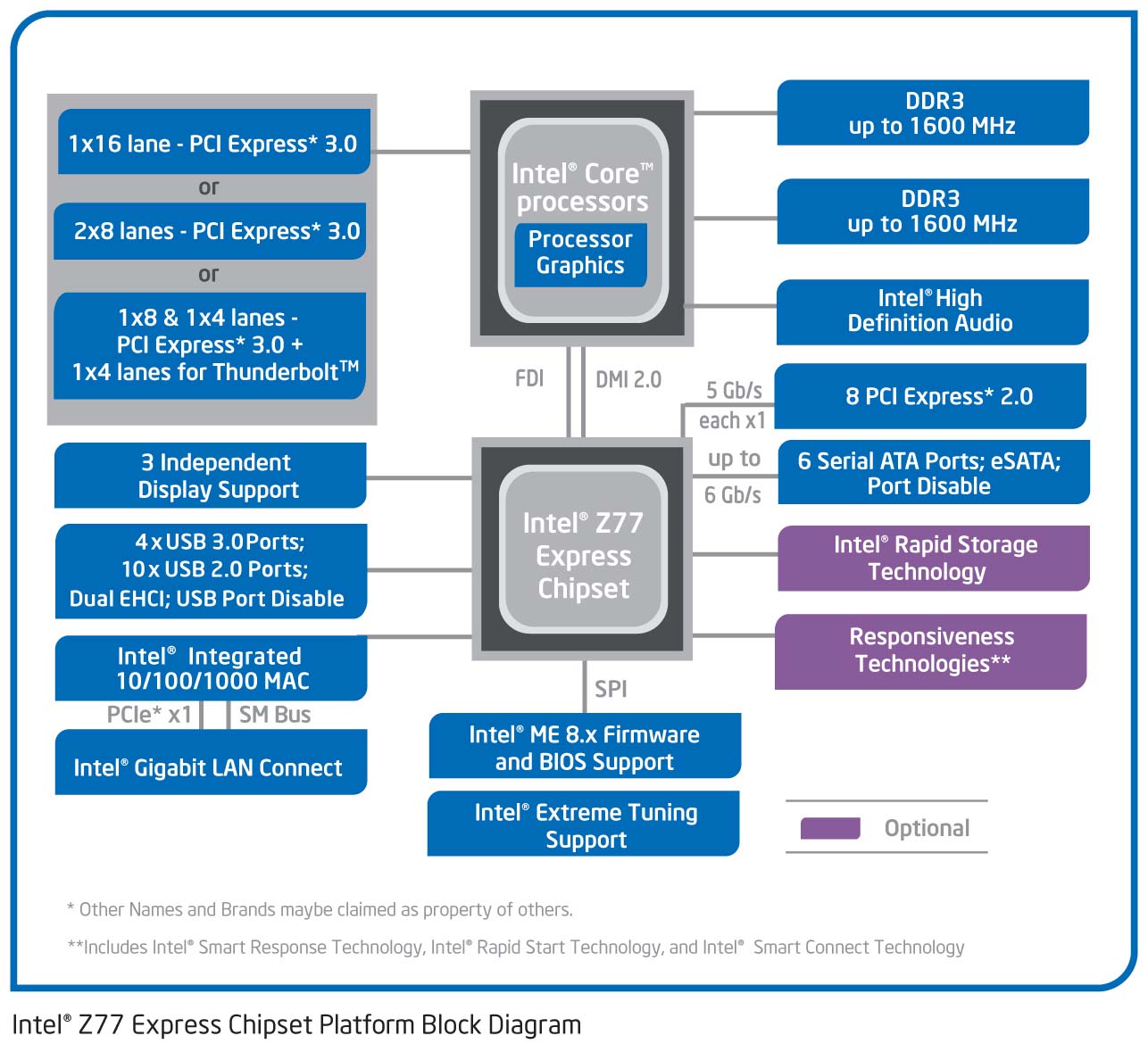
Other chipsets can have more features (like more usb 3 ports) or can have more business like features enabled like RAID 5 support on the sata controller (Intel's way to make more money by segmenting the market). Here's for example a diagram for the Z77 chipset, to see the differences between the H61 above and this one
 

Z77B.jpg


As you can see Z77 has 4 extra usb 3.0 ports built in , 2 extra pci express lanes (motherboard makers can take those 8 lanes and use them in any way they want, for example to create a x4 slot on the card and use the 4 other lanes as four x1 connections between onboard devices like an extra usb 3.0 controller and the chipset for example.


The video card performance is typically not affected by the chipset choice because you usually insert the video card in a pci express slot which is wired directly the processor socket, so there's independent communication channels between cpu-video card and cpu-chipset


The different Letters/Numbers note a different chipset. As a rule of thumb the better chipsets are on better motherboards, and overclocking should only be done on the Z chipset, the best one.


And this isn't all that nooby, I know a lot and still don't know much about the differences between chipsets besides some are better and Z is for overclocking

CPU: I5 4590 Motherboard: ASROCK H97 Pro4 Ram: XPG 16gb v2.0 4x4 kit  GPU: Gigabyte GTX 970 PSU: EVGA 550w Supernova G2 Storage: 128 gb Sandisk SSD + 525gb Mx300 SSD Cooling: Be Quiet! Shadow Rock LP Case: Zalman T2 Sound: Logitech Z506 5.1 Mouse: Razer Deathadder Chroma Keyboard: DBPower LED

Link to comment
https://linustechtips.com/topic/629587-noob-question-about-mobo/#findComment-8131237
Share on other sites

Link to post
Share on other sites

Just now, Moress said:

The different Letters/Numbers note a different chipset. As a rule of thumb the better chipsets are on better motherboards, and overclocking should only be done on the Z chipset, the best one.

so how does the chip set effect the fiction of CPU and gpu?

Link to comment
https://linustechtips.com/topic/629587-noob-question-about-mobo/#findComment-8131246
Share on other sites

Link to post
Share on other sites

H61 is the chipset used by the motherboard. 

The chipset is connected to the processor through a dedicated fast connection, and to this chipset almost all other components are connected to. For example, the chipset holds inside the SATA controller (creates the sata connectors) , usb controllers (to create usb ports), reads and runs the BIOS, creates a few pci express lanes for more pci express slots, to this chipset the onboard sound and network cards are connected and so on. 

Here's a diagram for the H61 chipset :

80d338de_H61-block-diagram_450x408.png


Other chipsets can have more features (like more usb 3 ports) or can have more business like features enabled like RAID 5 support on the sata controller (Intel's way to make more money by segmenting the market). Here's for example a diagram for the Z77 chipset, to see the differences between the H61 above and this one


Z77B.jpg


As you can see Z77 has 4 extra usb 3.0 ports built in , 2 extra pci express lanes (motherboard makers can take those 8 lanes and use them in any way they want, for example to create a x4 slot on the card and use the 4 other lanes as four x1 connections between onboard devices like an extra usb 3.0 controller and the chipset for example.


The video card performance is typically not affected by the chipset choice because you usually insert the video card in a pci express slot which is wired directly the processor socket, so there's independent communication channels between cpu-video card and cpu-chipset


Link to comment
https://linustechtips.com/topic/629587-noob-question-about-mobo/#findComment-8131259
Share on other sites

Link to post
Share on other sites

Just now, zehao39 said:

so how does the chip set effect the fiction of CPU and gpu?

Chipset doesn't affect the interaction between the CPU and GPU, it more or less effects how well the CPU works.

CPU: I5 4590 Motherboard: ASROCK H97 Pro4 Ram: XPG 16gb v2.0 4x4 kit  GPU: Gigabyte GTX 970 PSU: EVGA 550w Supernova G2 Storage: 128 gb Sandisk SSD + 525gb Mx300 SSD Cooling: Be Quiet! Shadow Rock LP Case: Zalman T2 Sound: Logitech Z506 5.1 Mouse: Razer Deathadder Chroma Keyboard: DBPower LED

Link to comment
https://linustechtips.com/topic/629587-noob-question-about-mobo/#findComment-8131261
Share on other sites

Link to post
Share on other sites

those are chipsets


different chipsets support different CPUs and provide different functionality and I/O

generally Z chipset is the high-end prives all the functionality available on the chip including overclocking

P chipset provides all the functionality, it does not support iGPU but it enables overclocking (very rare to non-existent nowadays, las time I saw it was with P67)

H are the mainstream chipsets which provide most of the functionality but lack overclocking, some are SLI certified

B chipsets are the basic cheapest options as a rule are never SLI certified

C chipsets are for Xeons, ECC memory and server stuff


the numbers following the letter are the series, like 100 is for Skylake CPUs, 80 and 90 are for Haswell, Broadwell etc.

CPU: Intel i7 5820K @ 4.20 GHz | MotherboardMSI X99S SLI PLUS | RAM: Corsair LPX 16GB DDR4 @ 2666MHz | GPU: Sapphire R9 Fury (x2 CrossFire)
Storage: Samsung 950Pro 512GB // OCZ Vector150 240GB // Seagate 1TB | PSU: Seasonic 1050 Snow Silent | Case: NZXT H440 | Cooling: Nepton 240M
FireStrike // Extreme // Ultra // 8K // 16K


Link to comment
https://linustechtips.com/topic/629587-noob-question-about-mobo/#findComment-8131300
Share on other sites

Link to post
Share on other sites

5 minutes ago, DXMember said:

those are chipsets


different chipsets support different CPUs and provide different functionality and I/O

generally Z chipset is the high-end prives all the functionality available on the chip including overclocking

P chipset provides all the functionality, it does not support iGPU but it enables overclocking (very rare to non-existent nowadays, las time I saw it was with P67)

H are the mainstream chipsets which provide most of the functionality but lack overclocking, some are SLI certified

B chipsets are the basic cheapest options as a rule are never SLI certified

C chipsets are for Xeons, ECC memory and server stuff


the numbers following the letter are the series, like 100 is for Skylake CPUs, 80 and 90 are for Haswell, Broadwell etc.

so I have a p8h61 what is that mean. Is that a p or a h

Link to comment
https://linustechtips.com/topic/629587-noob-question-about-mobo/#findComment-8131354
Share on other sites

Link to post
Share on other sites

5 minutes ago, zehao39 said:

so I have a p8h61 what is that mean. Is that a p or a h

p8h61 is the model number

if you open specification for the motherboard it will most likely say the chipset is H61

CPU: Intel i7 5820K @ 4.20 GHz | MotherboardMSI X99S SLI PLUS | RAM: Corsair LPX 16GB DDR4 @ 2666MHz | GPU: Sapphire R9 Fury (x2 CrossFire)
Storage: Samsung 950Pro 512GB // OCZ Vector150 240GB // Seagate 1TB | PSU: Seasonic 1050 Snow Silent | Case: NZXT H440 | Cooling: Nepton 240M
FireStrike // Extreme // Ultra // 8K // 16K


Link to comment
https://linustechtips.com/topic/629587-noob-question-about-mobo/#findComment-8131398
Share on other sites

Link to post
Share on other sites

The name or model of the motherboard doesn't necessarily tell you anything about the board, it's up to manufacturer if they want to include some "hints" or details in the name. In general they don't try to obfuscate or confuse users with their names, so they won't use something like "h61" in name for a "z77" based motherboard or the other way around.


In this particular case, it just so happens that H61 is an indication of the chipset and 8 is something like "the 8th generation" of intel processors (if you look in the list of boards you'll see motherboards starting with P2 and all the way up to P8) and P is a hint that it's an Intel motherboard (from "Pentium"), Asus uses M for AMD motherboards, A for Intel Atom motherboard ... an N (for example M2N68 SE) after the number is a hint that it's a board using a nVidia chipset (which is uncommon as these days, usually processors are paired these days with chipsets from same manufacturer)


Here's the list of all motherboards Asus makes, you can just find your model, click on it, then click on "Specifications" and you see all the details: https://www.asus.com/Motherboards/AllProducts/

Link to comment
https://linustechtips.com/topic/629587-noob-question-about-mobo/#findComment-8131618
Share on other sites

Link to post
Share on other sites

Create an account or sign in to comment

You need to be a member in order to leave a comment

Create an account

Sign up for a new account in our community. It's easy!

Register a new account

Sign in

Already have an account? Sign in here.

Sign In Now

×




