
Jump to content

Does response time REALLY matter?

Go to solution Solved by rcarlos243,

Yes, it matters. 

Is the response time spec on the product page trustworthy?--probably not. 


This is true, don't trust the spec as alot of times those were skewered or not even close to rated spec.


Yes it does, on higher response times, you will experience motion blur. However as long as you are under 10 you are fine, even for gaming.

Also, check if the response time is measured in GTG (gray to gray) or BTW (black to white). The second one is slower, so It's a better way to measure it.


Well, it "technically" can produce motion blur if too high


imo response time, resolution, IPS, TN, ima go back to mah CRT 


1024x768 Voodoo 2 SLI, keepin it oldschool


response time actually doesn't have anything to do with motion blur at all.


even with 0ms reponse time there would still be motion blur


Even instant pixel response (0 ms) can have lots of motion blur due to sample-and-hold... Your eyes are always moving when you track moving objects on a screen. Sample-and-hold means frames are statically displayed until the next refresh. Your eyes are in a different position at the beginning of a refresh than at the end of a refresh; this causes the frame to be blurred across your retinas.


The flicker of impulse-driven displays (CRT) shortens the frame samples, and eliminates eye-tracking based motion blur. This is why CRT displays have less motion blur than LCD’s, even though LCD pixel response times (1ms-2ms) are recently finally matching phosphor decay times of a CRT (with medium-persistence phosphor). Sample-and-hold displays continuously display frames for the whole refresh. Persistence (sample-and-hold) is a different measurement from pixel transitions (GtG). As a result, a 60Hz refresh (even on “2ms GtG” LCDs) is displayed for a whole 1/60th of a second (16.7ms persistence).


The only way to reduce motion blur caused by sample-and-hold, is to shorten the amount of time a frame is displayed for. This is accomplished by using extra refreshes (higher Hz) or via black periods between refreshes (flicker).
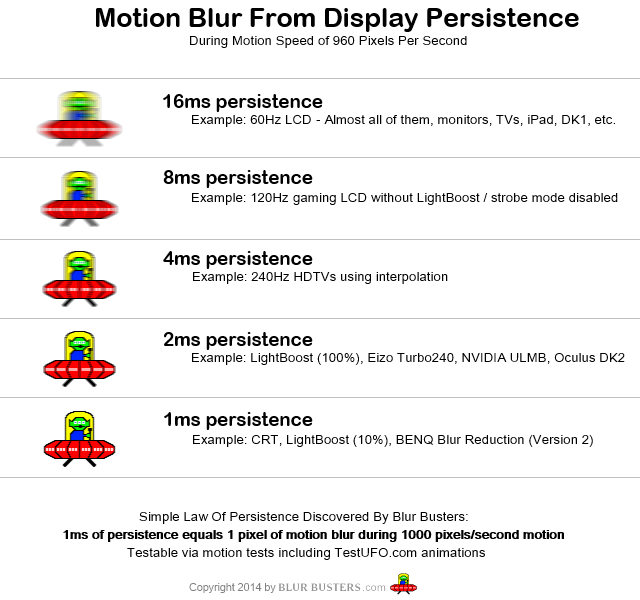
motion_blur_from_persistence.png


SOURCE: http://www.blurbusters.com/faq/oled-motion-blur/


To the OP:

I woudn't worry too much about pixel response time but I suggest you look at different aspect of the monitor like:

-what panel it is using (6bit + HiFRIC, 8bit, 10bit)

-IPS Glow

-Is it LED PWM Dimming or is Flicker Free?

-what kind of coating does it use?

-out of box calibration (look if it has problems with color tint like being yellowish, blueish, greenish, etc...)

-does the gamma rise at 60Hz+ (colors look dull and brightness seem to drop)

etc...

So I might be getting an IPS 1440p monitor which can be oc'd to ~120hz and its only downfall is that it has an 8ms response time while another 1440p oc'd monitor has 6ms respone time. If I went with the 6ms response time, would I notice the difference between my 1ms monitor or would the time not matter because of the speed of my CPU's ability to send commands?


Spoiler

i5 4670k, GTX 970, 12GB 1600, 120GB SSD, 240GB SDD, 1TB HDD, CM Storm Quickfire TK, G502, VG248QE, ATH M40x, Fractal R4

Spoiler

i5 4278U, Intel Iris Graphics, 8GB 1600, 128GB SSD, 2560x1600 IPS display, Mid-2014 Model

Spoiler

All the parts are here, just need to get customized cords to connect the motherboard to the front panel.

Link to comment
https://linustechtips.com/topic/174119-does-response-time-really-matter/
Share on other sites

Link to post
Share on other sites

Yes, it matters. 

Is the response time spec on the product page trustworthy?--probably not. 

If you ever need help with a build, read the following before posting: http://linustechtips.com/main/topic/3061-build-plan-thread-recommendations-please-read-before-posting/
Also, make sure to quote a post or tag a member when replying or else they won't get a notification that you replied to them.

Link to post
Share on other sites

Yes it does, on higher response times, you will experience motion blur. However as long as you are under 10 you are fine, even for gaming.

Also, check if the response time is measured in GTG (gray to gray) or BTW (black to white). The second one is slower, so It's a better way to measure it.

Link to post
Share on other sites

It does matter. How much of it mattering will depend on the rest of your setup and how good your eyes are.

We all need a daily check-up from the neck up to avoid stinkin' thinkin' which ultimately leads to the hardening of attitudes. - Zig Ziglar

The sad fact about atheists is that they stand for nothing while standing against things that have brought much good to the world. Now ain't that sad. - Anonymous

Replace fear with faith and fear will disappear. - Billy Cox  ......................................Also, Legalism, Education-bred Arrogance and Hubris-based Assumption are BULLSHIT.

Link to post
Share on other sites

Yes, it matters. 

Is the response time spec on the product page trustworthy?--probably not. 


This is true, don't trust the spec as alot of times those were skewered or not even close to rated spec.


Yes it does, on higher response times, you will experience motion blur. However as long as you are under 10 you are fine, even for gaming.

Also, check if the response time is measured in GTG (gray to gray) or BTW (black to white). The second one is slower, so It's a better way to measure it.


Well, it "technically" can produce motion blur if too high


imo response time, resolution, IPS, TN, ima go back to mah CRT 


1024x768 Voodoo 2 SLI, keepin it oldschool


response time actually doesn't have anything to do with motion blur at all.


even with 0ms reponse time there would still be motion blur


Even instant pixel response (0 ms) can have lots of motion blur due to sample-and-hold... Your eyes are always moving when you track moving objects on a screen. Sample-and-hold means frames are statically displayed until the next refresh. Your eyes are in a different position at the beginning of a refresh than at the end of a refresh; this causes the frame to be blurred across your retinas.


The flicker of impulse-driven displays (CRT) shortens the frame samples, and eliminates eye-tracking based motion blur. This is why CRT displays have less motion blur than LCD’s, even though LCD pixel response times (1ms-2ms) are recently finally matching phosphor decay times of a CRT (with medium-persistence phosphor). Sample-and-hold displays continuously display frames for the whole refresh. Persistence (sample-and-hold) is a different measurement from pixel transitions (GtG). As a result, a 60Hz refresh (even on “2ms GtG” LCDs) is displayed for a whole 1/60th of a second (16.7ms persistence).


The only way to reduce motion blur caused by sample-and-hold, is to shorten the amount of time a frame is displayed for. This is accomplished by using extra refreshes (higher Hz) or via black periods between refreshes (flicker).

motion_blur_from_persistence.png


SOURCE: http://www.blurbusters.com/faq/oled-motion-blur/


To the OP:

I woudn't worry too much about pixel response time but I suggest you look at different aspect of the monitor like:

-what panel it is using (6bit + HiFRIC, 8bit, 10bit)

-IPS Glow

-Is it LED PWM Dimming or is Flicker Free?

-what kind of coating does it use?

-out of box calibration (look if it has problems with color tint like being yellowish, blueish, greenish, etc...)

-does the gamma rise at 60Hz+ (colors look dull and brightness seem to drop)

etc...

Yeah, we're all just a bunch of idiots experiencing nothing more than the placebo effect.
Link to post
Share on other sites

I could notice when I moved from my Dell E176FP (12ms) to my AOC 2236Vw (5ms). There is less motion blur, and that's just using general Windows stuff (like moving windows and my mouse around) and simple gaming (GTA: Vice City). But I tend to notice smaller things a lot more.

Main rig on profile

VAULT - File Server

Spoiler

Intel Core i5 11400 w/ Shadow Rock LP, 2x16GB SP GAMING 3200MHz CL16, ASUS PRIME Z590-A, 2x LSI 9211-8i, Fractal Define 7, 256GB Team MP33, 3x 6TB WD Red Pro (general storage), 5x 8TB WD White Label/Red (Plex) (both arrays in their respective Windows Parity storage spaces), 1TB Teamgroup MP33 (dumping ground) Corsair RM750x, TrueNAS Scale

Sleeper HP Pavilion A6137C

Spoiler

Intel Core i7 6700K @ 4.4GHz, 4x8GB G.SKILL Ares 1800MHz CL10, ASUS Z170M-E D3, 128GB Team MP33, 1TB Seagate Barracuda, MSI GTX 970 100ME, EVGA 650G1, Windows 11 Pro

OptiPlex 7040M

Spoiler

Intel Core i7 6700, 2x16GB Mushkin Redline (stuck at 2133MHz CL13), 240GB Corsair MP510, 2TB Seagate Barracuda 2.5", 130w Dell power brick, Windows 11 Pro

Mac Mini (Late 2020)

Spoiler

Apple M1, 8GB RAM, 256GB, macOS Sonoma

Consoles: Steam Deck LCD (512GB), Softmodded 1.4 Xbox w/ 500GB HDD, Xbox 360 Elite 120GB Falcon, XB1X w/2TB MX500, Xbox Series X, PS1 1001, PS2 Slim 70000 w/ FreeMcBoot, PS4 Pro 7015B 1TB, PS5 Digital, Nintendo Switch OLED, Nintendo Wii RVL-001 (black)

Link to post
Share on other sites

It's an obscenely overrated spec, but it does matter to an extent, especially for those into competitive gaming. Like others have said, don't trust the spec sheet, consult professional reviews instead.

Intel Core i7-5930K | Noctua NH-D15S | ASUS X99-M WS | 32GB (4 x 8GB) G.Skill Ripjaws V 2666MHz | MSI GeForce GTX 980 Ti Gaming 6G | Samsung 850 Pro 512GB | Seasonic 660XP2 | Phanteks Enthoo EVOLV


LG 34UM95-P w/ Ergotron MX  | O2/ODAC | Audioengine A5+ w/ AS8 | Sennheiser HD 598 | Ducky Shine 3 | Cooler Master Storm Spawn

Link to post
Share on other sites

I could notice when I moved from my Dell E176FP (12ms) to my AOC 2236Vw (5ms). There is less motion blur, and that's just using general Windows stuff (like moving windows and my mouse around) and simple gaming (GTA: Vice City). But I tend to notice smaller things a lot more.

Probably that 12ms was more 25ms, and that AOC probably 7-6ms for the reality of things.

'cause remember it's speed from gray to another gray/ But each manufacture uses different grays, and uses different equipment to measure, where the precision can be off by a few milliseconds.

Link to post
Share on other sites

It's an obscenely overrated spec, but it does matter to an extent, especially for those into competitive gaming. Like others have said, don't trust the spec sheet, consult professional reviews instead.

Agreed. Today, you won't get a awful slow monitor, (if we ignore the ultra budget monitors) regardless of what you get.

However, if you do competitive gaming and it maters, then you can find in depth monitor review sites, and they'll show the reality of the speed of the monitor, and shows you comparison with other monitors.

Link to post
Share on other sites

Probably that 12ms was more 25ms, and that AOC probably 7-6ms for the reality of things.

'cause remember it's speed from gray to another gray/ But each manufacture uses different grays, and uses different equipment to measure, where the precision can be off by a few milliseconds.

I actually did that reaction time thing that Linus did (my cousin has a lot of cool stuff) and it was 12-15ms, I think.

Main rig on profile

VAULT - File Server

Spoiler

Intel Core i5 11400 w/ Shadow Rock LP, 2x16GB SP GAMING 3200MHz CL16, ASUS PRIME Z590-A, 2x LSI 9211-8i, Fractal Define 7, 256GB Team MP33, 3x 6TB WD Red Pro (general storage), 5x 8TB WD White Label/Red (Plex) (both arrays in their respective Windows Parity storage spaces), 1TB Teamgroup MP33 (dumping ground) Corsair RM750x, TrueNAS Scale

Sleeper HP Pavilion A6137C

Spoiler

Intel Core i7 6700K @ 4.4GHz, 4x8GB G.SKILL Ares 1800MHz CL10, ASUS Z170M-E D3, 128GB Team MP33, 1TB Seagate Barracuda, MSI GTX 970 100ME, EVGA 650G1, Windows 11 Pro

OptiPlex 7040M

Spoiler

Intel Core i7 6700, 2x16GB Mushkin Redline (stuck at 2133MHz CL13), 240GB Corsair MP510, 2TB Seagate Barracuda 2.5", 130w Dell power brick, Windows 11 Pro

Mac Mini (Late 2020)

Spoiler

Apple M1, 8GB RAM, 256GB, macOS Sonoma

Consoles: Steam Deck LCD (512GB), Softmodded 1.4 Xbox w/ 500GB HDD, Xbox 360 Elite 120GB Falcon, XB1X w/2TB MX500, Xbox Series X, PS1 1001, PS2 Slim 70000 w/ FreeMcBoot, PS4 Pro 7015B 1TB, PS5 Digital, Nintendo Switch OLED, Nintendo Wii RVL-001 (black)

Link to post
Share on other sites

The higher the response time the worse the 'ghosting' effect becomes.


I've had a 8ms screen before and I could not stand the ghosting. Its most noticeable in dark scenes in games. What I done to test it was start up Crysis 1, 1st level on the beach after u drop from the plane. Look up into the sky and move the view around, ull see the clouds blur/ghost as u move the image. Also ull notice it on any image that has a cartoon like boarders, like leaves with black lines around them like in WoW. when u move the image the blacks lines will ghost over the inner green color of the leaves making the whole tree look like it dims from its bright green look whilst the image is stationary, to a darker green as u move the image.


It will all depend on how sensitive you are to visual changes, much like refresh rate, stuttering, and screen tearing, it all depends on the person. But I would never look at a screen with 5ms or more. And even lower than that I would have to test the screen myself before purchase. That's one of the reasons I ended up buying a Plasma screen over LCD, Plasma has effectively instant response. And 1 of a few reasons im honestly trying to hold of on replacing my Plasma with a 4k monitor until OLED become more available.

CPU: Intel i7 3930k w/OC & EK Supremacy EVO Block | Motherboard: Asus P9x79 Pro  | RAM: G.Skill 4x4 1866 CL9 | PSU: Seasonic Platinum 1000w Corsair RM 750w Gold (2021)|

VDU: Panasonic 42" Plasma | GPU: Gigabyte 1080ti Gaming OC & Barrow Block (RIP)...GTX 980ti | Sound: Asus Xonar D2X - Z5500 -FiiO X3K DAP/DAC - ATH-M50S | Case: Phantek Enthoo Primo White |

Storage: Samsung 850 Pro 1TB SSD + WD Blue 1TB SSD | Cooling: XSPC D5 Photon 270 Res & Pump | 2x XSPC AX240 White Rads | NexXxos Monsta 80x240 Rad P/P | NF-A12x25 fans |

Link to post
Share on other sites

The higher the response time the worse the 'ghosting' effect becomes.


I've had a 8ms screen before and I could not stand the ghosting. Its most noticeable in dark scenes in games. What I done to test it was start up Crysis 1, 1st level on the beach after u drop from the plane. Look up into the sky and move the view around, ull see the clouds blur/ghost as u move the image. Also ull notice it on any image that has a cartoon like boarders, like leaves with black lines around them like in WoW. when u move the image the blacks lines will ghost over the inner green color of the leaves making the whole tree look like it dims from its bright green look whilst the image is stationary, to a darker green as u move the image.


It will all depend on how sensitive you are to visual changes, much like refresh rate, stuttering, and screen tearing, it all depends on the person. But I would never look at a screen with 5ms or more. And even lower than that I would have to test the screen myself before purchase. That's one of the reasons I ended up buying a Plasma screen over LCD, Plasma has effectively instant response. And 1 of a few reasons im honestly trying to hold of on replacing my Plasma with a 4k monitor until OLED become more available.

You have to read in depth review to know the real response time.

Manufactures don't reveal the real response time, as explained more properly previously.

Link to post
Share on other sites

Create an account or sign in to comment

You need to be a member in order to leave a comment

Create an account

Sign up for a new account in our community. It's easy!

Register a new account

Sign in

Already have an account? Sign in here.

Sign In Now

×



