
Jump to content

SSD read/write meaning?

Go to solution Solved by Boomwebsearch,
2 hours ago, minibois said:

The endurance of budget NVME drives like the 660p and Crucial P1 is not that great for an OS drive. Since you don't want to fill it up more than 70% too, you might as well get a better 500GB drive at that point.


If you motherboard has support for NVME SSDs, I would at least recommend having one. I would recommend getting something such as the MP33 from TeamGroup if you are on a limited budget, it comes with a 5 year warranty and you can get the 256GB version for $41.99 or the 128GB for $10 less. Would recommend the 256GB version if it would work within your budget since you have more room for OS updates/upgrades and to accelerate/cache frequently used programs, although if it's just for the OS then 128GB should be fine. SSDs don't really wear out when you read from them (especially if kept cool) and that is what is going to be used mostly by an operating system. For the average consumer, they are likely not going to hit anywhere near the maximum write cycles of their SSD within the time that they would use it (and the warranty is there if you need it). For data-center/server use, you may want to get drives rated for more data being read/written to them a year within the warranty, since it could be hundreds of terabytes of data you're working with.
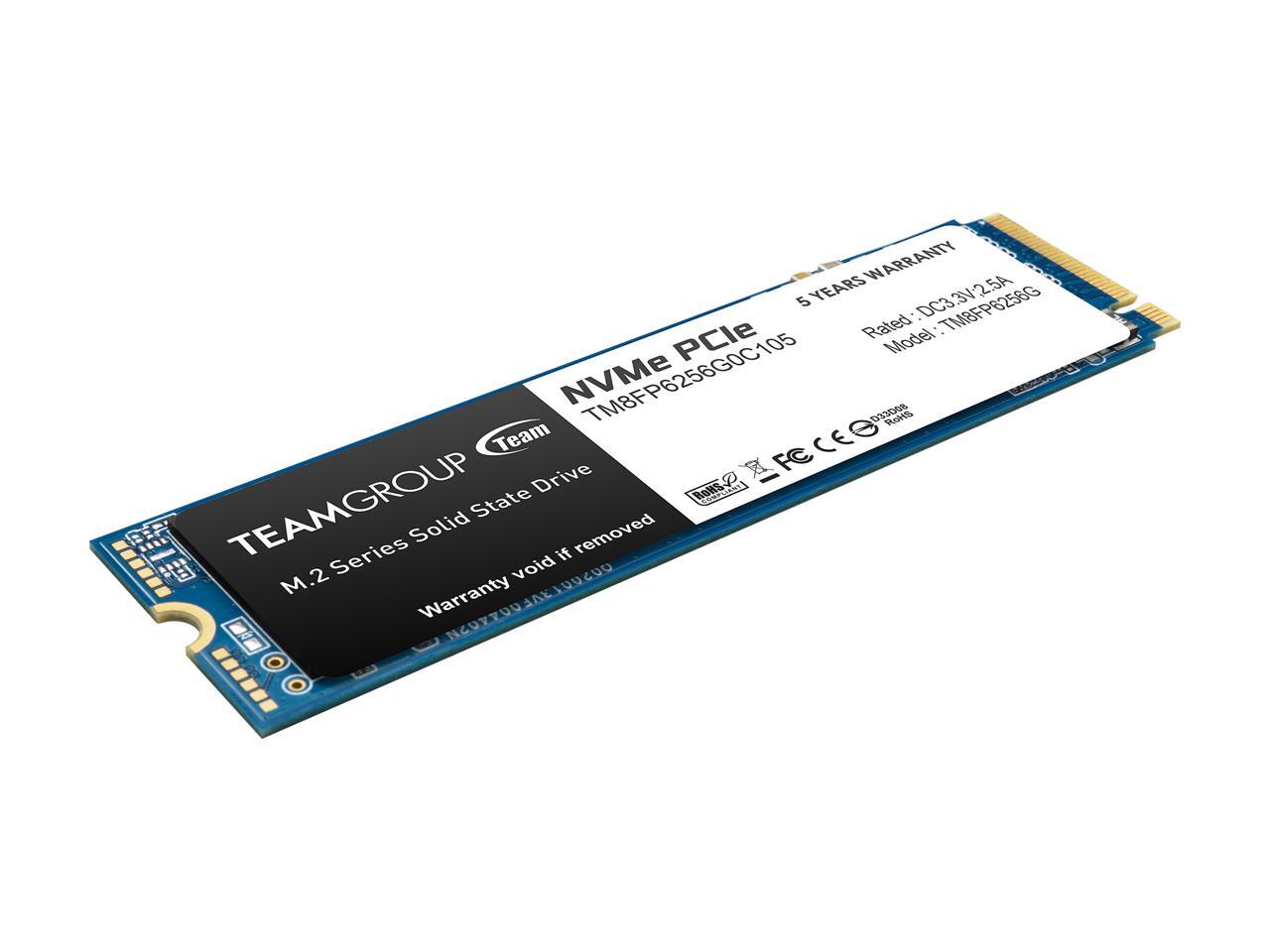
 

20-331-415-V07.jpg

https://www.newegg.com/team-group-mp33-256gb/p/N82E16820331415

Just now, Hz Eurythmic said:

What does the read write speed mean on an SSD?  I'm assuming that the write is for when you're saving/downloading something, and read is when you start up a game or something from on it.  Please help me understand!!

Quote

 I'm assuming that the write is for when you're saving/downloading something, and read is when you start up a game or something from on it.

Yes.

That's basically it.


To add, starting up Windows is for example a read operation too.

An SSD (or HDD for that matter) stores data in the form of 1's and 0's. Then you are using your PC and it has to either read/write (or both) to perform those tasks.

It either needs to look at what is already saved (like a document, program, etc.) to open it. Or it needs to write new/altered data (because you are saving something like a document or game).

"We're all in this together, might as well be friends" Tom, Toonami.


mini eLiXiVy: my open source 65% mechanical PCB, a build log, PCB anatomy and discussing open source licenses: https://linustechtips.com/topic/1366493-elixivy-a-65-mechanical-keyboard-build-log-pcb-anatomy-and-how-i-open-sourced-this-project/


mini_cardboard: a 4% keyboard build log and how keyboards workhttps://linustechtips.com/topic/1328547-mini_cardboard-a-4-keyboard-build-log-and-how-keyboards-work/

Link to comment
https://linustechtips.com/topic/1193254-ssd-readwrite-meaning/#findComment-13592680
Share on other sites

Link to post
Share on other sites

3 minutes ago, minibois said:

Yes.

That's basically it.


To add, starting up Windows is for example a read operation too.

An SSD (or HDD for that matter) stores data in the form of 1's and 0's. Then you are using your PC and it has to either read/write (or both) to perform those tasks.

It either needs to look at what is already saved (like a document, program, etc.) to open it. Or it needs to write new/altered data (because you are saving something like a document or game).

Thank you! That really helped.  Also, what is an ideal read/write speed for a good SSD  nowadays.  I've been seeing a lot with read speeds at about 1,000 and write at about 500.  Is that good for gaming with an SSD?

Link to comment
https://linustechtips.com/topic/1193254-ssd-readwrite-meaning/#findComment-13592707
Share on other sites

Link to post
Share on other sites

1 minute ago, Hz Eurythmic said:

Thank you! That really helped.  Also, what is an ideal read/write speed for a good SSD  nowadays.  I've been seeing a lot with read speeds at about 1,000 and write at about 500.  Is that good for gaming with an SSD?

Tke those listed numbers with a grain of salt, there under idela conditions, and won't be hit very often in the real world.


For gaming, ssd performance won't really matter, esp write speeds, games are alost all reads other than the install.

Link to comment
https://linustechtips.com/topic/1193254-ssd-readwrite-meaning/#findComment-13592727
Share on other sites

Link to post
Share on other sites

Just now, Electronics Wizardy said:

Tke those listed numbers with a grain of salt, there under idela conditions, and won't be hit very often in the real world.


For gaming, ssd performance won't really matter, esp write speeds, games are alost all reads other than the install.

Thanks!

Link to comment
https://linustechtips.com/topic/1193254-ssd-readwrite-meaning/#findComment-13592731
Share on other sites

Link to post
Share on other sites

1 minute ago, Hz Eurythmic said:

Thank you! That really helped.  Also, what is an ideal read/write speed for a good SSD  nowadays.  I've been seeing a lot with read speeds at about 1,000 and write at about 500.  Is that good for gaming with an SSD?

The 'issue' with these reported speeds for an SSD is that they are generally done with a new SSD, with little to no data on it.

Really, most SSD's will do fine for gaming. But you have certain types of SSD's that don't need their own DRAM will become a lot slower once they are filled up to a certain point.


For gaming, I would just get a good SATA drive (like an MX500 or Samsung 860 EVO) or a more budget NVME SSD (like a 660p. although you should not plan on using the latter for more than 70% and they are generally not recommended for an OS install).

"We're all in this together, might as well be friends" Tom, Toonami.


mini eLiXiVy: my open source 65% mechanical PCB, a build log, PCB anatomy and discussing open source licenses: https://linustechtips.com/topic/1366493-elixivy-a-65-mechanical-keyboard-build-log-pcb-anatomy-and-how-i-open-sourced-this-project/


mini_cardboard: a 4% keyboard build log and how keyboards workhttps://linustechtips.com/topic/1328547-mini_cardboard-a-4-keyboard-build-log-and-how-keyboards-work/

Link to comment
https://linustechtips.com/topic/1193254-ssd-readwrite-meaning/#findComment-13592742
Share on other sites

Link to post
Share on other sites

1 minute ago, Hz Eurythmic said:

Thank you! That really helped.  Also, what is an ideal read/write speed for a good SSD  nowadays.  I've been seeing a lot with read speeds at about 1,000 and write at about 500.  Is that good for gaming with an SSD?


For gaming, usually the majority of games will benefit from higher read speeds than write, and consumer-grade SSDs wear out from repeated writing (write then erase and write again). You may still need a mechanical drive for higher capacity storage (SSDs are significantly more expensive for storing large amounts of data than HDDs).


Hope this information post was helpful  ?,

        @Boomwebsearch 

Link to comment
https://linustechtips.com/topic/1193254-ssd-readwrite-meaning/#findComment-13592754
Share on other sites

Link to post
Share on other sites

38 minutes ago, minibois said:

The 'issue' with these reported speeds for an SSD is that they are generally done with a new SSD, with little to no data on it.

Really, most SSD's will do fine for gaming. But you have certain types of SSD's that don't need their own DRAM will become a lot slower once they are filled up to a certain point.


For gaming, I would just get a good SATA drive (like an MX500 or Samsung 860 EVO) or a more budget NVME SSD (like a 660p. although you should not plan on using the latter for more than 70% and they are generally not recommended for an OS install).

Why shouldn't I install an OS on an SSD?

Link to comment
https://linustechtips.com/topic/1193254-ssd-readwrite-meaning/#findComment-13592928
Share on other sites

Link to post
Share on other sites

Just now, Hz Eurythmic said:

Why shouldn't I install an OS on an SSD?

I advise people not to install their OS on certain budget NVME SSD's (like the Intel 660p, Crucial P1).

You should certainly install your OS on an SSD, just not of that variety (in my opinion).

"We're all in this together, might as well be friends" Tom, Toonami.


mini eLiXiVy: my open source 65% mechanical PCB, a build log, PCB anatomy and discussing open source licenses: https://linustechtips.com/topic/1366493-elixivy-a-65-mechanical-keyboard-build-log-pcb-anatomy-and-how-i-open-sourced-this-project/


mini_cardboard: a 4% keyboard build log and how keyboards workhttps://linustechtips.com/topic/1328547-mini_cardboard-a-4-keyboard-build-log-and-how-keyboards-work/

Link to comment
https://linustechtips.com/topic/1193254-ssd-readwrite-meaning/#findComment-13592937
Share on other sites

Link to post
Share on other sites

2 minutes ago, minibois said:

I advise people not to install their OS on certain budget NVME SSD's (like the Intel 660p, Crucial P1).

You should certainly install your OS on an SSD, just not of that variety (in my opinion).

Oh ok.  Corsair MP510 is one I can install the OS on right? Corsair is very reputable.

Link to comment
https://linustechtips.com/topic/1193254-ssd-readwrite-meaning/#findComment-13592945
Share on other sites

Link to post
Share on other sites

2 minutes ago, Hz Eurythmic said:

Oh ok.  Corsair MP510 is one I can install the OS on right? Corsair is very reputable.

Together with the Samsung 970 EVO (Plus) and ADATA SX8200/SX8800 Pro, the Corsair is one of the best SSD's you could get.

Certainly something you want to install your OS on.

"We're all in this together, might as well be friends" Tom, Toonami.


mini eLiXiVy: my open source 65% mechanical PCB, a build log, PCB anatomy and discussing open source licenses: https://linustechtips.com/topic/1366493-elixivy-a-65-mechanical-keyboard-build-log-pcb-anatomy-and-how-i-open-sourced-this-project/


mini_cardboard: a 4% keyboard build log and how keyboards workhttps://linustechtips.com/topic/1328547-mini_cardboard-a-4-keyboard-build-log-and-how-keyboards-work/

Link to comment
https://linustechtips.com/topic/1193254-ssd-readwrite-meaning/#findComment-13592961
Share on other sites

Link to post
Share on other sites

37 minutes ago, Hz Eurythmic said:

Why shouldn't I install an OS on an SSD?

35 minutes ago, minibois said:

I advise people not to install their OS on certain budget NVME SSD's (like the Intel 660p, Crucial P1).

You should certainly install your OS on an SSD, just not of that variety (in my opinion).

31 minutes ago, Hz Eurythmic said:

Oh ok.  Corsair MP510 is one I can install the OS on right? Corsair is very reputable.

28 minutes ago, minibois said:

Together with the Samsung 970 EVO (Plus) and ADATA SX8200/SX8800 Pro, the Corsair is one of the best SSD's you could get.

Certainly something you want to install your OS on.


If you are using a budget SSD (from at least a somewhat reputable manufacturer), you could install your OS on it, why not? As long as the system is not doing anything mission critical, in the worst case if your budget SSD fails, you could swap it for another one. 


The drive that you store your files on may be worth investing in for higher reliability, what I would recommend is installing the OS on a budget SSD and throwing in a HDD for RAID 1 redundancy, while it does not really count as a backup of your data, at least there is some protection against a hardware failure causing data loss. If you would like a recommendation for a HDD/SSD, please include what country you are shopping from, your budget, and how much storage capacity you need?

Hope this information post was helpful  ?,

        @Boomwebsearch 

Link to comment
https://linustechtips.com/topic/1193254-ssd-readwrite-meaning/#findComment-13593112
Share on other sites

Link to post
Share on other sites

6 minutes ago, Boomwebsearch said:

If you are using a budget SSD (from at least a somewhat reputable manufacturer), you could install your OS on it, why not? As long as the system is not doing anything mission critical, in the worst case if your budget SSD fails, you could swap it for another one. 

The endurance of budget NVME drives like the 660p and Crucial P1 is not that great for an OS drive. Since you don't want to fill it up more than 70% too, you might as well get a better 500GB drive at that point.

"We're all in this together, might as well be friends" Tom, Toonami.


mini eLiXiVy: my open source 65% mechanical PCB, a build log, PCB anatomy and discussing open source licenses: https://linustechtips.com/topic/1366493-elixivy-a-65-mechanical-keyboard-build-log-pcb-anatomy-and-how-i-open-sourced-this-project/


mini_cardboard: a 4% keyboard build log and how keyboards workhttps://linustechtips.com/topic/1328547-mini_cardboard-a-4-keyboard-build-log-and-how-keyboards-work/

Link to comment
https://linustechtips.com/topic/1193254-ssd-readwrite-meaning/#findComment-13593146
Share on other sites

Link to post
Share on other sites

2 hours ago, minibois said:

The endurance of budget NVME drives like the 660p and Crucial P1 is not that great for an OS drive. Since you don't want to fill it up more than 70% too, you might as well get a better 500GB drive at that point.


If you motherboard has support for NVME SSDs, I would at least recommend having one. I would recommend getting something such as the MP33 from TeamGroup if you are on a limited budget, it comes with a 5 year warranty and you can get the 256GB version for $41.99 or the 128GB for $10 less. Would recommend the 256GB version if it would work within your budget since you have more room for OS updates/upgrades and to accelerate/cache frequently used programs, although if it's just for the OS then 128GB should be fine. SSDs don't really wear out when you read from them (especially if kept cool) and that is what is going to be used mostly by an operating system. For the average consumer, they are likely not going to hit anywhere near the maximum write cycles of their SSD within the time that they would use it (and the warranty is there if you need it). For data-center/server use, you may want to get drives rated for more data being read/written to them a year within the warranty, since it could be hundreds of terabytes of data you're working with.


20-331-415-V07.jpg

https://www.newegg.com/team-group-mp33-256gb/p/N82E16820331415

Hope this information post was helpful  ?,

        @Boomwebsearch 

Link to comment
https://linustechtips.com/topic/1193254-ssd-readwrite-meaning/#findComment-13593589
Share on other sites

Link to post
Share on other sites

Create an account or sign in to comment

You need to be a member in order to leave a comment

Create an account

Sign up for a new account in our community. It's easy!

Register a new account

Sign in

Already have an account? Sign in here.

Sign In Now

×



