
Jump to content

Fallout 4 No Longer Working

Go to solution Solved by Knaj,
35 minutes ago, hex4 said:

I said it's pirated, it got deleted, notice how OP never responds to a single comment about STEAM?

Oh yeah that's right, must be a mysterious correlation to be ignorant to a specific thing, or my intelligence is trust worthy.


4 minutes ago, Ryan_Vickers said:

I hate to do this but @hex4 does have a valid point at this stage.  @Knaj, I assume you own the game on Steam since you haven't mentioned that you are with another distributor/method.  Please provide proof that Fallout 4 is in your Steam library or this thread will be locked; as per the community guidelines, we cannot assist anyone with pirated software, and failing to mention that is what you have (if that is what you have) is just wasting everyone's time.


I got it to work. It involved a bit of tinkering with the settings. I'm not entirely sure what I did, but it worked.

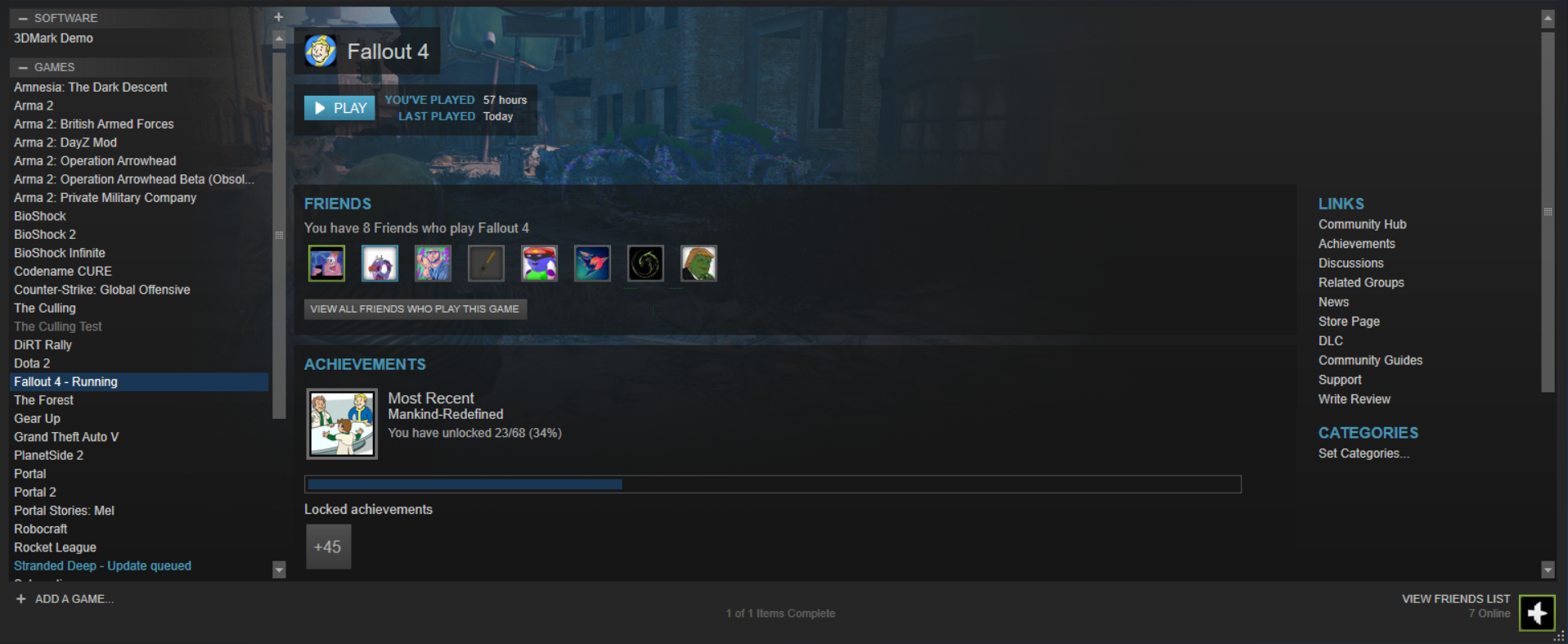
Also, I don't pirate software, but I understand that you can be wary. Here's proof:
ce76a3ef812650cfc1824b632c88b00e.png

So I tried the transfer over from my HDD to my SSD based on what @Aytex said here: 


The only problem is now, that every time I try to launch the game I get this error:

85c9cccec0217a458e13db7fc2546b8f.png

I don't know what to do.. I just want to play fallout 4....

Can somebody please help me?

Link to comment
https://linustechtips.com/topic/609291-fallout-4-no-longer-working/
Share on other sites

Link to post
Share on other sites

Verify game cache?

Community Standards || Tech News Posting Guidelines

---======================================================================---

CPU: R5 9600X || GPU: RX 9070 XT|| Memory: 32GB || Cooler: Peerless Assassin || PSU: RM850e|| Case: Lian Li A3

Link to post
Share on other sites

18 minutes ago, Knaj said:

So I tried the transfer over from my HDD to my SSD based on what @Aytex said here: 


The only problem is now, that every time I try to launch the game I get this error:

85c9cccec0217a458e13db7fc2546b8f.png

I don't know what to do.. I just want to play fallout 4....

Can somebody please help me?

delete and reinstall.

happened to me with gta v once.

Link to post
Share on other sites

2 minutes ago, Knaj said:


Working on that right now.

Note that if you do this properly it won't have to redownload anything - it will just detect what's already there, and make minor tweaks if bad files are found.

Solve your own audio issues  |  First Steps with RPi 3  |  Humidity & Condensation  |  Sleep & Hibernation  |  Overclocking RAM  |  Making Backups  |  Displays  |  4K / 8K / 16K / etc.  |  Do I need 80+ Platinum?

If you can read this you're using the wrong theme.  You can change it at the bottom.

Link to post
Share on other sites

1 minute ago, Ryan_Vickers said:

Note that if you do this properly it won't have to redownload anything - it will just detect what's already there, and make minor tweaks if bad files are found.

I probably wasn't doing it properly because it wasn't working still. I'm just redownloading it and having it on my SSD

Link to post
Share on other sites

1 minute ago, Knaj said:

I probably wasn't doing it properly because it wasn't working still. I'm just redownloading it and having it on my SSD

That won't accomplish anything different in the end.  Just so you know, it should go like this:

  1. Move the game data to the new location
    • The game will no longer start, but that doesn't matter
  2. Uninstall the game ("Delete local content")
    • This won't actually delete the bulk game data since you've moved it already.
  3. "Reinstall" the game to the new location
    • It will just detect the files that are already there and not have to download anything, unless there is a corrupt file in which case it will just fix that one.

Solve your own audio issues  |  First Steps with RPi 3  |  Humidity & Condensation  |  Sleep & Hibernation  |  Overclocking RAM  |  Making Backups  |  Displays  |  4K / 8K / 16K / etc.  |  Do I need 80+ Platinum?

If you can read this you're using the wrong theme.  You can change it at the bottom.

Link to post
Share on other sites

59 minutes ago, Ryan_Vickers said:

That won't accomplish anything different in the end.  Just so you know, it should go like this:

  1. Move the game data to the new location
    • The game will no longer start, but that doesn't matter
  2. Uninstall the game ("Delete local content")
    • This won't actually delete the bulk game data since you've moved it already.
  3. "Reinstall" the game to the new location
    • It will just detect the files that are already there and not have to download anything, unless there is a corrupt file in which case it will just fix that one.

The game still doesn't work.

Link to post
Share on other sites

41 minutes ago, Knaj said:

I did install. I didn't copy and paste at all.

It didn't work.

The game just opens and crashes.

have you tried this?

Quote

This is a Steam synchronization error.

Application load error P: 000000654321 and Error code 80
This is a synchronization issue with Steam. There are 3 ways I know of to fix this. But first, if you are using the workshop read this thread.

Help thread: CK\Workshop update problem
http://steamcommunity.com/app/72850/discussions/0/611701360834184285/

1. The first thing to try is just to exit out of steam, not just close it from the x in top right corner, but in upper left click Steam>Exit. Restart Steam.

2. If that doesn't work then shut down the computer, not just restart but power off. Wait 2 minutes to allow the software hooks to reset or some such nonsense. Then restart.

3. Last is exit Steam again in the same way. Goto your Steam directory, for me it is here C:\Program Files (x86)\Steam and delete the clientregistry.blob file. Shut down the computer, not just restart but power off. Wait 2 minutes. Restart and Steam will create a new version of that file.

https://steamcommunity.com/app/72850/discussions/0/810920325460240676/?ctp=13


Link to post
Share on other sites

I said it's pirated, it got deleted, notice how OP never responds to a single comment about STEAM?

Oh yeah that's right, must be a mysterious correlation to be ignorant to a specific thing, or my intelligence is trust worthy.

let us all remember now and today, computers do not like abuse, they will fight back!

Old Skool KILLBOX. XEON E5640 4.0ghz / ASUS P6X58D-E ~ Noctua NH-L12 ~ eVGA GTX 670 SC 2GB 1312/7000 ~ 4TB 7200 RPM RAID0 ~ CoolerMaster Haf 922 ~ DELL P214H 23" 1080 IPS 2ms ~ HP w2007v 1680x1050. Now Playing: Splinter Cell OG XBOX / CSGO PC


Original XBOX - Xecuter 2 4981.67 Bios. Playstation 2 Slim SCPH-70002. Sega Dreamcast. N64


Link to post
Share on other sites

I hate to do this but @hex4 does have a valid point at this stage.  @Knaj, I assume you own the game on Steam since you haven't mentioned that you are with another distributor/method.  Please provide proof that Fallout 4 is in your Steam library or this thread will be locked; as per the community guidelines, we cannot assist anyone with pirated software, and failing to mention that is what you have (if that is what you have) is just wasting everyone's time.

Solve your own audio issues  |  First Steps with RPi 3  |  Humidity & Condensation  |  Sleep & Hibernation  |  Overclocking RAM  |  Making Backups  |  Displays  |  4K / 8K / 16K / etc.  |  Do I need 80+ Platinum?

If you can read this you're using the wrong theme.  You can change it at the bottom.

Link to post
Share on other sites

35 minutes ago, hex4 said:

I said it's pirated, it got deleted, notice how OP never responds to a single comment about STEAM?

Oh yeah that's right, must be a mysterious correlation to be ignorant to a specific thing, or my intelligence is trust worthy.


4 minutes ago, Ryan_Vickers said:

I hate to do this but @hex4 does have a valid point at this stage.  @Knaj, I assume you own the game on Steam since you haven't mentioned that you are with another distributor/method.  Please provide proof that Fallout 4 is in your Steam library or this thread will be locked; as per the community guidelines, we cannot assist anyone with pirated software, and failing to mention that is what you have (if that is what you have) is just wasting everyone's time.


I got it to work. It involved a bit of tinkering with the settings. I'm not entirely sure what I did, but it worked.

Also, I don't pirate software, but I understand that you can be wary. Here's proof:

ce76a3ef812650cfc1824b632c88b00e.png

Link to post
Share on other sites

1 minute ago, Knaj said:


I got it to work. It involved a bit of tinkering with the settings. I'm not entirely sure what I did, but it worked.

Also, I don't pirate software, but I understand that you can be wary. Here's proof:

ce76a3ef812650cfc1824b632c88b00e.png

Awesome!

let us all remember now and today, computers do not like abuse, they will fight back!

Old Skool KILLBOX. XEON E5640 4.0ghz / ASUS P6X58D-E ~ Noctua NH-L12 ~ eVGA GTX 670 SC 2GB 1312/7000 ~ 4TB 7200 RPM RAID0 ~ CoolerMaster Haf 922 ~ DELL P214H 23" 1080 IPS 2ms ~ HP w2007v 1680x1050. Now Playing: Splinter Cell OG XBOX / CSGO PC


Original XBOX - Xecuter 2 4981.67 Bios. Playstation 2 Slim SCPH-70002. Sega Dreamcast. N64


Link to post
Share on other sites

3 minutes ago, Knaj said:


I got it to work. It involved a bit of tinkering with the settings. I'm not entirely sure what I did, but it worked.

Also, I don't pirate software, but I understand that you can be wary. Here's proof:

Thanks, and glad to hear you got it working! :)

Solve your own audio issues  |  First Steps with RPi 3  |  Humidity & Condensation  |  Sleep & Hibernation  |  Overclocking RAM  |  Making Backups  |  Displays  |  4K / 8K / 16K / etc.  |  Do I need 80+ Platinum?

If you can read this you're using the wrong theme.  You can change it at the bottom.

Link to post
Share on other sites

Create an account or sign in to comment

You need to be a member in order to leave a comment

Create an account

Sign up for a new account in our community. It's easy!

Register a new account

Sign in

Already have an account? Sign in here.

Sign In Now

×

