Jump to content

Hi LTT,

Before people will state this let me just say I can use NVENC just fine instead of x264 so streaming/recording is not an issue with NVENC.

The issue i'm running into:
I'm trying to run x264 medium cpu preset in OBS with a 12700kf(8P/4E cores), I use process lasso to give OBS all 4 E-cores but 4 E-cores is not enough to run the medium preset, so I'm trying to give OBS 2 extra P-cores but when recording starts OBS only uses the 2 assigned P-cores and shuts off the 4 E-cores.. 

I bascially can't get OBS going with a mix of P and E cores for x264 encoding, any ideas?

12700kf P-cores:5.1GHz / E-cores: 4.1GHz
Tried multiple versions of OBS studio
Windows 10
 

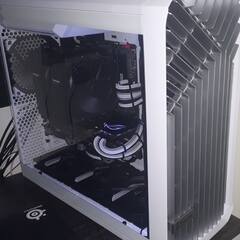
Specs: Ryzen 9800X3D 5425MHz - ASUS TUF RTX 4080 super - G.Skill Trident Z5 Neo 64GB 6400MT/s CL26 -  Gigabyte X870 AORUS Elite Wifi7 ICE - Torrent Fractal Design white - EVGA 850W Supernova G2 80+ Gold - Noctua NH-U12A

Link to comment
https://linustechtips.com/topic/1437161-obs-x264-12700kf-problem/
Share on other sites

Link to post
Share on other sites

Win10 scheduler doesn't properly support the P/E architecture, might be due to that. Should be using Win11 with Alder Lake. 

F@H
Desktop: i9-13900K, ASUS Z790-E, 64GB DDR5-6000 CL36, RTX3080, 2TB MP600 Pro XT, 2TB SX8200Pro, 2x16TB Ironwolf RAID0, Corsair HX1200, Antec Vortex 360 AIO, Thermaltake Versa H25 TG, Samsung 4K curved 49" TV, 23" secondary, Mountain Everest Max

Mobile SFF rig: i9-9900K, Noctua NH-L9i, Asrock Z390 Phantom ITX-AC, 32GB, GTX1070, 2x1TB SX8200Pro RAID0, 2x5TB 2.5" HDD RAID0, Athena 500W Flex (Noctua fan), Custom 4.7l 3D printed case


Asus Zenbook UM325UA, Ryzen 7 5700u, 16GB, 1TB, OLED


GPD Win 2

Link to post
Share on other sites

At least if you want to use the e-cores anyway.  Win10 could probably be updated to handle them properly, but then even fewer people would voluntarily go near win11.  I am really annoyed that Microsoft is making its product worse and worse and simply forcing consumers to use it.  It makes me feel like I’m caught in a leg hold trap.

Not a pro, not even very good.  I’m just old and have time currently.  Assuming I know a lot about computers can be a mistake.


Life is like a bowl of chocolates: there are all these little crinkly paper cups everywhere.

Link to post
Share on other sites

1 hour ago, Kilrah said:

Win10 scheduler doesn't properly support the P/E architecture, might be due to that. Should be using Win11 with Alder Lake. 

Yeah I guess so, I thought assigning cores manually would just work fine as it works fine for any other propgram I used E and P cores with at the same time.

I used W11 and I have to many issues with it sadly.

11 minutes ago, Bombastinator said:

At least if you want to use the e-cores anyway.  Win10 could probably be updated to handle them properly, but then even fewer people would voluntarily go near win11.  I am really annoyed that Microsoft is making its product worse and worse and simply forcing consumers to use it.  It makes me feel like I’m caught in a leg hold trap.

Totally agree with you, it is what it is I guess..


Specs: Ryzen 9800X3D 5425MHz - ASUS TUF RTX 4080 super - G.Skill Trident Z5 Neo 64GB 6400MT/s CL26 -  Gigabyte X870 AORUS Elite Wifi7 ICE - Torrent Fractal Design white - EVGA 850W Supernova G2 80+ Gold - Noctua NH-U12A

Link to post
Share on other sites

Create an account or sign in to comment

You need to be a member in order to leave a comment

Create an account

Sign up for a new account in our community. It's easy!

Register a new account

Sign in

Already have an account? Sign in here.

Sign In Now

×