

Jump to content

Hi

Quick question. I have a Corsair CX550M PSU. I have a Palit Geforce 1060 3GB GPU. Rest of the system in the description.

Anyway. I want to know if it is okay to power my GPU with the following old molex-6 pin pci-e adapter that I am attaching a photo of.
The PSU does come with a dual 6+2 pci e power connectors, but for visual reasons = as little cables in a small case as possible,
I have used the above.

Everything is running fine like this, but:

Can it damage the GPU in the long run? I read something about rails having to be utilized properly. It is also for obvious reasons, connected through the SATA/Periphial port on the PSU, not the PCI-e one.
The adapter came from an old PC from 2008. (This used to power a GTX 260!!) Does this matter? Do cables get "too old" ? I also noticed that there are only five wires on this adapter, as opposed to six on the one that came with the PSU.

Does it affect the lifetime of the GPU?

Like I said, everything is working fine with this setup, and I intend to keep it this way if it is good to go.


IMG_1397.JPG

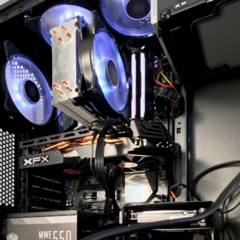
  • CPU - Ryzen 7 2700
  • Motherboard - Gigabyte B450 Aorus Elite
  • RAM - 2x 8GB Corsair DDR4-3200 MHZ Vengeance Pro
  • GPU - XFX Radeon RX590 8GB
  • Case - Fractal Design Focus G (because optical drive!)
  • Storage - Kingston A1000 256 NVMe System drive / 2TB Seagate HDD / ASUS generic optical drive
  • PSU - Cooler Master MWE Gold 550W modular
  • Cooling - 2x Cooler Master MF140R (in) / 4x Cooler Master MF120R (out)
  • Keyboard - Corsair K55
  • Mouse - HyperX Fury
  • Sound - 1969 Kenwood KA-4000 analogue amplifier coupled to 2x Dantax STR floor speakers
  • Operating System - Windows 10 Professional 64 bit
  • Laptop - Lenovo V130 series business laptop
Link to comment
https://linustechtips.com/topic/736669-gpu-power-question/
Share on other sites

Link to post
Share on other sites

use molex to pci-e for itself is not the problem, it is when you do this but your Psu doesnt even have enough power to deliver in the first place reason why i didnt have the enough pci-e connectors, in your case you will be giving the GPU the appropriated amount of power it needs therefore even if using the adapter it should be fine for the most part.

Personal Desktop":

CPU: Intel Core i7 10700K @5ghz |~| Cooling: bq! Dark Rock Pro 4 |~| MOBO: Gigabyte Z490UD ATX|~| RAM: 16gb DDR4 3333mhzCL16 G.Skill Trident Z |~| GPU: RX 6900XT Sapphire Nitro+ |~| PSU: Corsair TX650M 80Plus Gold |~| Boot:  SSD WD Green M.2 2280 240GB |~| Storage: 1x3TB HDD 7200rpm Seagate Barracuda + SanDisk Ultra 3D 1TB |~| Case: Fractal Design Meshify C Mini |~| Display: Toshiba UL7A 4K/60hz |~| OS: Windows 10 Pro.

Luna, the temporary Desktop:

CPU: AMD R9 7950XT  |~| Cooling: bq! Dark Rock 4 Pro |~| MOBO: Gigabyte Aorus Master |~| RAM: 32G Kingston HyperX |~| GPU: AMD Radeon RX 7900XTX (Reference) |~| PSU: Corsair HX1000 80+ Platinum |~| Windows Boot Drive: 2x 512GB (1TB total) Plextor SATA SSD (RAID0 volume) |~| Linux Boot Drive: 500GB Kingston A2000 |~| Storage: 4TB WD Black HDD |~| Case: Cooler Master Silencio S600 |~| Display 1 (leftmost): Eizo (unknown model) 1920x1080 IPS @ 60Hz|~| Display 2 (center): BenQ ZOWIE XL2540 1920x1080 TN @ 240Hz |~| Display 3 (rightmost): Wacom Cintiq Pro 24 3840x2160 IPS @ 60Hz 10-bit |~| OS: Windows 10 Pro (games / art) + Linux (distro: NixOS; programming and daily driver)
Link to comment
https://linustechtips.com/topic/736669-gpu-power-question/#findComment-9349282
Share on other sites

Link to post
Share on other sites

Create an account or sign in to comment

You need to be a member in order to leave a comment

Create an account

Sign up for a new account in our community. It's easy!

Register a new account

Sign in

Already have an account? Sign in here.

Sign In Now

×

