
Jump to content

Newb needs help lowering CPU voltage

Go to solution Solved by WoodenMarker,

Been there, can't exactly find it.

Are you using the advanced mode?

It should be in Ai Tweaker
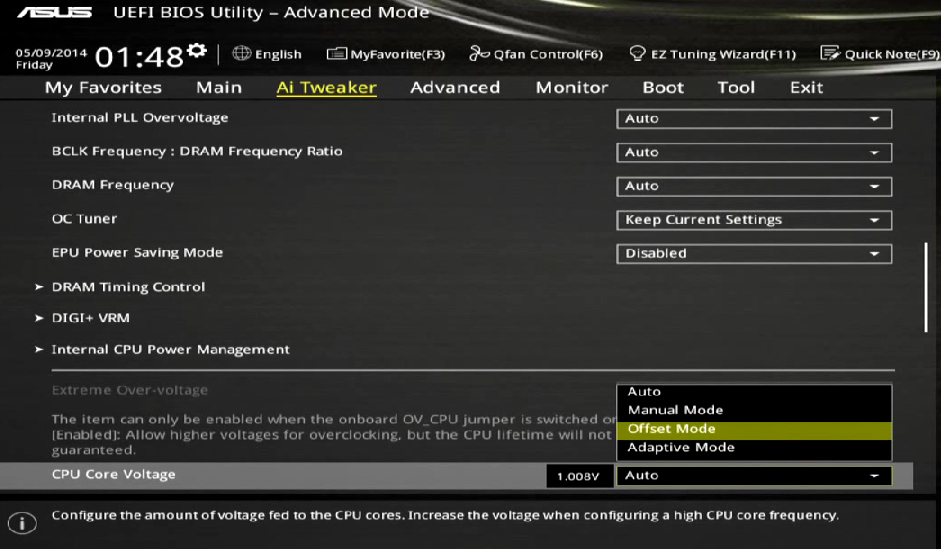
c7173c7abd9085e80a85eb343861266a.png

Ello,


So I'm running an i7 4790k at 4.6GHz that AISuite 3 has setup for me but it's running at 1.3275v.

My temps are 84c using Heavyload for more than 2 minutes (Corsair H100i cooler). I've heard I can get lower temps by lowering the voltage but I'm having a hard time exactly finding where I can change it on my Asus Z97-A motherboard.


Any help would be greatly appreciated!

Mid-range Emulation Gaming and Video Rendering PC

[CPU] i7 4790k 4.7GHz & 1.233v Delidded w/ CLU & vice method [Cooling] Corsair H100i [Mobo] Asus Z97-A [GPU] MSI GTX 1070 SeaHawk X[RAM] G.Skill TridentX 2400 9-11-11-30 CR1 [PSU] Corsair 750M 

Link to comment
https://linustechtips.com/topic/293550-newb-needs-help-lowering-cpu-voltage/
Share on other sites

Link to post
Share on other sites

Go into the uefi bios and find the core voltage setting. 

If you ever need help with a build, read the following before posting: http://linustechtips.com/main/topic/3061-build-plan-thread-recommendations-please-read-before-posting/
Also, make sure to quote a post or tag a member when replying or else they won't get a notification that you replied to them.

Link to post
Share on other sites

Go into the uefi bios and find the core voltage setting. 

Been there, can't exactly find it.

Mid-range Emulation Gaming and Video Rendering PC

[CPU] i7 4790k 4.7GHz & 1.233v Delidded w/ CLU & vice method [Cooling] Corsair H100i [Mobo] Asus Z97-A [GPU] MSI GTX 1070 SeaHawk X[RAM] G.Skill TridentX 2400 9-11-11-30 CR1 [PSU] Corsair 750M 

Link to post
Share on other sites

Been there, can't exactly find it.

Are you using the advanced mode?

It should be in Ai Tweaker

c7173c7abd9085e80a85eb343861266a.png

If you ever need help with a build, read the following before posting: http://linustechtips.com/main/topic/3061-build-plan-thread-recommendations-please-read-before-posting/
Also, make sure to quote a post or tag a member when replying or else they won't get a notification that you replied to them.

Link to post
Share on other sites

Been there, can't exactly find it.

Did you try going to the advanced tab and scrolling down a bit? It should be around there.

I actually couldn't underclock my 5 year old GPU to make it as slow as a next-gen console.

#pcmasterraceproblems

~Slick

Link to post
Share on other sites

Look in the manual if it's escaping you.

Specs are on my profile page


 Teach a man to fish and he ends up sticking a screw driver in a turned on power supply seeing if it still works.        #KilledMyWifeWithABomb            Resolution is just a number

Link to post
Share on other sites

Are you using the advanced mode?

It should be in Ai Tweaker

c7173c7abd9085e80a85eb343861266a.png

Thank you for actually giving me a picture of what I'm suppose to find.

I did this and set my voltage and couldn't boot up Windows 8.1.


http://oi58.tinypic.com/idw2hj.jpg

Is this right? I'm looking to get my voltage lower than 1.3v that AISuite set. Where should I start from there?

Mid-range Emulation Gaming and Video Rendering PC

[CPU] i7 4790k 4.7GHz & 1.233v Delidded w/ CLU & vice method [Cooling] Corsair H100i [Mobo] Asus Z97-A [GPU] MSI GTX 1070 SeaHawk X[RAM] G.Skill TridentX 2400 9-11-11-30 CR1 [PSU] Corsair 750M 

Link to post
Share on other sites

Don't use offset mode

Use manual mode

Mainboard Asrock Z170 OCF CPU 6700k RAM Tridentz 3600 HDD Intel 730 240gb GPU GTX 780ti sc acx PSU Silverstone Strider 1200W  Case Antec 900 Laptop Lenovo Thinkpad T520 build log-   http://linustechtips.com/main/topic/35809-antec-900-the-re-birth-of-a-legend/ Check out the Tech Center https://www.youtube.com/user/prokon24/videos LTT's Unicore King


Link to post
Share on other sites

Thank you for actually giving me a picture of what I'm suppose to find.

I did this and set my voltage and couldn't boot up Windows 8.1.


http://oi58.tinypic.com/idw2hj.jpg

Is this right? I'm looking to get my voltage lower than 1.3v that AISuite set. Where should I start from there?

Start from the current 1.3275v and lower it from there.

If you ever need help with a build, read the following before posting: http://linustechtips.com/main/topic/3061-build-plan-thread-recommendations-please-read-before-posting/
Also, make sure to quote a post or tag a member when replying or else they won't get a notification that you replied to them.

Link to post
Share on other sites

Start from the current 1.3275v and lower it from there.

By how much should I be lowering it by?

Mid-range Emulation Gaming and Video Rendering PC

[CPU] i7 4790k 4.7GHz & 1.233v Delidded w/ CLU & vice method [Cooling] Corsair H100i [Mobo] Asus Z97-A [GPU] MSI GTX 1070 SeaHawk X[RAM] G.Skill TridentX 2400 9-11-11-30 CR1 [PSU] Corsair 750M 

Link to post
Share on other sites

By how much should I be lowering it by?

~0.005v increments. 

If you ever need help with a build, read the following before posting: http://linustechtips.com/main/topic/3061-build-plan-thread-recommendations-please-read-before-posting/
Also, make sure to quote a post or tag a member when replying or else they won't get a notification that you replied to them.

Link to post
Share on other sites

~0.005v increments. 

And for each decrease, how long should I stress test for?

Mid-range Emulation Gaming and Video Rendering PC

[CPU] i7 4790k 4.7GHz & 1.233v Delidded w/ CLU & vice method [Cooling] Corsair H100i [Mobo] Asus Z97-A [GPU] MSI GTX 1070 SeaHawk X[RAM] G.Skill TridentX 2400 9-11-11-30 CR1 [PSU] Corsair 750M 

Link to post
Share on other sites

And for each decrease, how long should I stress test for?

I'd stress for 20-30min each bump and a 12-24 hour test for the final settings.

If you ever need help with a build, read the following before posting: http://linustechtips.com/main/topic/3061-build-plan-thread-recommendations-please-read-before-posting/
Also, make sure to quote a post or tag a member when replying or else they won't get a notification that you replied to them.

Link to post
Share on other sites

I'd stress for 20-30min each bump and a 12-24 hour test for the final settings.

Thank you a lot for the help! 

Mid-range Emulation Gaming and Video Rendering PC

[CPU] i7 4790k 4.7GHz & 1.233v Delidded w/ CLU & vice method [Cooling] Corsair H100i [Mobo] Asus Z97-A [GPU] MSI GTX 1070 SeaHawk X[RAM] G.Skill TridentX 2400 9-11-11-30 CR1 [PSU] Corsair 750M 

Link to post
Share on other sites

Create an account or sign in to comment

You need to be a member in order to leave a comment

Create an account

Sign up for a new account in our community. It's easy!

Register a new account

Sign in

Already have an account? Sign in here.

Sign In Now

×







