
Jump to content

SSD vs PCI SSD

Go to solution Solved by FizzyFantom,

How do you do it? or is it a complicated process?

Depending on your OS it could be very simple. In Windows 7/8/8.1 it will automatically be set to use TRIM if your SATA drives are set to AHCI in your BIOS. You can easily check this, it's usually called something like "Configure SATA as". This tutorial should be able to help you if you have it set to IDE:

http://www.askvg.com/how-to-change-sata-hard-disk-mode-from-ide-to-ahci-raid-in-bios-after-installing-windows/


You can download Crystal Disk Info to check if TRIM is working on your SSD:

http://crystalmark.info/software/CrystalDiskInfo/index-e.html

It will be listed in black under "Features" like this:
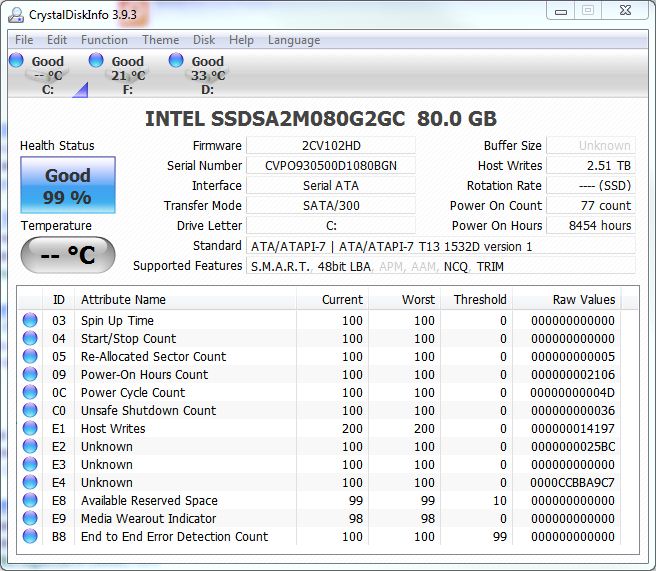
crydisinf01.jpg

I'm thinking of having either a PCI SSD as my Windows 7 (or windows 10 when it officially releases). But im not sure if going with an SSD is the better solution. I'm only trying to stay within the 500GB range for space. 

I primarily wanted to use PCI SSD because it frees up my SATA ports and i only planned to have a video card, possibly a sound card (so i should have the space for it).


Any thoughts?

Link to comment
https://linustechtips.com/topic/251843-ssd-vs-pci-ssd/
Share on other sites

Link to post
Share on other sites

I would go with regular SSD. You can use it for other things too. 


CPU - FX 8350 @ 4.5GHZ GPU - Radeon 5700  Mobo - M5A99FX Pro R2.0 RAM - Crucial Ballistix 16GB @ 1600 PSU - Corsair CX600M CPU Cooler - Hyper 212 EVO Storage - Samsung EVO 250GB, WD Blue 1TB

Link to comment
https://linustechtips.com/topic/251843-ssd-vs-pci-ssd/#findComment-3451690
Share on other sites

Link to post
Share on other sites

Can someone explain why I'd have to "trim" my ssd and what that does? i was told that before when i had my first SSD and it started to randomly reboot my computer.

TRIM keeps SSD performace nice and snappy. Without it the SSD would degrade fast. 

Interested in Business and Technology

Link to comment
https://linustechtips.com/topic/251843-ssd-vs-pci-ssd/#findComment-3451719
Share on other sites

Link to post
Share on other sites

How do you do it? or is it a complicated process?

Depending on your OS it could be very simple. In Windows 7/8/8.1 it will automatically be set to use TRIM if your SATA drives are set to AHCI in your BIOS. You can easily check this, it's usually called something like "Configure SATA as". This tutorial should be able to help you if you have it set to IDE:

http://www.askvg.com/how-to-change-sata-hard-disk-mode-from-ide-to-ahci-raid-in-bios-after-installing-windows/


You can download Crystal Disk Info to check if TRIM is working on your SSD:

http://crystalmark.info/software/CrystalDiskInfo/index-e.html

It will be listed in black under "Features" like this:

crydisinf01.jpg

"PSU brands are meaningless, look up the OEM."

Link to comment
https://linustechtips.com/topic/251843-ssd-vs-pci-ssd/#findComment-3451856
Share on other sites

Link to post
Share on other sites

Create an account or sign in to comment

You need to be a member in order to leave a comment

Create an account

Sign up for a new account in our community. It's easy!

Register a new account

Sign in

Already have an account? Sign in here.

Sign In Now

×

