
Jump to content

Philips hue?

Go to solution Solved by manikyath,

so you bought philips hue bulbs before looking up how they work?


since february of 2024 philips has announced that "for security reasons" you need an account to operate your lights.


can i suggest you return them, and buy something like this instead?
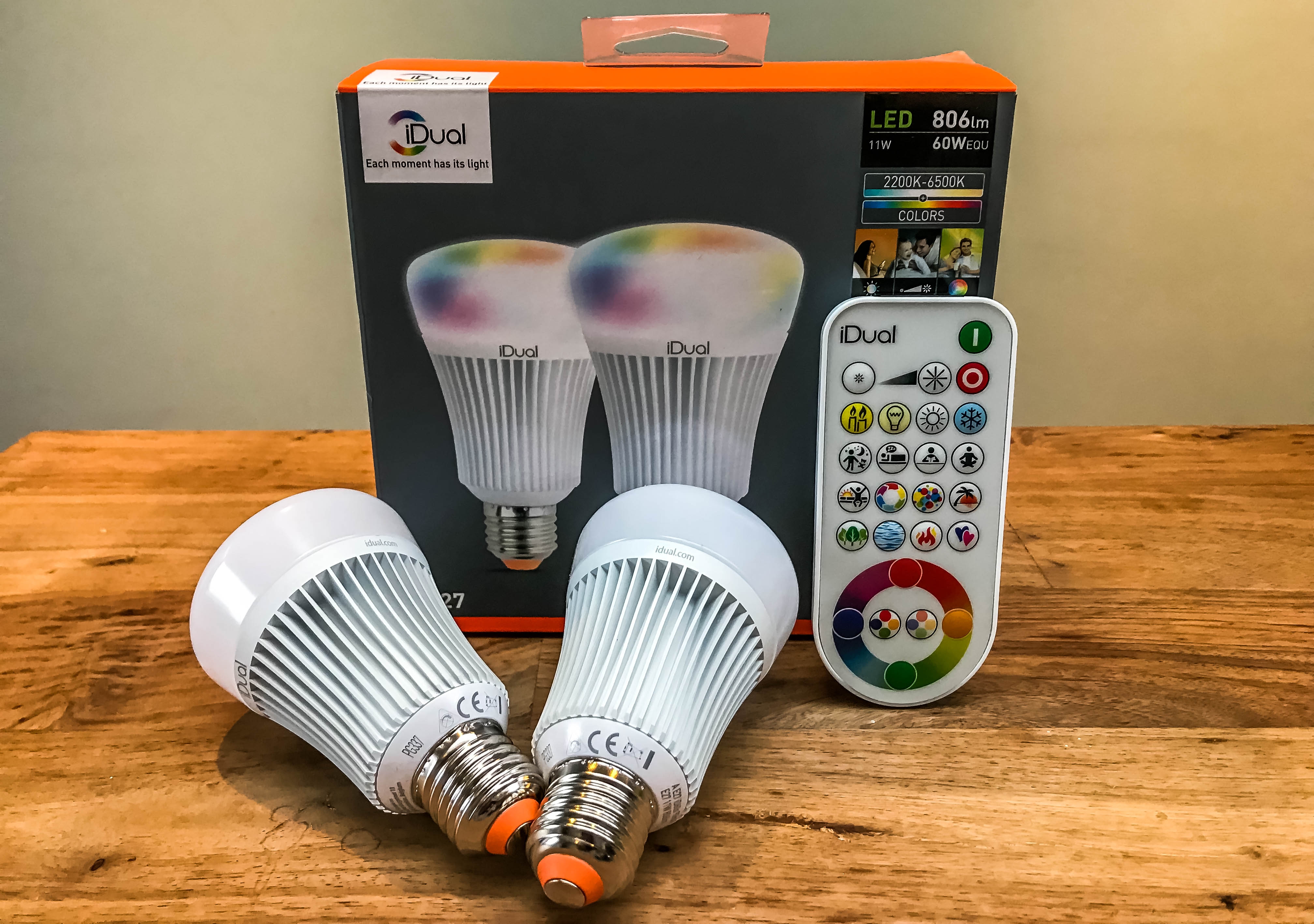
001-6.jpg


i use those around my desk, and they work surprisingly well. the remote even has an "IR intensity" switch on it to let you more precisely point it at specific lights or operate everything in the room.


it's propper cold white warm white adjustment, brightness adjustment, a silly RGB color picker mode, and some vanity stuff that's mostly for showing off.


on a sidenote, i'm installing about a km of low voltage wiring in my house specificly so i can run my own dimmers tied directly into homeassistant for this very reason.

I bought two Philips Hue bulbs but I'm a bit unclear of how to control them... I know there's an app but that appears to need an account, I WILL NOT USE AN ACCOUNT TO TURN OFF MY LIGHTS LMAO 


So what about a Hue Smart Button... will that work without further steps, accounts, or devices...?


Spoiler

To be clear ALL I want is turn on off and dim the bulb(s)


Idc about anything else (actually I just need it for the dimming)


The direction tells you... the direction

-Scott Manley, 2021


Link to comment
https://linustechtips.com/topic/1631783-philips-hue/
Share on other sites

Link to post
Share on other sites

so you bought philips hue bulbs before looking up how they work?


since february of 2024 philips has announced that "for security reasons" you need an account to operate your lights.


can i suggest you return them, and buy something like this instead?

001-6.jpg


i use those around my desk, and they work surprisingly well. the remote even has an "IR intensity" switch on it to let you more precisely point it at specific lights or operate everything in the room.


it's propper cold white warm white adjustment, brightness adjustment, a silly RGB color picker mode, and some vanity stuff that's mostly for showing off.


on a sidenote, i'm installing about a km of low voltage wiring in my house specificly so i can run my own dimmers tied directly into homeassistant for this very reason.

Link to comment
https://linustechtips.com/topic/1631783-philips-hue/#findComment-16862485
Share on other sites

Link to post
Share on other sites

6 hours ago, Mark Kaine said:

I bought two Philips Hue bulbs but I'm a bit unclear of how to control them... I know there's an app but that appears to need an account, I WILL NOT USE AN ACCOUNT TO TURN OFF MY LIGHTS LMAO 


So what about a Hue Smart Button... will that work without further steps, accounts, or devices...?


  Reveal hidden contents

To be clear ALL I want is turn on off and dim the bulb(s)


Idc about anything else (actually I just need it for the dimming)


https://www.casetawireless.com/us/en/products/dimmers-switches/original-smart-dimmer-switch-expansion-kit


If You want to dim this works great. It comes with a battery operated remote so you can control it from other places in the room. For example I keep the remote on my desk so I dont have to get up to turn on/off the light or dim the light. 

I just want to sit back and watch the world burn. 

Link to comment
https://linustechtips.com/topic/1631783-philips-hue/#findComment-16862503
Share on other sites

Link to post
Share on other sites

3 hours ago, manikyath said:

so you bought philips hue bulbs before looking up how they work?


since february of 2024 philips has announced that "for security reasons" you need an account to operate your lights.


can i suggest you return them, and buy something like this instead?

001-6.jpg


i use those around my desk, and they work surprisingly well. the remote even has an "IR intensity" switch on it to let you more precisely point it at specific lights or operate everything in the room.


it's propper cold white warm white adjustment, brightness adjustment, a silly RGB color picker mode, and some vanity stuff that's mostly for showing off.


on a sidenote, i'm installing about a km of low voltage wiring in my house specificly so i can run my own dimmers tied directly into homeassistant for this very reason.


I mean I did see that, but the description didn't mention that at all, and I've seen multiple people claim they use "zigbee" (a protocol?) so they claim they do not need an app or account but yes, no real info about how that works and what additional hardware is required if any.


So you're saying I need the app AND an account in order to use the "smart switch" which explicitly claims "no installation required"?  (yes I'm aware that's possibly misleading)


Imo it should just connect over Bluetooth?


As for that alternative bulbs with remote control, I saw these, looks like a good option but I did not see them in the form factor/style I want them, they all just look like disco lights to me? 😭🤷😂


That's the style I want, especially because the lamps I bought are very old-school 1920 style lamps and "modern" bulbs just will ruin the look sadly.


IMG_20260208_155707.jpg.342dc617fc0dea7e24b5979cc9bdbe06.jpg


3 hours ago, Needfuldoer said:

Is installing a regular "dumb" dimmer switch an option?


Well both are table lamps with built-in switch so idk?


IMG_20260208_154836.thumb.jpg.642a132ad97026527413f3011016e3e9.jpg

Edited by Mark Kaine
Bluetooth

The direction tells you... the direction

-Scott Manley, 2021


Link to comment
https://linustechtips.com/topic/1631783-philips-hue/#findComment-16862552
Share on other sites

Link to post
Share on other sites

2 hours ago, Donut417 said:

https://www.casetawireless.com/us/en/products/dimmers-switches/original-smart-dimmer-switch-expansion-kit


If You want to dim this works great. It comes with a battery operated remote so you can control it from other places in the room. For example I keep the remote on my desk so I dont have to get up to turn on/off the light or dim the light. 

So would that work with Philips Hue bulbs and table lamps?

The direction tells you... the direction

-Scott Manley, 2021


Link to comment
https://linustechtips.com/topic/1631783-philips-hue/#findComment-16862554
Share on other sites

Link to post
Share on other sites

4 minutes ago, Mark Kaine said:


I mean I did see that, but the description didn't mention that at all, and I've seen multiple people claim they use "zigbe" (a protocol?) so they do not need an app or account but yes, no real info about how that works and what additional hardware is required.

i did find this on HA forums, it appears you *can* use them with a dimmer, or reset them to make them discoverable by some zigbee ecosystem of your choosing. 

https://community.home-assistant.io/t/pairing-philips-hue-to-zigbee/711235

Link to comment
https://linustechtips.com/topic/1631783-philips-hue/#findComment-16862556
Share on other sites

Link to post
Share on other sites

Plug-in table lamps? Even easier. Get one of these and just leave their built-in power switches turned on.


https://www.amazon.com/TREATLIFE-Wireless-Control-Weather-Resistance/dp/B0CHMQW45X/

I sold my soul for ProSupport.

Link to comment
https://linustechtips.com/topic/1631783-philips-hue/#findComment-16862566
Share on other sites

Link to post
Share on other sites

29 minutes ago, Needfuldoer said:

Honestly, that looks perfect, the remote is cool too, cables look short which is good, I don't need 2 meter cables, that's just messy... unfortunately I can't find anything like it in Germany, all I see is stuff like this

https://www.amazon.de/Powice-Dimmer-Switch-Metres-220-250V/dp/B0DLNQ8LLX/ref=mp_s_a_1_9_sspa?crid=3BVC1A60CHI5Q&dib=eyJ2IjoiMSJ9.BtP7wcLGW8rP6OBFLf0ABDc7rUmvZB7b3niYr1ZPGvvQo-A6z7l-3H9YGG4ZcX7DLNc_au_nfBzt_QXw0-B2y3qyXSqYR73euv_UR0YQ02wV6abpCrbHSyfC2hbsR5XkG4IfiM6BlaRTk6pMLygXpIjKcoplqyYvdPMDq4eEgeToc8t7XdWvoVqCiPKehRW-EMHbjSBUaWeUPMQIOceeCMTlShae2P2xozyhQK8lRI05ZPkycZX0huz_JVUX227QfFiFECWWfRdNzRUpuUx45FiruMc4gjXinI14Vd3A7C8.5a9To8ltlEEHgVwaIzQhOLv6P8i4d1f3u6w_-NNA2jQ&dib_tag=se&keywords=TREATLIFE+Dimmer+Plug&qid=1770567083&s=industrial&sprefix=treatlife+dimmer+plug%2Cindustrial%2C165&sr=1-9-spons&aref=q1Wgyu5eqA&sp_csd=d2lkZ2V0TmFtZT1zcF9waG9uZV9zZWFyY2hfbXRm&psc=1


which looks cheaply made, reviews say it's loud or doesn't work etc 


Ima keep looking but yeah seems difficult. 🤔


PS: there's also ones you put into the outlet socket, which probably works, but is very inconvenient for me and I couldn't even operate those because my bed is right in front of the outlet, yikes. 


Well, I do think that Phillips "smart" switch might work, but yeah it's not a given (it might need the app "for reasons"... 👀)

The direction tells you... the direction

-Scott Manley, 2021


Link to comment
https://linustechtips.com/topic/1631783-philips-hue/#findComment-16862579
Share on other sites

Link to post
Share on other sites

On 2/7/2026 at 10:20 PM, Mark Kaine said:

I bought two Philips Hue bulbs but I'm a bit unclear of how to control them... I know there's an app but that appears to need an account, I WILL NOT USE AN ACCOUNT TO TURN OFF MY LIGHTS LMAO 


So what about a Hue Smart Button... will that work without further steps, accounts, or devices...?


  Reveal hidden contents

To be clear ALL I want is turn on off and dim the bulb(s)


Idc about anything else (actually I just need it for the dimming)


Dude, if it supports "thread/matter"

https://www.home-assistant.io/integrations/thread/

image

You can use basically anything. The nanoleaf stuff I have (version 4 platform or better) supports threads, the version 1 does not. So you need an "app" if it does not support thread.


https://www.philips-hue.com/en-ca/explore-hue/works-with/matter

A Matter-enabled Philips Hue smart bulb with packaging and the Hue app.


Link to comment
https://linustechtips.com/topic/1631783-philips-hue/#findComment-16862826
Share on other sites

Link to post
Share on other sites

5 hours ago, Kisai said:

Dude, if it supports "thread/matter"

https://www.home-assistant.io/integrations/thread/

And today I learned about the IOT mafia... Jeebus that's exactly the opposite of what I want?


4 hours ago, Pusbucket said:

just get one of these;

71lE3atg-ZL._AC_SL1500_.jpg

if your a Star Wars fan;

816vfdMQv7L._AC_SL1500_.jpg


or maybe you like Bob Ross;


81Hy+YgCfNL._AC_SL1500_.jpg


Bob Ross   WTF????

Haha those are awesome!  

The direction tells you... the direction

-Scott Manley, 2021


Link to comment
https://linustechtips.com/topic/1631783-philips-hue/#findComment-16862910
Share on other sites

Link to post
Share on other sites

4 hours ago, Mark Kaine said:

And today I learned about the IOT mafia... Jeebus that's exactly the opposite of what I want?


Just pointing out that everyone decided to support "matter/thread" as of a certain date. So if you bought them recently, you can probably use your smartphone to control them from the native thread support (which is Apple Homekit/Google Home/Alexa)


Quote

Thread-enabled Apple devices:

  • Apple TV 4K (3rd generation) Wi-Fi + Ethernet

  • Apple TV 4K (2nd generation)

  • HomePod (2nd generation)

  • HomePod mini

  • iPhone 15 Pro, iPhone 15 Pro Max, or later running iOS 18


https://support.apple.com/en-ca/102078


Quote

Thread devices join your home network and connect to the internet through a Thread border router. Just as a Wi-Fi router can join Wi-Fi and Ethernet devices into a single network, a Thread border router allows Thread devices to become part of your network. Thread border routers are already built into Nest Wifi Pro, the second-gen Nest Hub, Nest Hub Max, the Google TV Streamer (4K), and the Google Home Speaker (coming in spring 2026).

https://developers.home.google.com/matter/supported-devices


Basically, if you bought a smart LED bulb, that is your main option.

If you only want an on-off white/warm LED light, they are half the cost of the smart bulbs and don't last as long.


But I'll just warn you ahead of time that the failure conditions for the non-smartbulbs is always "the power supply dying" and the one Philips LED bulb that I had that burned out, the insulator holding the LED exploded inside the yellow-colored plastic. Most of a LED bulb is a heatsink. It's not the LED that costs money. The smartbulbs are always a little bit larger so they tend to just fit inside the standard 40/60w incandescent foot print, but all LED lights say they need air circulation, which means you technically should not be putting them inside the same fixtures. So you shorten the life of the LED bulb if it's not in a bare fixture (eg a floor lamp)


Link to comment
https://linustechtips.com/topic/1631783-philips-hue/#findComment-16863003
Share on other sites

Link to post
Share on other sites

3 minutes ago, Kisai said:

Just pointing out that everyone decided to support "matter/thread" as of a certain date. So if you bought them recently, you can probably use your smartphone to control them from the native thread support (which is Apple Homekit/Google Home/Alexa)

Yeah it's not bad information to have but I don't want it connected to the Internet simply, i don't really see why these lamps can't be controlled via Bluetooth, also plenty of info that you may need a hub, a router, but not Internet (which technically obviously makes sense)


Basically, yes while it would be nice to have dimming specifically (and again, the description of the hue bulbs didn't mention Internet requirements) if it means I need several accessories and tons of cables (I do not ever use wifi) then I'll just use none smart bulbs and maybe I can also just find a more convenient dimmer.


Or maybe I find some with filament that have a remote control.


I do agree I shouldn't have bought the hue, but almost everything I saw suggested that I don't need Internet...


Ive also read you can just use your phone which would obviously be ideal - but then I probably still need the bridge thing and some uncanny app... it all just sounds troublesome to me even though the idea is obviously great, it just seems very convoluted with lots of unnecessary steps.


The direction tells you... the direction

-Scott Manley, 2021


Link to comment
https://linustechtips.com/topic/1631783-philips-hue/#findComment-16863011
Share on other sites

Link to post
Share on other sites

9 hours ago, Pusbucket said:

Bob Ross   WTF????

Just a happy little outlet, right there in the corner. And you know what? Let's add a second outlet, because everyone needs a friend.


Serious answer: The Clapper is made by the same company that makes the Chia Pet, so they already have a license for his likeness. 


The Clapper is actually kind of neat as long as you don't need dimming.

I sold my soul for ProSupport.

Link to comment
https://linustechtips.com/topic/1631783-philips-hue/#findComment-16863013
Share on other sites

Link to post
Share on other sites

1 hour ago, Mark Kaine said:

Yeah it's not bad information to have but I don't want it connected to the Internet simply, i don't really see why these lamps can't be controlled via Bluetooth, also plenty of info that you may need a hub, a router, but not Internet (which technically obviously makes sense)

I have three "smart" bulbs. All three are nanoleaf

The one that is controllable by matter/thread is 4.0.8 (A19 383 / NL67)

The one that is using bluetooth is 1.2.4 (A19 3MEE / NL45)

These bulbs are physically identical on the outside. But the 1.2.4 one constantly flickers on and off at random, usually at like 2am. This bulb is a huge pain in an ass, and yet this was the one I bought first and had no problem running it, when it was setup on my iPhone XS. But when it moved to the 16, now suddenly it does this.

I also have a nanoleaf strip (7016) light which is my "backup" light when the power is out, as it's plugged into the UPS. This is 1.2.4 NL55 too. Yet... no problem?


I wound up just setting the color and then never ever doing anything else with the smart features. They work just fine on a regular on/off switch. You can not dim LED lights for the same reason you can not CFL lights. They are not AC power. If you try to dim by AC Dimmer, the voltage conversion doesn't work, the little microcontrollers in them have to work harder to not explode when the power level changes.


Hence if you want a dimmable light, smartbulb is basically your only option. If you want a programmable light color, smartbulb is the only option. If you only care about light being on/off, you can just buy any LED light bulb, smart or not, plug it in and leave it. 


Like I hear your complaint on this, but you're basically asking why you can't fill your gasoline car with natural gas. Just because "gas" is in the name, does not mean they are the same thing.


They are moving away from bluetooth and other proprietary standards set by individual brands to one standard primarily to save energy. A Bluetooth or WiFi radio requires a lot more power, when really only one device needs to speak this, whatever device is acting as the border router. Every other device speaks over this standard.


1 hour ago, Mark Kaine said:

Basically, yes while it would be nice to have dimming specifically (and again, the description of the hue bulbs didn't mention Internet requirements) if it means I need several accessories and tons of cables (I do not ever use wifi) then I'll just use none smart bulbs and maybe I can also just find a more convenient dimmer.

Not really. If you already have an iPhone, you don't. Blame Google, since it's their standard. If you own a AppleTV or Alexa device, that is new enough, those already work as thread border routers.


1 hour ago, Mark Kaine said:

I do agree I shouldn't have bought the hue, but almost everything I saw suggested that I don't need Internet...

You don't if you just want to turn it on and off. I still turn mine off with the light switch.


1 hour ago, Mark Kaine said:

Ive also read you can just use your phone which would obviously be ideal - but then I probably still need the bridge thing and some uncanny app... it all just sounds troublesome to me even though the idea is obviously great, it just seems very convoluted with lots of unnecessary steps.


Again, you only need the bridge if you don't have any of the other hardware. Like your border router technically doesn't need to have internet access, it just needs to be reachable on your wan/wifi.


My point in all this is that if you were an early adopter, or got into the smarthome stuff before 2022, you likely bought stuff that only works with it's own brand stuff, and you might luck out and they can get firmware updates to add WiFi thread/matter support. Like I know my Telus "home security" package which includes the Alexa is supposed to do this. I probably could use it as such. I don't know how, and I don't care to. I've never used the Alexa.


Link to comment
https://linustechtips.com/topic/1631783-philips-hue/#findComment-16863052
Share on other sites

Link to post
Share on other sites

On 2/8/2026 at 12:13 PM, manikyath said:

can i suggest you return them, and buy something like this instead?

Well I returned the "button" , I'll probably keep the LEDs even though they're expensive cause I can't really find a similar one with a "spiral" and I like it... 

Also the "dimmer" I bought doesn't really work, even with regular "dimmable" leds- it's very loud and basically flickers constantly except lowest setting. 1/10 china trash confirmed... 😭


I'll look at my local supermarket etc for something like you posted could be an alternative in the future - I really miss the 70s 80s when every single light we had was dimmable (those touch sensor thingies) I really don't like this so called "progress" of even simple light switches/dimmers being an extortion scheme (there's no other way to describe this lol)... 


Ps: I'd post a picture of my lamp but it's somewhat "NSFW"! 🤣


(google Kare lamps and you'll be able to figure it out! ;))

The direction tells you... the direction

-Scott Manley, 2021


Link to comment
https://linustechtips.com/topic/1631783-philips-hue/#findComment-16865444
Share on other sites

Link to post
Share on other sites

Ok after I returned the button I thought I should probably return the bulbs too as they're rather expensive... Turns out Amazon didn't want them either so now I have 2 Philips Hue hue hue light bulbs for free! Not bad I guess, and lesson learned stay away from anything "iot" it's designed to steal your data, your time and dignity... And thanks for the free lightbulbs! 😂

The direction tells you... the direction

-Scott Manley, 2021


Link to comment
https://linustechtips.com/topic/1631783-philips-hue/#findComment-16865978
Share on other sites

Link to post
Share on other sites

On 2/15/2026 at 4:10 AM, Mark Kaine said:


Also the "dimmer" I bought doesn't really work, even with regular "dimmable" leds- it's very loud and basically flickers constantly except lowest setting. 1/10 china trash confirmed... 😭


AC Dimmers do not work on CFL and LED bulbs because they basically turn the 60hz voltage into a bunch of variable spikes. That's why when you use them they just flicker.

Link to comment
https://linustechtips.com/topic/1631783-philips-hue/#findComment-16866017
Share on other sites

Link to post
Share on other sites

1 hour ago, Kisai said:

AC Dimmers do not work on CFL and LED bulbs because they basically turn the 60hz voltage into a bunch of variable spikes. That's why when you use them they just flicker.

I have an LED light on a dimmer, the bulb has to be designed for dimming. So not all bulbs will work but there are some that will. 

I just want to sit back and watch the world burn. 

Link to comment
https://linustechtips.com/topic/1631783-philips-hue/#findComment-16866035
Share on other sites

Link to post
Share on other sites

2 hours ago, Kisai said:

AC Dimmers do not work on CFL and LED bulbs because they basically turn the 60hz voltage into a bunch of variable spikes. That's why when you use them they just flicker.


43 minutes ago, Donut417 said:

I have an LED light on a dimmer, the bulb has to be designed for dimming. So not all bulbs will work but there are some that will. 

 the dimmer says "suitable for LEDs" and the Philips (none hue) LED says "dimmable".


Tldr: it doesn't work lol 

The direction tells you... the direction

-Scott Manley, 2021


Link to comment
https://linustechtips.com/topic/1631783-philips-hue/#findComment-16866046
Share on other sites

Link to post
Share on other sites

1 hour ago, Mark Kaine said:

Tldr: it doesn't work lol 

In my case my light is a ceiling light. When you have a lamp, the lamp itself likely has to support dimming. Technically the bulb you had would work, but you have to use their app. 

I just want to sit back and watch the world burn. 

Link to comment
https://linustechtips.com/topic/1631783-philips-hue/#findComment-16866063
Share on other sites

Link to post
Share on other sites

4 hours ago, Donut417 said:

In my case my light is a ceiling light. When you have a lamp, the lamp itself likely has to support dimming. Technically the bulb you had would work, but you have to use their app. 

Probably right, but that specific dimmable LED doesn't have an app, it's a "dumb bulb" 😂


 I forgot to test this mechanical plug dimm thing with normal lightbulbs (we have hundreds) not that I'd necessarily want to use an Incandescent lightbulb, but I'd have been curious how "broken" that "dimmer" thing really is... ah, well!  

The direction tells you... the direction

-Scott Manley, 2021


Link to comment
https://linustechtips.com/topic/1631783-philips-hue/#findComment-16866163
Share on other sites

Link to post
Share on other sites

Create an account or sign in to comment

You need to be a member in order to leave a comment

Create an account

Sign up for a new account in our community. It's easy!

Register a new account

Sign in

Already have an account? Sign in here.

Sign In Now

×

