Jump to content

Need Help With Making Wired Network!

Go to solution Solved by Atlantisman,

1. You can use pretty much any cable, if you need a lot of it i would recommend buying a spool, wire crimpers, key stone jacks, wall plates and etc.


2. Terminating a cable is simply putting an end on a bare wire.


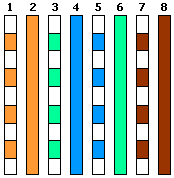
Avoid putting the wires in the wrong order. use TIA568B standards on both ends. http://www.marcspages.co.uk/tech/lantwst5.gif


Here are some products you might find useful:

http://www.amazon.com/100-Cat6-Cat5E-Crimp-Connectors/dp/B003M5BIII/ref=sr_1_10?ie=UTF8&qid=1401668606&sr=8-10&keywords=cat5e+wire+ends

http://www.amazon.com/Cable-Matters-In-Wall-Rated-Ethernet/dp/B0049KV52E/ref=sr_1_1?ie=UTF8&qid=1401668635&sr=8-1&keywords=cat6+spool

http://www.amazon.com/TRENDnet-RJ-45-RJ-12-RJ-11-TC-CT68/dp/B0000AZK4G/ref=sr_1_9?ie=UTF8&qid=1401668649&sr=8-9&keywords=wire+crimper


Patch cords are a little different than the wire that you would get in the spool i mentioned, they just have more flexible stranded core wires, vs that spool having solid core wires. stranded core wire is more flexible generally, rated for higher bend radius. refer to the image below:

 

http://www.pccableworld.com/images/strandedsolid.png

So, instead of using wireless for my PC, im going to wire Cat6 to my room and possibly some other rooms also. My house is pretty old and it doesnt have any pre-installed jack (phone jacks or ethernet jacks) going into the walls; just outlets. My Belking Router is in my living room and im planning on having a switch in the basement and then having the cables run through there to the walls. I have some materials already. I mostly need help with the type of wires to buy. 


I keep hearing about different terms used in the networking world (terminate, patch, etc) and confused of the difference. So first off, what cable can i use to go from the router to the switch? (probably around 25 feet or so)...


And what cables do i need to buy to be used from switch to the keystone jacks (regular Cat6? Cat6 Patch cable?) 


Also, what is terminating cables?


Do i need to buy a certain type and install the jacks myself or can i just order something like this, strip one end, install keystone and plug into switch? http://www.newegg.com/Product/Product.aspx?Item=N82E16812270090&cm_re=cat6-_-12-270-090-_-Product


Also, what should i avoid when wiring Cat6?

I Love Playing CS:GO!

Current 

AMD Athlon X4 760K | MSI A78M-E45 | Sapphire R7 265 | Cougar Solution | Cooler Master Hyper T4 | ADATA XPg V1.0 1600Mhz 8GB | Fractal Design 650W
Link to comment
https://linustechtips.com/topic/160517-need-help-with-making-wired-network/
Share on other sites

Link to post
Share on other sites

1. You can use pretty much any cable, if you need a lot of it i would recommend buying a spool, wire crimpers, key stone jacks, wall plates and etc.


2. Terminating a cable is simply putting an end on a bare wire.


Avoid putting the wires in the wrong order. use TIA568B standards on both ends. http://www.marcspages.co.uk/tech/lantwst5.gif


Here are some products you might find useful:

http://www.amazon.com/100-Cat6-Cat5E-Crimp-Connectors/dp/B003M5BIII/ref=sr_1_10?ie=UTF8&qid=1401668606&sr=8-10&keywords=cat5e+wire+ends

http://www.amazon.com/Cable-Matters-In-Wall-Rated-Ethernet/dp/B0049KV52E/ref=sr_1_1?ie=UTF8&qid=1401668635&sr=8-1&keywords=cat6+spool

http://www.amazon.com/TRENDnet-RJ-45-RJ-12-RJ-11-TC-CT68/dp/B0000AZK4G/ref=sr_1_9?ie=UTF8&qid=1401668649&sr=8-9&keywords=wire+crimper


Patch cords are a little different than the wire that you would get in the spool i mentioned, they just have more flexible stranded core wires, vs that spool having solid core wires. stranded core wire is more flexible generally, rated for higher bend radius. refer to the image below:


http://www.pccableworld.com/images/strandedsolid.png

CPU: i7 3770k @ 4.8Ghz Motherboard: Sabertooth Z77 RAM: 16GB Corsair Vengeance GPU: GTX 780 Case: Corsair 540 Air Storage: 2x Intel 520 SSD Raid 0 PSU: Corsair AX850 Display(s): 1x 27" Samsung Monitor 3x 24" Asus Monitors Cooling: Swifttech H220 Keyboard: Logitech 710+ Mouse: Logitech G500 Headphones: Sennheiser HD 558 --- Internet: http://linustechtips.com/main/uploads/gallery/album_1107/gallery_12431_1107_23677.png My Setup:  http://linustechtips.com/main/gallery/image/7922-1-rkcf7io/ -- NAS: 3x WD Red 3TB Drives (RAIDZ-1), 5x 750gb Seagate ES HDD(RAIDZ-1), 120gb SSD for caching, OS: FreeNAS --  Server 1: Xeon E3 1275v2, 32GB of RAM, OS: ESXi 5.5 -- Server 2: Xeon E3 1220v2, 32GB of RAM, OS: ESXi 5.5


Link to post
Share on other sites

Don't forget to get the punch down tool to wire up your wall jacks http://www.amazon.com/TRENDnet-Punch-Krone-Blade-TC-PDT/dp/B0000AZK4D/ref=sr_1_1?ie=UTF8&qid=1401669321&sr=8-1&keywords=punch+down


I'm so happy to hear you're manning up and running the cables.


Also it would be a good idea to run two cables to each location instead of one. And if you are worried about critters chewing through the cables it might not hurt to get some wire loom or conduit

Link to post
Share on other sites

Don't forget to get the punch down tool to wire up your wall jacks http://www.amazon.com/TRENDnet-Punch-Krone-Blade-TC-PDT/dp/B0000AZK4D/ref=sr_1_1?ie=UTF8&qid=1401669321&sr=8-1&keywords=punch+down


I'm so happy to hear you're manning up and running the cables.


Also it would be a good idea to run two cables to each location instead of one. And if you are worried about critters chewing through the cables it might not hurt to get some wire loom or conduit

Thats what im doing ,two jacks, one for pc, one for console

I Love Playing CS:GO!

Current 

AMD Athlon X4 760K | MSI A78M-E45 | Sapphire R7 265 | Cougar Solution | Cooler Master Hyper T4 | ADATA XPg V1.0 1600Mhz 8GB | Fractal Design 650W
Link to post
Share on other sites

1. You can use pretty much any cable, if you need a lot of it i would recommend buying a spool, wire crimpers, key stone jacks, wall plates and etc.


2. Terminating a cable is simply putting an end on a bare wire.


Avoid putting the wires in the wrong order. use TIA568B standards on both ends. http://www.marcspages.co.uk/tech/lantwst5.gif


Here are some products you might find useful:

http://www.amazon.com/100-Cat6-Cat5E-Crimp-Connectors/dp/B003M5BIII/ref=sr_1_10?ie=UTF8&qid=1401668606&sr=8-10&keywords=cat5e+wire+ends

http://www.amazon.com/Cable-Matters-In-Wall-Rated-Ethernet/dp/B0049KV52E/ref=sr_1_1?ie=UTF8&qid=1401668635&sr=8-1&keywords=cat6+spool

http://www.amazon.com/TRENDnet-RJ-45-RJ-12-RJ-11-TC-CT68/dp/B0000AZK4G/ref=sr_1_9?ie=UTF8&qid=1401668649&sr=8-9&keywords=wire+crimper


Patch cords are a little different than the wire that you would get in the spool i mentioned, they just have more flexible stranded core wires, vs that spool having solid core wires. stranded core wire is more flexible generally, rated for higher bend radius. refer to the image below:


http://www.pccableworld.com/images/strandedsolid.png


Can i use this? 

I Love Playing CS:GO!

Current 

AMD Athlon X4 760K | MSI A78M-E45 | Sapphire R7 265 | Cougar Solution | Cooler Master Hyper T4 | ADATA XPg V1.0 1600Mhz 8GB | Fractal Design 650W
Link to post
Share on other sites

http://www.newegg.com/Product/Product.aspx?Item=N82E16812270090&cm_re=cat6-_-12-270-090-_-Product    Can i use that cable to run from switch to jack, but cut of one end and connect to jack?

I Love Playing CS:GO!

Current 

AMD Athlon X4 760K | MSI A78M-E45 | Sapphire R7 265 | Cougar Solution | Cooler Master Hyper T4 | ADATA XPg V1.0 1600Mhz 8GB | Fractal Design 650W
Link to post
Share on other sites

http://www.newegg.com/Product/Product.aspx?Item=N82E16812270090&cm_re=cat6-_-12-270-090-_-Product    Can i use that cable to run from switch to jack, but cut of one end and connect to jack?

You could if you wanted to.


Don't forget to get the punch down tool to wire up your wall jacks http://www.amazon.com/TRENDnet-Punch-Krone-Blade-TC-PDT/dp/B0000AZK4D/ref=sr_1_1?ie=UTF8&qid=1401669321&sr=8-1&keywords=punch+down


I'm so happy to hear you're manning up and running the cables.


Also it would be a good idea to run two cables to each location instead of one. And if you are worried about critters chewing through the cables it might not hurt to get some wire loom or conduit

You dont need a punch down tool for keystone jacks really, most of them will come with a little tool that will assist you in putting the wires in all the way.

CPU: i7 3770k @ 4.8Ghz Motherboard: Sabertooth Z77 RAM: 16GB Corsair Vengeance GPU: GTX 780 Case: Corsair 540 Air Storage: 2x Intel 520 SSD Raid 0 PSU: Corsair AX850 Display(s): 1x 27" Samsung Monitor 3x 24" Asus Monitors Cooling: Swifttech H220 Keyboard: Logitech 710+ Mouse: Logitech G500 Headphones: Sennheiser HD 558 --- Internet: http://linustechtips.com/main/uploads/gallery/album_1107/gallery_12431_1107_23677.png My Setup:  http://linustechtips.com/main/gallery/image/7922-1-rkcf7io/ -- NAS: 3x WD Red 3TB Drives (RAIDZ-1), 5x 750gb Seagate ES HDD(RAIDZ-1), 120gb SSD for caching, OS: FreeNAS --  Server 1: Xeon E3 1275v2, 32GB of RAM, OS: ESXi 5.5 -- Server 2: Xeon E3 1220v2, 32GB of RAM, OS: ESXi 5.5


Link to post
Share on other sites

You could if you wanted to.


You dont need a punch down tool for keystone jacks really, most of them will come with a little tool that will assist you in putting the wires in all the way.

Would it not perform as well or would it perform just fine? (You could if you wanted to)

I Love Playing CS:GO!

Current 

AMD Athlon X4 760K | MSI A78M-E45 | Sapphire R7 265 | Cougar Solution | Cooler Master Hyper T4 | ADATA XPg V1.0 1600Mhz 8GB | Fractal Design 650W
Link to post
Share on other sites

Would it not perform as well or would it perform just fine? (You could if you wanted to)

It would. Or you could buy a keystone jack that is basically a coupler, so you don't have to cut that cable.

CPU: i7 3770k @ 4.8Ghz Motherboard: Sabertooth Z77 RAM: 16GB Corsair Vengeance GPU: GTX 780 Case: Corsair 540 Air Storage: 2x Intel 520 SSD Raid 0 PSU: Corsair AX850 Display(s): 1x 27" Samsung Monitor 3x 24" Asus Monitors Cooling: Swifttech H220 Keyboard: Logitech 710+ Mouse: Logitech G500 Headphones: Sennheiser HD 558 --- Internet: http://linustechtips.com/main/uploads/gallery/album_1107/gallery_12431_1107_23677.png My Setup:  http://linustechtips.com/main/gallery/image/7922-1-rkcf7io/ -- NAS: 3x WD Red 3TB Drives (RAIDZ-1), 5x 750gb Seagate ES HDD(RAIDZ-1), 120gb SSD for caching, OS: FreeNAS --  Server 1: Xeon E3 1275v2, 32GB of RAM, OS: ESXi 5.5 -- Server 2: Xeon E3 1220v2, 32GB of RAM, OS: ESXi 5.5


Link to post
Share on other sites

It would. Or you could buy a keystone jack that is basically a coupler, so you don't have to cut that cable.

So, cant i just cut the cable and attatch the ends to the keystone?


Is this a compatible keystone for Cat6? http://www.ebay.com/itm/251240781167?ssPageName=STRK:MEWNX:IT&_trksid=p3984.m1439.l2648

I Love Playing CS:GO!

Current 

AMD Athlon X4 760K | MSI A78M-E45 | Sapphire R7 265 | Cougar Solution | Cooler Master Hyper T4 | ADATA XPg V1.0 1600Mhz 8GB | Fractal Design 650W
Link to post
Share on other sites

So, cant i just cut the cable and attatch the ends to the keystone?


Is this a compatible keystone for Cat6? http://www.ebay.com/itm/251240781167?ssPageName=STRK:MEWNX:IT&_trksid=p3984.m1439.l2648

You can, it just seems like kind of a waste to cut a premade patch cord, when you could buy lengths of cable without the ends on them.


Also, while running the premade cable through the wall you're going to have to be careful about damaging the ends.


Yes, that keystone jack would work, make sure you get a wall plate it will fit in though, some brands have different shapes to the keystone jack so you have to buy the wall plate that matches the keystone jack.

CPU: i7 3770k @ 4.8Ghz Motherboard: Sabertooth Z77 RAM: 16GB Corsair Vengeance GPU: GTX 780 Case: Corsair 540 Air Storage: 2x Intel 520 SSD Raid 0 PSU: Corsair AX850 Display(s): 1x 27" Samsung Monitor 3x 24" Asus Monitors Cooling: Swifttech H220 Keyboard: Logitech 710+ Mouse: Logitech G500 Headphones: Sennheiser HD 558 --- Internet: http://linustechtips.com/main/uploads/gallery/album_1107/gallery_12431_1107_23677.png My Setup:  http://linustechtips.com/main/gallery/image/7922-1-rkcf7io/ -- NAS: 3x WD Red 3TB Drives (RAIDZ-1), 5x 750gb Seagate ES HDD(RAIDZ-1), 120gb SSD for caching, OS: FreeNAS --  Server 1: Xeon E3 1275v2, 32GB of RAM, OS: ESXi 5.5 -- Server 2: Xeon E3 1220v2, 32GB of RAM, OS: ESXi 5.5


Link to post
Share on other sites

You can, it just seems like kind of a waste to cut a premade patch cord, when you could buy lengths of cable without the ends on them.


Also, while running the premade cable through the wall you're going to have to be careful about damaging the ends.


Yes, that keystone jack would work, make sure you get a wall plate it will fit in though, some brands have different shapes to the keystone jack so you have to buy the wall plate that matches the keystone jack.

Ok, thanks for the info, last question (hopefully), For going from switch to my room, is stranded or solid better?

I Love Playing CS:GO!

Current 

AMD Athlon X4 760K | MSI A78M-E45 | Sapphire R7 265 | Cougar Solution | Cooler Master Hyper T4 | ADATA XPg V1.0 1600Mhz 8GB | Fractal Design 650W
Link to post
Share on other sites

Ok, thanks for the info, last question (hopefully), For going from switch to my room, is stranded or solid better?

Doesn't really matter. Stranded is generally used in patch cords (shorter and not inside walls) while sold is generally used inside walls.


They have no performance difference.


edit: spelling

CPU: i7 3770k @ 4.8Ghz Motherboard: Sabertooth Z77 RAM: 16GB Corsair Vengeance GPU: GTX 780 Case: Corsair 540 Air Storage: 2x Intel 520 SSD Raid 0 PSU: Corsair AX850 Display(s): 1x 27" Samsung Monitor 3x 24" Asus Monitors Cooling: Swifttech H220 Keyboard: Logitech 710+ Mouse: Logitech G500 Headphones: Sennheiser HD 558 --- Internet: http://linustechtips.com/main/uploads/gallery/album_1107/gallery_12431_1107_23677.png My Setup:  http://linustechtips.com/main/gallery/image/7922-1-rkcf7io/ -- NAS: 3x WD Red 3TB Drives (RAIDZ-1), 5x 750gb Seagate ES HDD(RAIDZ-1), 120gb SSD for caching, OS: FreeNAS --  Server 1: Xeon E3 1275v2, 32GB of RAM, OS: ESXi 5.5 -- Server 2: Xeon E3 1220v2, 32GB of RAM, OS: ESXi 5.5


Link to post
Share on other sites

Doesn't really matter. Stranded is generally used in patch cords (shorted and not inside walls) while sold is generally used inside walls.


They have no performance difference.

Ok! Thanks man! If i have any other questions ill be sure to ask you!

I Love Playing CS:GO!

Current 

AMD Athlon X4 760K | MSI A78M-E45 | Sapphire R7 265 | Cougar Solution | Cooler Master Hyper T4 | ADATA XPg V1.0 1600Mhz 8GB | Fractal Design 650W
Link to post
Share on other sites

Ok! Thanks man! If i have any other questions ill be sure to ask you!

Since you live in the USA, I highly recommend Monoprice.com for network cable, keystone jacks, etc.


Here is my recommended list:


For IN-WALL

Cat6 STP Wall-rated Bulk Cable (1000ft roll) - Use this stuff for running cable INSIDE the wall. It's STP (Solid core) and wall-rated. Both are better if you're gonna run it through the wall. Now the bulk roll is 1000ft long, which may be super overkill. Unfortunately Monoprice doesn't have smaller bulk runs, so you have a couple choices.


First, bulk cable is pretty damn cheap, so you could use keep the leftovers for future use. You never know when you'll move house or if a friend needs some cables made. Charge say $5 or $10 a cable for friends.

Second, you could go elsewhere, such as eBay, Amazon, or a local computer shop (or newegg or tiger direct, etc) and get a shorter run of Cat6 STP Wall-Rated Bulk cable.

Third, you could just buy pre-made cables of the length you need for through the wall. Please buy wall-rated cables, for fire safety and because they'll last longer. STP is better if you can find it, even though stranded would work too in a pinch.


Cat6 RJ-45 Ethernet plugs - These are the ends you would wire onto the bulk cable. These particular ones INCLUDE the loadbar (A little plastic/metal bar that slides onto the wires before you crimp the plug on. It holds them in place to make crimping easier, and helps with noise reduction in some manner that I'm not familiar with. If you buy RJ-45 plugs without these, you'll need to go find loadbars somewhere else and buy them too.

RJ-45 Ethernet Boots - these are those little rubber boots that cover the RJ-45 plugs. They are really good for wall-runs because they help ensure the cable doesn't become snagged when being pulled through, AND they help protect the plastic tab when inserting and removing the plug from a Ethernet port. Totally optional, but nice to have and super cheap.

RJ-45 Network Crimping Tool - This is used to crimp (secure) the RJ-45 Plug to the bulk Ethernet cable.


Cat6 Inline Coupler for Keystone Jacks - I HIGHLY HIGHLY recommend these over traditional punch-down Keystone jacks, especially for network beginners. It's just much easier to work with. Basically these little guys fit into a keystone wall-plate and you can just plug a regular ethernet plug (RJ-45) into each end. No wiring needed.


Keystone Wall-Plate (1 port)

Keystone Wall-Plate (2 ports) - Use whichever of these is needed per each room. One jack or two. (You could even get 3+ but they may be larger plates)


OUT OF WALL

Cat6 Patch Cable - Run these between the wall-plates and the actual devices (Switch to wall-plate, wall-plate to PC, etc). Buy whatever length you need.


That's my recommendation. If you're gonna run the cables, may as well do it right the first time so they last a long time and you won't need to replace or go back into the walls for a LONG time.

For Sale: Meraki Bundle


iPhone Xr 128 GB Product Red - HP Spectre x360 13" (i5 - 8 GB RAM - 256 GB SSD) - HP ZBook 15v G5 15" (i7-8850H - 16 GB RAM - 512 GB SSD - NVIDIA Quadro P600)


Link to post
Share on other sites

Since you live in the USA, I highly recommend Monoprice.com for network cable, keystone jacks, etc.


Here is my recommended list:


For IN-WALL

Cat6 STP Wall-rated Bulk Cable (1000ft roll) - Use this stuff for running cable INSIDE the wall. It's STP (Solid core) and wall-rated. Both are better if you're gonna run it through the wall. Now the bulk roll is 1000ft long, which may be super overkill. Unfortunately Monoprice doesn't have smaller bulk runs, so you have a couple choices.


First, bulk cable is pretty damn cheap, so you could use keep the leftovers for future use. You never know when you'll move house or if a friend needs some cables made. Charge say $5 or $10 a cable for friends.

Second, you could go elsewhere, such as eBay, Amazon, or a local computer shop (or newegg or tiger direct, etc) and get a shorter run of Cat6 STP Wall-Rated Bulk cable.

Third, you could just buy pre-made cables of the length you need for through the wall. Please buy wall-rated cables, for fire safety and because they'll last longer. STP is better if you can find it, even though stranded would work too in a pinch.


Cat6 RJ-45 Ethernet plugs - These are the ends you would wire onto the bulk cable. These particular ones INCLUDE the loadbar (A little plastic/metal bar that slides onto the wires before you crimp the plug on. It holds them in place to make crimping easier, and helps with noise reduction in some manner that I'm not familiar with. If you buy RJ-45 plugs without these, you'll need to go find loadbars somewhere else and buy them too.

RJ-45 Ethernet Boots - these are those little rubber boots that cover the RJ-45 plugs. They are really good for wall-runs because they help ensure the cable doesn't become snagged when being pulled through, AND they help protect the plastic tab when inserting and removing the plug from a Ethernet port. Totally optional, but nice to have and super cheap.

RJ-45 Network Crimping Tool - This is used to crimp (secure) the RJ-45 Plug to the bulk Ethernet cable.


Cat6 Inline Coupler for Keystone Jacks - I HIGHLY HIGHLY recommend these over traditional punch-down Keystone jacks, especially for network beginners. It's just much easier to work with. Basically these little guys fit into a keystone wall-plate and you can just plug a regular ethernet plug (RJ-45) into each end. No wiring needed.


Keystone Wall-Plate (1 port)

Keystone Wall-Plate (2 ports) - Use whichever of these is needed per each room. One jack or two. (You could even get 3+ but they may be larger plates)


OUT OF WALL

Cat6 Patch Cable - Run these between the wall-plates and the actual devices (Switch to wall-plate, wall-plate to PC, etc). Buy whatever length you need.


That's my recommendation. If you're gonna run the cables, may as well do it right the first time so they last a long time and you won't need to replace or go back into the walls for a LONG time.

This helps me soooo much, thank you very much!

I Love Playing CS:GO!

Current 

AMD Athlon X4 760K | MSI A78M-E45 | Sapphire R7 265 | Cougar Solution | Cooler Master Hyper T4 | ADATA XPg V1.0 1600Mhz 8GB | Fractal Design 650W
Link to post
Share on other sites

Also it would be a good idea to run two cables to each location instead of one.


This. This here is the one suggestion I'd make. You're buying probably more cable than you need and a fair chunk of the cost is in the wallplate especially if you want one that matches all your other stuff. So if you think you'll ever need more than one socket anywhere look at running two lines. It's probably overkill but given how small the extra cost/effort is there's little reason not to. Better than having a switch behind every other cabinet/desk.


That said if you're 100% sure you're never going to use or want to use more than one socket then don't bother. Like if it's a bedroom or something.

Fools think they know everything, experts know they know nothing

Link to post
Share on other sites

Create an account or sign in to comment

You need to be a member in order to leave a comment

Create an account

Sign up for a new account in our community. It's easy!

Register a new account

Sign in

Already have an account? Sign in here.

Sign In Now

×