Jump to content

Is rtx3070 compatible

Go to solution Solved by -rascal-,
20 minutes ago, Imagine-Wagons said:

Okay tysm if i do notice my cpu is a big bottleneck for the rtx i’ll try and do some more research. Just as a last question how would you upgrade my system if it was yours and what way you would go (intel/amd)

If I had a RTX 3070?

If a Z370 / Z390 motherboard can be had for a decent price, I'd probably just go that route, and either:

  • Overclock the i5-8600K to ~5GHz
  • Get a i7-8700K / 8086K or i9-9900K, and overclock that to ~5GHz

If the Ryzen 4000 series is available, I'd go AMD instead.

When you clock a CPU with the same number of cores + threads to a similar AMD chip, the AMD is actually faster.

AMD is "slower" because their current 3000-series is capped at 4.2 ~ 4.3 GHz ... versus Intel able to reach 5.0 GHz ~ 5.3 GHz

E.g. 6-core / 12-thread Intel @ 4.2GHz vs 6-core / 12-thread AMD @ 4.2 GHz


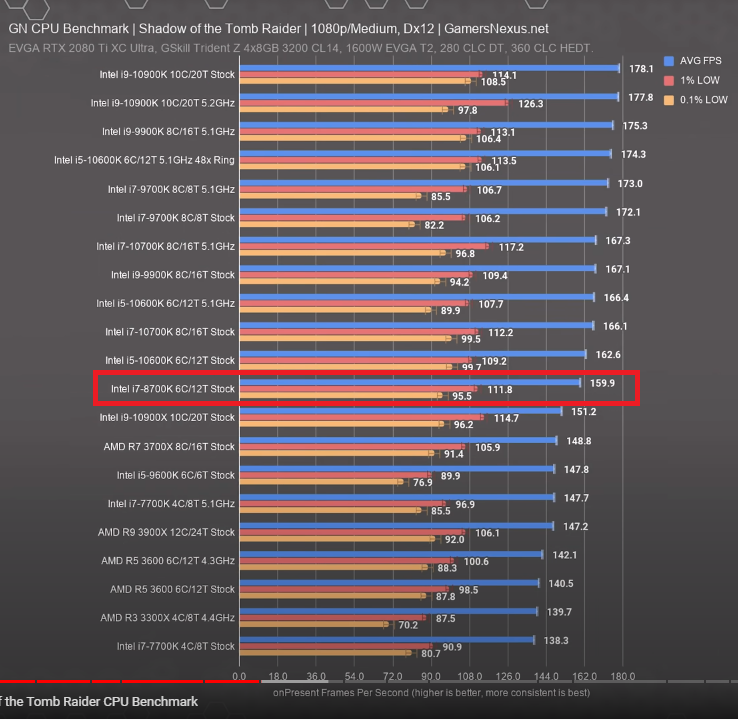
8th Gen or 9th Gen CPU overclocked is already nipping at the heals of an overclock i5-10600K / i7-10700K / i9-10900K.

The difference is there, but it's like 170 FPS vs 190 FPS.


Some examples:


https://www.gamersnexus.net/hwreviews/3592-intel-i5-10600k-cpu-review-benchmarks-ryzen-5-3600-et-al

image.png.1d87b5dfef43e6f5bbd7825903ffff10.png


See how they all stack up...all in the top-5 or top-10.

i7-9700K @ 5.1 GHz vs

i9-9900K @ 5.1 GHz vs

i5-10600K @ 5.1 GHz vs

i7-10700K @5.1 GHz vs

i9-10900K @5.2 or 5.3 GHz


image.png.aa9da3c0298fb7d75bd60817f98aa68e.pngimage.png.eba8ed445592b278d878604d5f07fa0c.pngimage.png.a7259854893577f3ac93044e18bc4509.png

So for a while now i’ve been looking yo upgrade my pc but i’m not the smartest person when it comes to compatibility etc... And i was about to buy a used rtx 2070 , but with the sudden release of the new rtx 30 series i’ve decided to buy the rtx 3070 (when it comes out) and i was just wondering if it would be compatible with the current motherboard that I have. And if my cpu won’t bottle neck it (i’m also upgrading my psu to a 700w unit) my specs are in the media thing i added to this post.

1C73AA63-F647-47FD-A8C1-0211F2E7E792.jpeg

Link to comment
https://linustechtips.com/topic/1245270-is-rtx3070-compatible/
Share on other sites

Link to post
Share on other sites

Yes, 3.0 x16 should be enough bandwidth for a 3080 and the 8600k is still a decent chip for gaming is still decent especially with an  overclock nvm it's a b series board I'm blind lol.  and at higher resolutions it shouldn't be bad. 

3 minutes ago, Imagine-Wagons said:

bought the 600w unit🥴

Wattage, brand and efficiency have nothing to do with quality. 

What specific 700w unit?

Edited by TofuHaroto

PC: Motherboard: ASUS B550M TUF-Plus, CPU: Ryzen 3 3100, CPU Cooler: Arctic Freezer 34, GPU: GIGABYTE WindForce GTX1650S, RAM: HyperX Fury RGB 2x8GB 3200 CL16, Case, CoolerMaster MB311L ARGB, Boot Drive: 250GB MX500, Game Drive: WD Blue 1TB 7200RPM HDD.


Peripherals: GK61 (Optical Gateron Red) with Mistel White/Orange keycaps, Logitech G102 (Purple), BitWit Ensemble Grey Deskpad. 


Audio: Logitech G432, Moondrop Starfield, Mic: Razer Siren Mini (White).


Phone: Pixel 3a (Purple-ish).


Build Log: 

Link to comment
https://linustechtips.com/topic/1245270-is-rtx3070-compatible/#findComment-14008852
Share on other sites

Link to post
Share on other sites

Just now, Imagine-Wagons said:

Not sure, any recommendations??

Budget and location?

PC: Motherboard: ASUS B550M TUF-Plus, CPU: Ryzen 3 3100, CPU Cooler: Arctic Freezer 34, GPU: GIGABYTE WindForce GTX1650S, RAM: HyperX Fury RGB 2x8GB 3200 CL16, Case, CoolerMaster MB311L ARGB, Boot Drive: 250GB MX500, Game Drive: WD Blue 1TB 7200RPM HDD.


Peripherals: GK61 (Optical Gateron Red) with Mistel White/Orange keycaps, Logitech G102 (Purple), BitWit Ensemble Grey Deskpad. 


Audio: Logitech G432, Moondrop Starfield, Mic: Razer Siren Mini (White).


Phone: Pixel 3a (Purple-ish).


Build Log: 

Link to comment
https://linustechtips.com/topic/1245270-is-rtx3070-compatible/#findComment-14008860
Share on other sites

Link to post
Share on other sites

11 minutes ago, Imagine-Wagons said:

So for a while now i’ve been looking yo upgrade my pc but i’m not the smartest person when it comes to compatibility etc... And i was about to buy a used rtx 2070 , but with the sudden release of the new rtx 30 series i’ve decided to buy the rtx 3070 (when it comes out) and i was just wondering if it would be compatible with the current motherboard that I have. And if my cpu won’t bottle neck it (i’m also upgrading my psu to a 700w unit) my specs are in the media thing i added to this post.

1C73AA63-F647-47FD-A8C1-0211F2E7E792.jpeg

so ypu play at 1080p? the rtx 3070 would be a bottleneck for the 8600k (expesially without any oc). if i were you, i would wait for the RDNA2 (amd's new gpus) and see what they offer.

rtx 3070=2080 ti. (we  do not really know that yet but atleast Nvidia said so so it cant be far from that really)


the bottleneck wont be that huge but still consider also new cpu like used 8700.

I Use my knowledge as business owner and self taught technician aswell as an AI to help people. AI might be controversial but it actually works pretty well 90% of the time.

Link to comment
https://linustechtips.com/topic/1245270-is-rtx3070-compatible/#findComment-14008874
Share on other sites

Link to post
Share on other sites

8 minutes ago, SavageNeo said:

so ypu play at 1080p? the rtx 3070 would be a bottleneck for the 8600k (expesially without any oc). if i were you, i would wait for the RDNA2 (amd's new gpus) and see what they offer.

rtx 3070=2080 ti. (we  do not really know that yet but atleast Nvidia said so so it cant be far from that really)


the bottleneck wont be that huge but still consider also new cpu like used 8700.

Yep i play at 1080p 144hz atm i only noticed i can’t oc with my motherboard after a friend of me told me😅 but tbh i haven’t really had any moments where my cpu was the bottleneck of anything i was playing/doing on my pc

Link to comment
https://linustechtips.com/topic/1245270-is-rtx3070-compatible/#findComment-14008913
Share on other sites

Link to post
Share on other sites

3 minutes ago, Imagine-Wagons said:

Yep i play at 1080p 144hz atm i only noticed i can’t oc with my motherboard after a friend of me told me😅 but tbh i haven’t really had any moments where my cpu was the bottleneck of anything i was playing/doing on my pc

you since oyur pc is pretty balanced right now. but if you add any rtx 3000 (even the potential rtx 3060) you will see bottleneck. so going with rtx 3070 instead of your 1060 you wont probably see 100% improve in performance since your cpu is a bottleneck. you will see beter performance but not that much that the gpu can offer

I Use my knowledge as business owner and self taught technician aswell as an AI to help people. AI might be controversial but it actually works pretty well 90% of the time.

Link to comment
https://linustechtips.com/topic/1245270-is-rtx3070-compatible/#findComment-14008929
Share on other sites

Link to post
Share on other sites

10 hours ago, Imagine-Wagons said:

Around €100?

well i can't find anything about your current psu. 

but decent psu's around 100ish euros..

MWE gold 650w/550, Revolution  D.F 650w/550, RM650x/550, tx550m/650m, AMP 550w/650w, straight power 11 550/650w, ion+ 560/660w (forgot what the 600+ wattage is exactly.), focus gm 550/650w, to name some, and are all good, and yes, 550w is more than enough for this build with a 3070.

PC: Motherboard: ASUS B550M TUF-Plus, CPU: Ryzen 3 3100, CPU Cooler: Arctic Freezer 34, GPU: GIGABYTE WindForce GTX1650S, RAM: HyperX Fury RGB 2x8GB 3200 CL16, Case, CoolerMaster MB311L ARGB, Boot Drive: 250GB MX500, Game Drive: WD Blue 1TB 7200RPM HDD.


Peripherals: GK61 (Optical Gateron Red) with Mistel White/Orange keycaps, Logitech G102 (Purple), BitWit Ensemble Grey Deskpad. 


Audio: Logitech G432, Moondrop Starfield, Mic: Razer Siren Mini (White).


Phone: Pixel 3a (Purple-ish).


Build Log: 

Link to comment
https://linustechtips.com/topic/1245270-is-rtx3070-compatible/#findComment-14008938
Share on other sites

Link to post
Share on other sites

22 minutes ago, SavageNeo said:

you since oyur pc is pretty balanced right now. but if you add any rtx 3000 (even the potential rtx 3060) you will see bottleneck. so going with rtx 3070 instead of your 1060 you wont probably see 100% improve in performance since your cpu is a bottleneck. you will see beter performance but not that much that the gpu can offer

What cpu would you upgrade to? (Ofc nothing crazy expensive) but something that would last me for another 4-5 years that’s upgrade proof if that makes any sense? But with like a €400 budget or something?

Link to comment
https://linustechtips.com/topic/1245270-is-rtx3070-compatible/#findComment-14009008
Share on other sites

Link to post
Share on other sites

6 minutes ago, Imagine-Wagons said:

What cpu would you upgrade to? (Ofc nothing crazy expensive) but something that would last me for another 4-5 years that’s upgrade proof if that makes any sense? But with like a €400 budget or something?

wait a month for ryzen 4th gen. you can get the rtx 3070 or 3080 and upgrade the cpu in am ont or two. any ryzen 4th gen cpu will be massivly better than your current cpu.

I Use my knowledge as business owner and self taught technician aswell as an AI to help people. AI might be controversial but it actually works pretty well 90% of the time.

Link to comment
https://linustechtips.com/topic/1245270-is-rtx3070-compatible/#findComment-14009039
Share on other sites

Link to post
Share on other sites

30 minutes ago, SavageNeo said:

wait a month for ryzen 4th gen. you can get the rtx 3070 or 3080 and upgrade the cpu in am ont or two. any ryzen 4th gen cpu will be massivly better than your current cpu.

Doesn’t that mean i’ll also have to buy a new motherboard?

Link to comment
https://linustechtips.com/topic/1245270-is-rtx3070-compatible/#findComment-14009144
Share on other sites

Link to post
Share on other sites

1 minute ago, Imagine-Wagons said:

Doesn’t that mean i’ll also have to buy a new motherboard?

yes. or you could go for i 7 8700.


it seems liek your motherboard supports 9th gen cpus too. get one of these:


i 5 9600, i7 8700,9700 or i9 9900.


but get those used since those have bad value over money new.

I Use my knowledge as business owner and self taught technician aswell as an AI to help people. AI might be controversial but it actually works pretty well 90% of the time.

Link to comment
https://linustechtips.com/topic/1245270-is-rtx3070-compatible/#findComment-14009160
Share on other sites

Link to post
Share on other sites

13 minutes ago, Imagine-Wagons said:

Doesn’t that mean i’ll also have to buy a new motherboard?


If you want to overclock your CPU, you'll need swap the board to a Z370 / Z390 board anyways.

You upgrade to Intel 10th Gen, you'll need to swap the board for a 400-series board.

Upgrade to AMD CPU, will need a new AMD motherboard, too.


If you want to keep your B360 board, options you have is basically whay @SavageNeo suggested.

You can get the K-SKU CPUs, since the Base frequency and/or max Turbo Boost is usually higher than their non-K siblings.

You just can't overclock them further than what Intel spec'ed them out as.


Example:

Your i5-8600K is 3.6GHz Base, up to 4.3GHz Turbo.

The i5-8600 is 3.1GHz Base, up to 4.3GHz Turbo.


AMD Ryzen 9000 Rig

  • AMD R7 9800X3D + Alphacool CORE 1 w/ Performance Mount Kit + Thermal Grizzly AM5 Contact Frame
  • Gigabyte X870E Aorus Pro Ice
  • 32GB (16GB X2) G.Skill Trident Z5 Neo RGB DDR5-6400
  • Sapphire NITRO+ 6800 XT Special Edition + EKwb Full Cover Block
  • Custom Loop w/ 2x 360mm Radiators
  • WD SN850X + WD SN750 + Samsung 980
  • EVGA P2 850W + Red/White CableMod Cables
  • Lian-Li O11 Dynamic EVO XL

AMD Ryzen 5000 Rig

  • AMD R7-5800X
  • Gigabyte B550 Aorus Pro AC
  • 32GB (16GB X 2) Crucial Ballistix RGB DDR4-3600
  • Gigabyte Vision RTX 3060 Ti OC
  • EKwb D-RGB 360mm AIO
  • Intel 660p NVMe 1TB + Crucial MX500 1TB + WD Black 1TB HDD
  • EVGA P2 850W + White CableMod cables
  • Lian-Li LanCool II Mesh - White

Intel i7-8086K / Z390 Rig (Decommissioned Q2' 2025)

Intel i7-6800K / X99 Rig (Officially Decommissioned, Dead CPU returned to Intel)
Intel i5-4690K / Z97 Rig (Decommissioned)

AMD FX-8350 / 990FX Rig (Decommissioned)

AMD Phenom II X6 1090T / 890FX Rig (Decommissioned)


<> Electrical Engineer , B.Eng <>

<> Electronics & Computer Engineering Technologist (Diploma + Advanced Diploma) <>

<> Electronics Engineering Technician for the Canadian Department of National Defence <>

Link to comment
https://linustechtips.com/topic/1245270-is-rtx3070-compatible/#findComment-14009178
Share on other sites

Link to post
Share on other sites

53 minutes ago, -rascal- said:


If you want to overclock your CPU, you'll need swap the board to a Z370 / Z390 board anyways.

You upgrade to Intel 10th Gen, you'll need to swap the board for a 400-series board.

Upgrade to AMD CPU, will need a new AMD motherboard, too.


If you want to keep your B360 board, options you have is basically whay @SavageNeo suggested.

You can get the K-SKU CPUs, since the Base frequency and/or max Turbo Boost is usually higher than their non-K siblings.

You just can't overclock them further than what Intel spec'ed them out as.


Example:

Your i5-8600K is 3.6GHz Base, up to 4.3GHz Turbo.

The i5-8600 is 3.1GHz Base, up to 4.3GHz Turbo.


What would be the better option then? for me to go ryzen 4th gen with say a z370 and an rtx 3070 or just go with an higher up intel cpu that still ‘fits’ the motherboard i have now with an rtx 3070? What would be better bang for the buck also looking at the future because i ‘only’ have about €800 of budget for the whole thing(if i would buy it right now) and is it possible for me to already buy a new graphics card when it releases install it and upgrade cpu/motherboard later if really needed?

(btw i’m sorry if i’m asking stupid questions i just have no idea what do do)

Link to comment
https://linustechtips.com/topic/1245270-is-rtx3070-compatible/#findComment-14009325
Share on other sites

Link to post
Share on other sites

37 minutes ago, Imagine-Wagons said:

What would be the better option then? for me to go ryzen 4th gen with say a z370 and an rtx 3070 or just go with an higher up intel cpu that still ‘fits’ the motherboard i have now with an rtx 3070? What would be better bang for the buck also looking at the future because i ‘only’ have about €800 of budget for the whole thing(if i would buy it right now) and


is it possible for me to already buy a new graphics card when it releases install it and upgrade cpu/motherboard later if really needed?

(btw i’m sorry if i’m asking stupid questions i just have no idea what do do)


Yes, it is absolutely possible.

The best bet would be to get a hold of a RTX 3070 first, and see how it performs with your current system set-up.

If it does not meet your expectations due to CPU bottleneck, THEN upgrade the CPU and/or motherboard.


The problem with Z370 / Z390 is that new stock is drying up, since motherboard manufacturers (and Intel for the CPU) have either ramped down production, or no longer makes them anymore. This is because the latest-and-greatest Z490 is already here.


AMD Ryzen 9000 Rig

  • AMD R7 9800X3D + Alphacool CORE 1 w/ Performance Mount Kit + Thermal Grizzly AM5 Contact Frame
  • Gigabyte X870E Aorus Pro Ice
  • 32GB (16GB X2) G.Skill Trident Z5 Neo RGB DDR5-6400
  • Sapphire NITRO+ 6800 XT Special Edition + EKwb Full Cover Block
  • Custom Loop w/ 2x 360mm Radiators
  • WD SN850X + WD SN750 + Samsung 980
  • EVGA P2 850W + Red/White CableMod Cables
  • Lian-Li O11 Dynamic EVO XL

AMD Ryzen 5000 Rig

  • AMD R7-5800X
  • Gigabyte B550 Aorus Pro AC
  • 32GB (16GB X 2) Crucial Ballistix RGB DDR4-3600
  • Gigabyte Vision RTX 3060 Ti OC
  • EKwb D-RGB 360mm AIO
  • Intel 660p NVMe 1TB + Crucial MX500 1TB + WD Black 1TB HDD
  • EVGA P2 850W + White CableMod cables
  • Lian-Li LanCool II Mesh - White

Intel i7-8086K / Z390 Rig (Decommissioned Q2' 2025)

Intel i7-6800K / X99 Rig (Officially Decommissioned, Dead CPU returned to Intel)
Intel i5-4690K / Z97 Rig (Decommissioned)

AMD FX-8350 / 990FX Rig (Decommissioned)

AMD Phenom II X6 1090T / 890FX Rig (Decommissioned)


<> Electrical Engineer , B.Eng <>

<> Electronics & Computer Engineering Technologist (Diploma + Advanced Diploma) <>

<> Electronics Engineering Technician for the Canadian Department of National Defence <>

Link to comment
https://linustechtips.com/topic/1245270-is-rtx3070-compatible/#findComment-14009435
Share on other sites

Link to post
Share on other sites

12 minutes ago, -rascal- said:


Yes, it is absolutely possible.

The best bet would be to get a hold of a RTX 3070 first, and see how it performs with your current system set-up.

If it does not meet your expectations due to CPU bottleneck, THEN upgrade the CPU and/or motherboard.


The problem with Z370 / Z390 is that new stock is drying up, since motherboard manufacturers (and Intel for the CPU) have either ramped down production, or no longer makes them anymore. This is because the latest-and-greatest Z490 is already here.


Okay tysm if i do notice my cpu is a big bottleneck for the rtx i’ll try and do some more research. Just as a last question how would you upgrade my system if it was yours and what way you would go (intel/amd)

Link to comment
https://linustechtips.com/topic/1245270-is-rtx3070-compatible/#findComment-14009468
Share on other sites

Link to post
Share on other sites

20 minutes ago, Imagine-Wagons said:

Okay tysm if i do notice my cpu is a big bottleneck for the rtx i’ll try and do some more research. Just as a last question how would you upgrade my system if it was yours and what way you would go (intel/amd)

If I had a RTX 3070?

If a Z370 / Z390 motherboard can be had for a decent price, I'd probably just go that route, and either:

  • Overclock the i5-8600K to ~5GHz
  • Get a i7-8700K / 8086K or i9-9900K, and overclock that to ~5GHz

If the Ryzen 4000 series is available, I'd go AMD instead.

When you clock a CPU with the same number of cores + threads to a similar AMD chip, the AMD is actually faster.

AMD is "slower" because their current 3000-series is capped at 4.2 ~ 4.3 GHz ... versus Intel able to reach 5.0 GHz ~ 5.3 GHz

E.g. 6-core / 12-thread Intel @ 4.2GHz vs 6-core / 12-thread AMD @ 4.2 GHz


8th Gen or 9th Gen CPU overclocked is already nipping at the heals of an overclock i5-10600K / i7-10700K / i9-10900K.

The difference is there, but it's like 170 FPS vs 190 FPS.


Some examples:


https://www.gamersnexus.net/hwreviews/3592-intel-i5-10600k-cpu-review-benchmarks-ryzen-5-3600-et-al

image.png.1d87b5dfef43e6f5bbd7825903ffff10.png


See how they all stack up...all in the top-5 or top-10.

i7-9700K @ 5.1 GHz vs

i9-9900K @ 5.1 GHz vs

i5-10600K @ 5.1 GHz vs

i7-10700K @5.1 GHz vs

i9-10900K @5.2 or 5.3 GHz
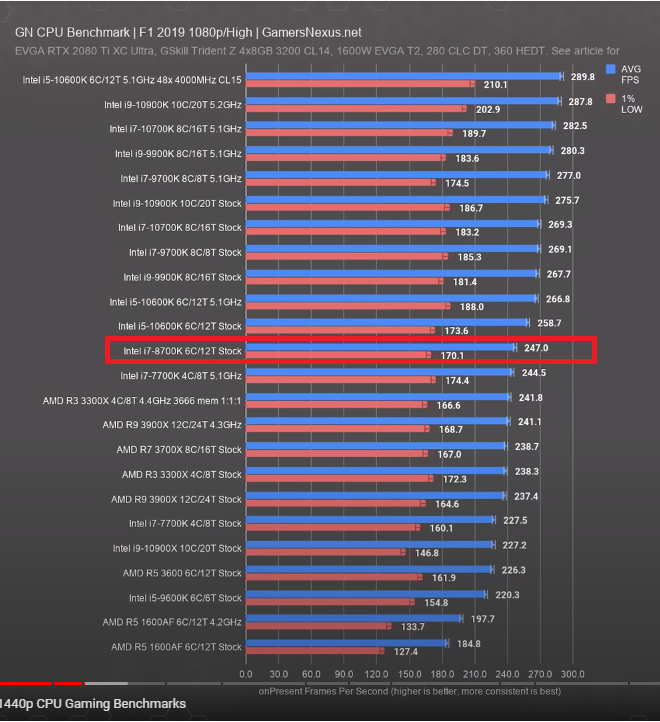
 

image.png.aa9da3c0298fb7d75bd60817f98aa68e.pngimage.png.eba8ed445592b278d878604d5f07fa0c.pngimage.png.a7259854893577f3ac93044e18bc4509.png

AMD Ryzen 9000 Rig

  • AMD R7 9800X3D + Alphacool CORE 1 w/ Performance Mount Kit + Thermal Grizzly AM5 Contact Frame
  • Gigabyte X870E Aorus Pro Ice
  • 32GB (16GB X2) G.Skill Trident Z5 Neo RGB DDR5-6400
  • Sapphire NITRO+ 6800 XT Special Edition + EKwb Full Cover Block
  • Custom Loop w/ 2x 360mm Radiators
  • WD SN850X + WD SN750 + Samsung 980
  • EVGA P2 850W + Red/White CableMod Cables
  • Lian-Li O11 Dynamic EVO XL

AMD Ryzen 5000 Rig

  • AMD R7-5800X
  • Gigabyte B550 Aorus Pro AC
  • 32GB (16GB X 2) Crucial Ballistix RGB DDR4-3600
  • Gigabyte Vision RTX 3060 Ti OC
  • EKwb D-RGB 360mm AIO
  • Intel 660p NVMe 1TB + Crucial MX500 1TB + WD Black 1TB HDD
  • EVGA P2 850W + White CableMod cables
  • Lian-Li LanCool II Mesh - White

Intel i7-8086K / Z390 Rig (Decommissioned Q2' 2025)

Intel i7-6800K / X99 Rig (Officially Decommissioned, Dead CPU returned to Intel)
Intel i5-4690K / Z97 Rig (Decommissioned)

AMD FX-8350 / 990FX Rig (Decommissioned)

AMD Phenom II X6 1090T / 890FX Rig (Decommissioned)


<> Electrical Engineer , B.Eng <>

<> Electronics & Computer Engineering Technologist (Diploma + Advanced Diploma) <>

<> Electronics Engineering Technician for the Canadian Department of National Defence <>

Link to comment
https://linustechtips.com/topic/1245270-is-rtx3070-compatible/#findComment-14009526
Share on other sites

Link to post
Share on other sites

Create an account or sign in to comment

You need to be a member in order to leave a comment

Create an account

Sign up for a new account in our community. It's easy!

Register a new account

Sign in

Already have an account? Sign in here.

Sign In Now

×