Jump to content

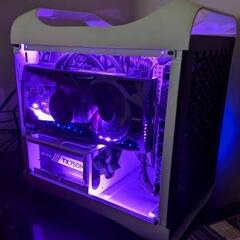
Hi, I'm trying to figure out if there's a solution to fitting a 2080 Ti inside my case. I have a Bitfenix Prodigy ITX, and I currently have a ROG Strix 2070 in it. If I want to upgrade to a 2080 Ti, the ROG Strix one is too thick. My 2070 is the absolute max thickness I can go. I'd like to have a pretty card (so no blowers), because I have an acrylic side panel to show off the build. The Aorus Waterforce caught my eye, but I already have a 240mm rad at the front of my case for the 9900K. I'm not sure if there are any rads thin enough to fit in the top. I'd need a fan and rad combo thinner than about 30mm at least at one end to fit with the current rad at the front. I could do a little bit of case modding too, but I love this case and don't really want to swap it entirely. I have plenty of length and height to go in the GPU slot, but 4.89cm thickness of the 2070 is the absolute max. 


Here's a current pic for reference. If this is the wrong place to ask just let me know or move it, thanks!

Edited PC.jpg

Mini-ITX Desktop: i9-9900K@5GHz, 32GB TridentZ RGB 3200MHz, Asus Strix Z390-i, EVGA 3090 Hybrid FTW3, Samsung 970 EVO+ NVMe 1TB, Lian Li O11 Air Mini White

Plex/Minecraft Server: Dell PowerEdge T320, Xeon E5-2470 v2, 48GB RAM, 19.25TB storage, RTX A2000 6GB

Tablet: iPad Pro 11” M1

Link to comment
https://linustechtips.com/topic/1195041-2080-ti-upgrade-help/
Share on other sites

Link to post
Share on other sites

Would it be possible to bring the side panel out more, either by mounting it differently or adding spacers? Not sure what to do about the sides for dust/airflow. I'm sure you could run by a hardware store and buy a strip or two of airgap filler (That's my term for it, I'm not sure exactly what it's called) for a door that might be paintable and add that along the sides to fill in the gap. The airgap fillers I've seen have a non-permanent sticky side so it'll stick to a doorway easily.

It's non-permanent case-modding. :)

Link to comment
https://linustechtips.com/topic/1195041-2080-ti-upgrade-help/#findComment-13606279
Share on other sites

Link to post
Share on other sites

Its a bad time to be upgrading to a 2080ti. Those things are going to drop in value like a stone when the 30 series releases, based on expected performance.

The new GPUs are not only more efficient, thus more powerfull per watt, and more powerfull per given mm2 in size, but the chips themselves are massive, its expected that both AMD and Nvidas top gaming cards will wreck the 2080ti and possibly have lower mid range cards matching the current 2080ti for a fraction of the cost.


IMO nobody should be buying 2080ti's anymore, not with the information we have now.

CPU: Intel i7 3930k w/OC & EK Supremacy EVO Block | Motherboard: Asus P9x79 Pro  | RAM: G.Skill 4x4 1866 CL9 | PSU: Seasonic Platinum 1000w Corsair RM 750w Gold (2021)|

VDU: Panasonic 42" Plasma | GPU: Gigabyte 1080ti Gaming OC & Barrow Block (RIP)...GTX 980ti | Sound: Asus Xonar D2X - Z5500 -FiiO X3K DAP/DAC - ATH-M50S | Case: Phantek Enthoo Primo White |

Storage: Samsung 850 Pro 1TB SSD + WD Blue 1TB SSD | Cooling: XSPC D5 Photon 270 Res & Pump | 2x XSPC AX240 White Rads | NexXxos Monsta 80x240 Rad P/P | NF-A12x25 fans |

Link to comment
https://linustechtips.com/topic/1195041-2080-ti-upgrade-help/#findComment-13606328
Share on other sites

Link to post
Share on other sites

18 minutes ago, Fishscene said:

Would it be possible to bring the side panel out more, either by mounting it differently or adding spacers? Not sure what to do about the sides for dust/airflow. I'm sure you could run by a hardware store and buy a strip or two of airgap filler (That's my term for it, I'm not sure exactly what it's called) for a door that might be paintable and add that along the sides to fill in the gap. The airgap fillers I've seen have a non-permanent sticky side so it'll stick to a doorway easily.

It's non-permanent case-modding. :)

If you look at the picture, you can see there's a lip around the corner of the case at the rear. I would have to cut that off since that is moreso the limiting factor than the side of the case. The acrylic panel is bowed out a little already

Mini-ITX Desktop: i9-9900K@5GHz, 32GB TridentZ RGB 3200MHz, Asus Strix Z390-i, EVGA 3090 Hybrid FTW3, Samsung 970 EVO+ NVMe 1TB, Lian Li O11 Air Mini White

Plex/Minecraft Server: Dell PowerEdge T320, Xeon E5-2470 v2, 48GB RAM, 19.25TB storage, RTX A2000 6GB

Tablet: iPad Pro 11” M1

Link to comment
https://linustechtips.com/topic/1195041-2080-ti-upgrade-help/#findComment-13606350
Share on other sites

Link to post
Share on other sites

7 minutes ago, Sorenson said:

I think your only bet would be a 2080 ti with a 120mm rad and mount it as exhaust.

Is a 120mm rad enough for a 2080 Ti?

Mini-ITX Desktop: i9-9900K@5GHz, 32GB TridentZ RGB 3200MHz, Asus Strix Z390-i, EVGA 3090 Hybrid FTW3, Samsung 970 EVO+ NVMe 1TB, Lian Li O11 Air Mini White

Plex/Minecraft Server: Dell PowerEdge T320, Xeon E5-2470 v2, 48GB RAM, 19.25TB storage, RTX A2000 6GB

Tablet: iPad Pro 11” M1

Link to comment
https://linustechtips.com/topic/1195041-2080-ti-upgrade-help/#findComment-13606352
Share on other sites

Link to post
Share on other sites

7 minutes ago, SolarNova said:

Its a bad time to be upgrading to a 2080ti. Those things are going to drop in value like a stone when the 30 series releases, based on expected performance.

The new GPUs are not only more efficient, thus more powerfull per watt, and more powerfull per given mm2 in size, but the chips themselves are massive, its expected that both AMD and Nvidas top gaming cards will wreck the 2080ti and possibly have lower mid range cards matching the current 2080ti for a fraction of the cost.


IMO nobody should be buying 2080ti's anymore, not with the information we have now.

Valid points. However I expect all of this research to be useful for the 3080 Ti or whatever the case will be. 

Mini-ITX Desktop: i9-9900K@5GHz, 32GB TridentZ RGB 3200MHz, Asus Strix Z390-i, EVGA 3090 Hybrid FTW3, Samsung 970 EVO+ NVMe 1TB, Lian Li O11 Air Mini White

Plex/Minecraft Server: Dell PowerEdge T320, Xeon E5-2470 v2, 48GB RAM, 19.25TB storage, RTX A2000 6GB

Tablet: iPad Pro 11” M1

Link to comment
https://linustechtips.com/topic/1195041-2080-ti-upgrade-help/#findComment-13606354
Share on other sites

Link to post
Share on other sites

1 hour ago, Xaiux said:

Is a 120mm rad enough for a 2080 Ti?

Honestly, I’m not sure. I doubt companies would sell them if it couldn’t cool it though. I used a 2080 super modded with a kraken g12 and a 140mm aio and it worked fine. The temps were like mid 70s in a really really small case.

Link to comment
https://linustechtips.com/topic/1195041-2080-ti-upgrade-help/#findComment-13606643
Share on other sites

Link to post
Share on other sites

17 hours ago, Sorenson said:

Honestly, I’m not sure. I doubt companies would sell them if it couldn’t cool it though. I used a 2080 super modded with a kraken g12 and a 140mm aio and it worked fine. The temps were like mid 70s in a really really small case.

Would that be like the EVGA FTW3 where it has a fan on the gpu and on the rad?

Mini-ITX Desktop: i9-9900K@5GHz, 32GB TridentZ RGB 3200MHz, Asus Strix Z390-i, EVGA 3090 Hybrid FTW3, Samsung 970 EVO+ NVMe 1TB, Lian Li O11 Air Mini White

Plex/Minecraft Server: Dell PowerEdge T320, Xeon E5-2470 v2, 48GB RAM, 19.25TB storage, RTX A2000 6GB

Tablet: iPad Pro 11” M1

Link to comment
https://linustechtips.com/topic/1195041-2080-ti-upgrade-help/#findComment-13608966
Share on other sites

Link to post
Share on other sites

2 hours ago, Xaiux said:

Would that be like the EVGA FTW3 where it has a fan on the gpu and on the rad?

Yea pretty much. I had their version of the 1070 ti that did that but had problems with the 120mm fan. I had to plug it into a mobo header to control the fan speed. You might have better luck with the MSI one. 

Link to comment
https://linustechtips.com/topic/1195041-2080-ti-upgrade-help/#findComment-13609393
Share on other sites

Link to post
Share on other sites

Create an account or sign in to comment

You need to be a member in order to leave a comment

Create an account

Sign up for a new account in our community. It's easy!

Register a new account

Sign in

Already have an account? Sign in here.

Sign In Now

×