
Jump to content

Alienware Alpha Cooling

Go to solution Solved by TetraSky,

Except changing the thermal paste for maybe something higher end to prevent the temps from getting too high and making the fans spins, there isn't much you can do.

The inside seems to have two custom blower type heatsinks/fans, so you can't change those easily for lower noise fans.
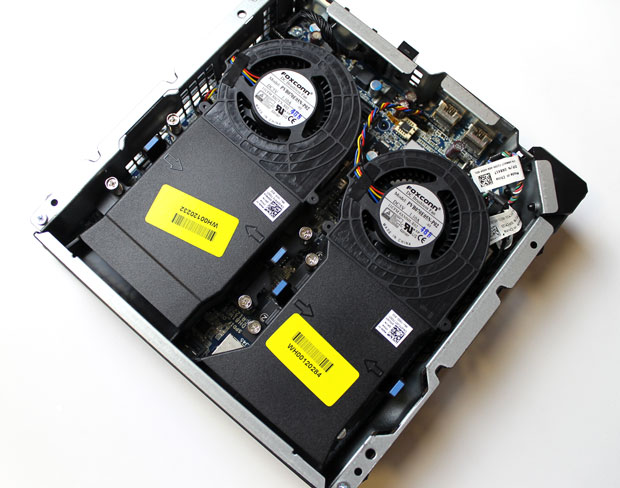
 

Spoiler

small_alpha-top1.jpg


But, what you may be able to do, is either changing the fan curve through software /BIOS, if at all possible so that it stays at lower RPM until a set temperature. Or buy some low noise fan adapters if the fans themselves have 3/4 pin cables on them and not some proprietary crap.

https://www.amazon.com/Noctua-NA-SRC7-Accessory-Low-Noise-Adaptors/dp/B00KG3KP1U/
This WILL impact your thermals, so if it was already reaching high temps, it could end up thermal throttling. 

Okay, so I have owned an Alienware Alpha for about 6-7 months now and have wondering a little about it, so when I am playing a graphics intensive game such as GTA V, the 2 fans start to become really loud and annoying, so I was wondering due to how small this is there any way to increase the cooling in it at somewhat of a low cost, I don't want to have this kill its self by running so hot and not being able to cool its self down fast enough.

Link to comment
https://linustechtips.com/topic/954232-alienware-alpha-cooling/
Share on other sites

Link to post
Share on other sites

Maybe try different thermal paste? Or making sure the fins are clean. Sometimes dust can get stuck inside the fins. Don't just blow air into the computer either... 

Corsair 4000D RGB

Asus B550 Tuf Gaming II

Asus 7700XT Tuf Gaming

AMD 5600x3d

32gb 3200mhz gskil 


Link to comment
https://linustechtips.com/topic/954232-alienware-alpha-cooling/#findComment-11593499
Share on other sites

Link to post
Share on other sites

Except changing the thermal paste for maybe something higher end to prevent the temps from getting too high and making the fans spins, there isn't much you can do.

The inside seems to have two custom blower type heatsinks/fans, so you can't change those easily for lower noise fans.


Spoiler

small_alpha-top1.jpg


But, what you may be able to do, is either changing the fan curve through software /BIOS, if at all possible so that it stays at lower RPM until a set temperature. Or buy some low noise fan adapters if the fans themselves have 3/4 pin cables on them and not some proprietary crap.

https://www.amazon.com/Noctua-NA-SRC7-Accessory-Low-Noise-Adaptors/dp/B00KG3KP1U/
This WILL impact your thermals, so if it was already reaching high temps, it could end up thermal throttling. 

CPU: AMD Ryzen 3700x / GPU: Asus Radeon RX 6750XT OC 12GB RAM: Corsair Vengeance LPX 2x16GB DDR4-3200
MOBO: MSI B450m Gaming Plus NVME: Corsair MP510 240GB / Case: TT Core v21 PSU: Seasonic 750W / OS: Bazzite

Link to comment
https://linustechtips.com/topic/954232-alienware-alpha-cooling/#findComment-11593564
Share on other sites

Link to post
Share on other sites

Create an account or sign in to comment

You need to be a member in order to leave a comment

Create an account

Sign up for a new account in our community. It's easy!

Register a new account

Sign in

Already have an account? Sign in here.

Sign In Now

×






