
Jump to content

Hi people, I manually configured my fan speeds through qfan control in the BIOS. My rig has been crashing on games and even freezing sometimes causing me to restart the PC using the power button. Is it possible that changing the fan speed is causing the crashes and freezing?

Link to comment
https://linustechtips.com/topic/912861-computer-freezing-and-crashing/
Share on other sites

Link to post
Share on other sites

1) This doesn't seem to be liquid/exotic cooling related.

2) When encountering performance issues, please post CPU usage (by core if possible), GPU usage, GPU memory usage, RAM usage, and temps for your rig when under the load that's causing issues to give us the best chance of helping you.

Main Rig: R9 5950X @ PBO, RTX 3090, 64 GB DDR4 3666, InWin 101, Full Hardline Watercooling

Server: R7 1700X @ 4.0 GHz, GTX 1080 Ti, 32GB DDR4 3000, Cooler Master NR200P, Full Soft Watercooling

LAN Rig: R5 3600X @ PBO, RTX 2070, 32 GB DDR4 3200, Dan Case A4-SFV V4, 120mm AIO for the CPU

HTPC: i7-7700K @ 4.6 GHz, GTX 1050 Ti, 16 GB DDR4 3200, AliExpress K39, IS-47K Cooler

Router: R3 2200G @ stock, 4GB DDR4 2400, what are cases, stock cooler
 

I don't have a problem...

Link to post
Share on other sites

Just now, TheNuzziNuzz said:

Please quote us when replying so we get a notification

Alright, thanks! I just reset my PC with the drive windows was installed on and it didn't fix it. So I just put the fan speeds back to standard to see if it fixes it. 

Link to post
Share on other sites

29 minutes ago, Habib said:

Alright, thanks! I just reset my PC with the drive windows was installed on and it didn't fix it. So I just put the fan speeds back to standard to see if it fixes it. 

I'm sorry I don't undertand what you mean.


Reset your BIOS


naturally, if you suspect something is causing issues the first thing you do is remove that thing. If the issue is still there you know its not a problem with that, if the issue is gone you know where your problem is.

Computers r fun

Link to post
Share on other sites

22 minutes ago, TheNuzziNuzz said:

I'm sorry I don't undertand what you mean.


Reset your BIOS


naturally, if you suspect something is causing issues the first thing you do is remove that thing. If the issue is still there you know its not a problem with that, if the issue is gone you know where your problem is.

I thought I had virus in the drive windows was installed on bcz desktop icons were broken on startup and reappeared after a couple of seconds or a refresh so I reset the windows. Resetting the windows fixed the broken icons but not the crashing of games and freezing of the PC. I have reset the fan speeds and my PC hasn't crashed since.

Link to post
Share on other sites

5 hours ago, Habib said:

I thought I had virus in the drive windows was installed on bcz desktop icons were broken on startup and reappeared after a couple of seconds or a refresh so I reset the windows. Resetting the windows fixed the broken icons but not the crashing of games and freezing of the PC. I have reset the fan speeds and my PC hasn't crashed since.

So now you know it is the fan adjustments causing the issues.

Computers r fun

Link to post
Share on other sites

1 hour ago, TheNuzziNuzz said:

So now you know it is the fan adjustments causing the issues.

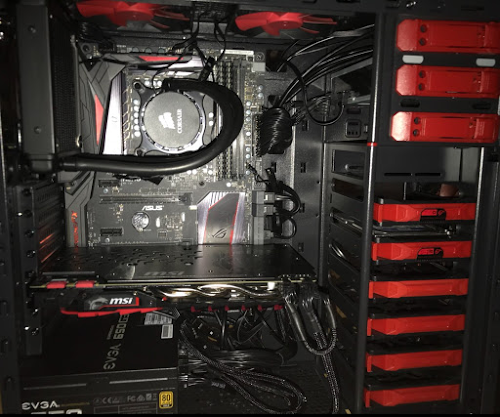
Not exactly, after half an hour of game play online on battlefield 4 at 71C gpu it crashed, that's the only thing what I was able to see. I have a MSI gtx1070.

Link to post
Share on other sites

1 hour ago, Habib said:

Not exactly, after half an hour of game play online on battlefield 4 at 71C gpu it crashed, that's the only thing what I was able to see. I have a MSI gtx1070.

You just said resting the fan speeds made the crashes stop, so I am confused.

Computers r fun

Link to post
Share on other sites


12 hours ago, TheNuzziNuzz said:

You just said resting the fan speeds made the crashes stop, so I am confused.

Yes, my PC was only crashing while playing games now. I just figured I had my base clock at 103, I put that back to 100 and no more crashing at all but fps dropped from 180 to 90-100 on bf4 on ultra settings. My core temperatures are 65-70 and gpu temperature was at 62.

Link to post
Share on other sites

6 hours ago, Habib said:


Yes, my PC was only crashing while playing games now. I just figured I had my base clock at 103, I put that back to 100 and no more crashing at all but fps dropped from 180 to 90-100 on bf4 on ultra settings. My core temperatures are 65-70 and gpu temperature was at 62.

I find it hard to believe your FPS dropped that much just because of a clock change. What GPU do you have? And what is your CPU usage while in game at 65-70?

Computers r fun

Link to post
Share on other sites

Create an account or sign in to comment

You need to be a member in order to leave a comment

Create an account

Sign up for a new account in our community. It's easy!

Register a new account

Sign in

Already have an account? Sign in here.

Sign In Now

×







