
Jump to content

Motherboard automatically underclocking CPU

Go to solution Solved by Knight,

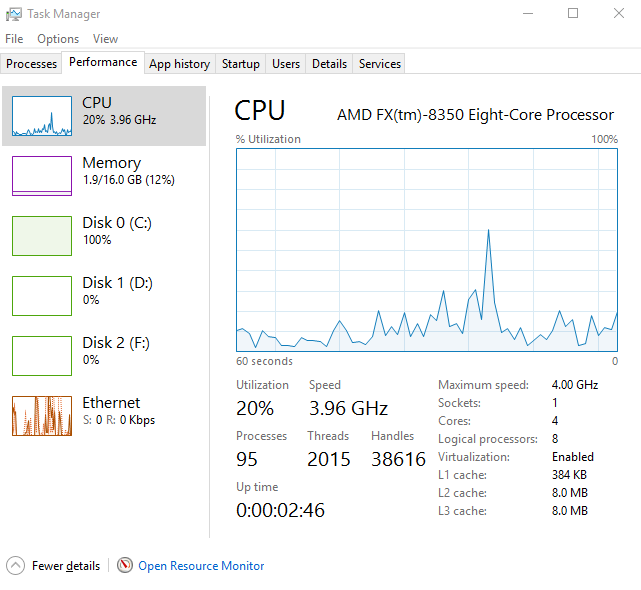
I fixed this myself. I was fucking around within Windows settings and my BIOS and rebooted and now my frequency seems to be unlocked. Thanks for the help guys, really. You guys put me on the right track for Power Management.

 

8316764e4462b47aa2274b30a0104542.png

Okay, long story short. I bought this motherboard to replace this one. The MSI motherboard automatically underclocks the CPU by so much that my EVGA GTX 980 is bottlenecked. I have a AMD FX-8350 and it's stock clocked @ 4.0GHz.
But when I boot up, Windows 10 tells me that this CPU is clocked @ 1.36GHz. This is simply ridiculous I can't even think about gaming with it being clocked so low. Now I can over clock it, but I'm much too dense to figure it out. Could someone give me specific instructions for this CPU so I can have it base clocked @ 4.0GHz? Also, the CPU is locked at that speed. I've tried to stress it with Prime95 and it  Thanks.


b5caa9d86c6572f07fb8200bbca07150.png

Link to comment
https://linustechtips.com/topic/605501-motherboard-automatically-underclocking-cpu/
Share on other sites

Link to post
Share on other sites

ugh yeah, that's normal. It clocks down when there's no load?!


Have you tried a game yet?

Gaming HTPC:

R5 5600X - Cryorig C7 - Asus ROG B350-i - EVGA RTX2060KO - 16gb G.Skill Ripjaws V 3333mhz - Corsair SF450 - 500gb 960 EVO - LianLi TU100B


Desktop PC:
R9 3900X - Peerless Assassin 120 SE - Asus Prime X570 Pro - Powercolor 7900XT - 32gb LPX 3200mhz - Corsair SF750 Platinum - 1TB WD SN850X - CoolerMaster NR200 White - Gigabyte M27Q-SA - Corsair K70 Rapidfire - Logitech MX518 Legendary - HyperXCloud Alpha wireless


Boss-NAS [Build Log]:
R5 2400G - Noctua NH-D14 - Asus Prime X370-Pro - 16gb G.Skill Aegis 3000mhz - Seasonic Focus Platinum 550W - Fractal Design R5 - 
250gb 970 Evo (OS) - 2x500gb 860 Evo (Raid0) - 6x4TB WD Red (RaidZ2)

Synology-NAS:
DS920+
2x4TB Ironwolf - 1x18TB Seagate Exos X20


Audio Gear:

Hifiman HE-400i - Kennerton Magister - Beyerdynamic DT880 250Ohm - AKG K7XX - Fostex TH-X00 - O2 Amp/DAC Combo - 
Klipsch RP280F - Klipsch RP160M - Klipsch RP440C - Yamaha RX-V479


Reviews and Stuff:

GTX 780 DCU2 // 8600GTS // Hifiman HE-400i // Kennerton Magister
Folding all the Proteins! // Boincerino

Useful Links:
Do you need an AMP/DAC? // Recommended Audio Gear // PSU Tier List 

Link to post
Share on other sites

disable AMD Cool'N'Quiet from your BIOS

Remember kids, the only difference between screwing around and science is writing it down. - Adam Savage


PHOΞNIX Ryzen 5 1600 @ 3.75GHz | Corsair LPX 16Gb DDR4 @ 2933 | MSI B350 Tomahawk | Sapphire RX 480 Nitro+ 8Gb | Intel 535 120Gb | Western Digital WD5000AAKS x2 | Cooler Master HAF XB Evo | Corsair H80 + Corsair SP120 | Cooler Master 120mm AF | Corsair SP120 | Icy Box IB-172SK-B | OCZ CX500W | Acer GF246 24" + AOC <some model> 21.5" | Steelseries Apex 350 | Steelseries Diablo 3 | Steelseries Syberia RAW Prism | Corsair HS-1 | Akai AM-A1

D.VA coming soon™ xoxo

Sapphire Acer Aspire 1410 Celeron 743 | 3Gb DDR2-667 | 120Gb HDD | Windows 10 Home x32

Vault Tec Celeron 420 | 2Gb DDR2-667 | Storage pending | Open Media Vault

gh0st Asus K50IJ T3100 | 2Gb DDR2-667 | 40Gb HDD | Ubuntu 17.04

Diskord Apple MacBook A1181 Mid-2007 Core2Duo T7400 @2.16GHz | 4Gb DDR2-667 | 120Gb HDD | Windows 10 Pro x32

Firebird//Phoeniix FX-4320 | Gigabyte 990X-Gaming SLI | Asus GTS 450 | 16Gb DDR3-1600 | 2x Intel 535 250Gb | 4x 10Tb Western Digital Red | 600W Segotep custom refurb unit | Windows 10 Pro x64 // offisite backup and dad's PC


Saint Olms Apple iPhone 6 16Gb Gold

Archon Microsoft Lumia 640 LTE

Gulliver Nokia Lumia 1320

Werkfern Nokia Lumia 520

Hydromancer Acer Liquid Z220

Link to post
Share on other sites

It clearly states the CPU max clock is 4.2Ghz in task manager. 

Main Rig:-

Ryzen 7 3800X | Asus ROG Strix X570-F Gaming | 16GB Team Group Dark Pro 3600Mhz | Corsair MP600 1TB PCIe Gen 4 | Sapphire 5700 XT Pulse | Corsair H115i Platinum | WD Black 1TB | WD Green 4TB | EVGA SuperNOVA G3 650W | Asus TUF GT501 | Samsung C27HG70 1440p 144hz HDR FreeSync 2 | Ubuntu 20.04.2 LTS |


Server:-

Intel NUC running Server 2019 + Synology DSM218+ with 2 x 4TB Toshiba NAS Ready HDDs (RAID0)

Link to post
Share on other sites

Go into Power Management for Windows, and select the "High Performance" profile.   It should speed things up.  But if you are on a 'balanced' setting, it will work perfectly fine, speeding up the clock when needed, and slowing it down to conserve energy. 

Link to post
Share on other sites

Actually...


Now that I had a look at it, unless you're stuck in Power Saver mode, it shouldn't be sitting at 33% utilization and in that power state. That normally triggers a clock speed bump. Unless AMD is more conservative about bumping clocks.

Link to post
Share on other sites

3 minutes ago, M.Yurizaki said:

Yes, it's completely normal, even Intel's does it:


Go run something demanding and it'll spike up.

intel_cpu.png

Your 6700 should be going to 4Ghz, not 3.4Ghz?

Main Rig:-

Ryzen 7 3800X | Asus ROG Strix X570-F Gaming | 16GB Team Group Dark Pro 3600Mhz | Corsair MP600 1TB PCIe Gen 4 | Sapphire 5700 XT Pulse | Corsair H115i Platinum | WD Black 1TB | WD Green 4TB | EVGA SuperNOVA G3 650W | Asus TUF GT501 | Samsung C27HG70 1440p 144hz HDR FreeSync 2 | Ubuntu 20.04.2 LTS |


Server:-

Intel NUC running Server 2019 + Synology DSM218+ with 2 x 4TB Toshiba NAS Ready HDDs (RAID0)

Link to post
Share on other sites

2 minutes ago, M.Yurizaki said:

It's not the K version. I wanted a lower power part for my FTZ01.

Yeah, 6700 has a max turbo clock of 4Ghz. Did you disable Turbo? 


http://ark.intel.com/m/products/88196/Intel-Core-i7-6700-Processor-8M-Cache-up-to-4_00-GHz

Main Rig:-

Ryzen 7 3800X | Asus ROG Strix X570-F Gaming | 16GB Team Group Dark Pro 3600Mhz | Corsair MP600 1TB PCIe Gen 4 | Sapphire 5700 XT Pulse | Corsair H115i Platinum | WD Black 1TB | WD Green 4TB | EVGA SuperNOVA G3 650W | Asus TUF GT501 | Samsung C27HG70 1440p 144hz HDR FreeSync 2 | Ubuntu 20.04.2 LTS |


Server:-

Intel NUC running Server 2019 + Synology DSM218+ with 2 x 4TB Toshiba NAS Ready HDDs (RAID0)

Link to post
Share on other sites

1 minute ago, M.Yurizaki said:

I don't think Windows counts Turbo Boost for some reason, because I've seen it go up to 3.9GHz

That's very likely, MS still haven't fixed the OC bug either that's been present since the Ivy Bridge processors. 

Main Rig:-

Ryzen 7 3800X | Asus ROG Strix X570-F Gaming | 16GB Team Group Dark Pro 3600Mhz | Corsair MP600 1TB PCIe Gen 4 | Sapphire 5700 XT Pulse | Corsair H115i Platinum | WD Black 1TB | WD Green 4TB | EVGA SuperNOVA G3 650W | Asus TUF GT501 | Samsung C27HG70 1440p 144hz HDR FreeSync 2 | Ubuntu 20.04.2 LTS |


Server:-

Intel NUC running Server 2019 + Synology DSM218+ with 2 x 4TB Toshiba NAS Ready HDDs (RAID0)

Link to post
Share on other sites

It's probably a CPUID thing or something Intel does ( http://superuser.com/questions/635628/how-to-get-the-maximum-speed-of-cpu )


(So uh, OP, when are we going to get back from you?)

Link to post
Share on other sites

Have you flashed to latest uefi? 

Main Rig:-

Ryzen 7 3800X | Asus ROG Strix X570-F Gaming | 16GB Team Group Dark Pro 3600Mhz | Corsair MP600 1TB PCIe Gen 4 | Sapphire 5700 XT Pulse | Corsair H115i Platinum | WD Black 1TB | WD Green 4TB | EVGA SuperNOVA G3 650W | Asus TUF GT501 | Samsung C27HG70 1440p 144hz HDR FreeSync 2 | Ubuntu 20.04.2 LTS |


Server:-

Intel NUC running Server 2019 + Synology DSM218+ with 2 x 4TB Toshiba NAS Ready HDDs (RAID0)

Link to post
Share on other sites

I fixed this myself. I was fucking around within Windows settings and my BIOS and rebooted and now my frequency seems to be unlocked. Thanks for the help guys, really. You guys put me on the right track for Power Management.


8316764e4462b47aa2274b30a0104542.png

Link to post
Share on other sites

Create an account or sign in to comment

You need to be a member in order to leave a comment

Create an account

Sign up for a new account in our community. It's easy!

Register a new account

Sign in

Already have an account? Sign in here.

Sign In Now

×

