Jump to content

Hi Guys,


So I am thinking of going to 16GB of RAM from my 8GB I have at the moment. I want to go with the Kingston Hyper-X Fury RAM as I personally find them SEXY! Especially when you have contrasting colours like I wanna do. But the different colours seem to have different clock speeds. So my question is if I install these two sets will my motherboard automaticly set both stick to the higher or lower clock speeds? Obviously I am gunna run both sets  at 1866mhz or 2133mhz as this is easy with Fury RAM. But the first time I boot the PC will it throw any error code at all? I don't think so but I am just curious and playing safe! 


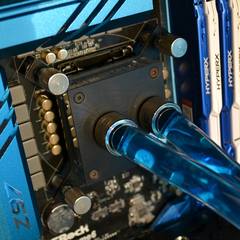
So yeah will the motherboard set all the stick to the speed of the blue or white set? (See pic)


post-131546-0-50842000-1429448035.jpg

'FrostNova' https://uk.pcpartpicker.com/user/Samsterstorm/saved/WtBWGX :

CPU: Intel 4790k | MB: Asrock Z97 Extreme6 | GPU: Gigabyte GTX 970 G1 Gaming (+200, +250) | CASE: NZXT H440 (Black & Blue) | COOLER: Full EK 240mm CPU Loop | RAM: 16GB Hyper-X Fury (4x4GB @2133mhz) | STORAGE: Seagate Barracuda 1TB & Hyperx 120gb SSD | PSU: Corsair RM650 | SCREEN: Benq G2750 | LIGHTING: Deepcool RGB LED Kit | KEYBOARD: CM Devastator | MOUSE: Logitech G502 | HEADSET: Hyperx Clouds White 

Link to comment
https://linustechtips.com/topic/350973-ram-clock-questions/
Share on other sites

Link to post
Share on other sites

It will both automatically clock to the lowest available clock speeds.

|CPU: Intel i7-5960X @ 4.4ghz|MoBo: Asus Rampage V|RAM: 64GB Corsair Dominator Platinum|GPU:2-way SLI Gigabyte G1 Gaming GTX 980's|SSD:512GB Samsung 850 pro|HDD: 2TB WD Black|PSU: Corsair AX1200i|COOLING: NZXT Kraken x61|SOUNDCARD: Creative SBX ZxR|  ^_^  Planned Bedroom Build: Red Phantom [quadro is stuck in customs, still trying to find a cheaper way to buy a highend xeon]

Link to comment
https://linustechtips.com/topic/350973-ram-clock-questions/#findComment-4772871
Share on other sites

Link to post
Share on other sites

What he said ^

Though, I wouldn't recommend mixing different types of ram because sometimes they don't play nice.

If it's just a color change it will be fine. Also, it is most likely going to work anyways--just something to be mindful of :)

Atom14 [Corsair] i5-4690K | Corsair H110i GT | MSI Z97S SLI Krait | 16 GB Team Group DDR3 | Samsung 850 EVO 250GB X2 | EVGA SuperNOVA 850W 80+ Gold | Corsair K95 RGB | Corsair M65 RGB | EVGA ACX 2.0 GTX 980Ti

Corsair KXX RGB Keyboard Cover Mod Make your own using my templates!

Link to comment
https://linustechtips.com/topic/350973-ram-clock-questions/#findComment-4772883
Share on other sites

Link to post
Share on other sites

It will both automatically clock to the lowest available clock speeds.

Ok so the 1866mhz set will be brought down to 1333mhz the first time and then I can take it to 2133mhz and should be fine

'FrostNova' https://uk.pcpartpicker.com/user/Samsterstorm/saved/WtBWGX :

CPU: Intel 4790k | MB: Asrock Z97 Extreme6 | GPU: Gigabyte GTX 970 G1 Gaming (+200, +250) | CASE: NZXT H440 (Black & Blue) | COOLER: Full EK 240mm CPU Loop | RAM: 16GB Hyper-X Fury (4x4GB @2133mhz) | STORAGE: Seagate Barracuda 1TB & Hyperx 120gb SSD | PSU: Corsair RM650 | SCREEN: Benq G2750 | LIGHTING: Deepcool RGB LED Kit | KEYBOARD: CM Devastator | MOUSE: Logitech G502 | HEADSET: Hyperx Clouds White 

Link to comment
https://linustechtips.com/topic/350973-ram-clock-questions/#findComment-4772884
Share on other sites

Link to post
Share on other sites

Ok so the 1866mhz set will be brought down to 1333mhz the first time and then I can take it to 2133mhz and should be fine

All ram sticks have to run at the same speed. Either all 16 GB at 1333 or 8 GB at 1866

EDIT: or you can try to overclock both sets to 2133.

Atom14 [Corsair] i5-4690K | Corsair H110i GT | MSI Z97S SLI Krait | 16 GB Team Group DDR3 | Samsung 850 EVO 250GB X2 | EVGA SuperNOVA 850W 80+ Gold | Corsair K95 RGB | Corsair M65 RGB | EVGA ACX 2.0 GTX 980Ti

Corsair KXX RGB Keyboard Cover Mod Make your own using my templates!

Link to comment
https://linustechtips.com/topic/350973-ram-clock-questions/#findComment-4772890
Share on other sites

Link to post
Share on other sites

Ok so the 1866mhz set will be brought down to 1333mhz the first time and then I can take it to 2133mhz and should be fine

All ram sticks have to run at the same speed. Either all 16 GB at 1333 or 8 GB at 1866

EDIT: or you can try to overclock both sets to 2133.

The dude is right but It might cause instability like frequent to occasional BSODs so do a few mem checks from time to time

|CPU: Intel i7-5960X @ 4.4ghz|MoBo: Asus Rampage V|RAM: 64GB Corsair Dominator Platinum|GPU:2-way SLI Gigabyte G1 Gaming GTX 980's|SSD:512GB Samsung 850 pro|HDD: 2TB WD Black|PSU: Corsair AX1200i|COOLING: NZXT Kraken x61|SOUNDCARD: Creative SBX ZxR|  ^_^  Planned Bedroom Build: Red Phantom [quadro is stuck in customs, still trying to find a cheaper way to buy a highend xeon]

Link to comment
https://linustechtips.com/topic/350973-ram-clock-questions/#findComment-4772929
Share on other sites

Link to post
Share on other sites

Create an account or sign in to comment

You need to be a member in order to leave a comment

Create an account

Sign up for a new account in our community. It's easy!

Register a new account

Sign in

Already have an account? Sign in here.

Sign In Now

×