
Jump to content

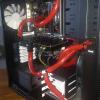
Custom Loop, GPU is running hot.
Go to solution Solved by robinkle,

Okay. Now I fixed it. I used alot more thermal compound on the GPU and some extra on the block side. I also pressed the block firmly onto the gpu. Assembled and back to 40+ celcius. Thank you for all help. I hope this thread becomes usefull to others.

My CPU runs at 31 Celcius Idle, 42 on full load.

GPU Runs at 82 degress on full load, it used to be around 45.


Should I Disassemble my GPU card and replace thermal paste?


Any other suggestions?


Here is my System:


CPU: Intel Core i7-4930K 3.4GHz 6-Core Processor

Motherboard: Asus Rampage IV Black Edition EATX LGA2011 Motherboard

Memory: Corsair Vengeance Pro 8GB (2 x 4GB) DDR3-1866 Memory

Memory: Corsair Vengeance Pro 8GB (2 x 4GB) DDR3-1866 Memory

Storage: Samsung 840 EVO 500GB 2.5" Solid State Drive

Case: Fractal Design Define XL R2 (Black Pearl) ATX Full Tower Case

Operating System: Microsoft Windows 8.1 Pro - 64-bit (OEM) (64-bit)


GPU: EVGA GeForce GTX 770 4GB Dual Classified Hydro Copper

PSU: Chieftec BPS-950C 950W 80 plus Silver.


Custom Water cooling loop:

Slim 280mm Radiator (top)

60x240 mm radiator (front with push/pull) 


Koolance CPU block

Original EVGA GPU block (Hydro Copper).

Alphacool Dual 5.25" Res/D5 pump combo, Using 1 pump.


Rob

Link to comment
https://linustechtips.com/topic/319996-custom-loop-gpu-is-running-hot/
Share on other sites

Link to post
Share on other sites

did you flush your radiators before building the loop?

NEW PC build: Blank Heaven   minimalist white and black PC     Old S340 build log "White Heaven"        The "LIGHTCANON" flashlight build log        Project AntiRoll (prototype)        Custom speaker project

Spoiler

Ryzen 3950X | AMD Vega Frontier Edition | ASUS X570 Pro WS | Corsair Vengeance LPX 64GB | NZXT H500 | Seasonic Prime Fanless TX-700 | Custom loop | Coolermaster SK630 White | Logitech MX Master 2S | Samsung 980 Pro 1TB + 970 Pro 512GB | Samsung 58" 4k TV | Scarlett 2i4 | 2x AT2020


Link to post
Share on other sites

82 Degrees isn't that bad on full load. Sure it could be better but nothing really out of the ordinary.


Ensure that the card is stock clocks. Ensure that there is actually water flowing to the GPU and that it is cycling properly.

What's out of the ordinary is that 82 degrees is ALMOST TWICE AS MUCH as what he was getting before.

NEW PC build: Blank Heaven   minimalist white and black PC     Old S340 build log "White Heaven"        The "LIGHTCANON" flashlight build log        Project AntiRoll (prototype)        Custom speaker project

Spoiler

Ryzen 3950X | AMD Vega Frontier Edition | ASUS X570 Pro WS | Corsair Vengeance LPX 64GB | NZXT H500 | Seasonic Prime Fanless TX-700 | Custom loop | Coolermaster SK630 White | Logitech MX Master 2S | Samsung 980 Pro 1TB + 970 Pro 512GB | Samsung 58" 4k TV | Scarlett 2i4 | 2x AT2020


Link to post
Share on other sites

82 Degrees isn't that bad on full load. Sure it could be better but nothing really out of the ordinary.


Ensure that the card is stock clocks. Ensure that there is actually water flowing to the GPU and that it is cycling properly.

82 degrees is 40 more then I had. For custom watercooling I think it's very bad.

The stock clocks seems to be normal for this card.

I do think the waterflow is okay, since the CPU is cool, and pump sounds happy. The GPU gets water directly from the output from the CPU.


edit: I'm sorry I didn't mention earlier. I've dissasembled the GPU card once before due to a small leak (my misstake) a while ago, so I wanted to dry it out before putting it back together and into the machine. I did replace the thermal paste on the gpu.

Rob

Link to post
Share on other sites

82 degrees is 40 more then I had. For custom watercooling I think it's very bad.

The stock clocks seems to be normal for this card.

I do think the waterflow is okay, since the CPU is cool, and pump sounds happy. The GPU gets water directly from the output from the CPU.


I'd redo your cooler on your card then. Might not be making contact. Tighten any screws on the card to ensure it's all down correctly.


Link to post
Share on other sites

I took the GPU card out, took the water block off. Cleaned the block and the GPU with alcohol. added new thermal paste on the GPU, carefully put the block back on, tightened the screws firmly.


Now 105 degrees on full load...  Since I only did something to the GPU, it still got to be the GPU, because something has changed.

Rob

Link to post
Share on other sites

Okay. Now I fixed it. I used alot more thermal compound on the GPU and some extra on the block side. I also pressed the block firmly onto the gpu. Assembled and back to 40+ celcius. Thank you for all help. I hope this thread becomes usefull to others.

Rob

Link to post
Share on other sites

Create an account or sign in to comment

You need to be a member in order to leave a comment

Create an account

Sign up for a new account in our community. It's easy!

Register a new account

Sign in

Already have an account? Sign in here.

Sign In Now

×





