
Jump to content

Help!

Go to solution Solved by BrinkGG,
Just now, fasauceome said:

most of the time the pins are in the bottom right of the motherboard

-image-

share a pic of the board so we can see what you may have available
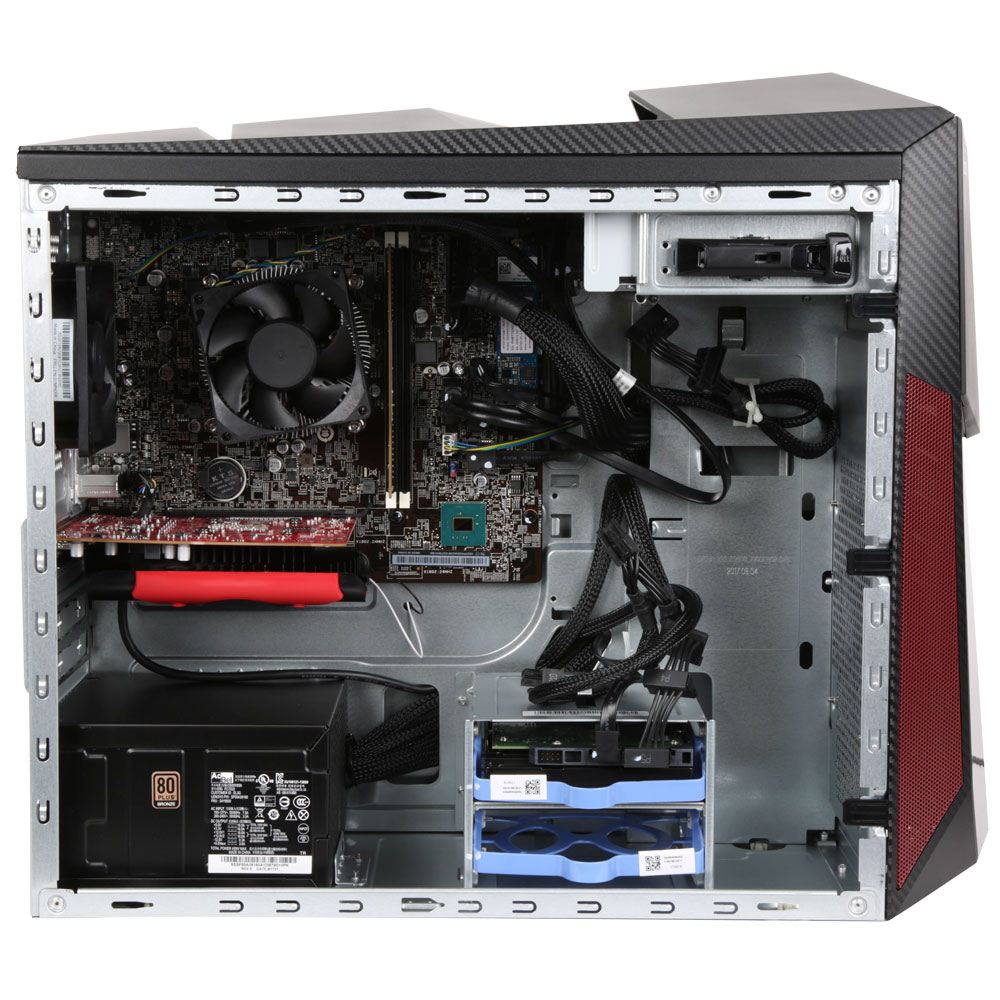
487718_440479_05_front_zoom.jpg

Here's the board from his computer. I can't find a picture of just the motherboard, but it looks like the front panel connectors are either just above the GPU or near the M.2 Drive. 


@Pc-Rookie Do you mind taking a picture of the connector on your motherboard? 

Hi, I just bought a new case that comes with power switch, hdd led, reset sw and power led and that shit but my motherboard does not have a normal slot for the cables. Not sure if I have one at all. The only information I have is that it's a Lenovo board and its a mATX.  I have one with 13 pins but even if that's the right one how do I connect the cables?

Link to comment
https://linustechtips.com/topic/1058497-help/
Share on other sites

Link to post
Share on other sites

5 minutes ago, Pc-Rookie said:

Hi, I just bought a new case that comes with power switch, hdd led, reset sw and power led and that shit but my motherboard does not have a normal slot for the cables. Not sure if I have one at all. The only information I have is that it's a Lenovo board and its a mATX.  I have one with 13 pins but even if that's the right one how do I connect the cables?

Is the motherboard from a prebuilt Lenovo system?

If so, do you know the model? That will help a lot with figuring out the pinout. You can also look for small silk-screened text on the motherboard next to the connector.  

Fine you want the PSU tier list? Have the PSU tier list: https://linustechtips.com/main/topic/1116640-psu-tier-list-40-rev-103/


Stille (Desktop)

Ryzen 9 3900XT@4.5Ghz - Cryorig H7 Ultimate - 16GB Vengeance LPX 3000Mhz- MSI RTX 3080 Ti Ventus 3x OC - SanDisk Plus 480GB - Crucial MX500 500GB - Intel 660P 1TB SSD - (2x) WD Red 2TB - EVGA G3 650w - Corsair 760T

Evoo Gaming 15"
i7-9750H - 16GB DDR4 - GTX 1660Ti - 480GB SSD M.2 - 1TB 2.5" BX500 SSD 

VM + NAS Server (ProxMox 6.3)

1x Xeon E5-2690 v2  - 92GB ECC DDR3 - Quadro 4000 - Dell H310 HBA (Flashed with IT firmware) -500GB Crucial MX500 (Proxmox Host) Kingston 128GB SSD (FreeNAS dev/ID passthrough) - 8x4TB Toshiba N300 HDD

Toys: Ender 3 Pro, Oculus Rift CV1, Oculus Quest 2, about half a dozen raspberry Pis (2b to 4), Arduino Uno, Arduino Mega, Arduino nano (x3), Arduino nano pro, Atomic Pi. 

Link to comment
https://linustechtips.com/topic/1058497-help/#findComment-12516389
Share on other sites

Link to post
Share on other sites

3 minutes ago, Brink2Three said:

Is the motherboard from a prebuilt Lenovo system?

If so, do you know the model? That will help a lot with figuring out the pinout. You can also look for small silk-screened text on the motherboard next to the connector.  


3 minutes ago, Brink2Three said:

Is the motherboard from a prebuilt Lenovo system?

If so, do you know the model? That will help a lot with figuring out the pinout. You can also look for small silk-screened text on the motherboard next to the connector.  

Yes, The motherboard is from a pre-built pc. It's from a Lenovo legion y520 Tower.

https://www.elkjop.no/product/data/stasjonar-pc/LE90H7002JMW/lenovo-legion-y520-tower-stasjonar-gaming-pc

^^ Sorry for Norwegian website^^

Link to comment
https://linustechtips.com/topic/1058497-help/#findComment-12516399
Share on other sites

Link to post
Share on other sites

most of the time the pins are in the bottom right of the motherboard

image.png.12a9a7ff3d6017c8d903e0158f49b099.png

share a pic of the board so we can see what you may have available

I WILL find your ITX build thread, and I WILL recommend the SIlverstone Sugo SG13B


Primary PC:

i7 8086k - EVGA Z370 Classified K - G.Skill Trident Z RGB - WD SN750 - Jedi Order Titan Xp - Hyper 212 Black (with RGB Riing flair) - EVGA G3 650W - dual booting Windows 11 and Fedora Linux - Black and green theme, Razer brainwashed me.

Draws 400 watts under max load, for reference.


PSU tier list

How many watts do I need?

PSU misconceptions, protections explainedgroup reg is bad

Link to comment
https://linustechtips.com/topic/1058497-help/#findComment-12516414
Share on other sites

Link to post
Share on other sites

Just now, fasauceome said:

most of the time the pins are in the bottom right of the motherboard

-image-

share a pic of the board so we can see what you may have available

487718_440479_05_front_zoom.jpg

Here's the board from his computer. I can't find a picture of just the motherboard, but it looks like the front panel connectors are either just above the GPU or near the M.2 Drive. 


@Pc-Rookie Do you mind taking a picture of the connector on your motherboard? 

Fine you want the PSU tier list? Have the PSU tier list: https://linustechtips.com/main/topic/1116640-psu-tier-list-40-rev-103/


Stille (Desktop)

Ryzen 9 3900XT@4.5Ghz - Cryorig H7 Ultimate - 16GB Vengeance LPX 3000Mhz- MSI RTX 3080 Ti Ventus 3x OC - SanDisk Plus 480GB - Crucial MX500 500GB - Intel 660P 1TB SSD - (2x) WD Red 2TB - EVGA G3 650w - Corsair 760T

Evoo Gaming 15"
i7-9750H - 16GB DDR4 - GTX 1660Ti - 480GB SSD M.2 - 1TB 2.5" BX500 SSD 

VM + NAS Server (ProxMox 6.3)

1x Xeon E5-2690 v2  - 92GB ECC DDR3 - Quadro 4000 - Dell H310 HBA (Flashed with IT firmware) -500GB Crucial MX500 (Proxmox Host) Kingston 128GB SSD (FreeNAS dev/ID passthrough) - 8x4TB Toshiba N300 HDD

Toys: Ender 3 Pro, Oculus Rift CV1, Oculus Quest 2, about half a dozen raspberry Pis (2b to 4), Arduino Uno, Arduino Mega, Arduino nano (x3), Arduino nano pro, Atomic Pi. 

Link to comment
https://linustechtips.com/topic/1058497-help/#findComment-12516419
Share on other sites

Link to post
Share on other sites

3 minutes ago, Brink2Three said:

Here's the board from his computer. I can't find a picture of just the motherboard, but it looks like the front panel connectors are either just above the GPU or near the M.2 Drive. 

It's a shame the image is too low res, at a glance it looks like that might be the HD_ Audio connector but I can't be certain

I WILL find your ITX build thread, and I WILL recommend the SIlverstone Sugo SG13B


Primary PC:

i7 8086k - EVGA Z370 Classified K - G.Skill Trident Z RGB - WD SN750 - Jedi Order Titan Xp - Hyper 212 Black (with RGB Riing flair) - EVGA G3 650W - dual booting Windows 11 and Fedora Linux - Black and green theme, Razer brainwashed me.

Draws 400 watts under max load, for reference.


PSU tier list

How many watts do I need?

PSU misconceptions, protections explainedgroup reg is bad

Link to comment
https://linustechtips.com/topic/1058497-help/#findComment-12516428
Share on other sites

Link to post
Share on other sites

20 minutes ago, fasauceome said:

most of the time the pins are in the bottom right of the motherboard

image.png.12a9a7ff3d6017c8d903e0158f49b099.png

share a pic of the board so we can see what you may have available


18 minutes ago, Brink2Three said:

487718_440479_05_front_zoom.jpg

Here's the board from his computer. I can't find a picture of just the motherboard, but it looks like the front panel connectors are either just above the GPU or near the M.2 Drive. 


@Pc-Rookie Do you mind taking a picture of the connector on your motherboard?

Here are some pictures:

I have currently some cables plugged in so please dont mind themIMG_20190426_204301.thumb.jpg.b5e358e0c311b7a81e848b9f20cd1e41.jpg 

IMG_20190426_204308.jpg

IMG_20190426_204253.jpg

IMG_20190426_204248_1.jpg

IMG_20190426_204234_1.jpg

Link to comment
https://linustechtips.com/topic/1058497-help/#findComment-12516464
Share on other sites

Link to post
Share on other sites

Create an account or sign in to comment

You need to be a member in order to leave a comment

Create an account

Sign up for a new account in our community. It's easy!

Register a new account

Sign in

Already have an account? Sign in here.

Sign In Now

×


