
Jump to content

Windows cannot automatically detect this network's proxy settings

Go to solution Solved by VinZie,

Then try


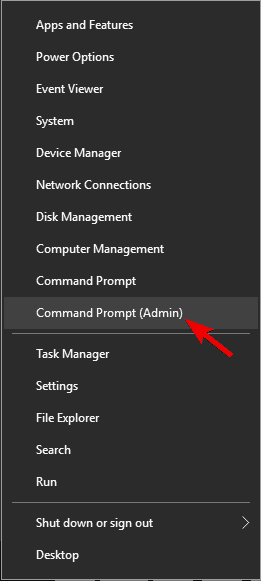
  1. Press Windows Key + X and select Command Prompt (Admin) from the menu.
    Windows proxy settings keep changing
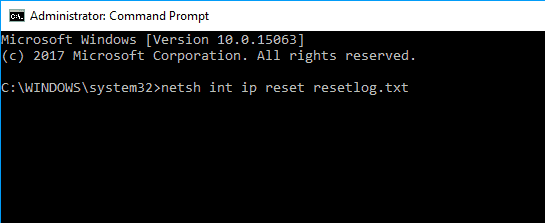
  2. When Command Prompt starts, type netsh int ip reset resetlog.txt.
    Windows 10 proxy settings not saving
  3. Restart your computer and see if the issue is resolved.
At random intervals, I lose connectivity (on my PC exclusively - I troubleshoot problems and it comes up with the error in the title) and to fix; I have to unplug and plug back in the ethernet into my motherboard's ethernet port (MSI Z170A Tomahawk), or go into device manager, uninstall device and scan for hardware changes. This causes me much frustration, as I'm an online gamer who likes to take games semi-seriously. I can imagine getting a new PCI ethernet adapter may fix the issue but I want to make sure there's nothing I can do before going out to buy one. Thanks for any help!  

Link to post
Share on other sites

  1. Disable proxy server on Internet Explorer.
  2. Press Windows Key + R on the keyboard.
  3. When Run dialog appears type inetcpl.cpl and hit Enter.
    Windows 10 can't detect proxy settings
  4. Click Connections tab, and then click the LAN settings button.
    Windows could not automatically detect proxy server
  5. Check if your proxy settings are okay.
  6. Windows won't save proxy settings
Link to post
Share on other sites

6 minutes ago, VinZie said:
  1. Disable proxy server on Internet Explorer.
  2. Press Windows Key + R on the keyboard.
  3. When Run dialog appears type inetcpl.cpl and hit Enter.
    Windows 10 can't detect proxy settings
  4. Click Connections tab, and then click the LAN settings button.
    Windows could not automatically detect proxy server
  5. Check if your proxy settings are okay.
  6. Windows won't save proxy settings

Doesn't work D:

Link to post
Share on other sites

Then try


  1. Press Windows Key + X and select Command Prompt (Admin) from the menu.
    Windows proxy settings keep changing
  2. When Command Prompt starts, type netsh int ip reset resetlog.txt.
    Windows 10 proxy settings not saving
  3. Restart your computer and see if the issue is resolved.
Link to post
Share on other sites

Create an account or sign in to comment

You need to be a member in order to leave a comment

Create an account

Sign up for a new account in our community. It's easy!

Register a new account

Sign in

Already have an account? Sign in here.

Sign In Now

×


