Jump to content

Put a new build together tonight. Still new at this and need help trouble shooting. Build specs below: 


phanteks enthoo luxe case

cpu: Intel i7 6700k

mobo: asus z-170 deluxe

cpu cooler: enermax ets t-40 fit

ram: 16gb corsair vengeance lpx ddr4 3200 Mhz

hd: Samsung evo 850 500GB ssd

Power supply: corsair cx 750m


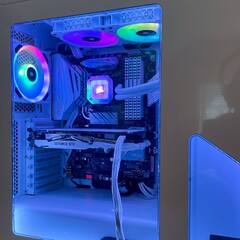
When I turned on the system for the first time all the factory case fans came on with the exception of the front 200mm fan. I checked all connections and it is hooked up. The pwm fan header is connected to the cpu fan header. Anything I am missing? I also get the following error on my monitor "cpu fan speed error detected" "ensure that the cpu fan is properly installed on the cpu_fan header or adjust/disable the fan speed low limit option in the UEFI bios.  


Does this sound like a hardware or software (BIOS) problem? 


Thanks in advance.  


Below are pictures of the fan hub in the rear of the case along with the error message I get...

File Jun 17, 10 31 22 AM.jpeg

File Jun 17, 10 41 33 AM.jpeg

Link to comment
https://linustechtips.com/topic/612612-case-fan-not-working/
Share on other sites

Link to post
Share on other sites

Did you try plugging the fan directly into a motherboard header or using a Molex to 3-pin fan adapter to verify if it's the fan itself or the fan controller?

Link to comment
https://linustechtips.com/topic/612612-case-fan-not-working/#findComment-7917919
Share on other sites

Link to post
Share on other sites

Just now, Windows7ge said:

Did you try plugging the fan directly into a motherboard header or using a Molex to 3-pin fan adapter to verify if it's the fan itself or the fan controller?


No, I will give that a try, thank you for the suggestion. 

Link to comment
https://linustechtips.com/topic/612612-case-fan-not-working/#findComment-7917921
Share on other sites

Link to post
Share on other sites

That CPU fan speed error is when whatever fan header you plugged in the CPU fan header is not spinning.


Have you tried plugging it to the Case Fan headers instead?

CPU: Ryzen 2 2700@ 4.0Ghz    Mobo: Gigabyte X470 Gaming 7 Wifi    Cooler: EVGA CLC 240    GPU: GTX1080 FTW DT @ 2113Mhz   PSU: EVGA 750W P2   

Case: Fractal Design Meshify C   Displays: 34" LG34UC79G, 24" Dell

Link to comment
https://linustechtips.com/topic/612612-case-fan-not-working/#findComment-7918520
Share on other sites

Link to post
Share on other sites

29 minutes ago, MilfShake said:

That CPU fan speed error is when whatever fan header you plugged in the CPU fan header is not spinning.


Have you tried plugging it to the Case Fan headers instead?

I plugged the cpu fan into the w_pump header. The cpu fans spin. Did I do something wrong by plugging cpu fan into wrong header? 

Link to comment
https://linustechtips.com/topic/612612-case-fan-not-working/#findComment-7918653
Share on other sites

Link to post
Share on other sites

17 minutes ago, w8kdrifter said:

I plugged the cpu fan into the w_pump header. The cpu fans spin. Did I do something wrong by plugging cpu fan into wrong header? 

If nothing is plugged in the CPU_FAN header on the mobo (the one closest to the socket with this label on it), then the system will assume that there is no CPU fan, and it will display that error and will not boot to prevent CPU overheating. It will even display that error if you plug your CPU fan to the CPU_OPT fan header, you have to plug in the main CPU_FAN header.


If you plugged ur CPU fan to the case fan header and want to turn off the warning, you can disable the warning by going in BIOS and find under PC health monitor or something like that, and disable the CPU Fan Fail Warning. After that you wont see it again

CPU: Ryzen 2 2700@ 4.0Ghz    Mobo: Gigabyte X470 Gaming 7 Wifi    Cooler: EVGA CLC 240    GPU: GTX1080 FTW DT @ 2113Mhz   PSU: EVGA 750W P2   

Case: Fractal Design Meshify C   Displays: 34" LG34UC79G, 24" Dell

Link to comment
https://linustechtips.com/topic/612612-case-fan-not-working/#findComment-7918721
Share on other sites

Link to post
Share on other sites

2 hours ago, MilfShake said:

If nothing is plugged in the CPU_FAN header on the mobo (the one closest to the socket with this label on it), then the system will assume that there is no CPU fan, and it will display that error and will not boot to prevent CPU overheating. It will even display that error if you plug your CPU fan to the CPU_OPT fan header, you have to plug in the main CPU_FAN header.


If you plugged ur CPU fan to the case fan header and want to turn off the warning, you can disable the warning by going in BIOS and find under PC health monitor or something like that, and disable the CPU Fan Fail Warning. After that you wont see it again

Thank you. I swapped the cpu cooler to the cpu fan header and that allowed me to boot fine. 


Also confirmed bad fan on case. Phanteks already shipped out a new one. 


Thanks to to everone for the help, much appreciated. 

Link to comment
https://linustechtips.com/topic/612612-case-fan-not-working/#findComment-7919362
Share on other sites

Link to post
Share on other sites

Create an account or sign in to comment

You need to be a member in order to leave a comment

Create an account

Sign up for a new account in our community. It's easy!

Register a new account

Sign in

Already have an account? Sign in here.

Sign In Now

×