

Jump to content

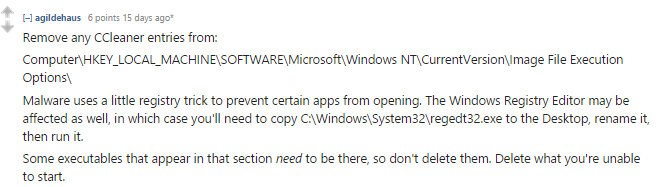
CCleaner won't open

Go to solution Solved by Tim Drake,

FIXED IT


00f7e84ebee343f847400cf7a3dfdb03.png

No matter how many times I reinstall it, it just refuses to open.


A split second of loading and then nothing.


Any ideas?

Link to comment
https://linustechtips.com/topic/382799-ccleaner-wont-open/
Share on other sites

Link to post
Share on other sites

have you tried restarting your PC?

3 tips to have a good time on the LTT forums | 1. When you reply to someone please quote them | 2. Please follow your threads | 3. Follow the C.o.C 

If you follow these 3 tips you should have a blast.

i'm rather proud of this for some reason. http://imgur.com/6ttS5XZ

Link to comment
https://linustechtips.com/topic/382799-ccleaner-wont-open/#findComment-5168346
Share on other sites

Link to post
Share on other sites

Windows 8.1

Many of times

Have you attempted to run in administrator?

CPU: Pentium G3258 @ 3.2GHz || GPU:(first release,used) MSI R9 270 OC || Motherboard:MSI Z97-G45 Gaming Motherboard || RAM: 8 GB G.Skill Sniper 1600 || Monitors: Vizio 22 in Ultra slim 1080p TV || Storage: Seagate barracuda 160 GB 7200RPM,(REFURB) 1TB toshiba 7200RPM || PSU: (stripped from 2013 CAD PC)Corsair CX600 build was under $420

BE SURE TO FOLLOW YOUR THREADS! READ THIS BEFORE POSTING IN TROUBLESHOOTING!! http://linustechtips.com/main/topic/40334-read-before-asking-for-help/
Link to comment
https://linustechtips.com/topic/382799-ccleaner-wont-open/#findComment-5168360
Share on other sites

Link to post
Share on other sites

I assume you have UAC on?


You could always uninstall it, then use CCleaner to clear.. wait that won't work  :lol: Low blow??

Low blow..


How do I check UAC again?


Change install location?

Will try that now

Link to comment
https://linustechtips.com/topic/382799-ccleaner-wont-open/#findComment-5168393
Share on other sites

Link to post
Share on other sites

Can't tell if serious or not..

Yeah i'm serious. You can't just expect me to understand abbreviations?

Link to comment
https://linustechtips.com/topic/382799-ccleaner-wont-open/#findComment-5168415
Share on other sites

Link to post
Share on other sites

Yeah i'm serious. You can't just expect me to understand abbreviations?

OK sorry, I wrongly assumed.


Go to control panel, click User Accounts, then choose Change User Account Control settings. What's the slider set to?

System/Server Administrator - Networking - Storage - Virtualization - Scripting - Applications

Link to comment
https://linustechtips.com/topic/382799-ccleaner-wont-open/#findComment-5168430
Share on other sites

Link to post
Share on other sites

OK sorry, I wrongly assumed.


Go to control panel, click User Accounts, then choose Change User Account Control settings. What's the slider set to?

Never notify

Link to comment
https://linustechtips.com/topic/382799-ccleaner-wont-open/#findComment-5168438
Share on other sites

Link to post
Share on other sites

Never notify

Can you set it to default (you'll need to restart) sometimes turning UAC off for Windows 8/8.1 can have some weird effects on programs.

Not saying it will work, just to rule it out.

System/Server Administrator - Networking - Storage - Virtualization - Scripting - Applications

Link to comment
https://linustechtips.com/topic/382799-ccleaner-wont-open/#findComment-5168456
Share on other sites

Link to post
Share on other sites

Can you set it to default (you'll need to restart) sometimes turning UAC off for Windows 8/8.1 can have some weird effects on programs.

Not saying it will work, just to rule it out.

I am currently doing a full system scan for malware + viruses as I seem to have something that keeps coming back every restart.


For all I know this could be the cause of my problem.


If not, I will try it after this scan.


P.S 666 posts

Link to comment
https://linustechtips.com/topic/382799-ccleaner-wont-open/#findComment-5168462
Share on other sites

Link to post
Share on other sites

I am currently doing a full system scan for malware + viruses as I seem to have something that keeps coming back every restart.


For all I know this could be the cause of my problem.


If not, I will try it after this scan.


P.S 666 posts

Good idea!


P.S Coincidence? I think not!!

System/Server Administrator - Networking - Storage - Virtualization - Scripting - Applications

Link to comment
https://linustechtips.com/topic/382799-ccleaner-wont-open/#findComment-5168475
Share on other sites

Link to post
Share on other sites

Could be a problem in the registry or something.

Have you tried the portable version? You can download it from the official CCleaner builds page.

I tend to use that rather than the installer because it also allows me to run it on other people's computers and also run multiple instances simultaneously.

Link to comment
https://linustechtips.com/topic/382799-ccleaner-wont-open/#findComment-5169031
Share on other sites

Link to post
Share on other sites

Could be a problem in the registry or something.

Have you tried the portable version? You can download it from the official CCleaner builds page.

I tend to use that rather than the installer because it also allows me to run it on other people's computers and also run multiple instances simultaneously.

Doesn't work either...

Link to comment
https://linustechtips.com/topic/382799-ccleaner-wont-open/#findComment-5169067
Share on other sites

Link to post
Share on other sites

Create an account or sign in to comment

You need to be a member in order to leave a comment

Create an account

Sign up for a new account in our community. It's easy!

Register a new account

Sign in

Already have an account? Sign in here.

Sign In Now

×


