Jump to content

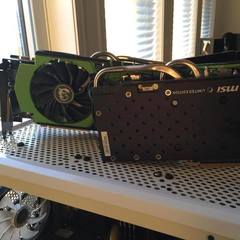
Ok so i just got my new 770 this evening and i remember seeing something about an optimal overclock on it as recommended by msi labs and i cant for the life of me find it again, if anyone knows what i mean and can help me out it would be much appreciated cause i wanna give it a try and see how it goes, as is i have +400 on the me and +65 on the core which boosts to 1306 and hasnt even broke 60c yet so i think i have lots of headroom here :)

Link to comment
https://linustechtips.com/topic/34316-msi-770-lightning-edition/
Share on other sites

Link to post
Share on other sites

Just keep pushing it as far as you can until it starts artifacting or hanging.

BRAIN: intel i5 4670k @ 4.0 ghz stock voltage. GPU: ZOTAC GTX 770*2, both @ 1300mhz core 7900mhz memory. 
CASE: custom painted Fractal Design R4.        SSD: Samsung 128GB 840 pro.    STORAGE: 2TB WD NAS.                 MOTHERBOARD: GIGABYTE z87x-ud3h
PSU: Corsair 760.    LIGHTS: NZXT hue.          FANS: 4 NZXT rifle bearing.          RAM: 2*4GB patriot black mamba.    CPU COOLER: Noctua NH C12P with NZXT 140mm fan.  

Link to comment
https://linustechtips.com/topic/34316-msi-770-lightning-edition/#findComment-443224
Share on other sites

Link to post
Share on other sites

MSİ twin frozr is one of the best coolers ive used so far (i used alot of them trust me) so you will hit nice numbers with it ;)

He is the hero this forum deserves but not the one it needs right now.So we'll hunt him because he can take it because he is not our hero he is a silent guardian 


a watchful protector A Dark Knight

Link to comment
https://linustechtips.com/topic/34316-msi-770-lightning-edition/#findComment-443236
Share on other sites

Link to post
Share on other sites

Just keep pushing it as far as you can until it starts artifacting or hanging.


MSİ twin frozr is one of the best coolers ive used so far (i used alot of them trust me) so you will hit nice numbers with it ;)

without touching voltages the best ive got is +75 on the core which boosted to i think it was 1326mhz or something like that and +400 on the mem before it hangs, might play with voltages a little bit later on since my temps are still really good and that fans arent even going over 40% so its been silent so far

Link to comment
https://linustechtips.com/topic/34316-msi-770-lightning-edition/#findComment-444089
Share on other sites

Link to post
Share on other sites

without touching voltages the best ive got is +75 on the core which boosted to i think it was 1326mhz or something like that and +400 on the mem before it hangs, might play with voltages a little bit later on since my temps are still really good and that fans arent even going over 40% so its been silent so far

nicee ;)

He is the hero this forum deserves but not the one it needs right now.So we'll hunt him because he can take it because he is not our hero he is a silent guardian 


a watchful protector A Dark Knight

Link to comment
https://linustechtips.com/topic/34316-msi-770-lightning-edition/#findComment-444786
Share on other sites

Link to post
Share on other sites

nicee ;)

yeah this card is well worth $489 plus tax lol :) thats what it costs in my local shop anyway. Playing crysis 3 on very high with low smaa at 1920x1080 no problem what so ever itll dip below to maybe 55 here and there but its more then playable, i think i might toss up a review and a few benchmark videos later on once i have a rock solid oc on it

Link to comment
https://linustechtips.com/topic/34316-msi-770-lightning-edition/#findComment-444820
Share on other sites

Link to post
Share on other sites

yeah this card is well worth $489 plus tax lol :) thats what it costs in my local shop anyway. Playing crysis 3 on very high with low smaa at 1920x1080 no problem what so ever itll dip below to maybe 55 here and there but its more then playable, i think i might toss up a review and a few benchmark videos later on once i have a rock solid oc on it

yea those overclocks you reached is really fascinating that shows how good MSİ TwinFrozr is i always been a fan of TwinFrozr over other coolers i had 2 7970 TwinFrozr in my old build they look amazing and cool amazing only reason why i didnt geet lihgtning was because it was yellow... im a looks>performance type of a person so i cant stand yellow on my icy white build :/

He is the hero this forum deserves but not the one it needs right now.So we'll hunt him because he can take it because he is not our hero he is a silent guardian 


a watchful protector A Dark Knight

Link to comment
https://linustechtips.com/topic/34316-msi-770-lightning-edition/#findComment-444828
Share on other sites

Link to post
Share on other sites

yea those overclocks you reached is really fascinating that shows how good MSİ TwinFrozr is i always been a fan of TwinFrozr over other coolers i had 2 7970 TwinFrozr in my old build they look amazing and cool amazing only reason why i didnt geet lihgtning was because it was yellow... im a looks>performance type of a person so i cant stand yellow on my icy white build :/

me to but its an mpower build this time round so it fits really well :) build before this was an rog board and directcuii top 680's

Link to comment
https://linustechtips.com/topic/34316-msi-770-lightning-edition/#findComment-444846
Share on other sites

Link to post
Share on other sites

Yesterday I bought the GTX 770 Lighting and it is superb. My last GPU was a HD 6970, which is not slow by any stretch of the imagination, but the GTX 770 Lighting is awesome. I got it running 1280Mhz on the core with boost 2.0 and 1900Mhz on the memory. Till now performance is impressive compared to the HD 6970. I saw up to 45% performance improvement in 3D Mark Vantage and 3D Mark 11.


I'm running the 320.49 driver from nVidia, however it still causes problems when playing Metro Last Light. I tried rolling back to one of the older drivers, but that just made it worse... Right now I'm installing the unofficial drivers for Windows 8.1 - 326.01. I really hope that nVidia has finally sorted thing out. I'll let you know it goes.


Edit: the Metro Last Light problem is still present... With the new 326.01 driver I'm not even able to pass 3D Mark Vantage with this overclock. I guess nVidia messed things up again. It seems that I'll be rolling back to the 320.49 drivers again.

CPU: AMD Ryzen 9 - 3900x @ 4.4GHz with a Custom Loop | MBO: ASUS Crosshair VI Extreme | RAM: 4x4GB Apacer 2666MHz overclocked to 3933MHz with OCZ Reaper HPC Heatsinks | GPU: PowerColor Red Devil 6900XT | SSDs: Intel 660P 512GB SSD and Intel 660P 1TB SSD | HDD: 2x WD Black 6TB and Seagate Backup Plus 8TB External Drive | PSU: Corsair RM1000i | Case: Cooler Master C700P Black Edition | Build Log: here

Link to comment
https://linustechtips.com/topic/34316-msi-770-lightning-edition/#findComment-445263
Share on other sites

Link to post
Share on other sites

Yesterday I bought the GTX 770 Lighting and it is superb. My last GPU was a HD 6970, which is not slow by any stretch of the imagination, but the GTX 770 Lighting is awesome. I got it running 1280Mhz on the core with boost 2.0 and 1900Mhz on the memory. Till now performance is impressive compared to the HD 6970. I saw up to 45% performance improvement in 3D Mark Vantage and 3D Mark 11.


I'm running the 320.49 driver from nVidia, however it still causes problems when playing Metro Last Light. I tried rolling back to one of the older drivers, but that just made it worse... Right now I'm installing the unofficial drivers for Windows 8.1 - 326.01. I really hope that nVidia has finally sorted thing out. I'll let you know it goes.


Edit: the Metro Last Light problem is still present... With the new 326.01 driver I'm not even able to pass 3D Mark Vantage with this overclock. I guess nVidia messed things up again. It seems that I'll be rolling back to the 320.49 drivers again.

i dont know what problem your having with metro last light but im able to play without issue, framerates arent exactly amazing but thats just how metro is

Link to comment
https://linustechtips.com/topic/34316-msi-770-lightning-edition/#findComment-446479
Share on other sites

Link to post
Share on other sites

Turns out that the problem was mainly MSI Afterburner, which showed incorrect values, however not only that, but also my initial incorrect perception that my overclock is stable. I had validated it with 3D Mark Vantage, which is very graphics demanding and I have used in the past, but it turned ot to be wrong in this particular case. Having that in mind, I installed EVGA Precision and did my OC with it. I managed to get 1267Mhz boost clock speeds and 1853Mhz on the memory. This time I tested it with Unigine Vally and also a bit gameplay with Metro Last Light. I have maxed out everything without the SSAA and running at 1920x1080 resolution and my FPS is around 70-85.


Does anyone have any idea how can I put a custom bios on the GTX 770 Lightning in order to push the core clock even further? I have seen people on other forums saying that they have done this, but they don't really explain how. 

CPU: AMD Ryzen 9 - 3900x @ 4.4GHz with a Custom Loop | MBO: ASUS Crosshair VI Extreme | RAM: 4x4GB Apacer 2666MHz overclocked to 3933MHz with OCZ Reaper HPC Heatsinks | GPU: PowerColor Red Devil 6900XT | SSDs: Intel 660P 512GB SSD and Intel 660P 1TB SSD | HDD: 2x WD Black 6TB and Seagate Backup Plus 8TB External Drive | PSU: Corsair RM1000i | Case: Cooler Master C700P Black Edition | Build Log: here

Link to comment
https://linustechtips.com/topic/34316-msi-770-lightning-edition/#findComment-446899
Share on other sites

Link to post
Share on other sites

Turns out that the problem was mainly MSI Afterburner, which showed incorrect values, however not only that, but also my initial incorrect perception that my overclock is stable. I had validated it with 3D Mark Vantage, which is very graphics demanding and I have used in the past, but it turned ot to be wrong in this particular case. Having that in mind, I installed EVGA Precision and did my OC with it. I managed to get 1267Mhz boost clock speeds and 1853Mhz on the memory. This time I tested it with Unigine Vally and also a bit gameplay with Metro Last Light. I have maxed out everything without the SSAA and running at 1920x1080 resolution and my FPS is around 70-85.


Does anyone have any idea how can I put a custom bios on the GTX 770 Lightning in order to push the core clock even further? I have seen people on other forums saying that they have done this, but they don't really explain how. 

you shouldnt need to with the lightning.. its already an unlocked bios, you have to download msi afternburner 3.0 beta 10 so that it well recognize that its a lightning edition then click settings and click unlock voltage and all that good stuff, im pushing over 1300mhz on mine with a mem of i think it was 1806 on the mem but i can check again, i dont use those synthetic bs benchmarks for stabilization testing, far cry 3 crysis 3 and metro lastlight are what you wanna be using. use the game engines you play on to test stability not a synthetic benchmark they are very different engines and whats stable on one wont be on the other, i yhavent even touched my voltages yet and im getting awesome numbers, just remember to max your power limit and keep the card at a reasonable temp

Link to comment
https://linustechtips.com/topic/34316-msi-770-lightning-edition/#findComment-446960
Share on other sites

Link to post
Share on other sites

you shouldnt need to with the lightning.. its already an unlocked bios, you have to download msi afternburner 3.0 beta 10 so that it well recognize that its a lightning edition then click settings and click unlock voltage and all that good stuff, im pushing over 1300mhz on mine with a mem of i think it was 1806 on the mem but i can check again, i dont use those synthetic bs benchmarks for stabilization testing, far cry 3 crysis 3 and metro lastlight are what you wanna be using. use the game engines you play on to test stability not a synthetic benchmark they are very different engines and whats stable on one wont be on the other, i yhavent even touched my voltages yet and im getting awesome numbers, just remember to max your power limit and keep the card at a reasonable temp

Thanks for the quick answer, however MSI Afterburner allowed me to get only +12 on the core. Yes it's more then the +9 which I have now with EVGA Precision, but with Afterburner I didn't really get any higher clock speeds, quite the contrary... I wasn't able to get the 1267Mhz, which I have now. Most probably I will be waiting for an official non-beta version to roll out and then try again, but for now I'll stick with EVGA Precision.

CPU: AMD Ryzen 9 - 3900x @ 4.4GHz with a Custom Loop | MBO: ASUS Crosshair VI Extreme | RAM: 4x4GB Apacer 2666MHz overclocked to 3933MHz with OCZ Reaper HPC Heatsinks | GPU: PowerColor Red Devil 6900XT | SSDs: Intel 660P 512GB SSD and Intel 660P 1TB SSD | HDD: 2x WD Black 6TB and Seagate Backup Plus 8TB External Drive | PSU: Corsair RM1000i | Case: Cooler Master C700P Black Edition | Build Log: here

Link to comment
https://linustechtips.com/topic/34316-msi-770-lightning-edition/#findComment-447003
Share on other sites

Link to post
Share on other sites

After several hours of overclocking with Afterburner 3.0.0 beta 10, I was able to push my card up to a boost clock of 1330Mhz (+100mV on the core), which in my opinion was completely and utterly ridiculous and my temps were hitting a good 80C. Did some benchmarks though. I didn't bother doing screen shots, because I'm very tired right now (it's 2am here) and just wanted to show you guys some numbers.   

@ 1330Mhz: Unigine Vally (Extreme HD preset) - 2154

                     3D Mark Vantage (P score) - 40295.5 

@ 1267Mhz: Unigine Vally (Extreme HD preset) - 2147

                     3D Mark Vantage (P score) - 39863.0


At the end of the day...

Is it faster?

- Yes, but only benchmark-wise.

Real world performance increase?

- Probably 1-2fps (best scenario).

Was it worth it?

- Definitely not! 

CPU: AMD Ryzen 9 - 3900x @ 4.4GHz with a Custom Loop | MBO: ASUS Crosshair VI Extreme | RAM: 4x4GB Apacer 2666MHz overclocked to 3933MHz with OCZ Reaper HPC Heatsinks | GPU: PowerColor Red Devil 6900XT | SSDs: Intel 660P 512GB SSD and Intel 660P 1TB SSD | HDD: 2x WD Black 6TB and Seagate Backup Plus 8TB External Drive | PSU: Corsair RM1000i | Case: Cooler Master C700P Black Edition | Build Log: here

Link to comment
https://linustechtips.com/topic/34316-msi-770-lightning-edition/#findComment-451952
Share on other sites

Link to post
Share on other sites

After several hours of overclocking with Afterburner 3.0.0 beta 10, I was able to push my card up to a boost clock of 1330Mhz (+100mV on the core), which in my opinion was completely and utterly ridiculous and my temps were hitting a good 80C. Did some benchmarks though. I didn't bother doing screen shots, because I'm very tired right now (it's 2am here) and just wanted to show you guys some numbers.   

@ 1330Mhz: Unigine Vally (Extreme HD preset) - 2154

                     3D Mark Vantage (P score) - 40295.5 

@ 1267Mhz: Unigine Vally (Extreme HD preset) - 2147

                     3D Mark Vantage (P score) - 39863.0


At the end of the day...

Is it faster?

- Yes, but only benchmark-wise.

Real world performance increase?

- Probably 1-2fps (best scenario).

Was it worth it?

- Definitely not! 

interesting numbers actually, ive been away at the lake for the past three days so i havent had a chance to tweak or play with mine as yet but without touching voltages im getting 1327mhz on the core and not breaking 60c and have a +400 mem offset as well

Link to comment
https://linustechtips.com/topic/34316-msi-770-lightning-edition/#findComment-460252
Share on other sites

Link to post
Share on other sites

interesting numbers actually, ive been away at the lake for the past three days so i havent had a chance to tweak or play with mine as yet but without touching voltages im getting 1327mhz on the core and not breaking 60c and have a +400 mem offset as well

There where some changes in the situation, but nevertheless the main problem is that obviously my card is a mid-range overclocker.


So I tried dropping the clock speeds a bit to +80 and I was able to drop the core voltage to +56mV. I also managed to hit 8 GHz on the memory. The max temps are around 71C with a custom fan profile, however not a very aggressive one. It's been 100% stable till now. Yesterday I had an insane 3 hour game session of Metro Last Light with this overclock (1306MHz/2000Mhz). After that I left Unigine loop vor 40 minutes.


The only thing that concerns me is the TDP. Afterburner was showing me that the max TDP was 105%. Will that cause any damage to the card in the longer run?  

CPU: AMD Ryzen 9 - 3900x @ 4.4GHz with a Custom Loop | MBO: ASUS Crosshair VI Extreme | RAM: 4x4GB Apacer 2666MHz overclocked to 3933MHz with OCZ Reaper HPC Heatsinks | GPU: PowerColor Red Devil 6900XT | SSDs: Intel 660P 512GB SSD and Intel 660P 1TB SSD | HDD: 2x WD Black 6TB and Seagate Backup Plus 8TB External Drive | PSU: Corsair RM1000i | Case: Cooler Master C700P Black Edition | Build Log: here

Link to comment
https://linustechtips.com/topic/34316-msi-770-lightning-edition/#findComment-460997
Share on other sites

Link to post
Share on other sites

There where some changes in the situation, but nevertheless the main problem is that obviously my card is a mid-range overclocker.


So I tried dropping the clock speeds a bit to +80 and I was able to drop the core voltage to +56mV. I also managed to hit 8 GHz on the memory. The max temps are around 71C with a custom fan profile, however not a very aggressive one. It's been 100% stable till now. Yesterday I had an insane 3 hour game session of Metro Last Light with this overclock (1306MHz/2000Mhz). After that I left Unigine loop vor 40 minutes.


The only thing that concerns me is the TDP. Afterburner was showing me that the max TDP was 105%. Will that cause any damage to the card in the longer run?  

not that im aware of, as long as your temps are within reason which to me is below the 90's then it should be fine :)

Link to comment
https://linustechtips.com/topic/34316-msi-770-lightning-edition/#findComment-463050
Share on other sites

Link to post
Share on other sites

not that im aware of, as long as your temps are within reason which to me is below the 90's then it should be fine :)

Thanks man! You have been very helpful. :)

CPU: AMD Ryzen 9 - 3900x @ 4.4GHz with a Custom Loop | MBO: ASUS Crosshair VI Extreme | RAM: 4x4GB Apacer 2666MHz overclocked to 3933MHz with OCZ Reaper HPC Heatsinks | GPU: PowerColor Red Devil 6900XT | SSDs: Intel 660P 512GB SSD and Intel 660P 1TB SSD | HDD: 2x WD Black 6TB and Seagate Backup Plus 8TB External Drive | PSU: Corsair RM1000i | Case: Cooler Master C700P Black Edition | Build Log: here

Link to comment
https://linustechtips.com/topic/34316-msi-770-lightning-edition/#findComment-463060
Share on other sites

Link to post
Share on other sites

Im gonna buy the msi 770 lightning edition soon and would really appreciate if you could tell me some of the questions i have been wondering about


Do you want to overclock this graphic card any different than the other msi models cause it has gpu boost 2.0? 

And what is the most important thing to overclock? core clock, shader clock, or memory clock. 

is it also bad to let the fans be at 100 % all the time? cause i dont really care about the noise it makes, or will it not be so healthy for them?


im gonna get really happy if i could get some answers :) 

Link to comment
https://linustechtips.com/topic/34316-msi-770-lightning-edition/#findComment-466857
Share on other sites

Link to post
Share on other sites

Im gonna buy the msi 770 lightning edition soon and would really appreciate if you could tell me some of the questions i have been wondering about


Do you want to overclock this graphic card any different than the other msi models cause it has gpu boost 2.0? 

And what is the most important thing to overclock? core clock, shader clock, or memory clock. 

is it also bad to let the fans be at 100 % all the time? cause i dont really care about the noise it makes, or will it not be so healthy for them?


im gonna get really happy if i could get some answers :)

1) you overclock it the same as any other card with msi afterburner or any other ocing software if you prefer.

2) the most important thing is to get a good balance of all of those things at once, but i would start by overclocking the core first then the memory after.

3)there wouldn't be a point running your fans at 100% unless it is getting very hot. you can also set up your own fan profile so that they keep the card cooler than the stock profile if you needed or wanted to. 

Rig Specs:

AMD Threadripper 5990WX@4.8Ghz

Asus Zenith III Extreme

Asrock OC Formula 7970XTX Quadfire

G.Skill Ripheartout X OC 7000Mhz C28 DDR5 4X16GB  

Super Flower Power Leadex 2000W Psu's X2

Harrynowl's 775/771 OC and mod guide: http://linustechtips.com/main/topic/232325-lga775-core2duo-core2quad-overclocking-guide/ http://linustechtips.com/main/topic/365998-mod-lga771-to-lga775-cpu-modification-tutorial/

ProKoN haswell/DC OC guide: http://linustechtips.com/main/topic/41234-intel-haswell-4670k-4770k-overclocking-guide/


"desperate for just a bit more money to watercool, the titan x would be thankful" Carter -2016

Link to comment
https://linustechtips.com/topic/34316-msi-770-lightning-edition/#findComment-466948
Share on other sites

Link to post
Share on other sites

Im gonna buy the msi 770 lightning edition soon and would really appreciate if you could tell me some of the questions i have been wondering about


Do you want to overclock this graphic card any different than the other msi models cause it has gpu boost 2.0? 

And what is the most important thing to overclock? core clock, shader clock, or memory clock. 

is it also bad to let the fans be at 100 % all the time? cause i dont really care about the noise it makes, or will it not be so healthy for them?


im gonna get really happy if i could get some answers :)

jumper pretty much nailed it on the head :) just remember to increase power limit to its max (109%) and overclock it like you would any other card

Link to comment
https://linustechtips.com/topic/34316-msi-770-lightning-edition/#findComment-467230
Share on other sites

Link to post
Share on other sites

1) you overclock it the same as any other card with msi afterburner or any other ocing software if you prefer.

2) the most important thing is to get a good balance of all of those things at once, but i would start by overclocking the core first then the memory after.

3)there wouldn't be a point running your fans at 100% unless it is getting very hot. you can also set up your own fan profile so that they keep the card cooler than the stock profile if you needed or wanted to. 

Ty. But i was thinking if you overclock it alot and the only problem you have is that it is getting too hot you would go in and increase the speed of your fans right?

Link to comment
https://linustechtips.com/topic/34316-msi-770-lightning-edition/#findComment-467312
Share on other sites

Link to post
Share on other sites

Ty. But i was thinking if you overclock it alot and the only problem you have is that it is getting too hot you would go in and increase the speed of your fans right?

they speed up by themselves as the card gets hotter. if it still gets too hot you can use speed fan or msi afterburner to set up a fan profile that makes the fans speed up faster or higher. if it still gets too hot the you can just put it back down to a slower clock speed and lower voltage.

Rig Specs:

AMD Threadripper 5990WX@4.8Ghz

Asus Zenith III Extreme

Asrock OC Formula 7970XTX Quadfire

G.Skill Ripheartout X OC 7000Mhz C28 DDR5 4X16GB  

Super Flower Power Leadex 2000W Psu's X2

Harrynowl's 775/771 OC and mod guide: http://linustechtips.com/main/topic/232325-lga775-core2duo-core2quad-overclocking-guide/ http://linustechtips.com/main/topic/365998-mod-lga771-to-lga775-cpu-modification-tutorial/

ProKoN haswell/DC OC guide: http://linustechtips.com/main/topic/41234-intel-haswell-4670k-4770k-overclocking-guide/


"desperate for just a bit more money to watercool, the titan x would be thankful" Carter -2016

Link to comment
https://linustechtips.com/topic/34316-msi-770-lightning-edition/#findComment-467406
Share on other sites

Link to post
Share on other sites

  • 1 month later...

Im gonna buy the msi 770 lightning edition soon and would really appreciate if you could tell me some of the questions i have been wondering about


Do you want to overclock this graphic card any different than the other msi models cause it has gpu boost 2.0? 

And what is the most important thing to overclock? core clock, shader clock, or memory clock. 

is it also bad to let the fans be at 100 % all the time? cause i dont really care about the noise it makes, or will it not be so healthy for them?


im gonna get really happy if i could get some answers :)

Fan can be set to 100% all the time if you really want wont make much difference, all 700 series cards have gpu boost 2.0 but you overclock them in the same manner as you did a 600 series card. whats more important to oc is dependent mostly on the game as each engine will benefit more from different things you just gotta play with it

Link to comment
https://linustechtips.com/topic/34316-msi-770-lightning-edition/#findComment-658253
Share on other sites

Link to post
Share on other sites

Create an account or sign in to comment

You need to be a member in order to leave a comment

Create an account

Sign up for a new account in our community. It's easy!

Register a new account

Sign in

Already have an account? Sign in here.

Sign In Now

×