Jump to content

Anyone using GIMP?

Go to solution Solved by alpenwasser,

@Gilbernata

As has been mentioned, the game engine likely won't support it, but

that shouldn't stop you from seeing what happens if you try. :D

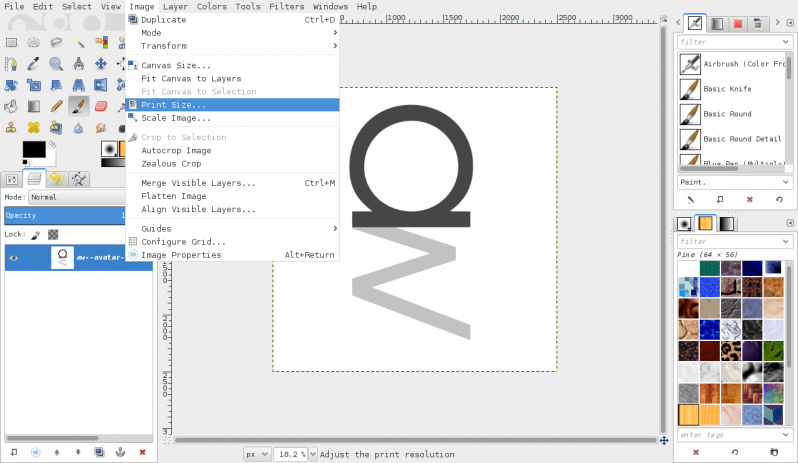
As for scaling images, as Ubuntu mentioned, there's a tool for that,

in my version of GIMP it's in the "image" menu (right below the blue

selection box, sorry, I moved the mouse cursor while taking the

screenshot, but I'm sure you'll be able to see it nonetheless ;)).

2014-12-13--11-51-43--screenshot.png

As a side note, if you want, you can have all the stuff in a single window

in modern GIMP versions, "Windows" menu -> "Single-Window Mode". Not that

you need to, but I know quite a few people who prefer it that way and

were annoyed by the multiple-window paradigm which is default, so just in

case you want to try it out:
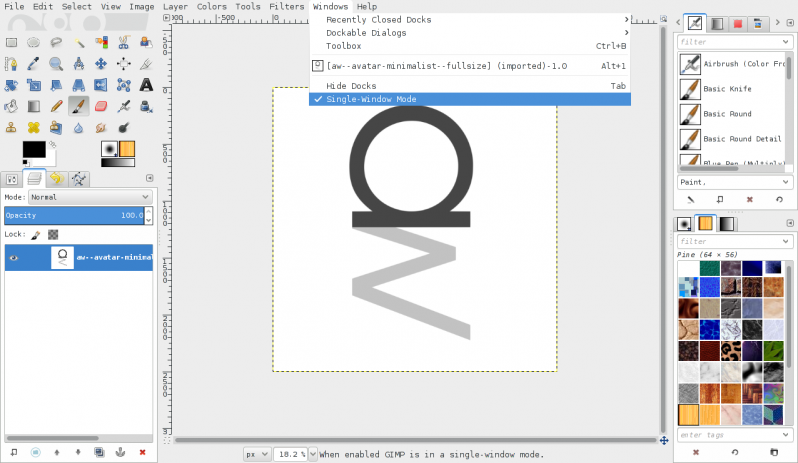
2014-12-13--11-52-24--screenshot.png

Also, in general, for most "standard" things one might want to do, the

documentation for GIMP is actually pretty good IME, so if you really want to

get into it, there's lots of reading material to be found.

So im modifying textures in an early 2000s game. Is it possible to upgrade the resolution of a single texture from 64x64 to something a little higher? or would that mess up the game?

post-48917-0-45497100-1418448448.png

GILBERNATA

"They will suck your energy from you -- the energy you call money and will put it to evil ends giving you worthless dross in return, Your inner self will protect you from this."

Link to comment
https://linustechtips.com/topic/269226-anyone-using-gimp/
Share on other sites

Link to post
Share on other sites

The games engine likely wouldn't support it, however, as long as you backup the files there's no harm in trying. Report back with results :)

export PS1='\[\033[1;30m\]┌╼ \[\033[1;32m\]\u@\h\[\033[1;30m\] ╾╼ \[\033[0;34m\]\w\[\033[0;36m\]\n\[\033[1;30m\]└╼ \[\033[1;37m\]'


"All your threads are belong to /dev/null"


| 80's Terminal Keyboard Conversion | $5 Graphics Card Silence Mod Tutorial | 485KH/s R9 270X | The Smallest Ethernet Cable | Ass Pennies | My Screenfetch |

Link to comment
https://linustechtips.com/topic/269226-anyone-using-gimp/#findComment-3655856
Share on other sites

Link to post
Share on other sites

The games engine likely wouldn't support it, however, as long as you backup the files there's no harm in trying. Report back with results :)

Im quite new to gimp so how do i increase the pixel count on my bricks texture? thanks :P

GILBERNATA

"They will suck your energy from you -- the energy you call money and will put it to evil ends giving you worthless dross in return, Your inner self will protect you from this."

Link to comment
https://linustechtips.com/topic/269226-anyone-using-gimp/#findComment-3655961
Share on other sites

Link to post
Share on other sites

Im quite new to gimp so how do i increase the pixel count on my bricks texture? thanks :P

What happens is it confines the picture to that 64x64 square no matter how large i scale it

GILBERNATA

"They will suck your energy from you -- the energy you call money and will put it to evil ends giving you worthless dross in return, Your inner self will protect you from this."

Link to comment
https://linustechtips.com/topic/269226-anyone-using-gimp/#findComment-3656003
Share on other sites

Link to post
Share on other sites

http://imgur.com/SMPxGsR heres the problem. that white area will not go away and its as if my images are hidden under it. any ideas?

GILBERNATA

"They will suck your energy from you -- the energy you call money and will put it to evil ends giving you worthless dross in return, Your inner self will protect you from this."

Link to comment
https://linustechtips.com/topic/269226-anyone-using-gimp/#findComment-3656064
Share on other sites

Link to post
Share on other sites

@Gilbernata

As has been mentioned, the game engine likely won't support it, but

that shouldn't stop you from seeing what happens if you try. :D

As for scaling images, as Ubuntu mentioned, there's a tool for that,

in my version of GIMP it's in the "image" menu (right below the blue

selection box, sorry, I moved the mouse cursor while taking the

screenshot, but I'm sure you'll be able to see it nonetheless ;)).

2014-12-13--11-51-43--screenshot.png

As a side note, if you want, you can have all the stuff in a single window

in modern GIMP versions, "Windows" menu -> "Single-Window Mode". Not that

you need to, but I know quite a few people who prefer it that way and

were annoyed by the multiple-window paradigm which is default, so just in

case you want to try it out:

2014-12-13--11-52-24--screenshot.png

Also, in general, for most "standard" things one might want to do, the

documentation for GIMP is actually pretty good IME, so if you really want to

get into it, there's lots of reading material to be found.

BUILD LOGS: HELIOS - Latest Update: 2015-SEP-06 ::: ZEUS - BOTW 2013-JUN-28 ::: APOLLO - Complete: 2014-MAY-10
OTHER STUFF: Cable Lacing Tutorial ::: What Is ZFS? ::: mincss Primer ::: LSI RAID Card Flashing Tutorial
FORUM INFO: Community Standards ::: The Moderating Team ::: 10TB+ Storage Showoff Topic

Link to comment
https://linustechtips.com/topic/269226-anyone-using-gimp/#findComment-3657013
Share on other sites

Link to post
Share on other sites

Thanks a lot 

alpenwasser

I appreciate the very detailed reply! 

I will be trying this! it will be interesting to see if an early 2000s game engine will support it. If not then im thinking ill have to do A LOT of research and try and learn how, and if it is possible to use an engine from a different game or something. (im probably kidding myself if i think i can do this)

GILBERNATA

"They will suck your energy from you -- the energy you call money and will put it to evil ends giving you worthless dross in return, Your inner self will protect you from this."

Link to comment
https://linustechtips.com/topic/269226-anyone-using-gimp/#findComment-3659327
Share on other sites

Link to post
Share on other sites

Unless you are making the game you posted in the wrong section

CPU: i7 4770k | GPU: Sapphire 290 Tri-X OC | RAM: Corsair Vengeance LP 2x8GB | MTB: GA-Z87X-UD5HCOOLER: Noctua NH-D14 | PSU: Corsair 760i | CASE: Corsair 550D | DISPLAY:  BenQ XL2420TE


Firestrike scores - Graphics: 10781 Physics: 9448 Combined: 4289


"Nvidia, Fuck you" - Linus Torvald

Link to comment
https://linustechtips.com/topic/269226-anyone-using-gimp/#findComment-3663106
Share on other sites

Link to post
Share on other sites

Create an account or sign in to comment

You need to be a member in order to leave a comment

Create an account

Sign up for a new account in our community. It's easy!

Register a new account

Sign in

Already have an account? Sign in here.

Sign In Now

×