
Jump to content

NZXT H440 LED

Go to solution Solved by W-L,

Ah..how do I connect it to power? sorry im new to building pcs. I connected the molex cable that came with the usb 3 and front headers to the psu already...there was one 3 pin connectors thats still not connected to anything. thanks for you reply by the way


No problem, just follow the wire that runs into the power unit so the 2 pins on the left in the photo, it should lead to a molex power and a small button on the back of the tower to turn it all on and off make sure that button is on and the board is plugged in.
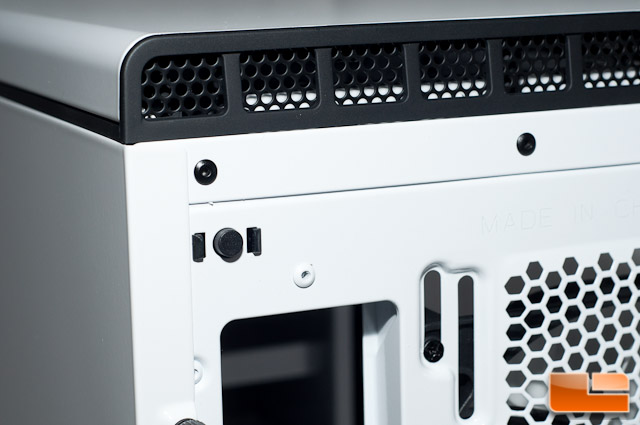
 

nzxt_h440_23.jpg

Hello my nzxt h440 power supply cover LED doesn't light up. I'm pretty sure I have all the front panel connectors right. Can anyone please help me?

I have a msi g55 x97 sli motherboard and a 650w evga supernova power supply.


There should be a small LED module board on the back of the motherboard tray make sure that is connected to power, the front panel connectors are not invoked in powering the LED's.


Just for reference (near the top of the motherboard tray on the back);

nzxt_h440_21.jpg

Link to comment
https://linustechtips.com/topic/249841-nzxt-h440-led/#findComment-3425855
Share on other sites

Link to post
Share on other sites

Ah..how do I connect it to power? sorry im new to building pcs. I connected the molex cable that came with the usb 3 and front headers to the psu already...there was one 3 pin connectors thats still not connected to anything. thanks for you reply by the way

Link to comment
https://linustechtips.com/topic/249841-nzxt-h440-led/#findComment-3425871
Share on other sites

Link to post
Share on other sites

Ah..how do I connect it to power? sorry im new to building pcs. I connected the molex cable that came with the usb 3 and front headers to the psu already...there was one 3 pin connectors thats still not connected to anything. thanks for you reply by the way


No problem, just follow the wire that runs into the power unit so the 2 pins on the left in the photo, it should lead to a molex power and a small button on the back of the tower to turn it all on and off make sure that button is on and the board is plugged in.


nzxt_h440_23.jpg

Edited by W-L
Link to comment
https://linustechtips.com/topic/249841-nzxt-h440-led/#findComment-3425888
Share on other sites

Link to post
Share on other sites

thank you again so much!

Just have to say, nice choice on case. I'm planning to get the H440 for my planned build next year. What colour did you get? I'm personally going for the White/black colour myself. :)

ON A 7 MONTH BREAK FROM THESE LTT FORUMS. WILL BE BACK ON NOVEMBER 5th.


Advisor in the 'Displays' Sub-forum | Sony Vegas Pro Enthusiast & Advisor


  Tech Tips Christian Fellowship Founder & Coordinator 

Link to comment
https://linustechtips.com/topic/249841-nzxt-h440-led/#findComment-3425946
Share on other sites

Link to post
Share on other sites

Create an account or sign in to comment

You need to be a member in order to leave a comment

Create an account

Sign up for a new account in our community. It's easy!

Register a new account

Sign in

Already have an account? Sign in here.

Sign In Now

×


