
Jump to content

Shorted PSU / Recommend Extensions please

Go to solution Solved by Guest,
3 hours ago, Overheal said:

im not seeing that: these cables are collared up top at the shrinkwrap point. You mean re-sleeve the entire cable? 

I don't know what cables you're looking at.


The aftermarket Corsair cables have no shrinkwrap.
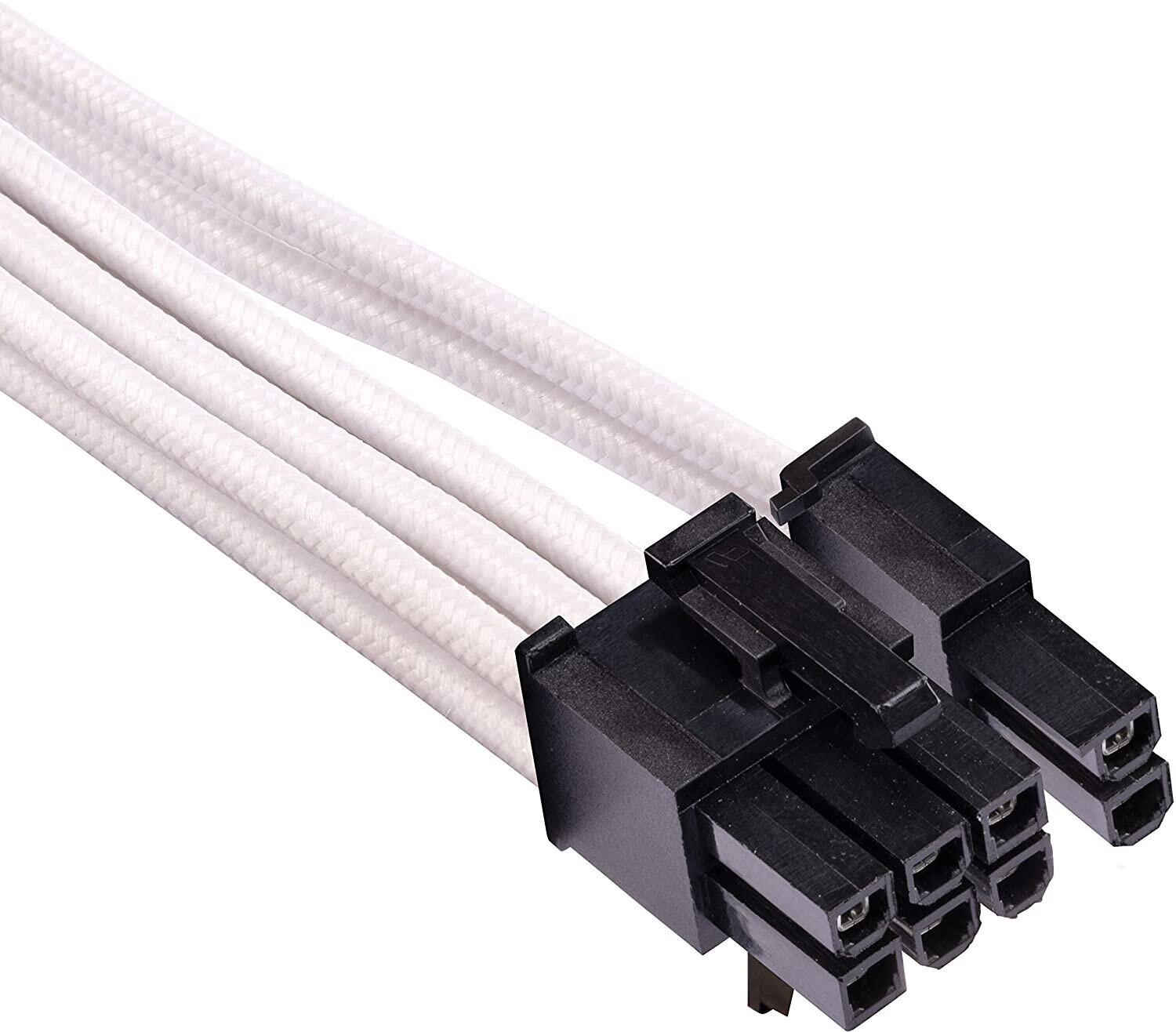
 

Buy Corsair Premium Individually Sleeved PCIe Cables (Dual Connector) Type 4  Gen 4 - White online Worldwide - Tejar.com

And neither are the cables from any of the other companies I have listed.

 

Ho boy. 


Went to bed last night after playing Raft. Left the PC on the desktop. In the morning, my office and the adjacent bathroom had no power. Couldn’t see any broken circuits at the panel. Googling around it was suggesting this might be a phase outage. Was advised to unplug anything since a brownout might damage components. So I did.


Maintenance shows up and they show me a flipped circuit. Huh. Very sure I looked for that. But one was half tripped (now anyway).

So I plug the PC surge protector back in and trip.


Unplugging the PC, everything else worked fine on the surge protector, monitors speakers etc. but plug in the PC, trip. Change the power supply cable, trip.

So I unplugged the GPU. Trip. Unplugged the motherboard. Trip. Isolate the PSU test cap. Trip. After the first couple tests I could use the kill switch on the PSU but now it’s stuck on. I push against the switch and it just pops back to on, even while unplugged (and it just trips the circuit). Is the capacitor ‘hot?’


May be a closeup


So now I’ve also noticed the left (-_-) male prong on the PSU has a damaged tip now. Evidence of an arc event. Tip now has a very rough looking surface. No component burn smell from the unit. No sign of damage in the unit visible. No dust no foreign objects no moisture event. I checked the cable: only the 2nd cable has pin damage on the female end (it’s copper the other cable was not). This was after I isolated the PSU from the downstream parts.


What caused this, possibly, and what is the likelihood my computer components were saved by over current protection? From what I gathered, seeing no other damage, blown caps anywhere inside the PC or the PSU, etc etc. that it shorted to ground, somehow. But, would like to pick the community's experienced hivemind. Are there diagnostics I can perform to confirm there are no hidden power issues now? 


Specs:


Seasonic Focus GM-750 80+ gold

Asrock Taichi X570

AMD Ryzen 5600X

AMD R9 390 8GB (old boy, awful buyers market)

M.2 1TB SSD

16 GB DDR4


There have been AMD driver crashes lately since playing star citizen that I couldn’t pin down. Happens occasionally every day or so. All chipset etc drivers up to date. I did notice a couple of these driver hang ups last night at the desktop. So, not sure if that’s eg. A card issue, or a power supply irregularity issue.


ANYWAY - Ran out this morning (Seasonic PSU still won't click to OFF) and got a Corsair RM850x. Wired it up and... I reused the seasonic SATA power cable for the case LEDs (BE Quiet! Purebase 500DX Black) aaaaaaand.... system booting great but smoke billowed out and I unplugged it.


tenor.gif


Traced it to the 3 Pin LED controller on the motherboard to the front panel (BQ case uses a modular cable for both the PowerLED and Powerbutton, Case RGB power, and case RGB 3 pin controller). So, that 3 pin wire melted. 


Sigh. Already contact BQ for a replacement cable. PC was running fine, wire looked .... servicable - no shorts to the paired wire, just one section exposed copper to tape up. So I did try to plug the 3 pin in again, since the power button, RGB etc. all worked, this 3 pin just lets the Motherboard change the colors. Well when I did that the whole computer took a second or two before it legit froze cold. No BSOD no nothing just frozen with no audio. I'm thinking I don't need that (Because if you have the Taichi - holy crap, it's RGB software is useless and crashes constantly). But does this mean I have a short in the 3 pin on the motherboard? It's running fine otherwise. 

Finally: I like the RM850x because now I do have the extra cabling to fill out the MoBo's power ports to the CPU (I was told it didn't matter before, but meh) so it now has the 24 pin, an 8 pin, and a 4 pin on the Mobo. The PCIe cables, not so much. Ugly cables with loose connectors that ruin my cable management. The R9 390 takes a 8 pin and a 6 pin. Can someone point me in the direction of a matching 6-pin (not 6+2) and an 8, and a 24 pin extension? Not as worried about the CPU power cables, they're barely noticeable and not a hinerance, but a 4-pin only CPU extension would be nice to hide that handing +4 plug I have showing in the corner. I tried searching for these but wasn't having luck on google, newegg, amazon etc. 


Thanks in advance. 

Link to comment
https://linustechtips.com/topic/1379753-shorted-psu-recommend-extensions-please/
Share on other sites

Link to post
Share on other sites

1 hour ago, Overheal said:

Ho boy. 


Went to bed last night after playing Raft. Left the PC on the desktop. In the morning, my office and the adjacent bathroom had no power. Couldn’t see any broken circuits at the panel. Googling around it was suggesting this might be a phase outage. Was advised to unplug anything since a brownout might damage components. So I did.


Maintenance shows up and they show me a flipped circuit. Huh. Very sure I looked for that. But one was half tripped (now anyway).

So I plug the PC surge protector back in and trip.


Unplugging the PC, everything else worked fine on the surge protector, monitors speakers etc. but plug in the PC, trip. Change the power supply cable, trip.

So I unplugged the GPU. Trip. Unplugged the motherboard. Trip. Isolate the PSU test cap. Trip. After the first couple tests I could use the kill switch on the PSU but now it’s stuck on. I push against the switch and it just pops back to on, even while unplugged (and it just trips the circuit). Is the capacitor ‘hot?’


ANYWAY - Ran out this morning (Seasonic PSU still won't click to OFF) and got a Corsair RM850x. Wired it up and... I reused the seasonic SATA power cable for the case LEDs (BE Quiet! Purebase 500DX Black) aaaaaaand.... system booting great but smoke billowed out and I unplugged it.


Not going to sugar coat it.  That was a stupid thing to do.

1 hour ago, Overheal said:

Finally: I like the RM850x because now I do have the extra cabling to fill out the MoBo's power ports to the CPU (I was told it didn't matter before, but meh) so it now has the 24 pin, an 8 pin, and a 4 pin on the Mobo. The PCIe cables, not so much. Ugly cables with loose connectors that ruin my cable management.

This is also a bad idea.  Don't get extensions.  You get replacement cables that suit your needs.


Link to post
Share on other sites

1 hour ago, jonnyGURU said:

Not going to sugar coat it.  That was a stupid thing to do.

This is also a bad idea.  Don't get extensions.  You get replacement cables that suit your needs.


Corsair doesn't sell bespoke cables like that (eg. 4 pin CPU, 6 pin only PCIe, etc). What would you recommend. 

Link to post
Share on other sites

30 minutes ago, Overheal said:

Corsair doesn't sell bespoke cables like that (eg. 4 pin CPU, 6 pin only PCIe, etc). What would you recommend. 

CableMod, ModDIY, Titan Rig, PC Mods.....


Also, while the Corsair brand cables are 6+2 and not just 6, the +2 is not daisy chained to the 6 and can be pulled all the way back and hidden.  Likewise with the 4+4 for the CPU.


Link to post
Share on other sites

6 hours ago, Overheal said:

ANYWAY - Ran out this morning (Seasonic PSU still won't click to OFF) and got a Corsair RM850x. Wired it up and... I reused the seasonic SATA power cable for the case LEDs (BE Quiet! Purebase 500DX Black) aaaaaaand.... system booting great but smoke billowed out and I unplugged it.

Never use cables from different power supplies. Only use the cables that come included with the power supply. Unfortunately you had to learn the lesson the hard way. At least it was only the case RGB strip you killed and not your storage drives.


As for the dead Seasonic power supply, send it back to Seasonic for a replacement. Since you've already bought the RMx keep that and sell the replacement Seasonic PSU (or keep it if you have another system you can use it in).

CPU: Intel i7 6700k  | Motherboard: Gigabyte Z170x Gaming 5 | RAM: 2x16GB 3000MHz Corsair Vengeance LPX | GPU: Gigabyte Aorus GTX 1080ti | PSU: Corsair RM750x (2018) | Case: BeQuiet SilentBase 800 | Cooler: Arctic Freezer 34 eSports | SSD: Samsung 970 Evo 500GB + Samsung 840 500GB + Crucial MX500 2TB | Monitor: Acer Predator XB271HU + Samsung BX2450

Link to post
Share on other sites

15 hours ago, Spotty said:

Never use cables from different power supplies. Only use the cables that come included with the power supply. Unfortunately you had to learn the lesson the hard way. At least it was only the case RGB strip you killed and not your storage drives.


As for the dead Seasonic power supply, send it back to Seasonic for a replacement. Since you've already bought the RMx keep that and sell the replacement Seasonic PSU (or keep it if you have another system you can use it in).

Yep, learned an important lesson, very quickly. Didn't even kill the RGBs! Which is crazy. All I know is I'm not plugging that 3 pin back in though lol. The case runs its own RGB presets without it, it was only for using software to change the patterns/react to gameplay. 

Will use the RMA in another build. 

Link to post
Share on other sites

17 hours ago, jonnyGURU said:

CableMod, ModDIY, Titan Rig, PC Mods.....


Also, while the Corsair brand cables are 6+2 and not just 6, the +2 is not daisy chained to the 6 and can be pulled all the way back and hidden.  Likewise with the 4+4 for the CPU.


im not seeing that: these cables are collared up top at the shrinkwrap point. You mean re-sleeve the entire cable? 

Link to post
Share on other sites

3 hours ago, Overheal said:

im not seeing that: these cables are collared up top at the shrinkwrap point. You mean re-sleeve the entire cable? 

I don't know what cables you're looking at.


The aftermarket Corsair cables have no shrinkwrap.


Buy Corsair Premium Individually Sleeved PCIe Cables (Dual Connector) Type 4  Gen 4 - White online Worldwide - Tejar.com

And neither are the cables from any of the other companies I have listed.


Link to post
Share on other sites

20 hours ago, jonnyGURU said:

I don't know what cables you're looking at.


The aftermarket Corsair cables have no shrinkwrap.


Buy Corsair Premium Individually Sleeved PCIe Cables (Dual Connector) Type 4  Gen 4 - White online Worldwide - Tejar.com

And neither are the cables from any of the other companies I have listed.


thought you meant the included cables. thanks. 

Link to post
Share on other sites

Create an account or sign in to comment

You need to be a member in order to leave a comment

Create an account

Sign up for a new account in our community. It's easy!

Register a new account

Sign in

Already have an account? Sign in here.

Sign In Now

×







