
Jump to content

Hardware Combination HELP

Go to solution Solved by mariushm,

Hi from a fellow Romanian.


You probably mean B520 motherboard, or A320 motherboard ... B420 doesn't exist. 


edit : just read your post a second time, and I see now you already have the CPU + motherboard.. weird how you don't have ram from old pc in that case... or cpu cooler. the paragraph below was written assuming you want to buy cpu and motherboard. 


If A320, I recommend NOT buying one, because you wouldn't be able to upgrade to Ryzen 5xxx processors in the future.  Also, they usually have no heatsinks or basic heatsinks on vrm, so forget about overclocking or good support for 8+ core processors, and there's only 2 slots of ram, and minimal usb connectors..


If B520, double check that Ryzen 2400 is supported... I'm not sure it is.  I think only Ryzen 3xxx and 5xxx are supported on B520 / B550 chipset 


2400g has integrated graphics and because of this, there's only 8 pci-e lanes for video cards, besides the 4 pci-e lanes going to the m.2 connector.

This means that any video card you'll put in the slot, it will run at most at pci-e x8 so there will be a tiny loss of performance (maybe less than 1%)


Since you'll buy a separate video card, maybe consider getting a Ryzen 1600 AF or 2600  (six core , twelve threads) because then you'll have more performance and 16 pci-e lanes for video cards.


RAM... Ryzen processors really like higher frequencies... ideally aim for 3600 mhz, but 3200 should still be fine. There is a small performance bump from 3000 to 3200, but less of a jump from 3200 to 3600.  if your budget is tight, you can go for just one stick, work with less performance due to single chanel mode, and then buy a second stick when you have more cash. Dual channel mode does help and gives you a performance boost, but if money is tight, you can live with just a stick for a short period.


For example, you'd be better off spending those 20-25$ (a 8 gb stick) on a better motherboard and suffer for 1-2 months with a single 8 GB stick until you find 20-25$ to buy a 2nd stick. There's nothing special about ram sticks sold as a dual channel kit, you can buy individual sticks.


You DO NOT need a 700w power supply ... it's ok if you already have one but otherwise it's really not needed... the processor consumes maybe 60-80w, the video card maybe 100 watts, the motherboard and everything else around 20-30 watts. 

Even with a video card that consumes 200-250 watts, your whole computer will still consume less than 400w, so even a 500-550w psu will be plenty. 

A GOOD 550w power supply should work up to a RTX 3070 ( a bit borderline, but doable) ... 


Not sure if you can get 60fps in all those games with 1650, which is around 5-15% weaker than a RX 570  video card from AMD (though the AMD card consumes more power, something like 180 watts compared to 70-80 watts or so)

You can see a review here and a comparison with other video cards : https://www.techpowerup.com/review/msi-geforce-gtx-1650-gaming-x/27.html


By the way, if you don't have the card already and you plan to buy a used one, I happen to have a RX 570 4 GB I don't use, so if interested send me a private message and maybe we can work out something. 
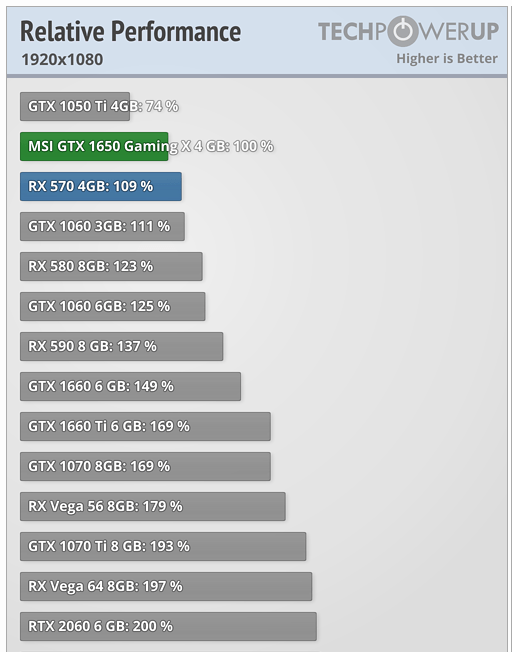
 

image.png.8849ae44d8a4902540223e8aa5c0f23b.png


Im no expert but im trying to make an pc. So i tought you guys here will help me. Thx


Bare in mind im from Romania, i dont speak english very well and prices are high af, but im trying to make this build max 1k dollars. 

(cpu, motherboard, kingston ssd, Hdd are from my old pc) 


I currently plan to build this:


-Ryzen 5 2400g (should i oc?) 

-No Stock Coller lol

-MSI GTX 1650 XS OC GDDR6 4GB 128bit

-Corsair Vengeance 2x8GB 3000mhz Dual Channel

-B420 Gigabyte Motherboard(yes i will use fan splitter) 

-3 fans on case(2 pull 1 push) 

-SilentiumPC 700w +Bronze 89% Efficency 

-WD Blue M.2 SSD 500gb read 2400 write 1750,  Kingstone SSD 240gb, Baracuda 1TB Hdd

-Standar case


I doesnt matter RGB or not, but it should be just a single/two color theme but its ok if the the theme is off, i care more about the Performance. 


I searched up and there is no bottleneck. 


I want to play 1080p 60Hz:

CSGO,R6S,GTA V, Minecraft, Apex Legends, PUBG, StarWars, Batman Arkham Knight/City etc, BattleField 1&4&5, COD Cold War, Warzone. 


Maybe Some editing in Adobe premiere Pro from time to time. 


This should run all the games above Medium-High settings? Am i wrong? Do i need to change something?


Thx for reading till the end :D

Link to comment
https://linustechtips.com/topic/1316097-hardware-combination-help/
Share on other sites

Link to post
Share on other sites

Hi from a fellow Romanian.


You probably mean B520 motherboard, or A320 motherboard ... B420 doesn't exist. 


edit : just read your post a second time, and I see now you already have the CPU + motherboard.. weird how you don't have ram from old pc in that case... or cpu cooler. the paragraph below was written assuming you want to buy cpu and motherboard. 


If A320, I recommend NOT buying one, because you wouldn't be able to upgrade to Ryzen 5xxx processors in the future.  Also, they usually have no heatsinks or basic heatsinks on vrm, so forget about overclocking or good support for 8+ core processors, and there's only 2 slots of ram, and minimal usb connectors..


If B520, double check that Ryzen 2400 is supported... I'm not sure it is.  I think only Ryzen 3xxx and 5xxx are supported on B520 / B550 chipset 


2400g has integrated graphics and because of this, there's only 8 pci-e lanes for video cards, besides the 4 pci-e lanes going to the m.2 connector.

This means that any video card you'll put in the slot, it will run at most at pci-e x8 so there will be a tiny loss of performance (maybe less than 1%)


Since you'll buy a separate video card, maybe consider getting a Ryzen 1600 AF or 2600  (six core , twelve threads) because then you'll have more performance and 16 pci-e lanes for video cards.


RAM... Ryzen processors really like higher frequencies... ideally aim for 3600 mhz, but 3200 should still be fine. There is a small performance bump from 3000 to 3200, but less of a jump from 3200 to 3600.  if your budget is tight, you can go for just one stick, work with less performance due to single chanel mode, and then buy a second stick when you have more cash. Dual channel mode does help and gives you a performance boost, but if money is tight, you can live with just a stick for a short period.


For example, you'd be better off spending those 20-25$ (a 8 gb stick) on a better motherboard and suffer for 1-2 months with a single 8 GB stick until you find 20-25$ to buy a 2nd stick. There's nothing special about ram sticks sold as a dual channel kit, you can buy individual sticks.


You DO NOT need a 700w power supply ... it's ok if you already have one but otherwise it's really not needed... the processor consumes maybe 60-80w, the video card maybe 100 watts, the motherboard and everything else around 20-30 watts. 

Even with a video card that consumes 200-250 watts, your whole computer will still consume less than 400w, so even a 500-550w psu will be plenty. 

A GOOD 550w power supply should work up to a RTX 3070 ( a bit borderline, but doable) ... 


Not sure if you can get 60fps in all those games with 1650, which is around 5-15% weaker than a RX 570  video card from AMD (though the AMD card consumes more power, something like 180 watts compared to 70-80 watts or so)

You can see a review here and a comparison with other video cards : https://www.techpowerup.com/review/msi-geforce-gtx-1650-gaming-x/27.html


By the way, if you don't have the card already and you plan to buy a used one, I happen to have a RX 570 4 GB I don't use, so if interested send me a private message and maybe we can work out something. 

 

image.png.8849ae44d8a4902540223e8aa5c0f23b.png


Link to post
Share on other sites

20 minutes ago, mariushm said:

B520 motherboard

not a thing.

the only 500 skus are b550 a520 an x570

I could use some help with this!

please, pm me if you would like to contribute to my gpu bios database (includes overclocking bios, stock bios, and upgrades to gpus via modding)

Bios database

My beautiful, but not that powerful, main PC:

prior build:

Spoiler


Link to post
Share on other sites

Just now, HelpfulTechWizard said:

not a thing.

the only 500 skus are b550 a520 an x570

Yeah you're right, don't know where my mind was. My bad.


A320, A520

B450, B550

x470, x570


with the note that A520 is much better than A320 from hardware point of view, compatibility, features etc.  If you don't need to OC the CPU, it can be a good value choice, but again, not sure 2400g is supported by A520 chipset.


Link to post
Share on other sites

28 minutes ago, mariushm said:

A320, A520

B450, B550

x470, x570

also x370 and b350

I could use some help with this!

please, pm me if you would like to contribute to my gpu bios database (includes overclocking bios, stock bios, and upgrades to gpus via modding)

Bios database

My beautiful, but not that powerful, main PC:

prior build:

Spoiler


Link to post
Share on other sites

1 hour ago, mariushm said:

Hi from a fellow Romanian.


You probably mean B520 motherboard, or A320 motherboard ... B420 doesn't exist. 


edit : just read your post a second time, and I see now you already have the CPU + motherboard.. weird how you don't have ram from old pc in that case... or cpu cooler. the paragraph below was written assuming you want to buy cpu and motherboard. 


If A320, I recommend NOT buying one, because you wouldn't be able to upgrade to Ryzen 5xxx processors in the future.  Also, they usually have no heatsinks or basic heatsinks on vrm, so forget about overclocking or good support for 8+ core processors, and there's only 2 slots of ram, and minimal usb connectors..


If B520, double check that Ryzen 2400 is supported... I'm not sure it is.  I think only Ryzen 3xxx and 5xxx are supported on B520 / B550 chipset 


2400g has integrated graphics and because of this, there's only 8 pci-e lanes for video cards, besides the 4 pci-e lanes going to the m.2 connector.

This means that any video card you'll put in the slot, it will run at most at pci-e x8 so there will be a tiny loss of performance (maybe less than 1%)


Since you'll buy a separate video card, maybe consider getting a Ryzen 1600 AF or 2600  (six core , twelve threads) because then you'll have more performance and 16 pci-e lanes for video cards.


RAM... Ryzen processors really like higher frequencies... ideally aim for 3600 mhz, but 3200 should still be fine. There is a small performance bump from 3000 to 3200, but less of a jump from 3200 to 3600.  if your budget is tight, you can go for just one stick, work with less performance due to single chanel mode, and then buy a second stick when you have more cash. Dual channel mode does help and gives you a performance boost, but if money is tight, you can live with just a stick for a short period.


For example, you'd be better off spending those 20-25$ (a 8 gb stick) on a better motherboard and suffer for 1-2 months with a single 8 GB stick until you find 20-25$ to buy a 2nd stick. There's nothing special about ram sticks sold as a dual channel kit, you can buy individual sticks.


You DO NOT need a 700w power supply ... it's ok if you already have one but otherwise it's really not needed... the processor consumes maybe 60-80w, the video card maybe 100 watts, the motherboard and everything else around 20-30 watts. 

Even with a video card that consumes 200-250 watts, your whole computer will still consume less than 400w, so even a 500-550w psu will be plenty. 

A GOOD 550w power supply should work up to a RTX 3070 ( a bit borderline, but doable) ... 


Not sure if you can get 60fps in all those games with 1650, which is around 5-15% weaker than a RX 570  video card from AMD (though the AMD card consumes more power, something like 180 watts compared to 70-80 watts or so)

You can see a review here and a comparison with other video cards : https://www.techpowerup.com/review/msi-geforce-gtx-1650-gaming-x/27.html


By the way, if you don't have the card already and you plan to buy a used one, I happen to have a RX 570 4 GB I don't use, so if interested send me a private message and maybe we can work out something. 


image.png.8849ae44d8a4902540223e8aa5c0f23b.png


Thank you a lot for the support! I will consider to buy a new cpu and maybe save even more for a better gpu, like 1660 because they are just a bit expensive, but have more fps/dollar. Thank you again! 

Link to post
Share on other sites

Create an account or sign in to comment

You need to be a member in order to leave a comment

Create an account

Sign up for a new account in our community. It's easy!

Register a new account

Sign in

Already have an account? Sign in here.

Sign In Now

×


