
Jump to content

Windows Server 2019 with GeForce GPU

Go to solution Solved by MachoDip,

I have a 802F from HP, the pc is a old z240 Workstation from HP
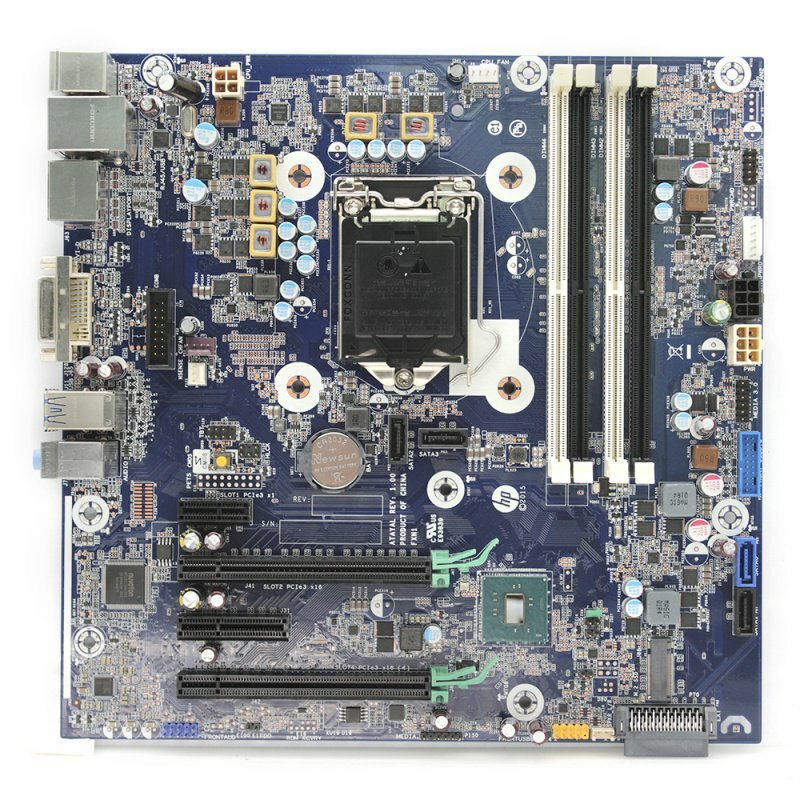
s-l1600.jpg

I put the GPU on the top PCIE Slot (the one with the green thing)

Hello


I am trying to installl a Nvidia GTX 980 into a windows server 2019, but when i go to the device manager i cant see it. I also tried to install the drivers of Nvidias Website. But the drivers said that they cant detect my GPU. I geuss there are diffrent drivers for a Windows Server, but i cant find them. Also right now i have Intels Integraded Graphics in the display adapter when i check the Device Manager. Im not sure if this causes some Problems.

Also when i turn on the Server the GPU gets super loud and the fans spin at max speed, i geuss thats because there arent any drivers.


Im running on a Xeon E3-1240 v5 , 24 Gb Ram (i just threw togther what i had, they are the same speed tho)


Im quite new to this so any help would be greatly appreciated

Link to comment
https://linustechtips.com/topic/1269037-windows-server-2019-with-geforce-gpu/
Share on other sites

Link to post
Share on other sites

The important question is does the server actually need the GPU? Since stability is paramount for servers its STRONGLY recommended that you run as few drivers as is possible, this is why the audio subsystem is disabled on server by default. Drivers are a huge cause of stability issues so unless you plan to do something that's going to need a 980 I would suggest pulling it and sticking with the Intel Onboard that's already working.

Main Rig:-

Ryzen 7 3800X | Asus ROG Strix X570-F Gaming | 16GB Team Group Dark Pro 3600Mhz | Corsair MP600 1TB PCIe Gen 4 | Sapphire 5700 XT Pulse | Corsair H115i Platinum | WD Black 1TB | WD Green 4TB | EVGA SuperNOVA G3 650W | Asus TUF GT501 | Samsung C27HG70 1440p 144hz HDR FreeSync 2 | Ubuntu 20.04.2 LTS |


Server:-

Intel NUC running Server 2019 + Synology DSM218+ with 2 x 4TB Toshiba NAS Ready HDDs (RAID0)

Link to post
Share on other sites

Well i wanted to make a VM that has the GPU 100% dedicated to it so, i could remote into it and play some games when im away or something like that.


Also i forgot to mention what psu im useing.


Im useing two ,one to power the Motherboard and one for the GPU.The factory PSU (400W) is pluggd into the Motherboad, i then used a second PSU to power the GPU. The GPU PSU is 450 W. The pc dident boot when i tryd to plug in the GPU with the Factory one. i know this stupid but it turn on atleast like this.

Link to post
Share on other sites

1 minute ago, MachoDip said:

Well i wanted to make a VM that has the GPU 100% dedicated to it so, i could remote into it and play some games when im away or something like that.

Not possible using Windows (AFAIK anyway). To do hardware passthrough you need a hypervisor OS or Linux.

Main Rig:-

Ryzen 7 3800X | Asus ROG Strix X570-F Gaming | 16GB Team Group Dark Pro 3600Mhz | Corsair MP600 1TB PCIe Gen 4 | Sapphire 5700 XT Pulse | Corsair H115i Platinum | WD Black 1TB | WD Green 4TB | EVGA SuperNOVA G3 650W | Asus TUF GT501 | Samsung C27HG70 1440p 144hz HDR FreeSync 2 | Ubuntu 20.04.2 LTS |


Server:-

Intel NUC running Server 2019 + Synology DSM218+ with 2 x 4TB Toshiba NAS Ready HDDs (RAID0)

Link to post
Share on other sites

Create an account or sign in to comment

You need to be a member in order to leave a comment

Create an account

Sign up for a new account in our community. It's easy!

Register a new account

Sign in

Already have an account? Sign in here.

Sign In Now

×

