
Jump to content

Watch dogs 2. Poorly optimised?

Go to solution Solved by Techicolors,

seems like this game likes threads... but don't buy an enthusiast-class CPU just for this game 
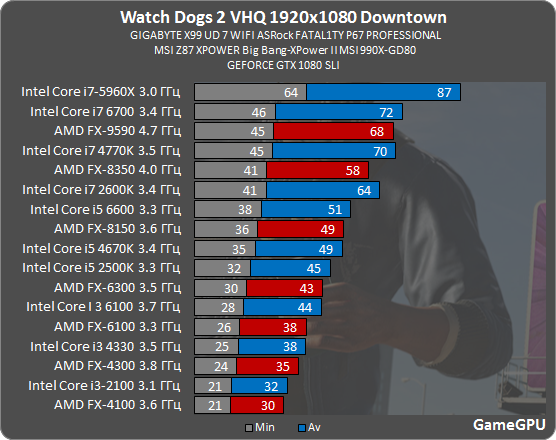
wd2_proz_2.png

before i ran watch dogs 2 on 30 fps on very high settings and 20 fps on ultra.

i was told the game relied on a multithreaded processor so i uppgraded from the i5 4690K to the i7 4790K

Also i got an extreme fps boost while i exited the cities of the game


ok so i bought and insalled an i7 4790K but the difference i felt was slim however it performed insanely much better on lower graphics setting than the i5 i had.


i now get a stable 65 fps on veary high settings and the texture quality on ultra. but on overall ultra setting i get 30 fps

is the game horribly optimised because call me a snobby gamer but i expected more than 60 fps when gaming on a 1070 and an i7 4790K

do i expect too much of my hardware?


i have not overclocked the i7 yet but my old CPU was overclocked from a base clock at 3,5 Ghz to 4,3 Ghz

the i7 has a base clock at 4 Ghz

however when i overclocked my old CPU it didnt realy give me a significant Fps boost.


i still get an extreme fps boost while i am out of cities. is it because the cpu is an older gen than the gpu?


sincerely sad gamer after spending 400$ on a cpu


Specs :

Specs :

16Gb DDR3 RAM

MSI z-97 motherboard

Zotac GTX 1070 Founders edition

intel i7-4790K

PSU no clue. i am 100% shure the PSU has nothing to do with the problem

1T HDD with watchdogs installed

128Gb SSD with OS

Link to comment
https://linustechtips.com/topic/718062-watch-dogs-2-poorly-optimised/
Share on other sites

Link to post
Share on other sites

4 minutes ago, FreakySnille said:

before i ran watch dogs 2 on 30 fps on very high settings and 20 fps on ultra.

i was told the game relied on a multithreaded processor so i uppgraded from the i5 4690K to the i7 4790K

Also i got an extreme fps boost while i exited the cities of the game


ok so i bought and insalled an i7 4790K but the difference i felt was slim however it performed insanely much better on lower graphics setting than the i5 i had.


i now get a stable 65 fps on veary high settings and the texture quality on ultra. but on overall ultra setting i get 30 fps

is the game horribly optimised because call me a snobby gamer but i expected more than 60 fps when gaming on a 1070 and an i7 4790K

do i expect too much of my hardware?


i have not overclocked the i7 yet but my old CPU was overclocked from a base clock at 3,5 Ghz to 4,3 Ghz

the i7 has a base clock at 4 Ghz

however when i overclocked my old CPU it didnt realy give me a significant Fps boost.


i still get an extreme fps boost while i am out of cities. is it because the cpu is an older gen than the gpu?


sincerely sad gamer after spending 400$ on a cpu


Specs :

Specs :

16Gb DDR3 RAM

MSI z-97 motherboard

Zotac GTX 1070 Founders edition

intel i7-4790K

PSU no clue. i am 100% shure the PSU has nothing to do with the problem

1T HDD with watchdogs installed

128Gb SSD with OS

When did you buy that 4790k for $400?

Link to post
Share on other sites

Just now, FreakySnille said:

it has been sitting in my rig for about 30 mins

tech prices are insane here in norway if thats what youre thinking

Yea the norway price is prob whats messing with me.


Are you overclocking?

What are your temps?

Whats the usage?

Link to post
Share on other sites

1 minute ago, Unexas. said:

Yea the norway price is prob whats messing with me.


Are you overclocking?

What are your temps?

Whats the usage?

temps are max 75 degress but rarely that high

i am not overclocking. the i7 has a base clock of 4 Ghz

usage araound 85% at max

Link to post
Share on other sites

Check the loads during gaming, which one is being pushed to 100%, CPU or GPU. Then you see, what the bottleneck is.

MSI Afterburner does it in a nice way.

HAL9000: AMD Ryzen 9 3900x | Noctua NH-D15 chromax.black | 32 GB Corsair Vengeance LPX DDR4 3200 MHz | Asus X570 Prime Pro | ASUS TUF 3080 Ti | 1 TB Samsung 970 Evo Plus + 1 TB Crucial MX500 + 6 TB WD RED | Corsair HX1000 | be quiet Pure Base 500DX | LG 34UM95 34" 3440x1440

Hydrogen server: Intel i3-10100 | Cryorig M9i | 64 GB Crucial Ballistix 3200MHz DDR4 | Gigabyte B560M-DS3H | 33 TB of storage | Fractal Design Define R5 | unRAID 6.9.2

Carbon server: Fujitsu PRIMERGY RX100 S7p | Xeon E3-1230 v2 | 16 GB DDR3 ECC | 60 GB Corsair SSD & 250 GB Samsung 850 Pro | Intel i340-T4 | ESXi 6.5.1

Big Mac cluster: 2x Raspberry Pi 2 Model B | 1x Raspberry Pi 3 Model B | 2x Raspberry Pi 3 Model B+

Link to post
Share on other sites

1 minute ago, Technicolors said:

i was thinking of getting a 4790K to raise minimum fps by a fair margin...


but watch dogs 2 is just really heavy on the CPU. you don't see this intensity outside of cities because there's nothing there.. 

which setting do i turn down to reduce the cpu load?

what do i do. i spendt alot of money on this high end cpu how can it still run this bad. call me snobby but i expected more from my components


Link to post
Share on other sites

3 minutes ago, FreakySnille said:

which setting do i turn down to reduce the cpu load?

what do i do. i spendt alot of money on this high end cpu how can it still run this bad. call me snobby but i expected more from my components


not much you can do. if there was a slider to control traffic or population density like GTAV, perhaps. i suspect it is the sheer amount of draw calls being done in the city

however is your Extra Details slider set a 0%? because i know that particular setting will tank performance even more. and turn off all Gameworks settings such as PCSS 

Link to post
Share on other sites

1 minute ago, Technicolors said:

not much you can do. if there was a slider to control traffic or population density like GTAV, perhaps. i suspect it is the sheer amount of draw calls being done in the city

however is your Extra Details slider set a 0%? because i know that particular setting will tank performance even more. and turn off all Gameworks settings such as PCSS 

yeah extra details are 0%

Link to post
Share on other sites

Some things you can try are: disable the Uplay in game overlay, and try turning off or reducing screen space reflections. 


One of the recent patches made performance a lot worse. 


Yes, you probably would get a boost from overclocking. However, Ubisoft needs to prioritize the issues on their end considering how many problems people are having. 

Link to post
Share on other sites

Guest
This topic is now closed to further replies.

×





