
Jump to content

Need help understanding Memtest

Go to solution Solved by Altecice,

It will test all the RAM in the system but its recommended that you only test 1 stick at a time to make it easier to determine the troublesome stick.

you can see the two bars with % signs at the top:


PASS - Once this reaches 100% it has finished 1 set of tests and will loop back to 1% to run the same tests another time, it is reccomended to run a few passes to test for errors.


TEST - This is the % status of the current test in that pass (1 full pass could be 50 tests for example, so it could be 59% done test 1/50 in that pass)


---


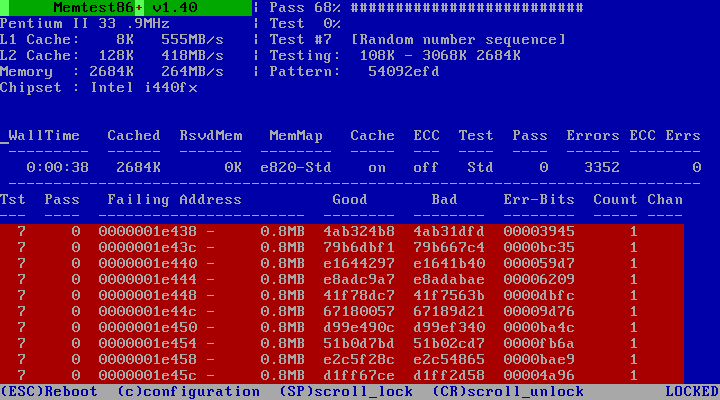
You are looking for any RED text/bars that show a failure. If you have run a few passes and you dont see any red highlighted sections below where its lists your two RAM sticks then you have no errors and your RAM is fine. If you have ANY errors your RAM is faulty.


For example this is what a failure looks like:
fMT8E.png


Yes you are correct you have finished 1 pass and its 81% into pass 2.

My computer has had some issues with the screens going black and everything just seems to stop working/freezes (I cannot see anything on my screens but software I have running in the background stops being accessible from other devices). So I thought I'd run a memtest as I've recently upgraded and have a new MB, CPU and RAM. But as this is the first time running a memtest, I don't really understand how it works. I'm running the latest version (5.01) and I put it on a usb and booted to it. But it seems that it just started doing something and I don't fully know what and where to look for stuff.


This is what it looks like currently:

lDm7IGo.jpg?1


First of all, does it test both sticks at the same time or do I have to select one, run some tests and then select the other one? Or are they both being tested at the same time?

Secondly, is it correct to say that 1 pass has been made (another pass has soon finished)? And is this of both sticks or has just one had 1 pass finished? If so, which one?


How many passes would you recommend? I do not have any overclocks.

Spoiler

System:

i5 3570k @ 4.4 GHz, MSI Z77A-G43, Dominator Platinum 1600MHz 16GB (2x8GB), EVGA GTX 980ti 6GB, CM HAF XM, Samsung 850 Pro 256GB + Some WD Red HDD, Corsair RM850 80+ Gold, Asus Xonar Essence STX, Windows 10 Pro 64bit

PCPP:

http://pcpartpicker.com/p/znZqcf


Link to comment
https://linustechtips.com/topic/627553-need-help-understanding-memtest/
Share on other sites

Link to post
Share on other sites

It will test all the RAM in the system but its recommended that you only test 1 stick at a time to make it easier to determine the troublesome stick.

you can see the two bars with % signs at the top:


PASS - Once this reaches 100% it has finished 1 set of tests and will loop back to 1% to run the same tests another time, it is reccomended to run a few passes to test for errors.


TEST - This is the % status of the current test in that pass (1 full pass could be 50 tests for example, so it could be 59% done test 1/50 in that pass)


---


You are looking for any RED text/bars that show a failure. If you have run a few passes and you dont see any red highlighted sections below where its lists your two RAM sticks then you have no errors and your RAM is fine. If you have ANY errors your RAM is faulty.


For example this is what a failure looks like:

fMT8E.png


Yes you are correct you have finished 1 pass and its 81% into pass 2.

Quack 🦆

Link to post
Share on other sites

5 minutes ago, Altecice said:

It will test all the RAM in the system but its recommended that you only test 1 stick at a time to make it easier to determine the troublesome stick.

you can see the two bars with % signs at the top:


PASS - Once this reaches 100% it has finished 1 set of tests and will loop back to 1% to run the same tests another time, it is reccomended to run a few passes to test for errors.


TEST - This is the % status of the current test in that pass (1 full pass could be 50 tests for example, so it could be 59% done test 1/50 in that pass)


---


You are looking for any RED text/bars that show a failure. If you have run a few passes and you dont see any red highlighted sections below where its lists your two RAM sticks then you have no errors and your RAM is fine. If you have ANY errors your RAM is faulty.


For example this is what a failure looks like:

fMT8E.png

Great! Thank you, this is how I assumed it was but I got a bit confused when I googled around because some people said that you had to switch the module and I wasn't sure if they meant in the software (and what module was being tested) or physically switch the ram to another one. But I guess this is similar to what you're saying that it's an easier way determine the faulty one if there is one.


But it should be ok to run both of them to see if there are any errors to begin with right (it won't affect the actual testing to have two sticks instead of one, just that's harder to determine the faulty one if there are any errors)? If I haven't got any errors after like 5-10 passes I should be fine right? And if I do get errors, I will have to take one module out to test individually.

Spoiler

System:

i5 3570k @ 4.4 GHz, MSI Z77A-G43, Dominator Platinum 1600MHz 16GB (2x8GB), EVGA GTX 980ti 6GB, CM HAF XM, Samsung 850 Pro 256GB + Some WD Red HDD, Corsair RM850 80+ Gold, Asus Xonar Essence STX, Windows 10 Pro 64bit

PCPP:

http://pcpartpicker.com/p/znZqcf


Link to post
Share on other sites

Create an account or sign in to comment

You need to be a member in order to leave a comment

Create an account

Sign up for a new account in our community. It's easy!

Register a new account

Sign in

Already have an account? Sign in here.

Sign In Now

×



