
Jump to content

More stupid Linux Sruff

Go to solution Solved by coollll068,

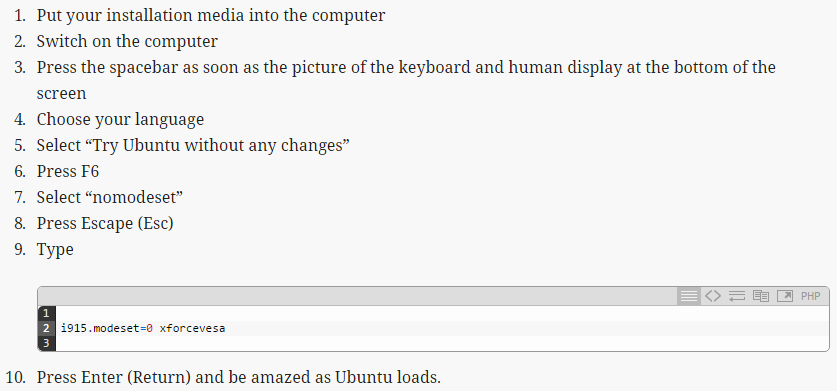
Try this

0f8ae24f285633b686c48a08335a7f99.png

                                 Source: some some GNU/Linux Forum

Once you get it installed, you may need to boot with "nomodeset" again. After this install the Proprietary drivers from system settings. (Assuming "nomodeset" works)
this is what happened it boot into this and thin i selected try ubuntu and it crashed again http://imgur.com/5jdEnGx should i try useing e to edit the comand

Hi guys I have been trying to install ubuntu all day and the following things occur


1. when i put my flash drive in it comes up with a GRU GRUB version 2.02`beta2-9ubuntu1.3 header and says try ubuntu without installing install ubuntu oem install and check disk


2. when i click on any of thees the computer dark screens displays 2 lines of code really quick and then my monitor shuts off


3. when i go into bios and i boot this drive (NOT UEFI VERSION) it displays a application version with a background for like 10 seconds then opens a prompt and then black screens again


4. i have looked at this for many hours and some say its a problem with the sandisk cruzer flash drive i have been working with but i found this not the case because everthing is wiped and formatted in it (FAT32)


so im wondering what could be the case thanks :D

Link to comment
https://linustechtips.com/topic/450695-more-stupid-linux-sruff/
Share on other sites

Link to post
Share on other sites

Why aren't you using the UEFI version?, also what's your mobo? (Also did you try waiting a while) It'd really help if you would fill out you PC specs on your profile page. 

uefi version gives me a grub the other doesnot anyways my mobo is a asus crosshair formula-z with a 8350 processor i tried waiting like 5 min to no avail 

Link to comment
https://linustechtips.com/topic/450695-more-stupid-linux-sruff/#findComment-6042897
Share on other sites

Link to post
Share on other sites

yea a msi 970

Try this

0f8ae24f285633b686c48a08335a7f99.png

                                 Source: some some GNU/Linux Forum

Once you get it installed, you may need to boot with "nomodeset" again. After this install the Proprietary drivers from system settings. (Assuming "nomodeset" works)

Link to comment
https://linustechtips.com/topic/450695-more-stupid-linux-sruff/#findComment-6042936
Share on other sites

Link to post
Share on other sites

Hi guys I have been trying to install ubuntu all day and the following things occur


1. when i put my flash drive in it comes up with a GRU GRUB version 2.02`beta2-9ubuntu1.3 header and says try ubuntu without installing install ubuntu oem install and check disk


2. when i click on any of thees the computer dark screens displays 2 lines of code really quick and then my monitor shuts off


3. when i go into bios and i boot this drive (NOT UEFI VERSION) it displays a application version with a background for like 10 seconds then opens a prompt and then black screens again


4. i have looked at this for many hours and some say its a problem with the sandisk cruzer flash drive i have been working with but i found this not the case because everthing is wiped and formatted in it (FAT32)


so im wondering what could be the case thanks :D

How did you copy ubuntu to the USB? What software did you use

Are you using USB 3.0 drive?

Have you tried a different USB drive

CPU : i7 5820k l MB : ASRock Fatal1ty X99M KILLER/3.1 l RAM : 64GB l GPUs : GTX 970 l Case : Corsair 350D l SSD 2x250gb HDD 2x3tb Raid0 l CS750M PSU
CPU : i7 920 l MB : Gigabyte GA-Ex58-UD5 l RAM : 24 GB  l Case : CoolerMaster Silencio l 3x3TB Raid 5 l  Corsair VS650 | ESXI 5.5
Asus G551VW | i7 6700HQ | 32 GB | GTX 960M | 500 GB Samsung mSata | 1TB WD 
 

Link to comment
https://linustechtips.com/topic/450695-more-stupid-linux-sruff/#findComment-6042989
Share on other sites

Link to post
Share on other sites

Try this

0f8ae24f285633b686c48a08335a7f99.png

                                 Source: some some GNU/Linux Forum

Once you get it installed, you may need to boot with "nomodeset" again. After this install the Proprietary drivers from system settings. (Assuming "nomodeset" works)

this is what happened it boot into this and thin i selected try ubuntu and it crashed again http://imgur.com/5jdEnGx should i try useing e to edit the comand

Link to comment
https://linustechtips.com/topic/450695-more-stupid-linux-sruff/#findComment-6042999
Share on other sites

Link to post
Share on other sites

this is what happened it boot into this and thin i selected try ubuntu and it crashed again http://imgur.com/5jdEnGx should i try useing e to edit the comand

OOOOOOOOOOOOOo I LOVE YOUUUUUUUUUUUUUUUUUUUUUUUUUUUU OMG I FUCKING LOOOOOVE YOUUUUUUUUUUUUUUU i changed quiet or whatever whit in the e setting to nomodeset and then ran it AND PRESTO 

Link to comment
https://linustechtips.com/topic/450695-more-stupid-linux-sruff/#findComment-6043079
Share on other sites

Link to post
Share on other sites


CPU : i7 5820k l MB : ASRock Fatal1ty X99M KILLER/3.1 l RAM : 64GB l GPUs : GTX 970 l Case : Corsair 350D l SSD 2x250gb HDD 2x3tb Raid0 l CS750M PSU
CPU : i7 920 l MB : Gigabyte GA-Ex58-UD5 l RAM : 24 GB  l Case : CoolerMaster Silencio l 3x3TB Raid 5 l  Corsair VS650 | ESXI 5.5
Asus G551VW | i7 6700HQ | 32 GB | GTX 960M | 500 GB Samsung mSata | 1TB WD 
 

Link to comment
https://linustechtips.com/topic/450695-more-stupid-linux-sruff/#findComment-6043080
Share on other sites

Link to post
Share on other sites

Create an account or sign in to comment

You need to be a member in order to leave a comment

Create an account

Sign up for a new account in our community. It's easy!

Register a new account

Sign in

Already have an account? Sign in here.

Sign In Now

×



