
Jump to content

Extremely High Ram Usage

Go to solution Solved by Captain_WD,

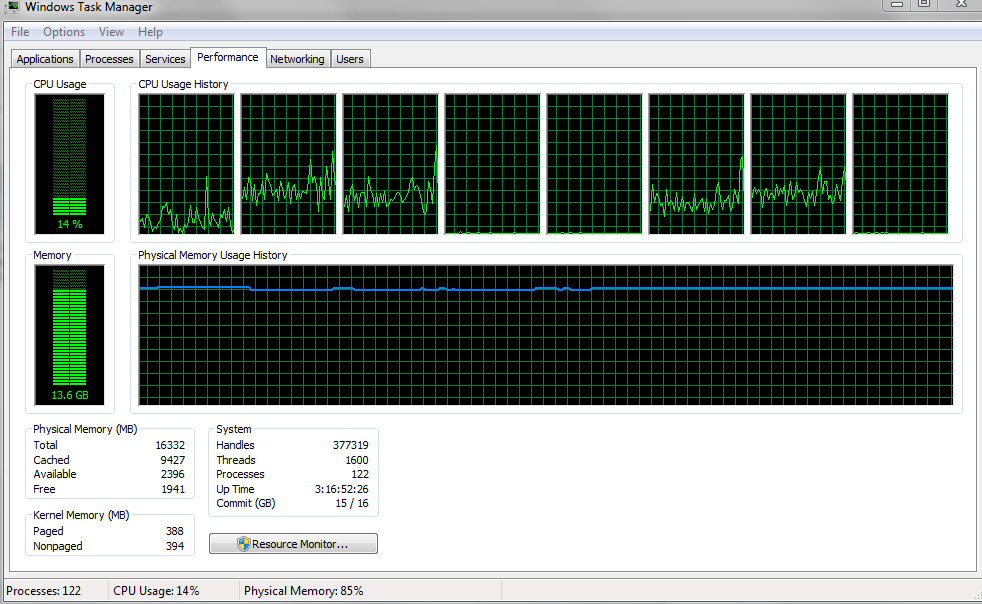
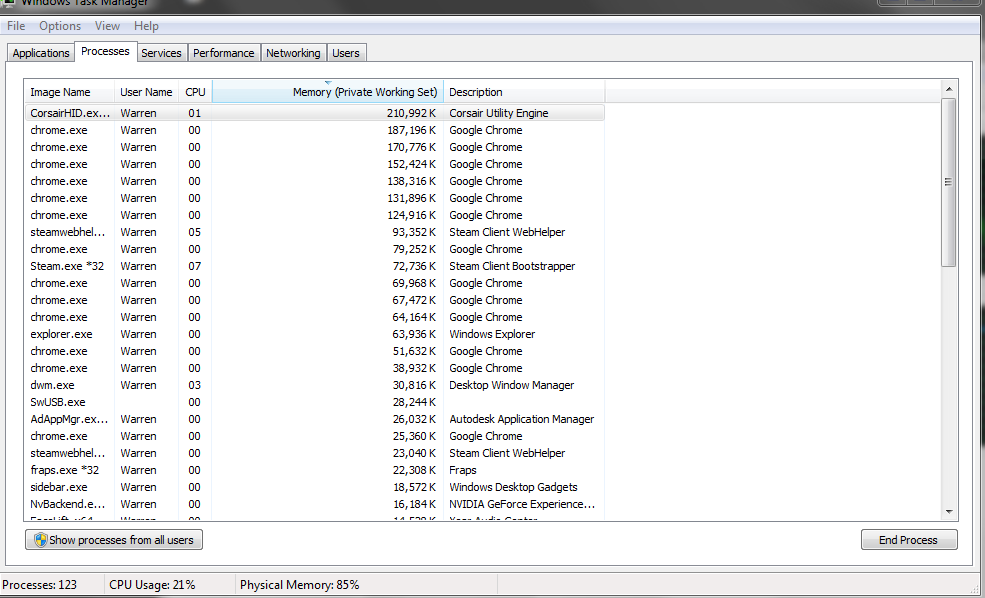
I have a computer with 16 GB of ram (http://www.ramexperts.com/corsair-cmy16gx3m2a2400c11a-vengeance-pro-gold-16gb-2x8gb-240p-ddr3-2400mhz-ram.html?gclid=CMWMtv3v2MICFYhbfgodbyIA1w). On most days, I usually have only Chrome and Steam as open. However, this still results in around 13 gb of ram being used. Is this normal? Everytime I play a game (such as FC4) or open a ram intensive program (such as After Effects), I get warnings to save my stuff and quit. Should I upgrade to 32 gb of ram? Any help would be appreciated. Attached are screenshots of my resource manager e7cda225915637c988b2aff8dfea8232.png881375b397e836657e30ad994a77b68d.png


Hey crakedapple,
 
This might be a long shot, but what is your storage configuration? Any SSDs? Some motherboards use part of the RAM to enhance the speed of the storage. Look into your motherboard's manual and see if such features are enabled. Even after the upgrade, the Modified portion stays the same proportion to the other which makes me think that the MSIControlService.exe reserves e certain percentage of your memory for something. Look into that.
 
Captain_WD.

I have a computer with 16 GB of ram (http://www.ramexperts.com/corsair-cmy16gx3m2a2400c11a-vengeance-pro-gold-16gb-2x8gb-240p-ddr3-2400mhz-ram.html?gclid=CMWMtv3v2MICFYhbfgodbyIA1w). On most days, I usually have only Chrome and Steam as open. However, this still results in around 13 gb of ram being used. Is this normal? Everytime I play a game (such as FC4) or open a ram intensive program (such as After Effects), I get warnings to save my stuff and quit. Should I upgrade to 32 gb of ram? Any help would be appreciated. Attached are screenshots of my resource manager e7cda225915637c988b2aff8dfea8232.png881375b397e836657e30ad994a77b68d.png
Link to comment
https://linustechtips.com/topic/274672-extremely-high-ram-usage/
Share on other sites

Link to post
Share on other sites

oh boy, you have a big time memory leak; there is software hogging the memory, often caused by bugs.

First off, Chrome is a eater of resources, and the Corsair software is grabbing all that memory for no apparent reason (it should only be using few MB). Try to do some system maintenance and also select what gets opened up on start (both for processes and services), run msconfig for this.

Even a simple chrome extension can be misbehaving and causing this much usage; basically try to see who is using all the memory and stop it.

Link to comment
https://linustechtips.com/topic/274672-extremely-high-ram-usage/#findComment-3729435
Share on other sites

Link to post
Share on other sites

Even will all that added up and playing far cry 4 you shouldn't be using more then 5GB. Maybe hidden malware is hiding in you computer? I recommend using Malwarebytes and/or AdwCleaner.

I've also noticed that you have about 9GB cached.

The biggest bottleneck is the Aussie internet..

CPU: i5 4690k @ 3.5 | GPU: Sapphire Tri-X R9 290 | Motherboard: Gigabyte Z97X-SOC | RAM: 8GB DDR3 @ 1333 | Storage: 2TB HDD, 500GB HDD & 120GB SSD | CPU Cooling: Hyper 212 Evo x 2 fans | Case: ThermalTake S41 

Display: 2 x 1080p Monitors | Keyboard: Logitech G510s | Mouse: DragonWar Phantom Battle Version | Mouse Pad: Logitech G240 | Audio: Logitech z506 Speakers & Audio Technica ATH-M50x | Misc: PS3, Iphone 5s & Ipad Air 


Link to comment
https://linustechtips.com/topic/274672-extremely-high-ram-usage/#findComment-3729468
Share on other sites

Link to post
Share on other sites

How would I go about cleaning it up? With a program?


I would use a program such as CCleaner: https://www.piriform.com/ccleaner/download

As I said above you could also use programs such as Malwarebytes or AdwCleaner if you have malware.

The biggest bottleneck is the Aussie internet..

CPU: i5 4690k @ 3.5 | GPU: Sapphire Tri-X R9 290 | Motherboard: Gigabyte Z97X-SOC | RAM: 8GB DDR3 @ 1333 | Storage: 2TB HDD, 500GB HDD & 120GB SSD | CPU Cooling: Hyper 212 Evo x 2 fans | Case: ThermalTake S41 

Display: 2 x 1080p Monitors | Keyboard: Logitech G510s | Mouse: DragonWar Phantom Battle Version | Mouse Pad: Logitech G240 | Audio: Logitech z506 Speakers & Audio Technica ATH-M50x | Misc: PS3, Iphone 5s & Ipad Air 


Link to comment
https://linustechtips.com/topic/274672-extremely-high-ram-usage/#findComment-3729510
Share on other sites

Link to post
Share on other sites

I have a computer with 16 GB of ram (http://www.ramexperts.com/corsair-cmy16gx3m2a2400c11a-vengeance-pro-gold-16gb-2x8gb-240p-ddr3-2400mhz-ram.html?gclid=CMWMtv3v2MICFYhbfgodbyIA1w). On most days, I usually have only Chrome and Steam as open. However, this still results in around 13 gb of ram being used. Is this normal? Everytime I play a game (such as FC4) or open a ram intensive program (such as After Effects), I get warnings to save my stuff and quit. Should I upgrade to 32 gb of ram? Any help would be appreciated. Attached are screenshots of my resource manager e7cda225915637c988b2aff8dfea8232.png881375b397e836657e30ad994a77b68d.png

Looks like you have something stealing all the mem. Try deleting the crapware on your pc if you have any. And make sure you have have show all processes ticked.

[CPU] i7 4790K OC [CPU Cooler] H100i [GPU] Evga GTX 980 SuperClocked [Ram] Corsair Vengeance 16 GB 1866 mhz [PSU] Cooler Master 1000w Silent Pro [storage] 256 GB Samsung 840 Pro, 1TB Seagate SSHD, 1 TB WD Blue 4 TB Seagate Nas. [Motherboard] Msi Z97 Gaming 5 [Case] Phantom 410 Red [sound] Onboard ALC 1150 [Headphones] Sennheiser HD 558 [Keyboard] Razer BlackWidow Chroma  [Mouse] Razer Deathadder Chroma [Mouse] Razer FireFly [Monitor] Asus MG278Q

Link to comment
https://linustechtips.com/topic/274672-extremely-high-ram-usage/#findComment-3729522
Share on other sites

Link to post
Share on other sites

Thanks for the advice. From the picture, could you tell that the processes were acting abnormal (is something like Chrome using up way more memory than it should)?

Chrome is normally a mem hog but def not that much unless you have 100 tabs open at once

[CPU] i7 4790K OC [CPU Cooler] H100i [GPU] Evga GTX 980 SuperClocked [Ram] Corsair Vengeance 16 GB 1866 mhz [PSU] Cooler Master 1000w Silent Pro [storage] 256 GB Samsung 840 Pro, 1TB Seagate SSHD, 1 TB WD Blue 4 TB Seagate Nas. [Motherboard] Msi Z97 Gaming 5 [Case] Phantom 410 Red [sound] Onboard ALC 1150 [Headphones] Sennheiser HD 558 [Keyboard] Razer BlackWidow Chroma  [Mouse] Razer Deathadder Chroma [Mouse] Razer FireFly [Monitor] Asus MG278Q

Link to comment
https://linustechtips.com/topic/274672-extremely-high-ram-usage/#findComment-3729546
Share on other sites

Link to post
Share on other sites

Click show processes from all users and see if there is something taking all the mem

[CPU] i7 4790K OC [CPU Cooler] H100i [GPU] Evga GTX 980 SuperClocked [Ram] Corsair Vengeance 16 GB 1866 mhz [PSU] Cooler Master 1000w Silent Pro [storage] 256 GB Samsung 840 Pro, 1TB Seagate SSHD, 1 TB WD Blue 4 TB Seagate Nas. [Motherboard] Msi Z97 Gaming 5 [Case] Phantom 410 Red [sound] Onboard ALC 1150 [Headphones] Sennheiser HD 558 [Keyboard] Razer BlackWidow Chroma  [Mouse] Razer Deathadder Chroma [Mouse] Razer FireFly [Monitor] Asus MG278Q

Link to comment
https://linustechtips.com/topic/274672-extremely-high-ram-usage/#findComment-3729574
Share on other sites

Link to post
Share on other sites

This looks quite normal. Seems like there might be a hidden problem. Try to run an antivirus to clear out some unnecessary issues. Also go to control panel and select uninstall files and search for some crapware that might have been installed.

[CPU] i7 4790K OC [CPU Cooler] H100i [GPU] Evga GTX 980 SuperClocked [Ram] Corsair Vengeance 16 GB 1866 mhz [PSU] Cooler Master 1000w Silent Pro [storage] 256 GB Samsung 840 Pro, 1TB Seagate SSHD, 1 TB WD Blue 4 TB Seagate Nas. [Motherboard] Msi Z97 Gaming 5 [Case] Phantom 410 Red [sound] Onboard ALC 1150 [Headphones] Sennheiser HD 558 [Keyboard] Razer BlackWidow Chroma  [Mouse] Razer Deathadder Chroma [Mouse] Razer FireFly [Monitor] Asus MG278Q

Link to comment
https://linustechtips.com/topic/274672-extremely-high-ram-usage/#findComment-3729645
Share on other sites

Link to post
Share on other sites

Can you check, if there is a very high value under "Working Set" "Private" or "Shareable".

Under normal circumstances it should display your program, that is taking all the RAM.

But as far as i know is the modified RAM not shown in the "Commit" value.

Normaly "Modified" is about 100-300MB your 10GB should be caused by a memory leak, as already mentioned.

This are my values with some programs open: (and i guess, thats what it should look like)

JAt9BKi.png

~ ThxAndBye

"You should remove any cats from the vicinity, because cats will cause all kinds of problems during CPU installation." -Linus

Link to comment
https://linustechtips.com/topic/274672-extremely-high-ram-usage/#findComment-3733856
Share on other sites

Link to post
Share on other sites

  • 3 weeks later...

I have a computer with 16 GB of ram (http://www.ramexperts.com/corsair-cmy16gx3m2a2400c11a-vengeance-pro-gold-16gb-2x8gb-240p-ddr3-2400mhz-ram.html?gclid=CMWMtv3v2MICFYhbfgodbyIA1w). On most days, I usually have only Chrome and Steam as open. However, this still results in around 13 gb of ram being used. Is this normal? Everytime I play a game (such as FC4) or open a ram intensive program (such as After Effects), I get warnings to save my stuff and quit. Should I upgrade to 32 gb of ram? Any help would be appreciated. Attached are screenshots of my resource manager e7cda225915637c988b2aff8dfea8232.png881375b397e836657e30ad994a77b68d.png


Hey crakedapple,
 
This might be a long shot, but what is your storage configuration? Any SSDs? Some motherboards use part of the RAM to enhance the speed of the storage. Look into your motherboard's manual and see if such features are enabled. Even after the upgrade, the Modified portion stays the same proportion to the other which makes me think that the MSIControlService.exe reserves e certain percentage of your memory for something. Look into that.
 
Captain_WD.

If this helped you, like and choose it as best answer - you might help someone else with the same issue. ^_^
WDC Representative, http://www.wdc.com/ 

Link to comment
https://linustechtips.com/topic/274672-extremely-high-ram-usage/#findComment-3905059
Share on other sites

Link to post
Share on other sites

Create an account or sign in to comment

You need to be a member in order to leave a comment

Create an account

Sign up for a new account in our community. It's easy!

Register a new account

Sign in

Already have an account? Sign in here.

Sign In Now

×


