
Jump to content

Horrendously low FPS in basic games
Go to solution Solved by xAcid9,
15 hours ago, BentleyOwen123 said:

-snip-

92c@77% usage? The hotspot is probably well above that. 

Run GPU-Z and check your Hotspot, Perfcap Reason and  CPU/VRAM frequency underload. It probably thermal throttling. 

So recently I've noticed my fps in easy to run titles such as rocket league absolutely plumet, i don't know why, could it be drivers?


RTX 3060 12G

R7 5700G

16GB 3200mhz


its just so strange to me because my older R5 5500 and RX6600 system rocked this game 500+ fps


Rocket League (64-bit, DX11, Cooked) 2_26_2025 1_16_57 PM.png

Link to comment
https://linustechtips.com/topic/1603222-horrendously-low-fps-in-basic-games/
Share on other sites

Link to post
Share on other sites

4 minutes ago, BentleyOwen123 said:

So recently I've noticed my fps in easy to run titles such as rocket league absolutely plumet, i don't know why, could it be drivers?


RTX 3060 12G

R7 5700G

16GB 3200mhz


its just so strange to me because my older R5 5500 and RX6600 system rocked this game 500+ fps


Your FPS makes me wonder if you are actually running the game on the integrated graphics on the 5700G instead of your RTX 3060.

I know the 5700G performs equal to your FPS shown in this picture.

Link to post
Share on other sites

Is it possible the game just defaults to higher settings now?


When did you change components,just recently?


Did you DDU your old AMD drivers? 

The direction tells you... the direction

-Scott Manley, 2021


Link to post
Share on other sites

1 minute ago, Hinjima said:

Your FPS makes me wonder if you are actually running the game on the integrated graphics on the 5700G instead of your RTX 3060.

I know the 5700G performs equal to your FPS shown in this picture.

i was thinking the same thing but here ill take a screenshot but the integrated graphics are at 0 utilization and the 3060 keeps 70%

Link to post
Share on other sites

1 minute ago, Mark Kaine said:

Is it possible the game just defaults to higher settings now?


When did you change components,just recently?


Did you DDU your old AMD drivers? 

haven't touched drivers yet, all the parts bought in December and put together, haven't changed anything, and they are at high but it cant even pass 200 on the lowest lowest settings. It should be able to get much much higher than that.

Link to post
Share on other sites

1 minute ago, BentleyOwen123 said:

haven't touched drivers yet, all the parts bought in December and put together, haven't changed anything, and they are at high but it cant even pass 200 on the lowest lowest settings. It should be able to get much much higher than that.

If you haven't uninstalled your AMD drivers and installed Nvidia drivers, you will not get very good 3D performance at all. You need to uninstall AMD drivers and install Nvidia Game Ready drivers.

GAMING PC "Ol' Bessie":

Ryzen 7 7800X3D | Radeon RX 9070 XT | Gigabyte B650M AORUS Elite AX | G.Skill Flare X5 6000MT/s CL36 16GBx2 | 5TB of SSD POWER | EVGA SuperNOVA 850W GT | Noctua NH-U14S | Fractal Design Pop! Mini AirCachyOS


Kind Of A Home Lab "Bay":

Ryzen 9 5900XT | Intel ARC A310 | ASUS PRIME B550-PLUS | T-FORCE 3200MT/s 16GBx2 + Corsair 3200MT/s 32GBx2 = 96GB!!! WOW!! | 2TB boot SSD + 8TBx6 HDD RaidZ2 | EVGA SuperNOVA 650W G2 | Phanteks Enthoo Pro M | Ubuntu 24.04 LTS


The Laptop:

Framework Laptop 13 | Intel i5-1340p | G.Skill Ripjaws 3200MT/s 16GBx2 | Solidigm P44 Pro 2TB | CachyOS

Link to post
Share on other sites

6 minutes ago, Hinjima said:

Your FPS makes me wonder if you are actually running the game on the integrated graphics on the 5700G instead of your RTX 3060.

I know the 5700G performs equal to your FPS shown in this picture.

TaskManager2_26_20251_29_55PM.png.f8ab571098bd1336a3c0777a1c10173a.png

Link to post
Share on other sites

1 minute ago, Kobathor said:

If you haven't uninstalled your AMD drivers and installed Nvidia drivers, you will not get very good 3D performance at all. You need to uninstall AMD drivers and install Nvidia Game Ready drivers.

ohhhhh i see what you mean now, does having NVidia control center not mean i have the drivers installed?

Link to post
Share on other sites

Have you changed you main screen resolution to 4K?
When I installed my new GPU it changed everything from 1440p to 4K including the main screen resolution.  So might be worth checking by that in case everything is trying to run native 4K. 

Link to post
Share on other sites

5 minutes ago, BentleyOwen123 said:

ohhhhh i see what you mean now, does having NVidia control center not mean i have the drivers installed?

You miiiiight. I'd run Display Driver Uninstaller and install fresh drivers from Nvidia.


https://www.guru3d.com/download/display-driver-uninstaller-download/

GAMING PC "Ol' Bessie":

Ryzen 7 7800X3D | Radeon RX 9070 XT | Gigabyte B650M AORUS Elite AX | G.Skill Flare X5 6000MT/s CL36 16GBx2 | 5TB of SSD POWER | EVGA SuperNOVA 850W GT | Noctua NH-U14S | Fractal Design Pop! Mini AirCachyOS


Kind Of A Home Lab "Bay":

Ryzen 9 5900XT | Intel ARC A310 | ASUS PRIME B550-PLUS | T-FORCE 3200MT/s 16GBx2 + Corsair 3200MT/s 32GBx2 = 96GB!!! WOW!! | 2TB boot SSD + 8TBx6 HDD RaidZ2 | EVGA SuperNOVA 650W G2 | Phanteks Enthoo Pro M | Ubuntu 24.04 LTS


The Laptop:

Framework Laptop 13 | Intel i5-1340p | G.Skill Ripjaws 3200MT/s 16GBx2 | Solidigm P44 Pro 2TB | CachyOS

Link to post
Share on other sites

3 hours ago, Kobathor said:

You miiiiight. I'd run Display Driver Uninstaller and install fresh drivers from Nvidia.


https://www.guru3d.com/download/display-driver-uninstaller-download/

it says i need to use safe mode any idea how i would enter that and which drivers i should remove? amd and nvidia?

Link to post
Share on other sites

15 hours ago, BentleyOwen123 said:

-snip-

92c@77% usage? The hotspot is probably well above that. 

Run GPU-Z and check your Hotspot, Perfcap Reason and  CPU/VRAM frequency underload. It probably thermal throttling. 

| Intel i7-3770@4.2Ghz | Asus Z77-V | Zotac 980 Ti Amp! Omega | DDR3 1800mhz 4GB x4 | 300GB Intel DC S3500 SSD | 512GB Plextor M5 Pro | 2x 1TB WD Blue HDD |
 | Enermax NAXN82+ 650W 80Plus Bronze | Fiio E07K | Grado SR80i | Cooler Master XB HAF EVO | Logitech G27 | Logitech G600 | CM Storm Quickfire TK | DualShock 4 |

Link to post
Share on other sites

13 hours ago, BentleyOwen123 said:

it says i need to use safe mode any idea how i would enter that and which drivers i should remove? amd and nvidia?

Safe Mode is optional—I would remove Both. Then run the driver installer you already downloaded.

GAMING PC "Ol' Bessie":

Ryzen 7 7800X3D | Radeon RX 9070 XT | Gigabyte B650M AORUS Elite AX | G.Skill Flare X5 6000MT/s CL36 16GBx2 | 5TB of SSD POWER | EVGA SuperNOVA 850W GT | Noctua NH-U14S | Fractal Design Pop! Mini AirCachyOS


Kind Of A Home Lab "Bay":

Ryzen 9 5900XT | Intel ARC A310 | ASUS PRIME B550-PLUS | T-FORCE 3200MT/s 16GBx2 + Corsair 3200MT/s 32GBx2 = 96GB!!! WOW!! | 2TB boot SSD + 8TBx6 HDD RaidZ2 | EVGA SuperNOVA 650W G2 | Phanteks Enthoo Pro M | Ubuntu 24.04 LTS


The Laptop:

Framework Laptop 13 | Intel i5-1340p | G.Skill Ripjaws 3200MT/s 16GBx2 | Solidigm P44 Pro 2TB | CachyOS

Link to post
Share on other sites

6 hours ago, xAcid9 said:

92c@77% usage? The hotspot is probably well above that. 

Run GPU-Z and check your Hotspot, Perfcap Reason and  CPU/VRAM frequency underload. It probably thermal throttling. 

true the fan doesn't turn on very often so it could be a fan curve I should change.

Link to post
Share on other sites

3 hours ago, Kobathor said:

Safe Mode is optional—I would remove Both. Then run the driver installer you already downloaded.

ok I'll try this and let you know, it didn't give me a proceed anyway option when it said to turn on safe mode, do I just try again?

Link to post
Share on other sites

25 minutes ago, BentleyOwen123 said:

ok I'll try this and let you know, it didn't give me a proceed anyway option when it said to turn on safe mode, do I just try again?

If you need to boot into Safe Mode there are some tutorials online for Windows 10 and 11 (it's different between them). In Safe Mode the app won't complain.

GAMING PC "Ol' Bessie":

Ryzen 7 7800X3D | Radeon RX 9070 XT | Gigabyte B650M AORUS Elite AX | G.Skill Flare X5 6000MT/s CL36 16GBx2 | 5TB of SSD POWER | EVGA SuperNOVA 850W GT | Noctua NH-U14S | Fractal Design Pop! Mini AirCachyOS


Kind Of A Home Lab "Bay":

Ryzen 9 5900XT | Intel ARC A310 | ASUS PRIME B550-PLUS | T-FORCE 3200MT/s 16GBx2 + Corsair 3200MT/s 32GBx2 = 96GB!!! WOW!! | 2TB boot SSD + 8TBx6 HDD RaidZ2 | EVGA SuperNOVA 650W G2 | Phanteks Enthoo Pro M | Ubuntu 24.04 LTS


The Laptop:

Framework Laptop 13 | Intel i5-1340p | G.Skill Ripjaws 3200MT/s 16GBx2 | Solidigm P44 Pro 2TB | CachyOS

Link to post
Share on other sites

okay i did everything driver related, pretty big boost(i feel dumb i was on november 2024 driver) but my gpu fan will not turn on no matter what i do.... so its definitely throttling @xAcid9 changing things in the NVidia app doesn't change the fan... any advice here


DesktopScreenshot2025_02.27-15_47_29_50.thumb.png.ac7fa1196ac28bfcfb68ff4c6d335c12.png

Link to post
Share on other sites

10 minutes ago, BentleyOwen123 said:

okay i did everything driver related, pretty big boost(i feel dumb i was on november 2024 driver) but my gpu fan will not turn on no matter what i do.... so its definitely throttling changing things in the NVidia app doesn't change the fan... any advice here

What's the maximum temperature you see while gaming? Make sure the fan setting is on Automatic, not Manual. It should spin up when the graphics card gets really got. Were the fans spinning up before, at all?

GAMING PC "Ol' Bessie":

Ryzen 7 7800X3D | Radeon RX 9070 XT | Gigabyte B650M AORUS Elite AX | G.Skill Flare X5 6000MT/s CL36 16GBx2 | 5TB of SSD POWER | EVGA SuperNOVA 850W GT | Noctua NH-U14S | Fractal Design Pop! Mini AirCachyOS


Kind Of A Home Lab "Bay":

Ryzen 9 5900XT | Intel ARC A310 | ASUS PRIME B550-PLUS | T-FORCE 3200MT/s 16GBx2 + Corsair 3200MT/s 32GBx2 = 96GB!!! WOW!! | 2TB boot SSD + 8TBx6 HDD RaidZ2 | EVGA SuperNOVA 650W G2 | Phanteks Enthoo Pro M | Ubuntu 24.04 LTS


The Laptop:

Framework Laptop 13 | Intel i5-1340p | G.Skill Ripjaws 3200MT/s 16GBx2 | Solidigm P44 Pro 2TB | CachyOS

Link to post
Share on other sites

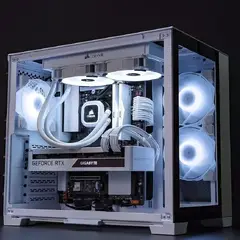
Alrighty i discovered the issue! The damn fan on my gpu was shot and just wouldn’t spin…. You won’t believe  what I did but we are getting great temps now and way better performance 

IMG_0502.jpeg

IMG_0501.jpeg

Link to post
Share on other sites

30 minutes ago, BentleyOwen123 said:

Alrighty i discovered the issue! The damn fan on my gpu was shot and just wouldn’t spin…. You won’t believe  what I did but we are getting great temps now and way better performance 

IMG_0502.jpeg

IMG_0501.jpeg

its mint

Link to post
Share on other sites

Create an account or sign in to comment

You need to be a member in order to leave a comment

Create an account

Sign up for a new account in our community. It's easy!

Register a new account

Sign in

Already have an account? Sign in here.

Sign In Now

×

