
Jump to content

No hdmi output

Go to solution Solved by Guest,
4 minutes ago, Eigenvektor said:

You should always be able to reset CMOS by removing the CMOS battery if your motherboard doesn't have an explicit button for that

remove the cmos battery for like 2-3 minutes at the most, and then put it back in before plugging back in the PC.

push against the clip and you should be able to easily slide the battery out of the slot
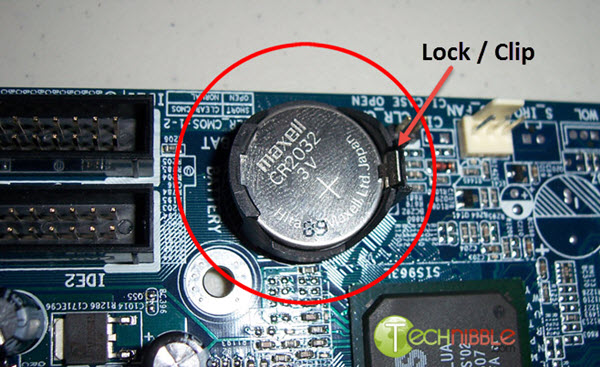
https://www.akshatblog.com/wp-content/uploads/2015/12/change-cmos-battery.jpg

I changed output to my motherboard for the hdmi signal. Now nether the graphics card or motherboard will display anything. Ive used 3 different cables that i know work. Is there anyway to reset the hdmi output without actually seeing it? Tried the good old turn off and on 3 times. Theres no reset button on the motherboard. Like..... how can you even do it

Link to comment
https://linustechtips.com/topic/1524045-no-hdmi-output/
Share on other sites

Link to post
Share on other sites

Which CPU do you have, does it have an iGPU? Without an iGPU the ports on the motherboard don't do anything.


You should always be able to reset CMOS by removing the CMOS battery if your motherboard doesn't have an explicit button for that (turn of the machine and unplug it beforehand, obviously).

Remember to either quote or @mention others, so they are notified of your reply

Link to comment
https://linustechtips.com/topic/1524045-no-hdmi-output/#findComment-16064353
Share on other sites

Link to post
Share on other sites

4 minutes ago, Eigenvektor said:

You should always be able to reset CMOS by removing the CMOS battery if your motherboard doesn't have an explicit button for that

remove the cmos battery for like 2-3 minutes at the most, and then put it back in before plugging back in the PC.

push against the clip and you should be able to easily slide the battery out of the slot

https://www.akshatblog.com/wp-content/uploads/2015/12/change-cmos-battery.jpg

Link to comment
https://linustechtips.com/topic/1524045-no-hdmi-output/#findComment-16064358
Share on other sites

Link to post
Share on other sites

1 hour ago, treestain said:

remove the cmos battery for like 2-3 minutes at the most, and then put it back in before plugging back in the PC.

push against the clip and you should be able to easily slide the battery out of the slot
https://www.akshatblog.com/wp-content/uploads/2015/12/change-cmos-battery.jpg

Awesome thanks ill give it a go

Link to comment
https://linustechtips.com/topic/1524045-no-hdmi-output/#findComment-16064399
Share on other sites

Link to post
Share on other sites

1 hour ago, treestain said:

how? in bios? or in 

I believe it was bios. I did it a few months back and couldnt be bothered with it because its not my main rig. Baldurs gate 3 came out and wanted to get the pc going again for my girlfriend lol. It has a 6800xt in it so it should be decent enough for it id hope

Link to comment
https://linustechtips.com/topic/1524045-no-hdmi-output/#findComment-16064402
Share on other sites

Link to post
Share on other sites

Create an account or sign in to comment

You need to be a member in order to leave a comment

Create an account

Sign up for a new account in our community. It's easy!

Register a new account

Sign in

Already have an account? Sign in here.

Sign In Now

×

