
Jump to content

Windows Storage Space performance

Go to solution Solved by alpenwasser,

@Xploda


I've never worked with Windows storage spaces, but as a reference from

ZFS on Linux, I can give you these numbers:
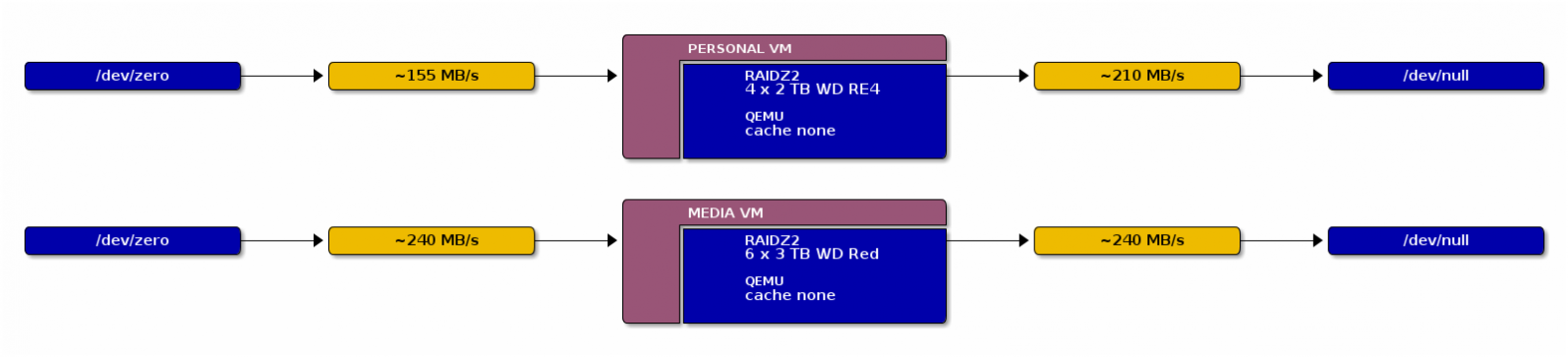
 

aw--apollo--2014-04-26--05--baseline--ca


Both are RAID6 (well, the ZFS version of it), not RAID5, so RAID5 should

be even faster as the parity calculations are less complex.


Have you looked around and checked if there might be any issues with

running the Barracudas with this setup? Also, if there are any tunable

parameters for storage spaces (as said, really don't know it), might be

time to start fiddling with those.


What method did you use to benchmark the setup?

Hello everyone,


I'm running 3x 4TB Seagate Barracuda hard drives in a Windows Storage Pool in a parity configuration (software RAID5).

I'm getting mixed results when it comes to performance. The read speeds are pretty good (around 300MB/s sequential reads), but the write is pretty slow with only 40MB/s.


Apparently the software RAID5 performance on Linux is a lot better. Is this just normal for Windows, or am I missing something?


Any help would be highly appreciated.

Link to comment
https://linustechtips.com/topic/150723-windows-storage-space-performance/
Share on other sites

Link to post
Share on other sites

hmm try buy a raid card, rather then using software raid try hardware that may increase your results 

~James

Check out my current projects: Selling site (Click Here)

If($reply == "for me to see"){

   $action = "Quote me!";

}else{

   $action = "Leave me alone!";

}

Link to post
Share on other sites

hmm try buy a raid card, rather then using software raid try hardware that may increase your results 

~James

I agree. However, if your raid card ever breaks down and you can't find one that's similar enough, you'll be in trouble. That's the main reason I went for software raid instead of hardware raid.

Link to post
Share on other sites

I agree. However, if your raid card ever breaks down and you can't find one that's similar enough, you'll be in trouble. That's the main reason I went for software raid instead of hardware raid.

the rarely break down, why dont you buy two identical cards and have one as back up.

~James

Check out my current projects: Selling site (Click Here)

If($reply == "for me to see"){

   $action = "Quote me!";

}else{

   $action = "Leave me alone!";

}

Link to post
Share on other sites

@Xploda


I've never worked with Windows storage spaces, but as a reference from

ZFS on Linux, I can give you these numbers:


aw--apollo--2014-04-26--05--baseline--ca


Both are RAID6 (well, the ZFS version of it), not RAID5, so RAID5 should

be even faster as the parity calculations are less complex.


Have you looked around and checked if there might be any issues with

running the Barracudas with this setup? Also, if there are any tunable

parameters for storage spaces (as said, really don't know it), might be

time to start fiddling with those.


What method did you use to benchmark the setup?

BUILD LOGS: HELIOS - Latest Update: 2015-SEP-06 ::: ZEUS - BOTW 2013-JUN-28 ::: APOLLO - Complete: 2014-MAY-10
OTHER STUFF: Cable Lacing Tutorial ::: What Is ZFS? ::: mincss Primer ::: LSI RAID Card Flashing Tutorial
FORUM INFO: Community Standards ::: The Moderating Team ::: 10TB+ Storage Showoff Topic

Link to post
Share on other sites

I didn't take a screenshot but I was able to squeeze 360MB/s from/to a 4 drive RaidZ ZFS system (3 data streams, 120MB/s each, so 360MB/s)


I would not recommend Windows for storage. The software raid just lacks so much in comparison to Linux based ones.

My builds:


'Baldur' - Data Server - Build Log


'Hlin' - UTM Gateway Server - Build Log

Link to post
Share on other sites

Thanks for your input guys. I'm currently in the process of transferring my RAID array to Ubuntu (mdadm), as I'm getting the impression Linux software RAID is much more mature than the Windows solution. 

Not only is it slow on Windows, it's also a pain to break the array on purpose in order to be able to copy everything  :D . I must say it was really easy to set up though, but I wouldn't recommend it to anyone, just because of its performance.

Link to post
Share on other sites

Thanks for your input guys. I'm currently in the process of transferring my RAID array to Ubuntu (mdadm), as I'm getting the impression Linux software RAID is much more mature than the Windows solution. 

Not only is it slow on Windows, it's also a pain to break the array on purpose in order to be able to copy everything  :D . I must say it was really easy to set up though, but I wouldn't recommend it to anyone, just because of its performance.

If you have any questions, MG2R knows mdadm quite well I believe,

personally I've only really worked with ZFS.

BUILD LOGS: HELIOS - Latest Update: 2015-SEP-06 ::: ZEUS - BOTW 2013-JUN-28 ::: APOLLO - Complete: 2014-MAY-10
OTHER STUFF: Cable Lacing Tutorial ::: What Is ZFS? ::: mincss Primer ::: LSI RAID Card Flashing Tutorial
FORUM INFO: Community Standards ::: The Moderating Team ::: 10TB+ Storage Showoff Topic

Link to post
Share on other sites

Hey guys, I thought I'd come back to you with some news. I have now made a RAID 5 degraded array (with mdadm) and ran a performance benchmark on it.
I thought it would be interesting for people to see the performance difference with Windows Storage Spaces on the exact same hardware.


Here's the result of my performance benchmark:

lsZFKR6.jpg


As you can see, the average will probably end up being a little lower if you run enough samples I guess.


This is the single drive performance I got under Windows (Crystaldiskmark), which is about the same as the single drive performance in Ubuntu:

4q4H3el.jpg


Unfortunately I don't have a Crystaldiskmark screenshot of my RAID in Windows, but the read speeds were around 300MB/s, while writes were at about 40MB/s (sequential).

I guess we can conclude that Windows Storage Spaces seem to have similar read speeds, but they are far behind when it comes to write speeds. This might also have something to do with the  -IsPowerProtected setting on Windows.


I know it's not the best comparison, but at least it gives us an idea  :D


Edit: Even though the benchmark seemed promising, I still got speeds of only 50MB/s when writing to my RAID array. However, I found a fix for this. Running this command: echo 32768 > /sys/block/md0/md/stripe_cache_size increased my speed with about 3 times, up to the point where I'm possibly maxing the read speed of the drive I'm copying from. Just letting you guys know, maybe someone can use this in the future.

Took me a while to figure this one out  :D

Link to post
Share on other sites

Create an account or sign in to comment

You need to be a member in order to leave a comment

Create an account

Sign up for a new account in our community. It's easy!

Register a new account

Sign in

Already have an account? Sign in here.

Sign In Now

×




