Jump to content

First build help

Go to solution Solved by SPARTAN VI,

It will work, but you're drastically overspending in some areas and skimping in others. 


  1. Processor: Pairing a Core i7-8700 (non-K) with a H100i and a Z390 motherboard is paying for a lot headroom, potential performance, and features that you're not utilizing.
    • Option 1: Go with an i7-8700K or i7-9700K instead, or...
    • Option 2: Keep the i7-8700 and drop the H100i for a nice air cooler (e.g. Hyper 212 Evo, or Noctua NH-D15 at the high-end), then drop the Z390 for a H370 (or B360) board and shift that savings toward the GPU budget (e.g. RTX 2070).
  2. NVMe SSD: Samsung 970 EVO is a great performer particularly for professional workloads, but there are cheaper NVMe's out there that offer comparable performance with higher capacities and at a better price. If the 970 EVO is your only storage, you will drive yourself mad constantly uninstalling and reinstalling software when your space inevitably runs out.
    • Corsair MP510 480GB nearly doubles your capacity for less euro than the 970 EVO. It has the well-reviewed Phison E12 controller that keeps up with the 970 EVO in all but the heaviest professional workloads.
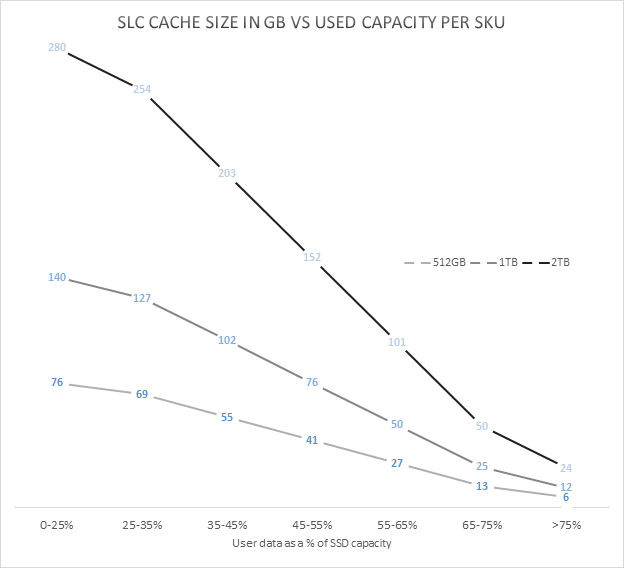
    • 1TB Intel 660p NVMe SSD is another (probably unpopular) choice for its high density but inferior performing QLC-based NAND. The 660p (and many other consumer QLC drives) combine cheap high density QLC NAND with a faster SLC cache that drastically increase performance for light workloads (such as launching a browser, a game, MS Office), but suffers in heavy professional workloads. The SLC cache also diminishes as the drive fills, so you would typically want to keep the drive below 75% full in order to utilize at least 50-100GB of that speedy SLC cache. 
  3. Power Supply: The CXM 550 will work fine. I'm sure the usual suspects will come in here with their expertise, but if the budget allows I'd simply prefer to stick to the Tier A (Mid-range) PSU's from our tiered list.

I’m building my first gaming pc and before I go out and buy all the parts I want to make sure that there are no issues/ incompatibilities


[PCPartPicker Part List](https://de.pcpartpicker.com/list/srMJcY)

Type|Item|Price
:----|:----|:----
**CPU** | [Intel - Core i7-8700 3.2 GHz 6-Core Processor]


**CPU Cooler** | [Corsair - H100i RGB PLATINUM 75 CFM Liquid CPU Cooler]


**Motherboard** | [Asus - ROG STRIX Z390-E GAMING ATX LGA1151 Motherboard]

 
**Memory** | [Corsair - Vengeance LPX 16 GB (2 x 8 GB) DDR4-3000 Memory]


**Storage** | [Samsung - 970 Evo 250 GB M.2-2280 Solid State Drive]


**Video Card** | [Zotac - GeForce RTX 2060 6 GB GAMING AMP Video Card]


**Case** | [NZXT - H500 (White) ATX Mid Tower Case]


**Power Supply** | [Corsair - CXM 550 W 80+ Bronze Certified Semi-modular ATX Power Supply]


**Case Fan** | [Corsair - LL120RGB LED (Three Fans With Lighting Node PRO) 43.25 CFM 120 mm Fans]


 | **Total** | **€1459.33**
 | Generated by [PCPartPicker](https://pcpartpicker.com) 2019-05-15 15:52 CEST+0200 |

Link to comment
https://linustechtips.com/topic/1064041-first-build-help/
Share on other sites

Link to post
Share on other sites

19 minutes ago, kdawwgg1221 said:

there are no issues, however, I would definitely look into changing your CPU to the Unlocked version of the 8700. You have the cooling capacity and mobo to do some overclocking. @Madmax123_

How much more performance could you get out of oc 

Link to comment
https://linustechtips.com/topic/1064041-first-build-help/#findComment-12568865
Share on other sites

Link to post
Share on other sites

Well you start with a higher base clock speed from 3.2GHz to 3.7GHz. The H100i's are decent coolers so you should be able to squeeze out an extra 500MHz conservatively. You are looking at a 10-15% increase in performance. Besides, it is loads of fun to tinker around with OC and see what your Hardware is truly made of. @Madmax123_

Link to comment
https://linustechtips.com/topic/1064041-first-build-help/#findComment-12568883
Share on other sites

Link to post
Share on other sites

It will work, but you're drastically overspending in some areas and skimping in others. 


  1. Processor: Pairing a Core i7-8700 (non-K) with a H100i and a Z390 motherboard is paying for a lot headroom, potential performance, and features that you're not utilizing.
    • Option 1: Go with an i7-8700K or i7-9700K instead, or...
    • Option 2: Keep the i7-8700 and drop the H100i for a nice air cooler (e.g. Hyper 212 Evo, or Noctua NH-D15 at the high-end), then drop the Z390 for a H370 (or B360) board and shift that savings toward the GPU budget (e.g. RTX 2070).
  2. NVMe SSD: Samsung 970 EVO is a great performer particularly for professional workloads, but there are cheaper NVMe's out there that offer comparable performance with higher capacities and at a better price. If the 970 EVO is your only storage, you will drive yourself mad constantly uninstalling and reinstalling software when your space inevitably runs out.
    • Corsair MP510 480GB nearly doubles your capacity for less euro than the 970 EVO. It has the well-reviewed Phison E12 controller that keeps up with the 970 EVO in all but the heaviest professional workloads.
    • 1TB Intel 660p NVMe SSD is another (probably unpopular) choice for its high density but inferior performing QLC-based NAND. The 660p (and many other consumer QLC drives) combine cheap high density QLC NAND with a faster SLC cache that drastically increase performance for light workloads (such as launching a browser, a game, MS Office), but suffers in heavy professional workloads. The SLC cache also diminishes as the drive fills, so you would typically want to keep the drive below 75% full in order to utilize at least 50-100GB of that speedy SLC cache. 
  3. Power Supply: The CXM 550 will work fine. I'm sure the usual suspects will come in here with their expertise, but if the budget allows I'd simply prefer to stick to the Tier A (Mid-range) PSU's from our tiered list.
Link to comment
https://linustechtips.com/topic/1064041-first-build-help/#findComment-12568980
Share on other sites

Link to post
Share on other sites

34 minutes ago, spartanvi said:

It will work, but you're drastically overspending in some areas and skimping in others. 


  1. Processor: Pairing a Core i7-8700 (non-K) with a H100i and a Z390 motherboard is paying for a lot headroom, potential performance, and features that you're not utilizing.
    • Option 1: Go with an i7-8700K or i7-9700K instead, or...
    • Option 2: Keep the i7-8700 and drop the H100i for a nice air cooler (e.g. Hyper 212 EVO, or Noctua NH-D15 at the high-end), then drop the Z390 for a H370 (or B360) board and shift that savings toward the GPU budget (e.g. RTX 2070).
  2. NVMe SSD: Samsung 970 Evo is a great performer particularly for professional workloads, but there are cheaper NVMe's out there that offer comparable performance with higher capacities and at a better price. If the 970 EVO is your only storage, you will drive yourself mad constantly uninstalling and reinstalling software when your space inevitably runs out.
    • Corsair MP510 480GB nearly doubles your capacity for less euro than the 970 EVO. It has the well-reviewed Phison E12 controller that keeps up with the 970 EVO in all but the heaviest professional workloads.
    • 1TB Intel 660p NVMe SSD is another (probably unpopular) choice for its high density but inferior performing QLC-based NAND. The 660p (and many other consumer QLC drives) combine cheap high density QLC NAND with a faster SLC cache that drastically increase performance for light workloads (such as launching a browser, a game, MS Office), but suffers in heavy professional workloads. The SLC cache also diminishes as the drive fills, so you would typically want to keep the drive at 75% or less in order to utilize that speedy SLC cache. 
  3. Power Supply: The CXM 550 will work fine. I'm sure the usual suspects will come in here with their expertise, but if the budget allows I'd simply prefer to stick to the Tier A (Mid-range) PSU's from our tiered list.

I asked Asus support is the 960 Evo is not compatible they said it's not. WHY what?!!

and I have an SSD already for mass storage

and the MP510 is not on the compatibility list is it compatible

Edited by Madmax123_
Link to comment
https://linustechtips.com/topic/1064041-first-build-help/#findComment-12569097
Share on other sites

Link to post
Share on other sites

@Madmax123_ The two m.2 slots on that board both match the MP510's form factor and interface, "socket 3" M.2 2280, PCIe 3.0 x4. Same with the 960 EVO. The only issue I can forsee is that the MP510 is double-sided, which could cause issues physically fitting on boards with the m.2 slot on the back (i.e. due to clearance). I'm unaware if this is actually an issue with motherboards with front-mounted m.2 slots, such as your Asus STRIX Z390-E board. On the other hand, the 960 EVO is single sided, so I don't understand why Asus support told you it is incompatible?


To date I've installed four m.2 NVMe SSDs in my personal and familial builds, and have never encountered an issue with physical clearance. Perhaps someone experienced in that area can chime in. 

Link to comment
https://linustechtips.com/topic/1064041-first-build-help/#findComment-12569203
Share on other sites

Link to post
Share on other sites

PCPartPicker Part List

CPU: Intel - Core i7-8700K 3.7 GHz 6-Core Processor  (€399.90 @ Caseking) 
CPU Cooler: be quiet! - Dark Rock Pro 4 50.5 CFM CPU Cooler  (€62.90 @ Amazon Deutschland) 
Motherboard: Gigabyte - Z390 AORUS ELITE ATX LGA1151 Motherboard  (€179.99 @ Amazon Deutschland) 
Memory: Corsair - Vengeance LPX 16 GB (2 x 8 GB) DDR4-3000 Memory  (€82.90 @ Amazon Deutschland) 
Storage: Crucial - MX500 500 GB 2.5" Solid State Drive  (€69.90 @ Amazon Deutschland) 
Video Card: Sapphire - Radeon RX VEGA 64 8 GB NITRO+ Video Card  (€404.99 @ Alternate) 
Case: Fractal Design - Meshify C ATX Mid Tower Case  (€84.90 @ Caseking) 
Power Supply: BitFenix - Formula Gold 650 W 80+ Gold Certified ATX Power Supply  (€79.90 @ Caseking) 
Total: €1365.38
Prices include shipping, taxes, and discounts when available
Generated by PCPartPicker 2019-05-16 00:06 CEST+0200

Link to comment
https://linustechtips.com/topic/1064041-first-build-help/#findComment-12570084
Share on other sites

Link to post
Share on other sites

Create an account or sign in to comment

You need to be a member in order to leave a comment

Create an account

Sign up for a new account in our community. It's easy!

Register a new account

Sign in

Already have an account? Sign in here.

Sign In Now

×