
Jump to content

Computer/server just shut down?

Go to solution Solved by GoodBytes,

Sounds like a blown capacitor on the motherboard or PSU. Open the computer and inspect for blown capacitors.

The following are images of blown capacitors:
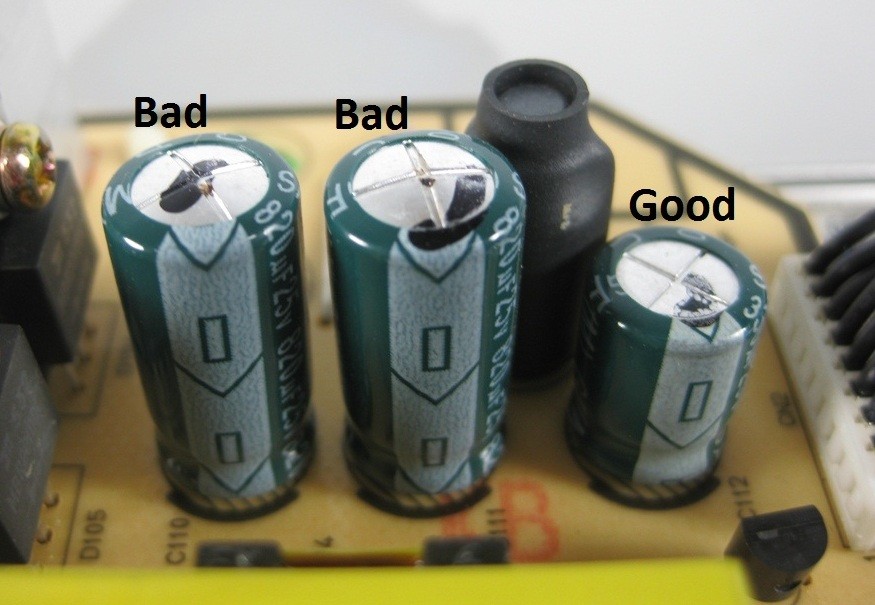
repairing-switching-power-supply-3.jpg

Al-Elko-bad-caps-Wiki-07-02-17.jpg


evga_nvidia_blown_capacitors_1080.jpg


If you see non on the motherboard, then it is your PSU. Do not open the PSU, it handles larges charges that can potentially kill you, without adequate equipment and training to discharge them for safe handling.


Hello everyone:

 so like 7 years ago I went to Best Buy to buy a computer. It worked great. It's a duel core celeron. Two years ago, I turned it into a nas for my schoolwork because I needed to move somethings off my laptop because the district was going to format them. Now that is not the problem. Today, my computer was just running fine, and it shut off. Not like because of an update, but because there was no power? I moved my computer to a different location, and the fans spun for like a second and then stopped receiving power. I tried it again, and nothing is happening. No led, no posting, no anything! I don't know what to do. For the time being, I got my hard drive and used a sata to usb connection and it works. Now what should I do?

Link to comment
https://linustechtips.com/topic/675586-computerserver-just-shut-down/
Share on other sites

Link to post
Share on other sites

try a diferent PSU, maybe you tripped a fuse

Elemental 

Spoiler

Intel i5 6500 @3.8ghz - 8GB HyperX - 600w Apex PSU - GTX 1060 G1 GIGABYTE 6GB - s340 Black - 240gb Toshiba Q300 - Cooler master TX3i - MSI z170-A PRO.

Old Build (sold for 290€)

Spoiler

Intel i3 540 @ 3.9ghz (On stock cooler, Hits 80c max) - 8gb ram - 500w power supply - P7H55-M LE  120gb SSD - Talius Drakko case

Project Frug 50$ Water loop


Laptops

Spoiler

13" Macbook Air - Alienware m14x r2 -  2009 15" Macbook Pro (I was give all of these and would never buy them myself)


Link to post
Share on other sites

1) Check your wall outlet by plugging something else into it. Also check your surge protector to make sure it is working properly.

2) Check all connections (sounds dumb, do it anyway).  This includes power connectors inside your PC.  Check that your power switch works.

3) Remove your PSU and try a different one.

4) If you have done all of the above, it's probably your motherboard.


i7 4790k @4.7 | GTX 1070 Strix | Z97 Sabertooth | 32GB  DDR3 2400 mhz | Intel 750 SSD | Define R5 | Corsair K70 | Steel Series Rival | XB271, 1440p, IPS, 165hz | 5.1 Surround
PC Build

Desk Build

Link to post
Share on other sites

Sounds like a blown capacitor on the motherboard or PSU. Open the computer and inspect for blown capacitors.

The following are images of blown capacitors:

repairing-switching-power-supply-3.jpg

Al-Elko-bad-caps-Wiki-07-02-17.jpg


evga_nvidia_blown_capacitors_1080.jpg


If you see non on the motherboard, then it is your PSU. Do not open the PSU, it handles larges charges that can potentially kill you, without adequate equipment and training to discharge them for safe handling.

 

Link to post
Share on other sites

Create an account or sign in to comment

You need to be a member in order to leave a comment

Create an account

Sign up for a new account in our community. It's easy!

Register a new account

Sign in

Already have an account? Sign in here.

Sign In Now

×



