Jump to content

Hello there, I currently have an issue with my new intake fans. My previous fans were 3 pin so there wasn't an issue, but my new fans are PWM so if I connect them to my fan hub, they lose the speed control and they are way too loud at 3000 RPM. Right now, my fan hub is connected to system_fan3 and my Swiftech x320x2 prestige is connected to CPU_Fan. 


I'm wondering, since my motherboard (gigabyte g1 gaming 7) has 3 system_fan headers which support PWM fans, if I switch my fan hub connection from system_fan3 to CPU_OPT and then plug my 3 new intake fans into system_fan (1 to 3), would this solve my issue?

CPU: Intel Core i9-10900K  MOBO: ROG MAXIMUS XII FORMULA GPU: 2080ti Hall of Fame 10th anniversary limited edition  PSU: Asus ROG THOR 1200W  COOLER: Optimus foundation black acetal RADS: 3x EKWB CoolStream PE 360  LOOP: EKWB torque HDC fittings / EKWB ZMT 15,9/9,5mm / EKWB CryoFuel Clear MONITOR: Acer predator X34

Link to comment
https://linustechtips.com/topic/653127-fan-connection-setup/
Share on other sites

Link to post
Share on other sites

Might as well try.  But it would be an unlikely fix.

ALCATRAZ |   CPU: i9 9900k @ 5GHz, Motherboard: Asus Prime Z390-A, RAM: Corsair Vengence LPX 32GB, GPU: Gigabyte 1070Ti Case: Zalman MS800 Plus, Storage: Corsair 2TB NVME | Crucial M550 128GB SSD  |  WD 640GB HDD, PSU: XFX Pro Series 1050w, Display: ASUS MG279Q, Cooling: Noctua NH-D15


Link to comment
https://linustechtips.com/topic/653127-fan-connection-setup/#findComment-8386038
Share on other sites

Link to post
Share on other sites

Just now, Subduck said:

Might as well try.  But it would be an unlikely fix.

How so? I'm curious. Just wanna get insights before moving everything.

CPU: Intel Core i9-10900K  MOBO: ROG MAXIMUS XII FORMULA GPU: 2080ti Hall of Fame 10th anniversary limited edition  PSU: Asus ROG THOR 1200W  COOLER: Optimus foundation black acetal RADS: 3x EKWB CoolStream PE 360  LOOP: EKWB torque HDC fittings / EKWB ZMT 15,9/9,5mm / EKWB CryoFuel Clear MONITOR: Acer predator X34

Link to comment
https://linustechtips.com/topic/653127-fan-connection-setup/#findComment-8386048
Share on other sites

Link to post
Share on other sites

4 minutes ago, TheRedViper said:

-SNIP-

Make sure in the BIOS that your header is setup as PWM control for that header or the fans connected to the hub will just run at full speed. 


-Moved to Liquid and Exotic Cooling-

Link to comment
https://linustechtips.com/topic/653127-fan-connection-setup/#findComment-8386052
Share on other sites

Link to post
Share on other sites

Just now, W-L said:

Make sure in the BIOS that your header is setup as PWM control for that header or the fans connected to the hub will just run at full speed. 

which one? The system_fan or the cpu_opt? I don't mind the fans connected to the fan hub to run at full speed, theyre 3 pins anyways and theyre quiet.

CPU: Intel Core i9-10900K  MOBO: ROG MAXIMUS XII FORMULA GPU: 2080ti Hall of Fame 10th anniversary limited edition  PSU: Asus ROG THOR 1200W  COOLER: Optimus foundation black acetal RADS: 3x EKWB CoolStream PE 360  LOOP: EKWB torque HDC fittings / EKWB ZMT 15,9/9,5mm / EKWB CryoFuel Clear MONITOR: Acer predator X34

Link to comment
https://linustechtips.com/topic/653127-fan-connection-setup/#findComment-8386057
Share on other sites

Link to post
Share on other sites

1 minute ago, TheRedViper said:

which one? The system_fan or the cpu_opt? I don't mind the fans connected to the fan hub to run at full speed, theyre 3 pins anyways and theyre quiet.

I thought you said your fans are 4pin PWM if they are 3 pin fans and hooked up to the fan hub they will only run at full speed with no control.


As for the header if you want to control 4 pin PWM fans on the fan hub you will need to setup the header on the motherboard system fan 3 to PWM mode. Most times the CPU opt depending on the motherboard is a slave header to the CPU header or power only with no control. 

Link to comment
https://linustechtips.com/topic/653127-fan-connection-setup/#findComment-8386073
Share on other sites

Link to post
Share on other sites

Just now, W-L said:

I thought you said your fans are 4pin PWM if they are 3 pin fans and hooked up to the fan hub they will only run at full speed with no control.


As for the header if you want to control 4 pin PWM fans on the fan hub you will need to setup the header on the motherboard system fan 3 to PWM mode. Most times the CPU opt depending on the motherboard is a slave header to the CPU header or power only with no control. 

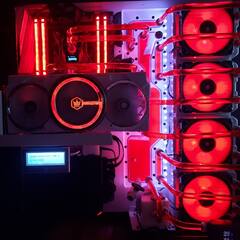
Il reformulate: My previous intake fans were 3 pins, my new ones are PWM. My fan hub has 7x3pins and 1xPWM ports (meant for CPU cooler). As of right now, I have my 3 pin exhaust fan connected to port 7 and my 3 new fans connected to port 4-5-6 with the fourth pin hanging out meaning theyre running at full speed. My CPU cooler has its own hub which is connected to CPU_FAN and my fan hub is connected to System_fan_3. 


What I want is to have my 3 new intake fans as PWM because theyre too loud at 3000 RPM. So I had a few ideas in mind.


1) Remove the 3 intakes from the fan hub and place them respectively into system_fan 1,2 and 3 (since these are PWM ports) and pass the fan hub connection from system_fan3 to cpu_opt. This option would require me to buy or find extenders as the system_fan 1 and 2 are very far from the front of my case.


2) Use a Noctua Y splitter and connect 2 of the intake fans with it into the fan hub only PWM port (meant for cpu cooler, but not used). The 3rd fan will go to system_fan3 which is in range without extenders and the fan hub connection will go to CPU_OPT.


PS. (Should I put my CPU cooler fan hub into the CPU_OPT instead of CPU_FAN, or does it change nothing)


CPU: Intel Core i9-10900K  MOBO: ROG MAXIMUS XII FORMULA GPU: 2080ti Hall of Fame 10th anniversary limited edition  PSU: Asus ROG THOR 1200W  COOLER: Optimus foundation black acetal RADS: 3x EKWB CoolStream PE 360  LOOP: EKWB torque HDC fittings / EKWB ZMT 15,9/9,5mm / EKWB CryoFuel Clear MONITOR: Acer predator X34

Link to comment
https://linustechtips.com/topic/653127-fan-connection-setup/#findComment-8386137
Share on other sites

Link to post
Share on other sites

3 minutes ago, TheRedViper said:

-SNIP-

What fan hub are you using not the original swiftech one that came with the cooler, it sounds like you have one of the Phantek ones that take in a PWM control signal but output an equivalent 3 pin DC voltage control. 

Link to comment
https://linustechtips.com/topic/653127-fan-connection-setup/#findComment-8386157
Share on other sites

Link to post
Share on other sites

1 minute ago, W-L said:

What fan hub are you using not the original swiftech one that came with the cooler, it sounds like you have one of the Phantek ones that take in a PWM control signal but output an equivalent 3 pin DC voltage control. 

huh I dont know, it came already placed with my NZXT Noctis 450 case. Il post a picture

CPU: Intel Core i9-10900K  MOBO: ROG MAXIMUS XII FORMULA GPU: 2080ti Hall of Fame 10th anniversary limited edition  PSU: Asus ROG THOR 1200W  COOLER: Optimus foundation black acetal RADS: 3x EKWB CoolStream PE 360  LOOP: EKWB torque HDC fittings / EKWB ZMT 15,9/9,5mm / EKWB CryoFuel Clear MONITOR: Acer predator X34

Link to comment
https://linustechtips.com/topic/653127-fan-connection-setup/#findComment-8386174
Share on other sites

Link to post
Share on other sites

4 minutes ago, TheRedViper said:

huh I dont know, it came already placed with my NZXT Noctis 450 case. Il post a picture

Ok that makes sense then I was assuming you were using the original one that came with the Swiftech AIO cooler. In this case then you can use the 3 pins outputs for the fans around the case but for the new front PWM fans i would suggest to get a PWM splitter to have all the fans group controlled and put onto one of the system headers for PWM control since the CPu opt as mentioned usually doesn't give control. 

Link to comment
https://linustechtips.com/topic/653127-fan-connection-setup/#findComment-8386204
Share on other sites

Link to post
Share on other sites

1 minute ago, W-L said:

Ok that makes sense then I was assuming you were using the original one that came with the Swiftech AIO cooler. In this case then you can use the 3 pins outputs for the fans around the case but for the new front PWM fans i would suggest to get a PWM splitter to have all the fans group controlled and put onto one of the system headers for PWM control since the CPu opt as mentioned usually doesn't give control. 

Nah the swiftech fan hub has the 3 radiator fans and the pump connected to it, then that fan hub goes to CPU_FAN.


The case fan hub has the 3 pin exhaust and the 3 new PWM intakes plugged into 3 pins. That Fan hub goes into system_fan3.


I could put the swiftech fan hub into CPU_OPT instead and put the fan hub of the case into CPU_FAN

CPU: Intel Core i9-10900K  MOBO: ROG MAXIMUS XII FORMULA GPU: 2080ti Hall of Fame 10th anniversary limited edition  PSU: Asus ROG THOR 1200W  COOLER: Optimus foundation black acetal RADS: 3x EKWB CoolStream PE 360  LOOP: EKWB torque HDC fittings / EKWB ZMT 15,9/9,5mm / EKWB CryoFuel Clear MONITOR: Acer predator X34

Link to comment
https://linustechtips.com/topic/653127-fan-connection-setup/#findComment-8386212
Share on other sites

Link to post
Share on other sites

5 minutes ago, TheRedViper said:

Nah the swiftech fan hub has the 3 radiator fans and the pump connected to it, then that fan hub goes to CPU_FAN.

The case fan hub has the 3 pin exhaust and the 3 new PWM intakes plugged into 3 pins. That Fan hub goes into system_fan3.

I could put the swiftech fan hub into CPU_OPT instead and put the fan hub of the case into CPU_FAN

Yeah you could reuse the swiftech hub for the PWM front fans, just test thee CPU opt since like I said I'm not sure that will let you control it, but run only at max speed. 

Link to comment
https://linustechtips.com/topic/653127-fan-connection-setup/#findComment-8386238
Share on other sites

Link to post
Share on other sites

Maybe you need a new PWM supporting fan hub if you are buying extenders anyway?


eg

https://www.amazon.co.uk/Phobya-8x-4-Pin-Splitter-PWM/dp/B00OD7MO6E

Build Log : Red N White Army


System Specs

NZXT S340

i7 4790k

Z97 MSI Gaming 5

Palit 980 Ti Super Jetstream

16GB HyperX Savage 1866 RAM

Samsung 850 Evo 500GB SSD

EVGA 750W G2 PSU

Custom Cooling Loop

Link to comment
https://linustechtips.com/topic/653127-fan-connection-setup/#findComment-8386240
Share on other sites

Link to post
Share on other sites

2 minutes ago, W-L said:

Yeah you could reuse the swiftech hub for the PWM front fans, just test thee CPU opt since like I said I'm not sure that will let you control it, but run only at max speed. 

I can't put the intake fans on the swiftech hub, its meant for 3 fans from the rad and the pump only, there's no extra place. What I want to do is use Noctua Y splitter and plug 2 of the 3 fans into the only PWM port of the case fan hub and let that fan hub into CPU_FAN.


Then il place the swiftech fan hub in CPU_OPT port (instead of system_fan_3) which is described by gigabyte as follow(CPU_OPT): ''Water cooling fan header/The fan header is a 4 pin. The speed control requires the use of a fan with fan speed control design.


Then il put the 3rd intake fan into system_fan_3

CPU: Intel Core i9-10900K  MOBO: ROG MAXIMUS XII FORMULA GPU: 2080ti Hall of Fame 10th anniversary limited edition  PSU: Asus ROG THOR 1200W  COOLER: Optimus foundation black acetal RADS: 3x EKWB CoolStream PE 360  LOOP: EKWB torque HDC fittings / EKWB ZMT 15,9/9,5mm / EKWB CryoFuel Clear MONITOR: Acer predator X34

Link to comment
https://linustechtips.com/topic/653127-fan-connection-setup/#findComment-8386266
Share on other sites

Link to post
Share on other sites

Just now, TheRedViper said:

-SNIP-

Ah ok, well you can always get something like this, it would simply the wiring a little with one splitter for all 3 front fans and the rest can be on the NZXT hub that came with the case.

https://www.amazon.com/Phobya-3-Way-Splitter-Single-Connection/dp/B004CLFOK4

Link to comment
https://linustechtips.com/topic/653127-fan-connection-setup/#findComment-8386278
Share on other sites

Link to post
Share on other sites

1 minute ago, W-L said:

Ah ok, well you can always get something like this, it would simply the wiring a little with one splitter for all 3 front fans and the rest can be on the NZXT hub that came with the case.

https://www.amazon.com/Phobya-3-Way-Splitter-Single-Connection/dp/B004CLFOK4

I can't use a 3 way splitter. 1 fan draws 5.62W and a fan port normally holds 12W max. Atleast thats what I got told.

CPU: Intel Core i9-10900K  MOBO: ROG MAXIMUS XII FORMULA GPU: 2080ti Hall of Fame 10th anniversary limited edition  PSU: Asus ROG THOR 1200W  COOLER: Optimus foundation black acetal RADS: 3x EKWB CoolStream PE 360  LOOP: EKWB torque HDC fittings / EKWB ZMT 15,9/9,5mm / EKWB CryoFuel Clear MONITOR: Acer predator X34

Link to comment
https://linustechtips.com/topic/653127-fan-connection-setup/#findComment-8386289
Share on other sites

Link to post
Share on other sites

4 minutes ago, TheRedViper said:

I can't use a 3 way splitter. 1 fan draws 5.62W and a fan port normally holds 12W max. Atleast thats what I got told.

It depends on what fans you use, usually 3-4 fans per header max is a good rule of thumb but now you mentioned it since they are 3K fans you can get powered splitters that only take the PWM control signal from the header and get supplied with auxiliary power.

https://www.amazon.com/Computer-Splitter-Connector-Sleeved-Adapter/dp/B00DYQRFY6/ref=pd_sim_147_2?ie=UTF8&psc=1&refRID=JDC8HKWJXESPY4YW1KYJ

Link to comment
https://linustechtips.com/topic/653127-fan-connection-setup/#findComment-8386320
Share on other sites

Link to post
Share on other sites

12 minutes ago, W-L said:

It depends on what fans you use, usually 3-4 fans per header max is a good rule of thumb but now you mentioned it since they are 3K fans you can get powered splitters that only take the PWM control signal from the header and get supplied with auxiliary power.

https://www.amazon.com/Computer-Splitter-Connector-Sleeved-Adapter/dp/B00DYQRFY6/ref=pd_sim_147_2?ie=UTF8&psc=1&refRID=JDC8HKWJXESPY4YW1KYJ

yeah il check that option if the one I'm thinking about isn't working, testing it now.

CPU: Intel Core i9-10900K  MOBO: ROG MAXIMUS XII FORMULA GPU: 2080ti Hall of Fame 10th anniversary limited edition  PSU: Asus ROG THOR 1200W  COOLER: Optimus foundation black acetal RADS: 3x EKWB CoolStream PE 360  LOOP: EKWB torque HDC fittings / EKWB ZMT 15,9/9,5mm / EKWB CryoFuel Clear MONITOR: Acer predator X34

Link to comment
https://linustechtips.com/topic/653127-fan-connection-setup/#findComment-8386383
Share on other sites

Link to post
Share on other sites

33 minutes ago, W-L said:

SIP

It works now, but I see something weird. My motherboard program is telling me the CPU_OPT is running at 3000 RPM (This is the connection leading to the fan hub on the swiftech AIO which has 3 fans on radiator and the pump plugged in). The issue is that the fans on that radiator are 2000 RPM NB E-loop so why is it showing 3000 RPM?

CPU: Intel Core i9-10900K  MOBO: ROG MAXIMUS XII FORMULA GPU: 2080ti Hall of Fame 10th anniversary limited edition  PSU: Asus ROG THOR 1200W  COOLER: Optimus foundation black acetal RADS: 3x EKWB CoolStream PE 360  LOOP: EKWB torque HDC fittings / EKWB ZMT 15,9/9,5mm / EKWB CryoFuel Clear MONITOR: Acer predator X34

Link to comment
https://linustechtips.com/topic/653127-fan-connection-setup/#findComment-8386496
Share on other sites

Link to post
Share on other sites

1 minute ago, TheRedViper said:

It works now, but I see something weird. My motherboard program is telling me the CPU_OPT is running at 3000 RPM (This is the connection leading to the fan hub on the swiftech AIO which has 3 fans on radiator and the pump plugged in). The issue is that the fans on that radiator are 2000 RPM NB E-loop so why is it showing 3000 RPM?

You said the pump is hooked up also to that hub, sounds like it's taking the pump RPM as the hub only uses one header to take the RPM from to not get conflicting signals. 

Link to comment
https://linustechtips.com/topic/653127-fan-connection-setup/#findComment-8386506
Share on other sites

Link to post
Share on other sites

3 minutes ago, W-L said:

You said the pump is hooked up also to that hub, sounds like it's taking the pump RPM as the hub only uses one header to take the RPM from to not get conflicting signals. 

So its fine? Its just that my pump is running at 3000 RPM?


Because ive read somewhere that the CPU_OPT is linked to CPU_FAN and knowing that my case hub is plugged into CPU_FAN with RPM lowered to 1 200 wouldn't this be an issue? 

CPU: Intel Core i9-10900K  MOBO: ROG MAXIMUS XII FORMULA GPU: 2080ti Hall of Fame 10th anniversary limited edition  PSU: Asus ROG THOR 1200W  COOLER: Optimus foundation black acetal RADS: 3x EKWB CoolStream PE 360  LOOP: EKWB torque HDC fittings / EKWB ZMT 15,9/9,5mm / EKWB CryoFuel Clear MONITOR: Acer predator X34

Link to comment
https://linustechtips.com/topic/653127-fan-connection-setup/#findComment-8386536
Share on other sites

Link to post
Share on other sites

11 minutes ago, TheRedViper said:

So its fine? Its just that my pump is running at 3000 RPM?


Because ive read somewhere that the CPU_OPT is linked to CPU_FAN and knowing that my case hub is plugged into CPU_FAN with RPM lowered to 1 200 wouldn't this be an issue? 

Well if you vary the PWM control speed you should be able to see a change in the speed, since both the pump and fans are hooked up to it. The pump on the prestige unit is designed to be variable so it's not a problem.

Link to comment
https://linustechtips.com/topic/653127-fan-connection-setup/#findComment-8386627
Share on other sites

Link to post
Share on other sites

Just now, W-L said:

Well if you vary the PWM control speed you should be able to see a change in the speed, since both the pump and fans are hooked up to it. The pump on the prestige unit is designed to be varied so it's not a problem.

But isn't the CPU_FAN made to vary its speed depending on the CPU temp? Like doing it automatically? Because right now whats on CPU_FAN is my case fan hub which I want at a specific speed all the time.

CPU: Intel Core i9-10900K  MOBO: ROG MAXIMUS XII FORMULA GPU: 2080ti Hall of Fame 10th anniversary limited edition  PSU: Asus ROG THOR 1200W  COOLER: Optimus foundation black acetal RADS: 3x EKWB CoolStream PE 360  LOOP: EKWB torque HDC fittings / EKWB ZMT 15,9/9,5mm / EKWB CryoFuel Clear MONITOR: Acer predator X34

Link to comment
https://linustechtips.com/topic/653127-fan-connection-setup/#findComment-8386642
Share on other sites

Link to post
Share on other sites

Just now, TheRedViper said:

But isn't the CPU_FAN made to vary its speed depending on the CPU temp? Like doing it automatically? Because right now whats on CPU_FAN is my case fan hub which I want at a specific speed all the time.

It depends on the motherboard some you can setup define fan curves for all fan headers with temperature probes on the board. I believe gigabyte has a more basic system which is based on CPU temp only and varies the PWM control from that where it allows you to change the rate at which the fan speeds increase with load. 

Link to comment
https://linustechtips.com/topic/653127-fan-connection-setup/#findComment-8386663
Share on other sites

Link to post
Share on other sites

Create an account or sign in to comment

You need to be a member in order to leave a comment

Create an account

Sign up for a new account in our community. It's easy!

Register a new account

Sign in

Already have an account? Sign in here.

Sign In Now

×