
Jump to content

Problems with installing new PSU

Go to solution Solved by Apathetik,
8 minutes ago, seami said:

Instead of this I have a 6 pin connector tho.

Your power supply comes with an x4 SATA power cable. 
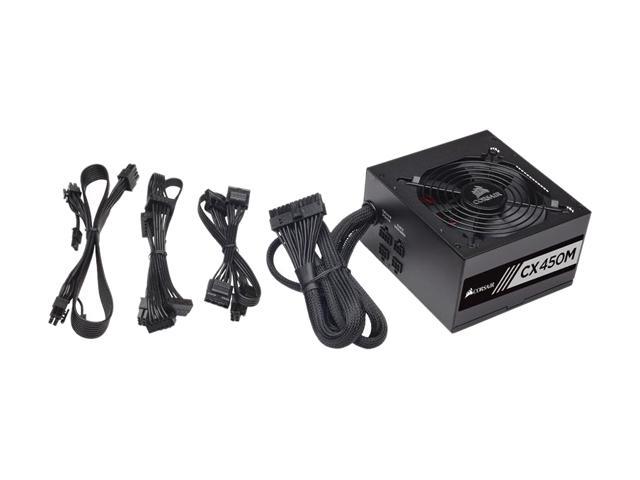
17-139-146-06.jpg

The cable you want is the second one, from the left. It should have a 6 pin connector on one end (this side plugs into your power supply), and 4 SATA power connectors spaced along the length of the cable. Plug the 6 pin side into your power supply where it says "Peripheral & SATA", then plug one of the SATA connectors from the other end of the cable, into your HDD.

Hello.


Today I bought a new PSU for my computer (Corsair CX450M) and decided to install it by myself. Everything was okay till I turned on my computer. I got an error with text: Reboot and Select proper boot device. So, I did some research and found two solutions: my main priority in BIOS for boot is not hma hardrive (I fixed that and nothing changed) or I connected cables wrong (what is probably correct I guess, but Im not sure, since this is

my first time to installing a CPU). 


Here is the pic how I connected cables:

9498541bffefaf37f5d116c6c6c2f15f134.jpg


Hope you can help me. Thank you.

Link to comment
https://linustechtips.com/topic/605060-problems-with-installing-new-psu/
Share on other sites

Link to post
Share on other sites

So what?

A new CPU or a new PSU? Can you decide pls.

Gaming HTPC:

R5 5600X - Cryorig C7 - Asus ROG B350-i - EVGA RTX2060KO - 16gb G.Skill Ripjaws V 3333mhz - Corsair SF450 - 500gb 960 EVO - LianLi TU100B


Desktop PC:
R9 3900X - Peerless Assassin 120 SE - Asus Prime X570 Pro - Powercolor 7900XT - 32gb LPX 3200mhz - Corsair SF750 Platinum - 1TB WD SN850X - CoolerMaster NR200 White - Gigabyte M27Q-SA - Corsair K70 Rapidfire - Logitech MX518 Legendary - HyperXCloud Alpha wireless


Boss-NAS [Build Log]:
R5 2400G - Noctua NH-D14 - Asus Prime X370-Pro - 16gb G.Skill Aegis 3000mhz - Seasonic Focus Platinum 550W - Fractal Design R5 - 
250gb 970 Evo (OS) - 2x500gb 860 Evo (Raid0) - 6x4TB WD Red (RaidZ2)

Synology-NAS:
DS920+
2x4TB Ironwolf - 1x18TB Seagate Exos X20


Audio Gear:

Hifiman HE-400i - Kennerton Magister - Beyerdynamic DT880 250Ohm - AKG K7XX - Fostex TH-X00 - O2 Amp/DAC Combo - 
Klipsch RP280F - Klipsch RP160M - Klipsch RP440C - Yamaha RX-V479


Reviews and Stuff:

GTX 780 DCU2 // 8600GTS // Hifiman HE-400i // Kennerton Magister
Folding all the Proteins! // Boincerino

Useful Links:
Do you need an AMP/DAC? // Recommended Audio Gear // PSU Tier List 

Link to post
Share on other sites

You need to connect the SATA-Power to the HDD, the cable you have connected now is the SATA-DATA 

Main gaming pc: Lian-Li Lancool II Mesh Performance - Ryzen 5 5600X - MSI GTX1080Ti Armor - AMD Wraith Spire RGB - ASUS TUF Gaming B550 Plus - Corsair Vengeance RGB PRO 2x8GB 3200MHz - 500GB M.2 (and a few other drives)


Gaming laptop: ASUS GL552VW: i7 6700HQ - GTX960M 2GB - 8GB DDR4 2166Mhz RAM - 1TB 7200RPM HDD

Link to post
Share on other sites

There is no power on that drive.. you have the data connection to the motherboard but nothing powering it


Generally you will need 2 wires for the motherboard (24pin iirc and 4pin//8pin ) a connector for each hdd/sdd you have and then whatever the GPU needs if at all.

I don'T PreSS caPs.. I juST Hit THe keYboARd so HarD iT CriTs :P


Quote or @dzzope to get my attention..

Link to post
Share on other sites

Like everyone has mentioned, you forgot to connect the power to that HDD. The power connector should look like the one in this picture (hidden in spoiler due to size)

Spoiler

SATA_power_cable.jpg


Keep in mind, SATA power connectors are keyed (noticed the small L shape on the left side). Be mindful of this when plugging in the drive. It should be snug, but you should not have to force it. If it's not wanting to slide into place. Verify the connector is oriented properly and try again.

Link to post
Share on other sites

5 minutes ago, Dzzope said:

There is no power on that drive.. you have the data connection to the motherboard but nothing powering it


Generally you will need 2 wires for the motherboard (24pin iirc and 4pin//8pin ) a connector for each hdd/sdd you have and then whatever the GPU needs if at all.


Ok. I understand. I put a thing in a HDD, but other side has 6pin connector and I have no place to connect it. 


2 minutes ago, Apathetik said:

Like everyone has mentioned, you forgot to connect the power to that HDD. The power connector should look like the one in this picture (hidden in spoiler due to size)

  Hide contents

SATA_power_cable.jpg


Keep in mind, SATA power connectors are keyed (noticed the small L shape on the left side). Be mindful of this when plugging in the drive. It should be snug, but you should not have to force it. If it's not wanting to slide into place. Verify the connector is oriented properly and try again.


Instead of this I have a 6 pin connector tho.

Link to post
Share on other sites

2 minutes ago, seami said:


Ok. I understand. I put a thing in a HDD, but other side has 6pin connector and I have no place to connect it. 


Instead of this I have a 6 pin connector tho.

There must be a SATA-Power cable in your PSU's box.

Main gaming pc: Lian-Li Lancool II Mesh Performance - Ryzen 5 5600X - MSI GTX1080Ti Armor - AMD Wraith Spire RGB - ASUS TUF Gaming B550 Plus - Corsair Vengeance RGB PRO 2x8GB 3200MHz - 500GB M.2 (and a few other drives)


Gaming laptop: ASUS GL552VW: i7 6700HQ - GTX960M 2GB - 8GB DDR4 2166Mhz RAM - 1TB 7200RPM HDD

Link to post
Share on other sites

8 minutes ago, seami said:

Instead of this I have a 6 pin connector tho.

Your power supply comes with an x4 SATA power cable. 

17-139-146-06.jpg

The cable you want is the second one, from the left. It should have a 6 pin connector on one end (this side plugs into your power supply), and 4 SATA power connectors spaced along the length of the cable. Plug the 6 pin side into your power supply where it says "Peripheral & SATA", then plug one of the SATA connectors from the other end of the cable, into your HDD.

Edited by Apathetik
Much typos. Such grammar.
Link to post
Share on other sites

8 minutes ago, Apathetik said:

Your power supply comes with an x4 SATA power cable. 

17-139-146-06.jpg

The cable you want is the second one, from the left. It should have a 6 pin connector on one end (this side plugs into your power supply), and 4 SATA power connectors spaced along the length of the cable. Plug the 6 pin side into your power supply where it says "Peripheral & SATA", then plug one of the SATA connectors from the other end of the cable, into your HDD.


Thanks. Didnt see those places

in PSU. Thank you again, have a wonderful day! :)

Link to post
Share on other sites

Create an account or sign in to comment

You need to be a member in order to leave a comment

Create an account

Sign up for a new account in our community. It's easy!

Register a new account

Sign in

Already have an account? Sign in here.

Sign In Now

×


