
Jump to content

Hackintoshing my build

Go to solution Solved by FranktheDinosaur,


So what you're saying is that when I install OSX on an SSD, I can then put the Windows HDD in and then there will be an option to boot from it.

And thanks for the audio tip. I may get a soundcard anyway, so it hopefully won't matter so much :)


Yup! I would select the SSD (or whatever drive you have OS X installed on) as your primary boot device. Once you're booting to that drive, there will be a little GUI bootloader which will load and during that, you can select which drive/partition to boot into.


You can make custom bootloader themes or get others, this one is called "Login to Lion"
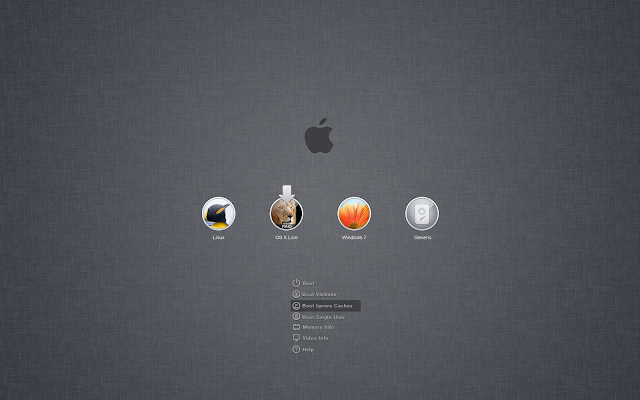
 

 logintolion.png


UPDATE:

If you're using Windows 8 the boot loader won't recognize the partition so you'll have to follow this guide: 

http://www.tonymacx86.com/multi-booting/96000-guide-dual-booting-mountain-lion-windows-8-a.html

Just the other day, I was taking a look at my mate's MacBook and thinking 'That is a pretty nice beast'. So, I have my Intel computer; now where do I start. Well of course, watching all of these hackintosh build things certainly enlightened me into what hackintoshing was. But I really don't know where to start.


Y'see, my use case is simple, OSX for things like Photoshop and all of the great video stuff on MAC and then Windows for everything else (e.g: games, web browsing etc). Since I already have Windows on my machine, the process would surely be more simple, right? Wrong. It is not simple at all!


I cannot install OSX on my current hard drive, I need to get a fresh one. All of that is quite alright. 


But it's really not. I was just thinking... How am I meant to be able to choose which OS to boot from? Is there a bootloader which you can configure to either boot from the OSX disk or boot to the windows one. Is there a specific bootloader which allows me to do that?


Thanks, Tom :)


PS: My relevant PC specs follow:


  • Power Button
  • Gigabyte GA-Z77-D3H
  • EVGA GeForce 760
  • Intel i5-3570k
  • Seagate Barracuda 1tB HDD
  • +1x Samsung 840 Pro 256gB SSD (If the project goes ahead, this is what it is going to be installed on. And yes, I know; how ironic to install Apple stuff on a Samsung device).

Compatible with Windows 95

Link to comment
https://linustechtips.com/topic/45973-hackintoshing-my-build/
Share on other sites

Link to post
Share on other sites

There are programs that let you repartition (or resize your partitions). But that is the least of the problems on a hackintosh.

Asrock 890GX Extreme 3 - AMD Phenom II X4 955 @3.50GHz - Arctic Cooling Freezer XTREME Rev.2 - 4GB Kingston HyperX - AMD Radeon HD7850 - Kingston V300 240GB - Samsung Spinpoint F3 1TB - Chieftec APS-750 - Cooler Master HAF912 PLUS


osu! profile

Link to comment
https://linustechtips.com/topic/45973-hackintoshing-my-build/#findComment-605433
Share on other sites

Link to post
Share on other sites

For great ways and support on how to do this go check out tonymacx86 they have numerous guides on how to do this...

There are 10 types of people in the world: Those who understand binary, and those who don't.

Just some helpful stuff: You're - You are, Your - Your car, They're - They are, Their - Their car, There - Over there.


Folding @ Home Install Guide and Links | My Build


Link to comment
https://linustechtips.com/topic/45973-hackintoshing-my-build/#findComment-605450
Share on other sites

Link to post
Share on other sites


But it's really not. I was just thinking... How am I meant to be able to choose which OS to boot from? Is there a bootloader which you can configure to either boot from the OSX disk or boot to the windows one. Is there a specific bootloader which allows me to do that?


The maybe best adress for hackintoshs is tonymacx86.  The bootloader chimera is bundled with multibeast.


----


The  GA-Z77-D3H is not an optimal hackintosh motherboard, but you will find successful builds with the motherboard over at tonymac.

Mini-Desktop: NCASE M1 Build Log
Mini-Server: M350 Build Log

Link to comment
https://linustechtips.com/topic/45973-hackintoshing-my-build/#findComment-605457
Share on other sites

Link to post
Share on other sites

I use photoshop on both windows and mac. I really don't see a difference in them. Then again I am not a professional.

I prefer the integration of media programmes with the operating system... It's hard to explain, it just is better, somehow.

Compatible with Windows 95

Link to comment
https://linustechtips.com/topic/45973-hackintoshing-my-build/#findComment-605821
Share on other sites

Link to post
Share on other sites


But it's really not. I was just thinking... How am I meant to be able to choose which OS to boot from? Is there a bootloader which you can configure to either boot from the OSX disk or boot to the windows one. Is there a specific bootloader which allows me to do that?


Like others said, look on Tonymacx86. But to answer this question, the install method has its own bootloader  (chimera) and on boot you can select which disk/partition to boot into

Also, I'm not sure but you might have some issues with onboard audio (not sure if there is a VIA audio driver) double check on that

Rig: Lian Li PC-V353 i5 2500K, GA-Z68MA-D2H, EVGA GTX 650, CM Gemiin S524, Corsair TX650M, Crucial M4 128GB, Seagate 1TB Barracuda, Fiio E10

Link to comment
https://linustechtips.com/topic/45973-hackintoshing-my-build/#findComment-608231
Share on other sites

Link to post
Share on other sites

Like others said, look on Tonymacx86. But to answer this question, the install method has its own bootloader  (chimera) and on boot you can select which disk/partition to boot into

Also, I'm not sure but you might have some issues with onboard audio (not sure if there is a VIA audio driver) double check on that


So what you're saying is that when I install OSX on an SSD, I can then put the Windows HDD in and then there will be an option to boot from it.

And thanks for the audio tip. I may get a soundcard anyway, so it hopefully won't matter so much :)

Compatible with Windows 95

Link to comment
https://linustechtips.com/topic/45973-hackintoshing-my-build/#findComment-609103
Share on other sites

Link to post
Share on other sites


So what you're saying is that when I install OSX on an SSD, I can then put the Windows HDD in and then there will be an option to boot from it.

And thanks for the audio tip. I may get a soundcard anyway, so it hopefully won't matter so much :)


Yup! I would select the SSD (or whatever drive you have OS X installed on) as your primary boot device. Once you're booting to that drive, there will be a little GUI bootloader which will load and during that, you can select which drive/partition to boot into.


You can make custom bootloader themes or get others, this one is called "Login to Lion"


 logintolion.png


UPDATE:

If you're using Windows 8 the boot loader won't recognize the partition so you'll have to follow this guide: 

http://www.tonymacx86.com/multi-booting/96000-guide-dual-booting-mountain-lion-windows-8-a.html

Rig: Lian Li PC-V353 i5 2500K, GA-Z68MA-D2H, EVGA GTX 650, CM Gemiin S524, Corsair TX650M, Crucial M4 128GB, Seagate 1TB Barracuda, Fiio E10

Link to comment
https://linustechtips.com/topic/45973-hackintoshing-my-build/#findComment-610713
Share on other sites

Link to post
Share on other sites

Create an account or sign in to comment

You need to be a member in order to leave a comment

Create an account

Sign up for a new account in our community. It's easy!

Register a new account

Sign in

Already have an account? Sign in here.

Sign In Now

×


