

Jump to content

Network switch

Go to solution Solved by GhettoUnboxings,

I can write 5 pages to explain how it works, but I'll show it this way.


Grapical: 220px-Kvm-switch-diagram.svg.png
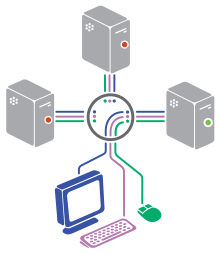
 

And you might want to read this: https://en.wikipedia.org/wiki/KVM_switch

What is it? Particularly this one: http://www.newegg.com/Product/Product.aspx?Item=N82E16817403047

What does it do?

My Best 2013 Bitfenix Prodigy Build  Case: Bitfenix Prodigy White | Motherboard: ASRock Z77E-ITX | CPU: Intel i7 3770k | CPU Cooler: H100i | GPU: GTX 690

Fan Controller: Bitfenix Recon | Ram: Patriot IEM 16GB @ 1600mhz | Primary Storage: 2 x Samsung 840 Pro 256GB | Backup Drives: 2 x Seagate Barracuda 2TB | PSU: Seasonic X850


Link to comment
https://linustechtips.com/topic/41830-network-switch/
Share on other sites

Link to post
Share on other sites

A NAS? That's what you linked at least. It's a large capacity data storage platform used for backups and media use typically.

CPU: i5 4670k • Cooler: Corsair H100i • Motherboard: MSI Z87 MPOWER • RAM: Crucial Ballistix Elite 2x 8GB • Storage: Samsung 840 250GB SSD, 2x WD Red 3TB • GPU: EVGA GTX 780 3GB • PSU: Corsair RM750W • Case: Corsair 750D • Mouse: Razer Naga 2012 (I actually use the thing for productivity/media buttons) • Keyboard: Ducky Shine 3 w/ Browns - Green LED • Monitor: Asus PB278Q 27" 2560 x 1440, ASUS PB238Q 23" 1920x1080 • Lighting: 2m NZXT Sleeved Blue LED Strip • pcpartpicker.com/p/3cHfZ


Link to comment
https://linustechtips.com/topic/41830-network-switch/#findComment-543343
Share on other sites

Link to post
Share on other sites

That is a NAS, a Network Attached Storage, is a computer/system that is hooked up to your network and provides extra storage for computer and laptops connected to the same network.

Link to comment
https://linustechtips.com/topic/41830-network-switch/#findComment-543364
Share on other sites

Link to post
Share on other sites

A network switch typically has between 5 and 100 ports and routes all incoming/outgoing traffic to all ports. Its a sort of extension for a router. So if you had a 5 port router and 7 wired devices, you'd connect a switch to the router and plug the devices into the switch and router

Intel Core i5 2500k @ 4.2GHz | Corsair Vengeance 16GB 1600MHz | MSI GTX660 Twin Frozr II OC | Samsung Evo 850 250GB | Seagate Barracuda 3TB | Corsair 600T White | Corsair H100 | Corsair HX850 | Corsair SP120 QE | Asus MX279H | LG Flatron E2251 | Logitech G502 | Das Keyboard Ultimate 4 Browns | Fiio E10 | Beyerdynamic Custom One Pro | Corsair SP2500 | HTC One M8 | MacBook Air (Mid 2013) i5 8GB 128GB


Link to comment
https://linustechtips.com/topic/41830-network-switch/#findComment-543395
Share on other sites

Link to post
Share on other sites

Sorry guys im on my phone and i put the wrong link. I updated my post.

My Best 2013 Bitfenix Prodigy Build  Case: Bitfenix Prodigy White | Motherboard: ASRock Z77E-ITX | CPU: Intel i7 3770k | CPU Cooler: H100i | GPU: GTX 690

Fan Controller: Bitfenix Recon | Ram: Patriot IEM 16GB @ 1600mhz | Primary Storage: 2 x Samsung 840 Pro 256GB | Backup Drives: 2 x Seagate Barracuda 2TB | PSU: Seasonic X850


Link to comment
https://linustechtips.com/topic/41830-network-switch/#findComment-543484
Share on other sites

Link to post
Share on other sites

It's a KVM switch (keyboard, video, mouse). You just put your mouse, keyboard and monitor in it an connect it to multiple pc's. So you can control all the connected pc's with the same peripherals.

so how does it work? And it doesnt connect to your router, right?

My Best 2013 Bitfenix Prodigy Build  Case: Bitfenix Prodigy White | Motherboard: ASRock Z77E-ITX | CPU: Intel i7 3770k | CPU Cooler: H100i | GPU: GTX 690

Fan Controller: Bitfenix Recon | Ram: Patriot IEM 16GB @ 1600mhz | Primary Storage: 2 x Samsung 840 Pro 256GB | Backup Drives: 2 x Seagate Barracuda 2TB | PSU: Seasonic X850


Link to comment
https://linustechtips.com/topic/41830-network-switch/#findComment-543506
Share on other sites

Link to post
Share on other sites

No, let's say:


i have my main pc and a media center.

I just connect the peripherals that are on my desk to the kvm switch (usb to the usb on the KVM, monitor to the display port on the KVM etc.).

Then you use 2 set's of the same cables from the KVM-switch to the PC and media center.


Then you can select witch output (PC or mediacenter) you want to use and you're ready to go

Link to comment
https://linustechtips.com/topic/41830-network-switch/#findComment-543540
Share on other sites

Link to post
Share on other sites

Create an account or sign in to comment

You need to be a member in order to leave a comment

Create an account

Sign up for a new account in our community. It's easy!

Register a new account

Sign in

Already have an account? Sign in here.

Sign In Now

×




