
Jump to content

New Build high memory usage.
Go to solution Solved by OnCue,

I recently had the same problem on a system, I idled at 6 gb usage. Unintalled Norton= problem solved. Now I idle at 256 mb usage.

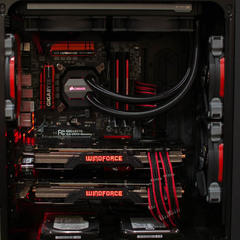
I'm having an issue with a new PC I've built. It's currently using almost all of the available ram. Upon first boot windows uses only a few GB of memory, but after a short time the system reaches 90-95% memory utilization and starts to bog down. The system has 8gb of ram installed which should be more than enough without any apps open. I can't seem to see any one program using more than a few MB of system memory at a time with steam, chrome or battlenet taking up the most while they are open.


Can someone give me a hand diagnosing where my issue lies?


Build Specs:


Motherboard: Gigabyte  Z97X - Gaming 5

CPU: Intel 4790K

Memory: G.Skill 8gb (2x4gb) 1600mhz DDR3

Video: Gigabyte GTX 770 OC

SSD: Samsung 840 EVO 250GB


This is a fresh install of Windows 8.1, only the latest chipset drivers, norton internet  security and mobo software have been installed and  are currently being used.

Link to comment
https://linustechtips.com/topic/208246-new-build-high-memory-usage/
Share on other sites

Link to post
Share on other sites

I'm having an issue with a new PC I've built. It's currently using almost all of the available ram. Upon first boot windows uses only a few GB of memory, but after a short time the system reaches 90-95% memory utilization and starts to bog down. The system has 8gb of ram installed which should be more than enough without any apps open. I can't seem to see any one program using more than a few MB of system memory at a time with steam, chrome or battlenet taking up the most while they are open.


Can someone give me a hand diagnosing where my issue lies?


Build Specs:


Motherboard: Gigabyte  Z97X - Gaming 5

CPU: Intel 4790K

Memory: G.Skill 8gb (2x4gb) 1600mhz DDR3

Video: Gigabyte GTX 770 OC

SSD: Samsung 840 EVO 250GB


This is a fresh install of Windows 8.1, only the latest chipset drivers, norton internet  security and mobo software have been installed and  are currently being used.


try use ram map to look what going on http://technet.microsoft.com/en-gb/sysinternals/ff700229.aspx

5820k@3.8GHz| Corsair H100i |Gigabyte x99 SLI | Corsair 16GB | EVGA 780Ti SC ACX SLI x2 |240GB SSD120GB SSD 512GB SSD 2TB HDD | 3x ASUS VN247H 24" ( nVidia Surround)

Link to post
Share on other sites

yeah I woulden't recommand using norton as a webb security program. its more like a virus really :/   ... just uninstal it and you should be ok :)

~New~  BoomBerryPi project !  ~New~


new build log : http://linustechtips.com/main/topic/533392-build-log-the-scrap-simulator-x/?p=7078757 (5 screen flight sim for 620$ CAD)LTT Web Challenge is back ! go here  :  http://linustechtips.com/main/topic/448184-ltt-web-challenge-3-v21/#entry601004

Link to post
Share on other sites

Thanks phillrulz, I will use this to track to ram usage. Seems much more useful than resource monitor.


I recently had the same problem on a system, I idled at 6 gb usage. Unintalled Norton= problem solved. Now I idle at 256 mb usage.


Did you have an issue with the system slowly creeping up to near 100% usage?

Link to post
Share on other sites


Did you have an issue with the system slowly creeping up to near 100% usage?

Yes, that was exactly my problem. Whenever I would load up a browser a popup would say "Your computer is running low on memory".


Look for Norton internet storage or something like that, that takes up a ton of RAM also.

I'm that guy with the GPD Win.

Link to post
Share on other sites

Thanks for the help everyone. Seems to be much better. Ran a few games and have origin, steam, battlenet and uplay running at the same time and updating games and using less than 50% memory. Will see if the issue creeps back in, but so far seems solved!

Link to post
Share on other sites

Thanks for the help everyone. Seems to be much better. Ran a few games and have origin, steam, battlenet and uplay running at the same time and updating games and using less than 50% memory. Will see if the issue creeps back in, but so far seems solved!

Awesome to hear bro! Happy Gaming :D

I'm that guy with the GPD Win.

Link to post
Share on other sites

Create an account or sign in to comment

You need to be a member in order to leave a comment

Create an account

Sign up for a new account in our community. It's easy!

Register a new account

Sign in

Already have an account? Sign in here.

Sign In Now

×


