
Jump to content

Can't mount ssd!

Go to solution Solved by tkitch,

there are 4 holes there for screws...  so, you use screws. 


ssd's have screw holes on the bottom:
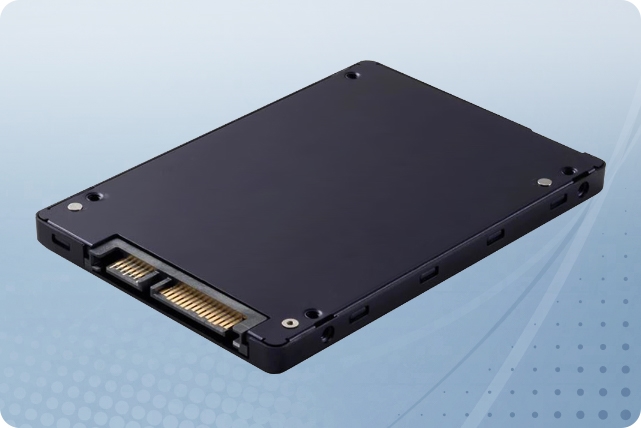
2TB 6Gb/s SATA SSD 2.5" Hard Drive for Synology


Hello,


So am I being really stupid or...

I have an ssd and I've kept it hanging by tape but it's fallen out of the tape. (Must've been really old) So I've decided I want to mount it but how in the hell! 

It's a cheap case so I expect it to be complex but I'm so confused. The case is a CiT Raider RGB and the ssd is a 480gb ssd from Kingston. Do I need a mounting plate or what please help!

Picture below is where I want to mount it. ⬇️⬇️⬇️

Kind Regards!


image.png.979b6db97098cfd6e8dcc72c6351b89c.png


Link to comment
https://linustechtips.com/topic/1577570-cant-mount-ssd/
Share on other sites

Link to post
Share on other sites

5 minutes ago, FireLegend said:

Hello,


So am I being really stupid or...

I have an ssd and I've kept it hanging by tape but it's fallen out of the tape. (Must've been really old) So I've decided I want to mount it but how in the hell! 

It's a cheap case so I expect it to be complex but I'm so confused. The case is a CiT Raider RGB and the ssd is a 480gb ssd from Kingston. Do I need a mounting plate or what please help!

Picture below is where I want to mount it. ⬇️⬇️⬇️

Kind Regards!


image.png.979b6db97098cfd6e8dcc72c6351b89c.png


You will need to screw the ssd from the opposite side (inside of the case). Since its a budget case the connections will sit tight so in my opinion just keep it lying somewhere in the bottom as SSD doesn't have any moving parts so won't cause any issue.

CPU: Ryzen 7 5700X Undervolted  Motherboard: B550 Aorus Elite V2 Rev1.2 RAM: G.Skill TridentZ Neo 3600Mhz CL16 32gb 

GPU: MSI Mech 2X RX6600 8GB Cooler: ProLab Design AI360 LC AIO Storage: WD SN770 500gb + Sn550 1Tb + MX500 1Tb + 1TB HDD

PSU: Antec EAG Pro 750 80+G Case: Deepcool CG580 WH Monitor: Benq Mobiuz EX2510 144Hz 

Mouse: G Pro Wireless Keyboard: Corsair K68 RGB Cherry MX Red Speakers: Creative Pebble V2

Link to comment
https://linustechtips.com/topic/1577570-cant-mount-ssd/#findComment-16476015
Share on other sites

Link to post
Share on other sites

16 minutes ago, Tech Reprise said:

You will need to screw the ssd from the opposite side (inside of the case). Since its a budget case the connections will sit tight so in my opinion just keep it lying somewhere in the bottom as SSD doesn't have any moving parts so won't cause any issue.

Alright awesome thanks!

Link to comment
https://linustechtips.com/topic/1577570-cant-mount-ssd/#findComment-16476034
Share on other sites

Link to post
Share on other sites

Create an account or sign in to comment

You need to be a member in order to leave a comment

Create an account

Sign up for a new account in our community. It's easy!

Register a new account

Sign in

Already have an account? Sign in here.

Sign In Now

×




