Jump to content

Best Settings?

Go to solution Solved by ChieriOnTop,
1 hour ago, Skyyblaze said:

I DM'ed you.

After we messaged each other on Discord, we ended up solving the issue by turning on and off a few settings. We ended up coming to the conclusion that my power supply was fine, being around 750W beforehand, be sure that ECO mode was disabled, set the Fmax enhancer to disabled, and change the MAX CPU Boost Clock to 150MHz. The power draw was much higher than before, being around 60-70W, now being in the 100W range. https://files.catbox.moe/9a5l54.png

My boost clocks were still lower, but Skyy said that would depend on what I was specifically doing, so we considered the issue fixed.

Hello! I'm trying to figure out the best settings I can possibly have on my computer as I've noticed using the default bios settings is terrible performance for my computer alone. I've been noticing lag spikes, boost clocks not going as high as they should (with no overheating issues), and my ram speed being a bit funky. What I'm trying to do on this computer is game and get the best performance I can out of my computer. I'm a bit scared to overclock and or mess with many settings on my own because I'm terrible at this newer technology, I only know a tiny bit from when you were able to use software to overclock your CPU's.

I have an Asus TUF Gaming X570-Plus (Wifi) motherboard, along with an AMD Ryzen 5 5600X, 64GB of DDR4 @ 3600MHz, and a RX 6600.

What I've changed myself is the D.O.C.P, being at "3603 MHz" and leave the defaulted OC Tuner setting on (which locked my CPU at 4.2GHz), that's pretty much about it. Any help would be great. Thanks.

Link to comment
https://linustechtips.com/topic/1528723-best-settings/
Share on other sites

Link to post
Share on other sites

3 minutes ago, emosun said:

You got a mid teir gpu in the build so get out of the bios settings and reduce the graphics quality in the game

I haven't been able to get better performance compared from my friends 1650, which says something, I'm fairly certain the 1650 is terrible compared to a 6600.

Edited by ChieriOnTop
forgot to add compared
Link to comment
https://linustechtips.com/topic/1528723-best-settings/#findComment-16115929
Share on other sites

Link to post
Share on other sites

Hmm honestly with the newer Ryzens you usually don't get too much from overclocking, most people undervolt via Curve Optimizer so the CPU runs a bit cooler and thus boosts higher. But before we look into that, could you elaborate a bit more: How much gap is there with your boost clocks, what exactly do you mean with funky RAM speed and when do the lag-spikes tend to occur?

Link to comment
https://linustechtips.com/topic/1528723-best-settings/#findComment-16115933
Share on other sites

Link to post
Share on other sites

5 minutes ago, Skyyblaze said:

Hmm honestly with the newer Ryzens you usually don't get too much from overclocking, most people undervolt via Curve Optimizer so the CPU runs a bit cooler and thus boosts higher. But before we look into that, could you elaborate a bit more: How much gap is there with your boost clocks, what exactly do you mean with funky RAM timings and when do the lag-spikes tend to occur?

1. Around a 400-600MHZ gap, the 5600X is supposed to boost up to 4.6GHz, mine is stuck at 4.2GHz as mentioned before.
2. I'm not sure, D.O.C.P just made the ram speed extremely funky, being at 3603MHz.
3. It depends on what game I'm playing so I can't really answer this question correctly, we'll go with a simple game, osu!, it's a 2D rhythm game. I lag randomly out of no where with frame drops all the sudden, then it needs to catch up. GTA 5 has the same issue, except sometimes it just doesn't know what to do and ends up crashing entirely, giving me nothing to go off of. (meaning, no error logs, nothing)

Link to comment
https://linustechtips.com/topic/1528723-best-settings/#findComment-16115939
Share on other sites

Link to post
Share on other sites

2 minutes ago, ChieriOnTop said:

1. Around a 600MHZ gap, the 5600X is supposed to boost up to 4.6GHz, mine is stuck at 4.2GHz as mentioned before.
2. I'm not sure, D.O.C.P just made the ram speed extremely funky, being at 3603MHz.
3. It depends on what game I'm playing so I can't really answer this question correctly, we'll go with a simple game, osu!, it's a 2D rhythm game. I lag randomly out of no where with frame drops all the sudden, then it needs to catch up. GTA 5 has the same issue, except sometimes it just doesn't know what to do and ends up crashing entirely, giving me nothing to go off of. (meaning, no error logs, nothing)

Alright I see, before I give suggestions for the first two, what program do you use to measure the speeds of CPU and RAM? There are some programs that measure wrong on Ryzen platforms as far as I know so before you take steps against these we should make sure both CPU and RAM are actually "underperforming".

For the third problem, that does sound troublesome. My first suggestion is, have you looked if there's a BIOS update available for your board? Ryzen platform BIOSs tend to be a funky until later revisions. For example my B550 board had its USB ports disconnect and reconnect every 30 or so seconds with the BIOS it came with and an update thankfully fixed that.

Link to comment
https://linustechtips.com/topic/1528723-best-settings/#findComment-16115943
Share on other sites

Link to post
Share on other sites

1 minute ago, Skyyblaze said:

Alright I see, before I give suggestions for the first two, what program do you use to measure the speeds of CPU and RAM? There are some programs that measure wrong on Ryzen platforms as far as I know so before you take steps against these we should make sure both CPU and RAM are actually "underperforming".

For the third problem, that does sound troublesome. My first suggestion is, have you looked if there's a BIOS update available for your board? Ryzen platform BIOSs tend to be a funky until later revisions. For example my B550 board had its USB ports disconnect and reconnect every 30 or so seconds with the BIOS it came with and an update thankfully fixed that.

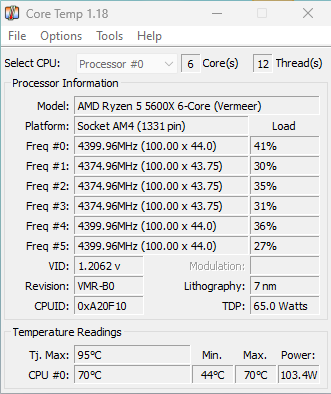
I use Task Manager and Core Temp to see how my CPU is running, it tells me everything that I really need to know. As for the ram speed, just Task Manager and the BIOS.

I haven't checked if there is an update for my BIOS in the last 6 months or so.
0lcbqy.pngybxrts.png

Link to comment
https://linustechtips.com/topic/1528723-best-settings/#findComment-16115946
Share on other sites

Link to post
Share on other sites

7 minutes ago, ChieriOnTop said:

I use Task Manager and Core Temp to see how my CPU is running, it tells me everything that I really need to know. As for the ram speed, just Task Manager and the BIOS.

I haven't checked if there is an update for my BIOS in the last 6 months or so.
0lcbqy.pngybxrts.png


Alright, first see if there's an update available, there have been two updates since February so maybe the latest version helps a bit: https://www.asus.com/motherboards-components/motherboards/tuf-gaming/tuf-gaming-x570-plus/helpdesk_bios/?model2Name=TUF-GAMING-X570-PLUS


Then I would run Prime95 (https://www.mersenne.org/download/) on one core and then on all cores and see if the CPU still doesn't boost as high. Since you only have a few percent of utilization in that screenshot the CPU wouldn't boost to the limit and even in games that might not be the case. Also make sure you have the latest Chipset Drivers from AMD installed, they can help with the task-scheduling on the CPU side.


5 minutes ago, ChieriOnTop said:

Task Manager itself shows that it's running only at 3600MHz, however the BIOS tells me 3603MHz. kh3bbi.png


I wouldn't worry about the 3mhz variance for now, it might be simply that the BIOS measures very exact while Windows rounds the value, your RAM seems to run like it should based on its D.O.C.P. profile so you shouldn't lose any performance here.

Link to comment
https://linustechtips.com/topic/1528723-best-settings/#findComment-16115961
Share on other sites

Link to post
Share on other sites

11 minutes ago, Skyyblaze said:


Alright, first see if there's an update available, there have been two updates since February so maybe the latest version helps a bit: https://www.asus.com/motherboards-components/motherboards/tuf-gaming/tuf-gaming-x570-plus/helpdesk_bios/?model2Name=TUF-GAMING-X570-PLUS


Then I would run Prime95 (https://www.mersenne.org/download/) on one core and then on all cores and see if the CPU still doesn't boost as high. Since you only have a few percent of utilization in that screenshot the CPU wouldn't boost to the limit and even in games that might not be the case. Also make sure you have the latest Chipset Drivers from AMD installed, they can help with the task-scheduling on the CPU side.


I wouldn't worry about the 3mhz variance for now, it might be simply that the BIOS measures very exact while Windows rounds the value, your RAM seems to run like it should based on its D.O.C.P. profile so you shouldn't lose any performance here.

Some bad news, the newest BIOS update refused to work, said something about it not being a valid BIOS file even after using the automatic renamer it gives you.

Link to comment
https://linustechtips.com/topic/1528723-best-settings/#findComment-16115969
Share on other sites

Link to post
Share on other sites

3 minutes ago, ChieriOnTop said:

Some bad news, the newest BIOS update refused to work, said something about it not being a valid BIOS file even after using the automatic renamer it gives you.

Hmm did you try a manual update through the BIOS with a USB stick or through ASUS' EZ Flash Utility? I'm heading for sleep so it will be a while till I can reply again, maybe someone else can chime in in the meantime, if not I'm back tomorrow.

Link to comment
https://linustechtips.com/topic/1528723-best-settings/#findComment-16115974
Share on other sites

Link to post
Share on other sites

Just now, Skyyblaze said:

Hmm did you try a manual update through the BIOS with a USB stick or through ASUS' EZ Flash Utility? I'm heading for sleep so it will be a while till I can reply again, maybe someone else can chime in in the meantime, if not I'm back tomorrow.

I did it using the EZ Flash Utility. However, I ended up doing what you said with prime95 and it doesn't look like the CPU is going to boost higher than the "base" speed of 4.2GHz. z4c2zt.png3sxmhq.png


Link to comment
https://linustechtips.com/topic/1528723-best-settings/#findComment-16115976
Share on other sites

Link to post
Share on other sites

6 hours ago, ChieriOnTop said:

I did it using the EZ Flash Utility. However, I ended up doing what you said with prime95 and it doesn't look like the CPU is going to boost higher than the "base" speed of 4.2GHz. z4c2zt.png3sxmhq.png


Hmm I see, before we care for the update go into your BIOS, disable the OC Tuner and make sure PBO - Precision Boost Overdrive is set to "Enabled", not "Auto".

Link to comment
https://linustechtips.com/topic/1528723-best-settings/#findComment-16116212
Share on other sites

Link to post
Share on other sites

6 hours ago, Skyyblaze said:


Hmm I see, before we care for the update go into your BIOS, disable the OC Tuner and make sure PBO - Precision Boost Overdrive is set to "Enabled", not "Auto".

Seems much better. (i forgot to send this over, got distracted by other things) 9p6esg.png

Link to comment
https://linustechtips.com/topic/1528723-best-settings/#findComment-16116631
Share on other sites

Link to post
Share on other sites

8 minutes ago, ChieriOnTop said:

A few tests fail to run. jvgqpd.png


Whoops accidentally deleted my message before I hit Send. That's odd but good to see that the CPU boosts relatively normal now. What I would try next: Set the BIOS back to Default Settings and then run the test again. If it doesn't fail go into the BIOS and just enable D.O.C.P.

That error can mean there's a RAM instability or that one of your CPU core doesn't get enough voltage.

Link to comment
https://linustechtips.com/topic/1528723-best-settings/#findComment-16116657
Share on other sites

Link to post
Share on other sites

8 minutes ago, Skyyblaze said:


Whoops accidentally deleted my message before I hit Send. That's odd but good to see that the CPU boosts relatively normal now. What I would try next: Set the BIOS back to Default Settings and then run the test again. If it doesn't fail go into the BIOS and just enable D.O.C.P.

That error can mean there's a RAM instability or that one of your CPU core doesn't get enough voltage.

No D.O.C.P, just defaulted settings: https://files.catbox.moe/bg76i3.png  (in link format to make this cleaner)
CPU speed: https://files.catbox.moe/yqamfv.png
RAM speed: https://files.catbox.moe/4dst54.png  (to be expected)
CPU Temps: https://files.catbox.moe/fbw027.png

Link to comment
https://linustechtips.com/topic/1528723-best-settings/#findComment-16116683
Share on other sites

Link to post
Share on other sites

1 minute ago, ChieriOnTop said:

No D.O.C.P, just defaulted settings: https://files.catbox.moe/bg76i3.png  (in link format to make this cleaner)
CPU speed: https://files.catbox.moe/yqamfv.png
RAM speed: https://files.catbox.moe/4dst54.png  (to be expected)
CPU Temps: https://files.catbox.moe/fbw027.png

Alright that looks good, now enable D.O.C.P. and run again, if it gives errors again we know the D.O.C.P. profile is the culprit and can look how to resolve this.

Link to comment
https://linustechtips.com/topic/1528723-best-settings/#findComment-16116685
Share on other sites

Link to post
Share on other sites

2 minutes ago, Skyyblaze said:

Alright that looks good, now enable D.O.C.P. and run again, if it gives errors again we know the D.O.C.P. profile is the culprit and can look how to resolve this.

Speaking of, this is what I was talking about with the "3603 MHz" funky speed. IMG_2676.jpg

Link to comment
https://linustechtips.com/topic/1528723-best-settings/#findComment-16116689
Share on other sites

Link to post
Share on other sites

4 minutes ago, ChieriOnTop said:

Along with this, with D.O.C.P on, my CPU is barely boosting. 2zpmkk.png


Well now we get into "headache" territory. Can you check if PBO fell back to "Auto" and if yes set it back to "Enabled"? If it is enabled we really have to dig into this to see what's going on.

Link to comment
https://linustechtips.com/topic/1528723-best-settings/#findComment-16116705
Share on other sites

Link to post
Share on other sites

Create an account or sign in to comment

You need to be a member in order to leave a comment

Create an account

Sign up for a new account in our community. It's easy!

Register a new account

Sign in

Already have an account? Sign in here.

Sign In Now

×