Jump to content

I need a custom notification software

Go to solution Solved by T.Vengeance,

reminders

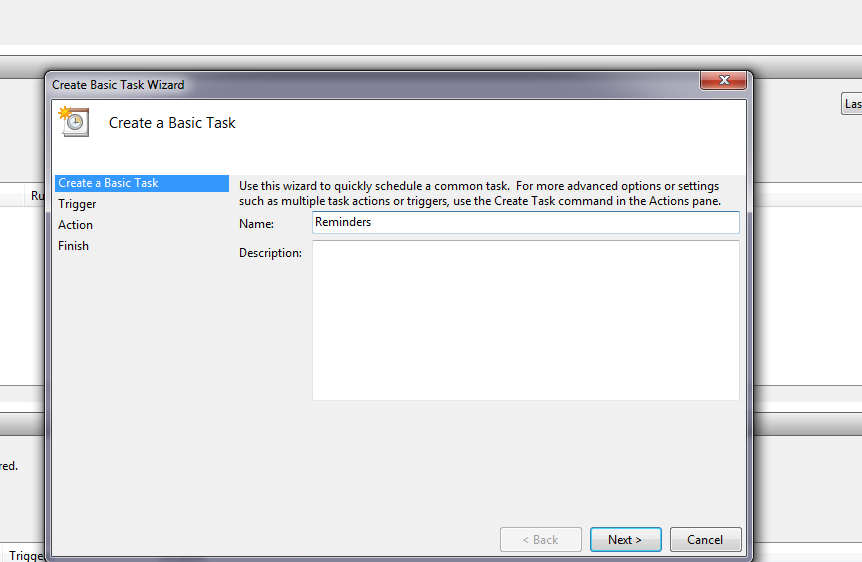
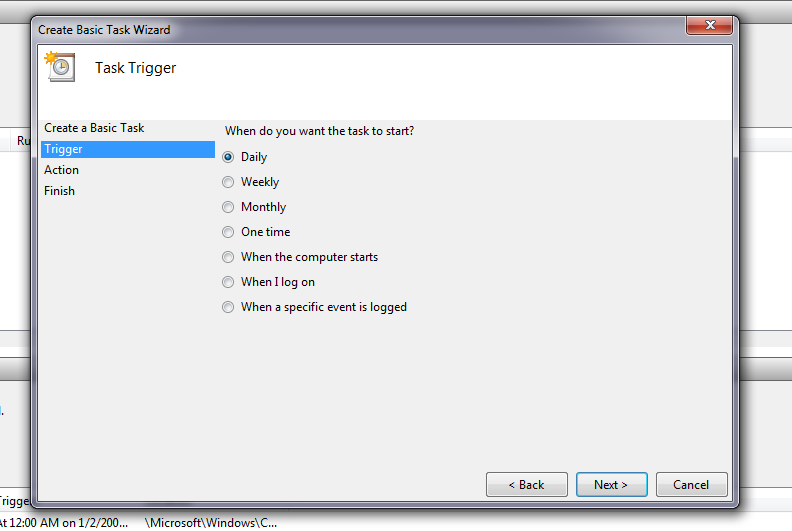
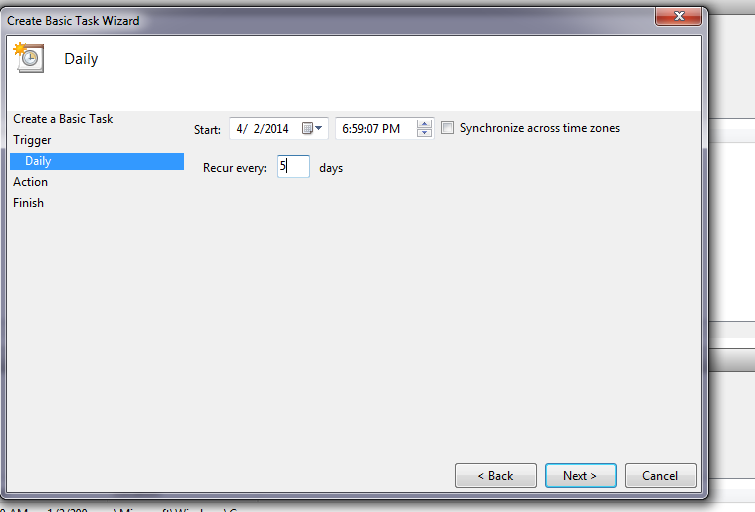
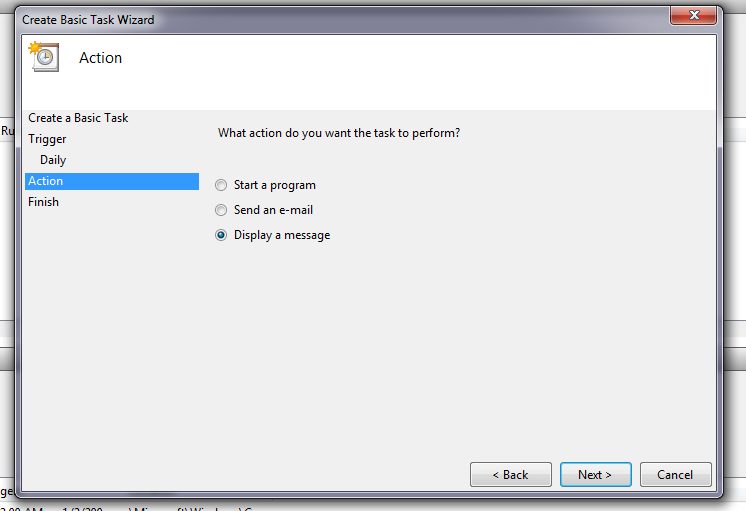
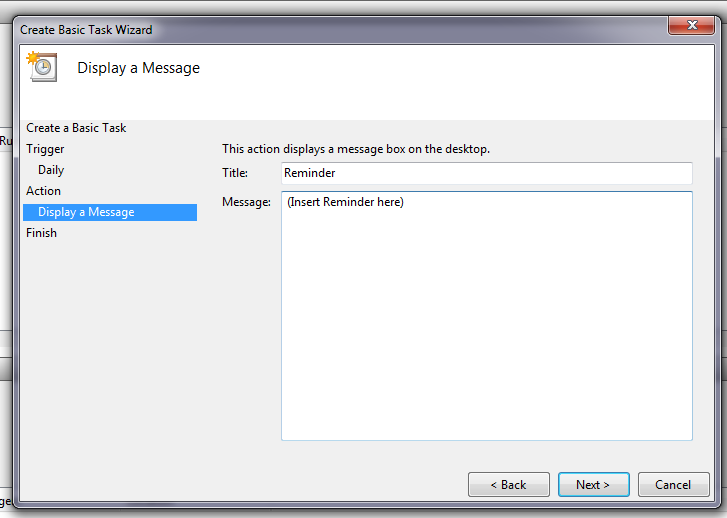
Oh well you can simply use Task Scheduler then :P


81d8c5afdd43de45018ee2ac98aa9b67.png

5a3a02e836210ea3ee6fac0bf29aece2.png

0eff7aadbe856241ed32839ce1a0b3eb.png

060f334af4f895019d884075141e1565.png

5c5568515deb599c9fef195557d5e1e6.png

ed2ed39f3d4cd3820da062f14d1170a6.png

Notification of what? Email? Or are you talking about reminders?

Yes reminders

I need a software for custom notifications. Here is what I want to do:


Important : [ independant time intervall ] Notify me of ... every 5 days


Notification type ( such as sound voice, volume, msg, pop-up, etc)


Other preferences:

NO BLOTWARE.

no malware

light software ( low ram &cpu usage & low hard storage usage)


Operating system: Windows 7 64bit.


Windows 7 should of had that, they would if they hired me! lol,

CPU: Ryzen 5500 GPU: RX 6800 RAM: DDR4 3200MHZ 48GB (2x8+2x16 GB)  MOBO: MSI B450-A PRO Display: 4k120hz with freesync premium.

Link to comment
https://linustechtips.com/topic/134845-i-need-a-custom-notification-software/
Share on other sites

Link to post
Share on other sites

I need a software for custom notifications. Here is what I want to do:


Important : [ independant time intervall ] Notify me of ... every 5 days


Notification type ( such as sound voice, volume, msg, pop-up, etc)


Other preferences:

NO BLOTWARE.

no malware

light software ( low ram &cpu usage & low hard storage usage)


Operating system: Windows 7 64bit.


Windows 7 should of had that, they would if they hired me! lol,

I would be happy to write that for you. £100 per hour  + £250 upfront. PM me if youre interested.

Link to post
Share on other sites

Yes reminders

I need a software for custom notifications. Here is what I want to do:


Important : [ independant time intervall ] Notify me of ... every 5 days


Notification type ( such as sound voice, volume, msg, pop-up, etc)


Other preferences:

NO BLOTWARE.

no malware

light software ( low ram &cpu usage & low hard storage usage)


Operating system: Windows 7 64bit.


Windows 7 should of had that, they would if they hired me! lol,


Use Task Scheduler.

80+ ratings certify electrical efficiency. Not quality.


Link to post
Share on other sites

Oh well you can simply use Task Scheduler then :P


81d8c5afdd43de45018ee2ac98aa9b67.png

5a3a02e836210ea3ee6fac0bf29aece2.png

0eff7aadbe856241ed32839ce1a0b3eb.png

060f334af4f895019d884075141e1565.png

5c5568515deb599c9fef195557d5e1e6.png

ed2ed39f3d4cd3820da062f14d1170a6.png

Thank you, where did you get that image?

Oh and where do these notification go? I checke doption to open properties and it siad it would go in my user folder.

But I cant find it there.

CPU: Ryzen 5500 GPU: RX 6800 RAM: DDR4 3200MHZ 48GB (2x8+2x16 GB)  MOBO: MSI B450-A PRO Display: 4k120hz with freesync premium.

Link to post
Share on other sites

Thank you, where did you get that image?

Oh and where do these notification go? I checke doption to open properties and it siad it would go in my user folder.

But I cant find it there.

I just took screenshots using Gyazo :P


Also in truth, I have never used this before, I just know it exists. I suspect they may be in the AppData folder.

“The value of a college education is not the learning of many facts but the training of the mind to think”


Link to post
Share on other sites

Create an account or sign in to comment

You need to be a member in order to leave a comment

Create an account

Sign up for a new account in our community. It's easy!

Register a new account

Sign in

Already have an account? Sign in here.

Sign In Now

×