
Jump to content

HELP!! Computer will not turn on

Go to solution Solved by MrJarhead,

did you plug all the power pins in etc, power led, power, reset. if you havent nothing will happen when you press the power button.


these: they need to be plugged in correctly.
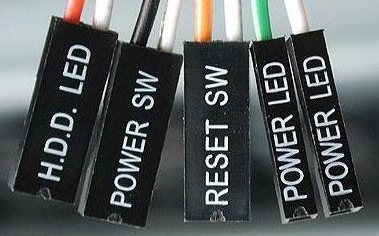
 

FPconnectors.jpg

8 minutes ago, levi7266 said:

So I just put my computer in a new case everything looks fine but the computer will not turn on I don't get any post or fans or motherboard lights any advice on what to do?

PSU turned on?

Welcome to Maryland. 

We have crabs. 

Link to post
Share on other sites

2 minutes ago, MrJarhead said:

did you plug all the power pins in etc, power led, power, reset. if you havent nothing will happen when you press the power button.


these: they need to be plugged in correctly.

 

FPconnectors.jpg

I but them in like the motherboard shoes but I have a feeling this could be the issue l

Link to post
Share on other sites

3 minutes ago, levi7266 said:

I but them in like the motherboard shoes but I have a feeling this could be the issue l

take them all out and just put the power sw in. if your power sw has a + and - side, make sure its in the correct orientation.


the best way to tell if its the psu is do this http://www.wikihow.com/Check-a-Power-Supply


WARNING: if you do the paper clip method, please do not touch it while its powered on, it will shock you and seriously hurt you.


my psu came with a psu tester, yours might have too.

Link to post
Share on other sites

Just now, levi7266 said:

No it did nothing it acts like the motherboard is not getting power at all even though all the wires are all plugged in a double checked them a couple of times 

if it did nothing then the psu is dead...


thats the whole point of the test, are you sure youre not flicking the switch on the back of the psu? which psu have you tried.

Link to post
Share on other sites

42 minutes ago, levi7266 said:

I don't have another motherboard to try it in and no I just swapped the motherboard with everything on it 

did you make sure that the motherboard stand offs were in the case? if you havent put the motherboard on the stand offs, likely would have shorted it.

Link to post
Share on other sites

Create an account or sign in to comment

You need to be a member in order to leave a comment

Create an account

Sign up for a new account in our community. It's easy!

Register a new account

Sign in

Already have an account? Sign in here.

Sign In Now

×

