
Jump to content

Help with cables...

Go to solution Solved by Oshino Shinobu,

24pin ATX should be obvious, there's only one place that it will fit, on the right side of the motherboard. 

24.jpg


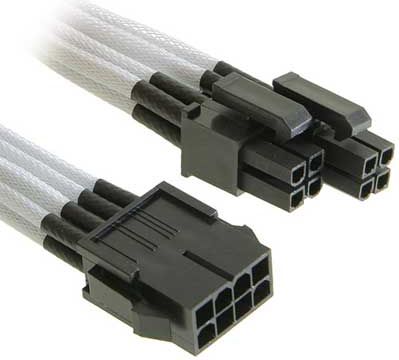
8pin EPS cable goes to the CPU power connector on the montherboard in the top left. (the 8pin EPS cable is a 4+4pin split cable on the RM650x)
503296_0_f.jpg


One 8 pin PCIe connector for the GPU (RM650x uses 6+2pin split PCIe cables)

14-PCI-E.jpg


SATA power for HDD. 

sata-hard-drive-power-cable-connector.jp


SATA Data for HDD, plugging into the right hand side of the board. 

7pin-serial-ata-cable.gif


NZXT Kraken X41 just uses a fan header. Plug it into the CPU_Fan header or labelled similar, will be close to the CPU socket. 


SSD plugs into the M.2 Slot on the board. 


Labelled your board for you:


asus_rog_strix_z270f_gaming_1307979.jpg


For the most part, if something isn't meant to be plugged in somewhere, it won't fit. PC connectors are basically adult LEGOs. On the PSU end, things should be labelled clearly. The connectors are also designed in a way to prevent things from being plugged in the wrong socket. 

 

Hi eveyone,

I'm building a game pc and really need help with the cables. Can someone help me and tell me which cables from which components need to put in where? I know it's a complex question but I hope someone can help me. :D 


My components:

CPU: intel core i5 7600K

CPU cooler: NZXT kraken x41

Motherboard: asus ROG strix Z270F

GPU: asus ROG strix 1060 OC 6GB

RAM: Corsair vengeance lpx 3200MHz 16Gb

SSD: Samsung 960 evo m.2

HDD: wd 1TB 7200RPM

PSU: corsair RM650x

Case: NZXT h440 RAZER edition


Thanks!

My own build: RΛZΞR theme

CPU: Intel Core i5 7600K // CPU cooler: Cryorig H7 // Motherboard: MSI Z270 gaming pro carbon //       

Video Card: MSI Armor gtx 1070 OC 8GB // RAM: Corsair Vengeance 16GB 3200MHz //  

SSD: Samsung EVO 960 500GB // HDD: 2x WD yellow edition 2TB //

Case: NZXT H440 RAZER edition // Power Supply: Corsair RM550x //         

Operating Software: Windows 10 pro 64-bit

Link to comment
https://linustechtips.com/topic/735032-help-with-cables/
Share on other sites

Link to post
Share on other sites

24pin ATX should be obvious, there's only one place that it will fit, on the right side of the motherboard. 

24.jpg


8pin EPS cable goes to the CPU power connector on the montherboard in the top left. (the 8pin EPS cable is a 4+4pin split cable on the RM650x)

503296_0_f.jpg


One 8 pin PCIe connector for the GPU (RM650x uses 6+2pin split PCIe cables)

14-PCI-E.jpg


SATA power for HDD. 

sata-hard-drive-power-cable-connector.jp


SATA Data for HDD, plugging into the right hand side of the board. 

7pin-serial-ata-cable.gif


NZXT Kraken X41 just uses a fan header. Plug it into the CPU_Fan header or labelled similar, will be close to the CPU socket. 


SSD plugs into the M.2 Slot on the board. 


Labelled your board for you:


asus_rog_strix_z270f_gaming_1307979.jpg


For the most part, if something isn't meant to be plugged in somewhere, it won't fit. PC connectors are basically adult LEGOs. On the PSU end, things should be labelled clearly. The connectors are also designed in a way to prevent things from being plugged in the wrong socket. 


Link to comment
https://linustechtips.com/topic/735032-help-with-cables/#findComment-9331917
Share on other sites

Link to post
Share on other sites

53 minutes ago, Oshino Shinobu said:

24pin ATX should be obvious, there's only one place that it will fit, on the right side of the motherboard. 

24.jpg


8pin EPS cable goes to the CPU power connector on the montherboard in the top left. (the 8pin EPS cable is a 4+4pin split cable on the RM650x)

503296_0_f.jpg


One 8 pin PCIe connector for the GPU (RM650x uses 6+2pin split PCIe cables)

14-PCI-E.jpg


SATA power for HDD. 

sata-hard-drive-power-cable-connector.jp


SATA Data for HDD, plugging into the right hand side of the board. 

7pin-serial-ata-cable.gif


NZXT Kraken X41 just uses a fan header. Plug it into the CPU_Fan header or labelled similar, will be close to the CPU socket. 


SSD plugs into the M.2 Slot on the board. 


Labelled your board for you:


asus_rog_strix_z270f_gaming_1307979.jpg


For the most part, if something isn't meant to be plugged in somewhere, it won't fit. PC connectors are basically adult LEGOs. On the PSU end, things should be labelled clearly. The connectors are also designed in a way to prevent things from being plugged in the wrong socket. 


This is by fare the best explanation i could get. Thanks you!!!

My own build: RΛZΞR theme

CPU: Intel Core i5 7600K // CPU cooler: Cryorig H7 // Motherboard: MSI Z270 gaming pro carbon //       

Video Card: MSI Armor gtx 1070 OC 8GB // RAM: Corsair Vengeance 16GB 3200MHz //  

SSD: Samsung EVO 960 500GB // HDD: 2x WD yellow edition 2TB //

Case: NZXT H440 RAZER edition // Power Supply: Corsair RM550x //         

Operating Software: Windows 10 pro 64-bit

Link to comment
https://linustechtips.com/topic/735032-help-with-cables/#findComment-9332119
Share on other sites

Link to post
Share on other sites

Create an account or sign in to comment

You need to be a member in order to leave a comment

Create an account

Sign up for a new account in our community. It's easy!

Register a new account

Sign in

Already have an account? Sign in here.

Sign In Now

×



