Jump to content

Windows 10 wont boot PLEASE HELP

Go to solution Solved by Dvdtrk,

Okay, and you are certain that is your SSD?

I took a picture for you. While in Win10 go to settings and follow the image:

7QQzaqU.png

Next, in disk management, I want you to right click on the little box to left that says "Disk 0" and go to "Properties". A little box will appear with the details of your SSD. Here is an image for reference. The squared thing is what you right click and the thing underlined is what we need. Be sure to right this down on a piece of paper or take a picture of it. We'll need it for the BIOS boot change.

drEUEqO.png

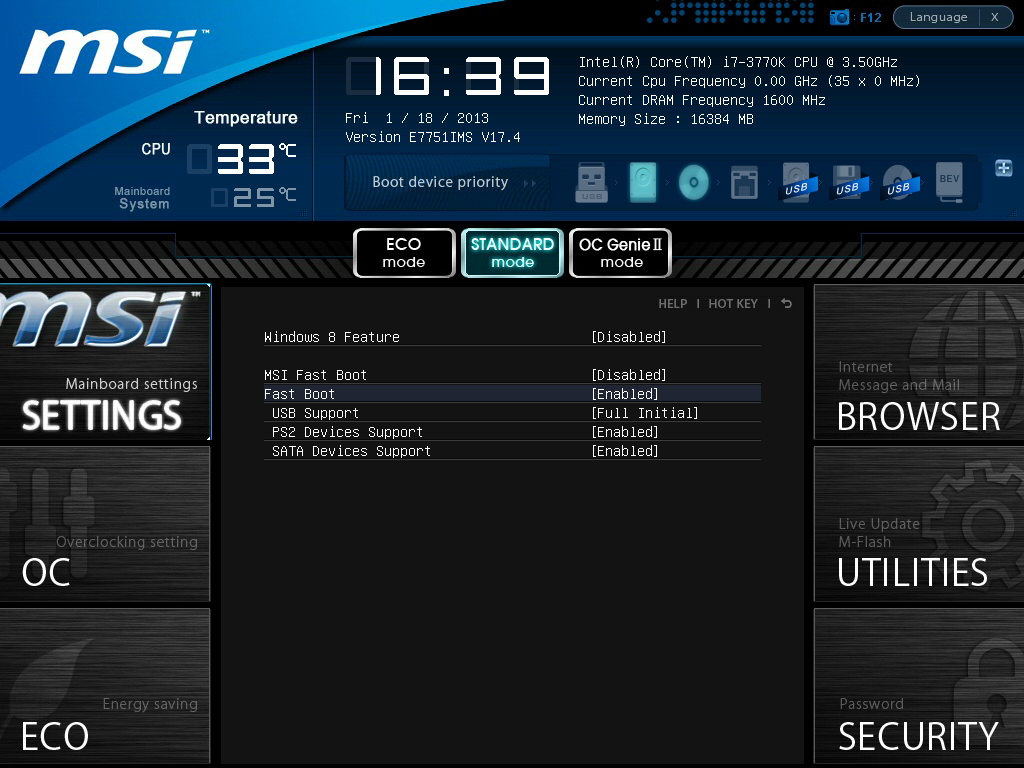
Next, boot into the BIOS and go to the boot option I highlighted in yellow earlier. It will bring you to a list, most of which should be empty but if it isn't don't worry. With the piece of paper or picture you took earlier (the string of numbers/name) we want to make sure that number/name is first in the list. You do that by click the first line and then selecting the correct drive. Next, go to the left of the BIOS and select "Settings" and find fastboot options, Windows 8 options etc etc. It will look something like this:

MSI%20Z77%20BBMP%20BIOS%2014%20-%20Fast%

Disable them! Next click the little X at the top right to save your settings and reboot the PC.

Now tell me whether or not the issue is gone. Hopefully it will be.

Well I got geek squad to fix it today. Turns out it wasnt working because I put both cords (that connect to the monitor) in and I didn't know that I wasn't supossed to. So it works now lol. But thank you so much for trying to help! I really appreciate it! And sorry if I caused any trouble or wasted your time.

I built a new computer and downloaded Windows 10 64 bit through a disk drive. Everything went normally and I used windows 10 for a while. Then I tested to see if it would continue to work after I turned the computer off and back on. But now it won't start up. It loads but then just becomes a blank screen. I tried fixing it in the BIOS but nothing seems to come close to working. What do I do?

For some reason i let the computer sleep. When I moved the mouse again to wake it up, windows actually started working. But obviously this is not what I want. I want it to start up immediately. So does it working after sleeping have to do with anything? How do I fix?

Feel free to ask questions about specs for I am too lazy to list them out.

“If you don't know history, then you don't know anything. You are a leaf that doesn't know it is part of a tree. ” 
- Michael Crichton

Link to comment
https://linustechtips.com/topic/514190-windows-10-wont-boot-please-help/
Share on other sites

Link to post
Share on other sites

Weird.


Can you tell us what your BIOS settings are? Also, run this in Windows 10 CMD:


(access CMD quickly by pressing the windows key + r, then type CMD and press enter.

sfc /scannow
(do not close until complete!)
 
and tell us what it says/reports.

|  The United Empire of Earth Wants You | The Stormborn (ongoing build; 90% done)  |  Skyrim Mods Recommendations  LTT Blue Forum Theme! | Learning Russian! Blog |
|"They got a war on drugs so the police can bother me.”Tupac Shakur  | "Half of writing history is hiding the truth"Captain Malcolm Reynolds | "Museums are racist."Michelle Obama | "Slap a word like "racist" or "nazi" on it and you'll have an army at your back."MSM Logic | "A new command I give you: love one another. As I have loved you, so you must love one another"Jesus Christ | "I love the Union and the Constitution, but I would rather leave the Union with the Constitution than remain in the Union without it."Jefferson Davis |

Link to post
Share on other sites

Weird.

Can you tell us what your BIOS settings are? Also, run this in Windows 10 CMD:

(access CMD quickly by pressing the windows key + r, then type CMD and press enter.

sfc /scannow

(do not close until complete!)

and tell us what it says/reports.

Erm... I know I'm a huge software noob but how do I run it as administrator. It won't allow me unless I'm an "administrator."

“If you don't know history, then you don't know anything. You are a leaf that doesn't know it is part of a tree. ” 
- Michael Crichton

Link to post
Share on other sites

what is your motherboard ? try checking the boot device option in the bios. if you still can't. go to another computer then make a USB bootable device and try to have a clean re-install of the OS. i have this problem aswell.

I have an MSI. I tried doing many boot options but nothing seems to work. I have windows on my SSD. What would you recommend to select then? Also I tried reinstalling windows but it also doesn't seem to work.

“If you don't know history, then you don't know anything. You are a leaf that doesn't know it is part of a tree. ” 
- Michael Crichton

Link to post
Share on other sites

Erm... I know I'm a huge software noob but how do I run it as administrator. It won't allow me unless I'm an "administrator."


If you ran it with the shortcut, it should automatically apply admin rights. If it doesn't, open the search bar and type CMD, right click the result and run as Admin.


I have an MSI. I tried doing many boot options but nothing seems to work. I have windows on my SSD. What would you recommend to select then? Also I tried reinstalling windows but it also doesn't seem to work.


You must boot off whatever drive has the OS bootloader on it. If it is on the SSD, make the SSD boot first. it would be easier if you took screenshots. Since you have MSI, there is a little camera icon on most MSI bioses you can press to take a snapshot with.

|  The United Empire of Earth Wants You | The Stormborn (ongoing build; 90% done)  |  Skyrim Mods Recommendations  LTT Blue Forum Theme! | Learning Russian! Blog |
|"They got a war on drugs so the police can bother me.”Tupac Shakur  | "Half of writing history is hiding the truth"Captain Malcolm Reynolds | "Museums are racist."Michelle Obama | "Slap a word like "racist" or "nazi" on it and you'll have an army at your back."MSM Logic | "A new command I give you: love one another. As I have loved you, so you must love one another"Jesus Christ | "I love the Union and the Constitution, but I would rather leave the Union with the Constitution than remain in the Union without it."Jefferson Davis |

Link to post
Share on other sites

When you have access after it sleeps check the s.m.a.r.t status through a program like speedfan because it may be an issue with your drive

Could you please give me a link to "smartfan"?

“If you don't know history, then you don't know anything. You are a leaf that doesn't know it is part of a tree. ” 
- Michael Crichton

Link to post
Share on other sites

If you ran it with the shortcut, it should automatically apply admin rights. If it doesn't, open the search bar and type CMD, right click the result and run as Admin.

You must boot off whatever drive has the OS bootloader on it. If it is on the SSD, make the SSD boot first. it would be easier if you took screenshots. Since you have MSI, there is a little camera icon on most MSI bioses you can press to take a snapshot with.

I did the CMD thing and it just says "Windows resource protection did not find any integrity violations"

Also there's many options for my ssd. Which one do I choose?

“If you don't know history, then you don't know anything. You are a leaf that doesn't know it is part of a tree. ” 
- Michael Crichton

Link to post
Share on other sites

If you ran it with the shortcut, it should automatically apply admin rights. If it doesn't, open the search bar and type CMD, right click the result and run as Admin.

I did it and it just says "Windows resource protection did not find any integrity errors."


Alright, go into your BIOS and take a picture (or write down) the boot order and whether or not you have any specific Windows/Fast boot options enabled. Also, what do you have the power settings set to on Windows 10? There is a hard drive option there to turn off. Make sure it isn't enabled (known to cause issues for people in Win10).

|  The United Empire of Earth Wants You | The Stormborn (ongoing build; 90% done)  |  Skyrim Mods Recommendations  LTT Blue Forum Theme! | Learning Russian! Blog |
|"They got a war on drugs so the police can bother me.”Tupac Shakur  | "Half of writing history is hiding the truth"Captain Malcolm Reynolds | "Museums are racist."Michelle Obama | "Slap a word like "racist" or "nazi" on it and you'll have an army at your back."MSM Logic | "A new command I give you: love one another. As I have loved you, so you must love one another"Jesus Christ | "I love the Union and the Constitution, but I would rather leave the Union with the Constitution than remain in the Union without it."Jefferson Davis |

Link to post
Share on other sites

Alright, go into your BIOS and take a picture (or write down) the boot order and whether or not you have any specific Windows/Fast boot options enabled. Also, what do you have the power settings set to on Windows 10? There is a hard drive option there to turn off. Make sure it isn't enabled (known to cause issues for people in Win10).

Great BIOS won't work now even when I press delete. This is pissing me off.

“If you don't know history, then you don't know anything. You are a leaf that doesn't know it is part of a tree. ” 
- Michael Crichton

Link to post
Share on other sites

Great BIOS won't work now even when I press delete. This is pissing me off.


What do you mean? Can you see anything but you just can't get into the BIOS? If that is the case, turn off the pc, flip the switch on the PSU, and press the CMOS button on your mother board. If you don't have a CMOS button on the back of your board (near your wires) take out the CMOS battery and leave it out for five minutes. Plug it back in, flip the switch and turn the system on. This result will force the BIOS to defaults and should get you into your PC.


If you can't see anything, do the above and see if that helps you to get back into the BIOS.

|  The United Empire of Earth Wants You | The Stormborn (ongoing build; 90% done)  |  Skyrim Mods Recommendations  LTT Blue Forum Theme! | Learning Russian! Blog |
|"They got a war on drugs so the police can bother me.”Tupac Shakur  | "Half of writing history is hiding the truth"Captain Malcolm Reynolds | "Museums are racist."Michelle Obama | "Slap a word like "racist" or "nazi" on it and you'll have an army at your back."MSM Logic | "A new command I give you: love one another. As I have loved you, so you must love one another"Jesus Christ | "I love the Union and the Constitution, but I would rather leave the Union with the Constitution than remain in the Union without it."Jefferson Davis |

Link to post
Share on other sites

Alright, go into your BIOS and take a picture (or write down) the boot order and whether or not you have any specific Windows/Fast boot options enabled. Also, what do you have the power settings set to on Windows 10? There is a hard drive option there to turn off. Make sure it isn't enabled (known to cause issues for people in Win10).

Well I can tell you before bios failed that I tried many different configurations. Absolutely nothing works.

“If you don't know history, then you don't know anything. You are a leaf that doesn't know it is part of a tree. ” 
- Michael Crichton

Link to post
Share on other sites

Well I can tell you before bios failed that I tried many different configurations. Absolutely nothing works.


It will still help us to know what your settings are though.


How many SSDs or HDDs do you have hooked up to the PC by the way?

|  The United Empire of Earth Wants You | The Stormborn (ongoing build; 90% done)  |  Skyrim Mods Recommendations  LTT Blue Forum Theme! | Learning Russian! Blog |
|"They got a war on drugs so the police can bother me.”Tupac Shakur  | "Half of writing history is hiding the truth"Captain Malcolm Reynolds | "Museums are racist."Michelle Obama | "Slap a word like "racist" or "nazi" on it and you'll have an army at your back."MSM Logic | "A new command I give you: love one another. As I have loved you, so you must love one another"Jesus Christ | "I love the Union and the Constitution, but I would rather leave the Union with the Constitution than remain in the Union without it."Jefferson Davis |

Link to post
Share on other sites

What do you mean? Can you see anything but you just can't get into the BIOS? If that is the case, turn off the pc, flip the switch on the PSU, and press the CMOS button on your mother board. If you don't have a CMOS button on the back of your board (near your wires) take out the CMOS battery and leave it out for five minutes. Plug it back in, flip the switch and turn the system on. This result will force the BIOS to defaults and should get you into your PC.

If you can't see anything, do the above and see if that helps you to get back into the BIOS.

Yea I see the MSI logo but for some reason now it won't alow me to press delete and go into the bios. I'll try what you suggested.

“If you don't know history, then you don't know anything. You are a leaf that doesn't know it is part of a tree. ” 
- Michael Crichton

Link to post
Share on other sites

Yea I see the MSI logo but for some reason now it won't alow me to press delete and go into the bios. I'll try what you suggested.


What keyboard do you have, does it have LEDs you can check to see if on? I have found that this happens to my CMStorm keyboard when I have a bad overclock (keyboard not working so I can get into bios) or BIOS settings on my MSI board. Resetting the CMOS always helps me, so hopefully it'll help you too.

|  The United Empire of Earth Wants You | The Stormborn (ongoing build; 90% done)  |  Skyrim Mods Recommendations  LTT Blue Forum Theme! | Learning Russian! Blog |
|"They got a war on drugs so the police can bother me.”Tupac Shakur  | "Half of writing history is hiding the truth"Captain Malcolm Reynolds | "Museums are racist."Michelle Obama | "Slap a word like "racist" or "nazi" on it and you'll have an army at your back."MSM Logic | "A new command I give you: love one another. As I have loved you, so you must love one another"Jesus Christ | "I love the Union and the Constitution, but I would rather leave the Union with the Constitution than remain in the Union without it."Jefferson Davis |

Link to post
Share on other sites

It will still help us to know what your settings are though.

How many SSDs or HDDs do you have hooked up to the PC by the way?

Well I have one 250 GB ssd which I installed Windows on. And 1 TB hardrive. But the funny thing is, because I didn't know my motherboard had only two SATA ports, I have to temporarily plug the disk drive using the hard drive sata cord and power to download everything. Maybe this is the problem? Idfk

“If you don't know history, then you don't know anything. You are a leaf that doesn't know it is part of a tree. ” 
- Michael Crichton

Link to post
Share on other sites

What keyboard do you have, does it have LEDs you can check to see if on? I have found that this happens to my CMStorm keyboard when I have a bad overclock (keyboard not working so I can get into bios) or BIOS settings on my MSI board. Resetting the CMOS always helps me, so hopefully it'll help you too.

Yep I have a cm storm.

“If you don't know history, then you don't know anything. You are a leaf that doesn't know it is part of a tree. ” 
- Michael Crichton

Link to post
Share on other sites

Well I have one 250 GB ssd which I installed Windows on. And 1 TB hardrive. But the funny thing is, because I didn't know my motherboard had only two SATA ports, I have to temporarily plug the disk drive using the hard drive sata cord and power to download everything. Maybe this is the problem? Idfk


Wait, what mobo do you have that only has two SATA ports?


Anyways, it shouldn't matter if you aren't disconnecting the hard drive that has the bootloader on it. If you are sure you installed the OS on the SSD, then it shouldn't be causing this problem (OR it is only because the BIOS is set to boot off that drive first). Though if you are through with installing Windows 10, you should hook the cord back to the HDD.


Yep I have a cm storm.


lol


Then I have a feeling it will work.


edit


just be sure to reset AFTER you turn the PC off and flip the switch.

|  The United Empire of Earth Wants You | The Stormborn (ongoing build; 90% done)  |  Skyrim Mods Recommendations  LTT Blue Forum Theme! | Learning Russian! Blog |
|"They got a war on drugs so the police can bother me.”Tupac Shakur  | "Half of writing history is hiding the truth"Captain Malcolm Reynolds | "Museums are racist."Michelle Obama | "Slap a word like "racist" or "nazi" on it and you'll have an army at your back."MSM Logic | "A new command I give you: love one another. As I have loved you, so you must love one another"Jesus Christ | "I love the Union and the Constitution, but I would rather leave the Union with the Constitution than remain in the Union without it."Jefferson Davis |

Link to post
Share on other sites

Wait, what mobo do you have that only has two SATA ports?

Anyways, it shouldn't matter if you aren't disconnecting the hard drive that has the bootloader on it. If you are sure you installed the OS on the SSD, then it shouldn't be causing this problem (OR it is only because the BIOS is set to boot off that drive first). Though if you are through with installing Windows 10, you should hook the cord back to the HDD.

lol

Then I have a feeling it will work.

edit

just be sure to reset AFTER you turn the PC off and flip the switch.

Where is the CMOS thing ugh

“If you don't know history, then you don't know anything. You are a leaf that doesn't know it is part of a tree. ” 
- Michael Crichton

Link to post
Share on other sites

Where is the CMOS thing ugh


Well, what motherboard do you have? It may not have the button, but it will have the battery. The battery is the circular silver thing usually near the GPU slots. It looks like this:


7.jpg

|  The United Empire of Earth Wants You | The Stormborn (ongoing build; 90% done)  |  Skyrim Mods Recommendations  LTT Blue Forum Theme! | Learning Russian! Blog |
|"They got a war on drugs so the police can bother me.”Tupac Shakur  | "Half of writing history is hiding the truth"Captain Malcolm Reynolds | "Museums are racist."Michelle Obama | "Slap a word like "racist" or "nazi" on it and you'll have an army at your back."MSM Logic | "A new command I give you: love one another. As I have loved you, so you must love one another"Jesus Christ | "I love the Union and the Constitution, but I would rather leave the Union with the Constitution than remain in the Union without it."Jefferson Davis |

Link to post
Share on other sites

Well, what motherboard do you have? It may not have the button, but it will have the battery. The battery is the circular silver thing usually near the GPU slots. It looks like this:

7.jpg

I have a MSI B85-G41 PC Mate. Is there a particular number code thing that it's associated with? Like JC11 as an example. Or is it different with other mobos.

“If you don't know history, then you don't know anything. You are a leaf that doesn't know it is part of a tree. ” 
- Michael Crichton

Link to post
Share on other sites

I have a MSI B85-G41 PC Mate. Is there a particular number code thing that it's associated with? Like JC11 as an example. Or is it different with other mobos.


Okay, that board doesn't have the button. You will need to use the battery method. I circled the thing you need to remove for five minutes after turning the PC completely off.


AyRgQBD.png


That silver thing is a "CMOS battery".

|  The United Empire of Earth Wants You | The Stormborn (ongoing build; 90% done)  |  Skyrim Mods Recommendations  LTT Blue Forum Theme! | Learning Russian! Blog |
|"They got a war on drugs so the police can bother me.”Tupac Shakur  | "Half of writing history is hiding the truth"Captain Malcolm Reynolds | "Museums are racist."Michelle Obama | "Slap a word like "racist" or "nazi" on it and you'll have an army at your back."MSM Logic | "A new command I give you: love one another. As I have loved you, so you must love one another"Jesus Christ | "I love the Union and the Constitution, but I would rather leave the Union with the Constitution than remain in the Union without it."Jefferson Davis |

Link to post
Share on other sites

Okay, that board doesn't have the button. You will need to use the battery method. I circled the thing you need to remove for five minutes after turning the PC completely off.

AyRgQBD.png

That silver thing is a "CMOS battery".

It worked! Thank you! Now what do I do?

“If you don't know history, then you don't know anything. You are a leaf that doesn't know it is part of a tree. ” 
- Michael Crichton

Link to post
Share on other sites

Create an account or sign in to comment

You need to be a member in order to leave a comment

Create an account

Sign up for a new account in our community. It's easy!

Register a new account

Sign in

Already have an account? Sign in here.

Sign In Now

×