
Jump to content

Broken USB connector

Go to solution Solved by W-L,

I looked for a tutorial on how to remove the pin from the connector but I was not able to find. Any tips?


You need to use a very fine flat head screw driver or needle to lift up the plastic tab between that metal tab holding the pin in place and pull it out from the cable side with probably a fair of tweezers or usually by tugging on the individual wire. Just be very careful to not break those plastic tabs or your pins won't click back into place when reinstalling.
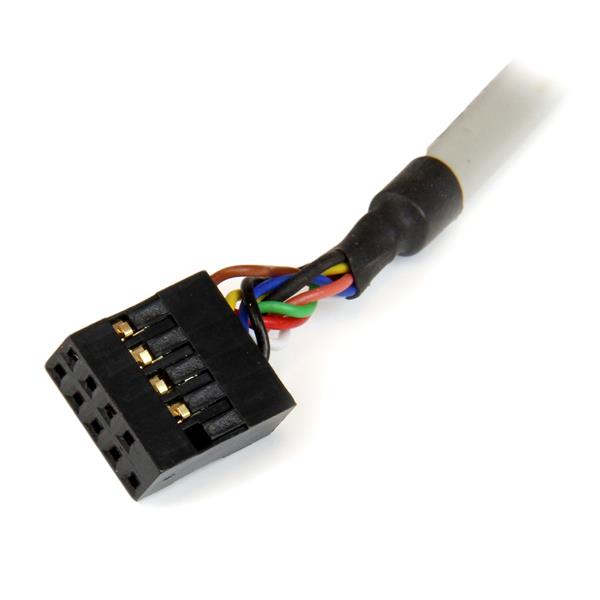

35FCREADBK3.C.jpg

Hi people!

Today I was organizing some stuff and found An old 2.5" card reader. I was going to test it so I can sell it, but I noticed that the little yellow wire in thr connector that goes into the mobo was broken.

Is there any cheap way to fix it?

Thanks for the attention.

post-230526-0-75379500-1442692546_thumb.

Intel i7-4770; ASUS Z97M-PLUS/BR ;Corsair Vengeance 8GB 1600MHz; EVGA Geforce 970 SC; Corsair TX550M; Raijintek Aeneas

Link to comment
https://linustechtips.com/topic/452807-broken-usb-connector/
Share on other sites

Link to post
Share on other sites

Hi people!

Today I was organizing some stuff and found An old 2.5" card reader. I was going to test it so I can sell it, but I noticed that the little yellow wire in thr connector that goes into the mobo was broken.

Is there any cheap way to fix it?

Thanks for the attention.


Ideally you would want to take out the old pin and repin the cable with a dupont type connector but you can try stripping back a bit of the wire and take out the old pin to solder it in place instead which would make it work.

Link to comment
https://linustechtips.com/topic/452807-broken-usb-connector/#findComment-6072829
Share on other sites

Link to post
Share on other sites

Ideally you would want to take out the old pin and repin the cable with a dupont type connector but you can try stripping back a bit of the wire and take out the old pin to solder it in place instead which would make it work.

I looked for a tutorial on how to remove the pin from the connector but I was not able to find. Any tips?

Intel i7-4770; ASUS Z97M-PLUS/BR ;Corsair Vengeance 8GB 1600MHz; EVGA Geforce 970 SC; Corsair TX550M; Raijintek Aeneas

Link to comment
https://linustechtips.com/topic/452807-broken-usb-connector/#findComment-6072925
Share on other sites

Link to post
Share on other sites

I looked for a tutorial on how to remove the pin from the connector but I was not able to find. Any tips?


You need to use a very fine flat head screw driver or needle to lift up the plastic tab between that metal tab holding the pin in place and pull it out from the cable side with probably a fair of tweezers or usually by tugging on the individual wire. Just be very careful to not break those plastic tabs or your pins won't click back into place when reinstalling.

35FCREADBK3.C.jpg

Link to comment
https://linustechtips.com/topic/452807-broken-usb-connector/#findComment-6072971
Share on other sites

Link to post
Share on other sites

Thanks W-L and Dukanater!

I'll try it later and mark this as solved if it works.

Update: I managed to remove the pin, reopened the tabs that hold the wire with a little nail reinserted wire and closed with my teeth. Now its perfectly held in place, will test on my PC later.

Intel i7-4770; ASUS Z97M-PLUS/BR ;Corsair Vengeance 8GB 1600MHz; EVGA Geforce 970 SC; Corsair TX550M; Raijintek Aeneas

Link to comment
https://linustechtips.com/topic/452807-broken-usb-connector/#findComment-6073004
Share on other sites

Link to post
Share on other sites

Create an account or sign in to comment

You need to be a member in order to leave a comment

Create an account

Sign up for a new account in our community. It's easy!

Register a new account

Sign in

Already have an account? Sign in here.

Sign In Now

×

