Jump to content

Ethernet not working

Go to solution Solved by Guest,

Are you in the UK?


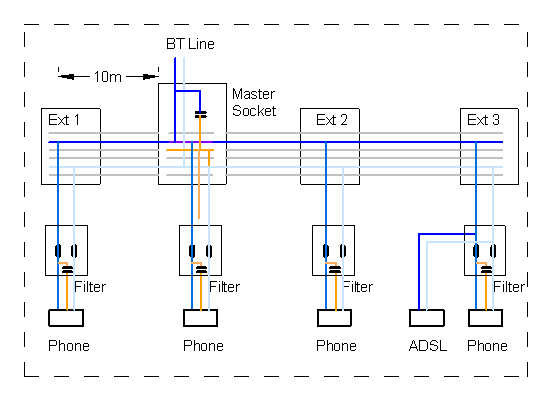
It is likely that you've just replaced the telephone extension sockets - these are extensions of the main Openreach master socket where your telephone/broadband terminates in the house and are meant to allow you to put a phone or router/modem in a different room. These days builders are running the extensions with cat5 instead of telephone wire as it is cheaper for them to buy in bulk and they don't have to order in different cable types. If you are with Virgin or a FTTP provider, then all this wiring is also no longer in use.


You'll likely need to have cat5/cat6 run from your router to the rooms you want wired data in. 


Here is a diagram which shows the typical arrangement, but not colours may not match the diagram - http://www.dougrice.plus.com/Erlangs/adsl_Wire003.gif

Hi I recently re-terminated the ends of my telephone wire with cat6 connectors hoping to get ethernet access in my room upstairs however I've had no such luck. I know the cable is cat5e and the connectors are cat6 so that might be the issue. In addition there are three ports upstairs yet I can only find two downstairs so any idea where I might be able to find the third one would be super helpful.


Edit:the listing said cat6/cat5e

Link to comment
https://linustechtips.com/topic/1537815-ethernet-not-working/
Share on other sites

Link to post
Share on other sites

mismatch of grades of connectors and wires should not be a problem -- copper is copper. At worse you don't get the speeds advertised on either.


What is the problem? Does it say "network cable unplugged"? Or something else?
If it says "network cable unplugged", then you might have plugged in the wrong port. Without knowing where the cables in your wall go to, I can't help you much.


If it doesn't say "network cable unplugged", it may be that the connector is wired in an unusual way -- maybe it used the "alternate" mapping.

Does the light (on the port) come on? If it does come on, you have plugged into something. If it did not come up at all, then nothing is on the other end.

Link to comment
https://linustechtips.com/topic/1537815-ethernet-not-working/#findComment-16183033
Share on other sites

Link to post
Share on other sites

32 minutes ago, CDR_Xavier said:

mismatch of grades of connectors and wires should not be a problem -- copper is copper. At worse you don't get the speeds advertised on either.


What is the problem? Does it say "network cable unplugged"? Or something else?
If it says "network cable unplugged", then you might have plugged in the wrong port. Without knowing where the cables in your wall go to, I can't help you much.


If it doesn't say "network cable unplugged", it may be that the connector is wired in an unusual way -- maybe it used the "alternate" mapping.

Does the light (on the port) come on? If it does come on, you have plugged into something. If it did not come up at all, then nothing is on the other end.

Well I wired both ends in the B configuration and I figured that would be fine as long as all the connectors were wired the same I tried all the connectors downstairs while pairing them with the various upstairs (two downstairs and three upstairs) and couldn't get any kinda of indicating from my router 

Link to comment
https://linustechtips.com/topic/1537815-ethernet-not-working/#findComment-16183061
Share on other sites

Link to post
Share on other sites

I would think that cables terminate where the phone/internet/Fiber/cable line comes in to the dwelling, not one floor to the next; Basement perhaps or a utility closet. I'd imagine there's a patch panel or a jumble of wires just hanging out. Could be in the attic (unlikely) or garage.

Can you provide more information on the setup, are the cables in the walls? properly terminated wall plates or free floating wire? Original with the house or added in?  Any other background information from the listing?

Link to comment
https://linustechtips.com/topic/1537815-ethernet-not-working/#findComment-16183316
Share on other sites

Link to post
Share on other sites

On 10/26/2023 at 11:42 PM, BM813 said:

I would think that cables terminate where the phone/internet/Fiber/cable line comes in to the dwelling, not one floor to the next; Basement perhaps or a utility closet. I'd imagine there's a patch panel or a jumble of wires just hanging out. Could be in the attic (unlikely) or garage.

Can you provide more information on the setup, are the cables in the walls? properly terminated wall plates or free floating wire? Original with the house or added in?  Any other background information from the listing?

Yeah, I was looking everywhere for a patch panel and have yet to find one, could be in my neighbor's portion of the house but I doubt it as these houses were built to be split down the middle. The cables in the wall were properly terminated originally with wall plate telephone jacks that I've since replaced with cat6-rated ethernet jacks. They are most likely original as this house was built in 2005. 

Link to comment
https://linustechtips.com/topic/1537815-ethernet-not-working/#findComment-16186830
Share on other sites

Link to post
Share on other sites

On 10/27/2023 at 10:47 AM, Needfuldoer said:

Are you positive it's one unbroken cable from one end to the other? There aren't any splices or phone connection blocks along the way?

I'm as certain as I can be without tearing open my walls and tracing it myself. 

Link to comment
https://linustechtips.com/topic/1537815-ethernet-not-working/#findComment-16186831
Share on other sites

Link to post
Share on other sites

1 hour ago, Skamous said:

Yeah, I was looking everywhere for a patch panel and have yet to find one, could be in my neighbor's portion of the house but I doubt it as these houses were built to be split down the middle. The cables in the wall were properly terminated originally with wall plate telephone jacks that I've since replaced with cat6-rated ethernet jacks. They are most likely original as this house was built in 2005. 

I found the patch panel and I will post a photo tomorrow

Link to comment
https://linustechtips.com/topic/1537815-ethernet-not-working/#findComment-16186861
Share on other sites

Link to post
Share on other sites

4 hours ago, Skamous said:

Yeah, I was looking everywhere for a patch panel and have yet to find one, could be in my neighbor's portion of the house but I doubt it as these houses were built to be split down the middle. The cables in the wall were properly terminated originally with wall plate telephone jacks that I've since replaced with cat6-rated ethernet jacks. They are most likely original as this house was built in 2005. 

I'm always dubious when something was terminated with telephone jacks though, as those aren't necessarily 1:1 (though I realise in some other countries having multiple phone lines is more common) but are you absolutely sure its Cat 5e?

ASUS B650E-F GAMING WIFI + R7 7800X3D + 2x Corsair Vengeance 32GB DDR5-6000 CL30-36-36-76  + ASUS RTX 4090 TUF Gaming OC

Router:  Intel N100 (pfSense) Backup: GL.iNet GL-X3000/ Spitz AX Switches: Netgear MS510TXUP, MS510TXPP, GS110EMX
WiFi6: Zyxel NWA210AX (1.7Gbit peak at 160Mhz) WiFi5: Ubiquiti NanoHD OpenWRT (~500Mbit at 80Mhz)
ISPs: Zen Full Fibre 900 (~930Mbit down, 115Mbit up) + Three 5G (~1200Mbit down, 115Mbit up, variable)
Upgrading Laptop/Desktop CNVIo WiFi 5 cards to PCIe WiFi6e/7

Link to comment
https://linustechtips.com/topic/1537815-ethernet-not-working/#findComment-16186959
Share on other sites

Link to post
Share on other sites

Are you in the UK?


It is likely that you've just replaced the telephone extension sockets - these are extensions of the main Openreach master socket where your telephone/broadband terminates in the house and are meant to allow you to put a phone or router/modem in a different room. These days builders are running the extensions with cat5 instead of telephone wire as it is cheaper for them to buy in bulk and they don't have to order in different cable types. If you are with Virgin or a FTTP provider, then all this wiring is also no longer in use.


You'll likely need to have cat5/cat6 run from your router to the rooms you want wired data in. 


Here is a diagram which shows the typical arrangement, but not colours may not match the diagram - http://www.dougrice.plus.com/Erlangs/adsl_Wire003.gif

Link to comment
https://linustechtips.com/topic/1537815-ethernet-not-working/#findComment-16186990
Share on other sites

Link to post
Share on other sites

On 10/30/2023 at 2:12 AM, Skamous said:

I found the patch panel and I will post a photo tomorrow

Awesome! Hidden in a good place?

Assuming the installer just used the cat 5e cable due to cost and no special wiring scheme then it shouldn't be difficult to convert to ethernet networking.

Link to comment
https://linustechtips.com/topic/1537815-ethernet-not-working/#findComment-16188431
Share on other sites

Link to post
Share on other sites

Create an account or sign in to comment

You need to be a member in order to leave a comment

Create an account

Sign up for a new account in our community. It's easy!

Register a new account

Sign in

Already have an account? Sign in here.

Sign In Now

×